Hiver

The AI-first customer service platform

0.0
Rating out of 5 Based on 0 reviews

What is Hiver?

Hiver is a effective Google Workspace (Gmail) collaboration software program that transforms your team's present Gmail inboxes into a multi-channel help desk and shared workspace. It lets in groups to manipulate, assign, tune, and collaborate on client emails, stay chat, WhatsApp, and voice calls—all without ever leaving the acquainted Gmail interface. Hiver software is built to streamline customer support, income, and operations workflows.

Pricing of Hiver

FREE

USD 0
USD 0.00

user/month

Buy Now
  • Shared Inboxes
  • Team collaboration
  • Email
  • Live chat
  • WhatsApp
  • Voice
  • Knowledge Base
  • Slack Integration
  • 24*7 email and live chat support

GROWTH

USD 25
USD 0.00

user/month

Buy Now
  • Everything in Free plus
  • Service Level Agreements
  • Customer Portal
  • Rule-based Automations
  • Round-Robin Auto-Assignment
  • Automations using Custom Fields
  • Conversation Analytics
  • Performance Analytics
  • CRM
  • E-commerce
  • Billing and more

PRO

USD 45
USD 0.00

user/month

Buy Now
  • Everything in Growth plus
  • CSAT Surveys
  • Custom Dashboards
  • Load-balanced Round-robin
  • Scheduled data exports
  • SLA Analytics

ELITE

USD 75
USD 0.00

user/month

Buy Now
  • Everything in Pro plus
  • Skill-based Routing
  • Custom Objects
  • Individual Inbox to Shared Inbox Automation
  • HIPAA compliance
  • Okta SSO Integration
  • Custom build hours

Awards & Badges Received

Get More Awards & Badges from Techimply
Badge-1
Badge-2
Badge-3

Key Features of Hiver

Key Features:
  • Help Desk Management
  • Knowledge Base
  • Live chat system
  • Saas help desk software
  • Service Desk (ITIL ITSM)
  • Chat History
  • User Management
  • Self Service Portal
  • Live Chat

Who uses Hiver

Personal
Personal
StartUps
StartUps
SMEs
SMEs
Agencies
Agencies

Company Details

Company Name: Hiver
Headquarter: San Jose, California United States
Social Media:

Hiver Description

Who Uses Hiver?

Hiver is designed for any team that manages shared e-mail money owed and operates heavily within Gmail or Google Workspace.

  • Customer Support Teams: Ideal for organizing excessive volumes of aid emails, dealing with SLAs, and enhancing first-reaction times.
  • Sales and Operations Teams: Perfect for dealing with sales inquiries  and internal operational obligations, making sure clean electronic mail possession and duty.
  • Small to Large Enterprises: Trusted by way of over 1,500 businesses globally, mainly the ones searching for a non-disruptive, lightweight help table that integrates seamlessly with their current email machine.

Why Choose Hiver?

Choose Hiver to leverage the simplicity of your Gmail inbox with the strength of a complete-fledged help desk. It eliminates the chaos of forwarding emails, the usage of CC/BCC, and switching between more than one gear. Hiver ensures each purchaser question is assigned, tracked, and resolved efficiently, boosting group productiveness and enhancing the overall customer enjoy. The deep integration with Google makes setup especially fast.

What are the Benefits of Hiver?

Maximize crew efficiency and patron pleasure with these core advantages:

  1. Zero Learning Curve: Since Hiver works inner Gmail, your group requires minimal education to start the use of it successfully.
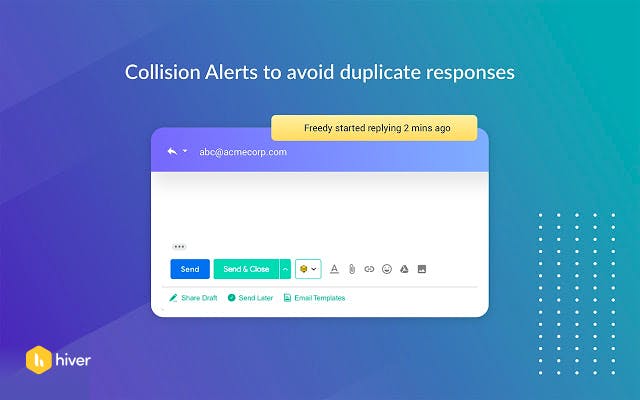
  2. Clear Accountability: Effortlessly assign emails to precise group members, ensuring clean possession and stopping missed or reproduction replies (Collision Detection).
  3. Faster Response & Resolution Times: Centralize all verbal exchange and use capabilities like Shared Drafts and Shared Email Templates to hurry up replies.
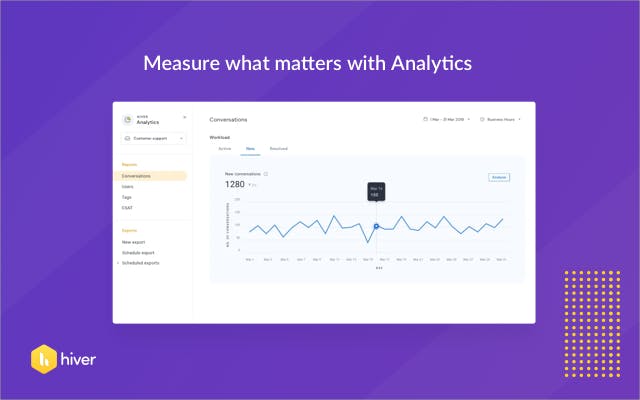
  4. Actionable Insights: Utilize advanced Analytics and reporting to music key metrics like reaction time, decision time, and team overall performance.
  5. Multi-Channel Support: Manage emails, stay chat, voice calls, and WhatsApp conversations from one unified Shared Inbox.

What are the Features of Hiver?

Hiver offers a robust set of features to turn crew email into an efficient workflow:

  1. Shared Inboxes: Manage common email addresses like guide@ or info@ collaboratively within Gmail.
  2. Email Assignment & Statuses: Assign emails as obligations and track their progress the usage of statuses like Open, Pending, and Closed.
  3. Internal Notes: Collaborate with teammates by way of adding personal notes without delay in the e-mail thread (no extra inner CCs/forwards).
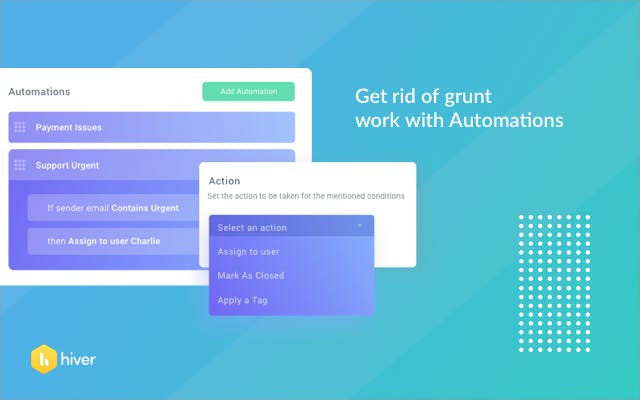
  4. Automation & Workflows: Use Hiver software regulations to robotically assign, tag, and categorize incoming emails based on content material or sender.
  5. SLA Management: Define Service Level Agreement (SLA) rules and obtain computerized violation reminders to ensure timely responses.
  6. Hiver AI: Leverage AI equipment for automated e mail summarization, suggesting replies, and detecting easy "Thank You" emails for vehicle-closure.
  7. Knowledge Base & Customer Portal: Create a self-provider help middle and purchaser portal to deflect commonplace queries.

How to Use Hiver?

Getting started out with Hiver takes simply minutes, leveraging its easy integration with Google Workspace:

  1. Sign Up: Create a Hiver account on the reliable internet site.
  2. Installation: Install the Hiver Chrome Extension or cellular app (iOS/Android).
  3. Connect: Link your existing Google Workspace/Gmail account.
  4. Setup Shared Inbox: Convert your team e-mail addresses right into a Hiver Shared Inbox within the admin panel.
  5. Start Collaborating: You can straight away start assigning emails, including notes, and monitoring conversations at once inside your acquainted Gmail window.

How to Get Demo of Hiver?

To absolutely understand the blessings of Hiver to your crew:

  1. Free Trial: Sign up on the Hiver website for a 7-day free trial of the most feature-rich plan (Elite) to test all functionalities. No credit card is required.
  2. Contact Sales: For a personalized stroll-thru, specific dialogue on the Hiver pricing shape, or to talk about custom employer requirements, you can without difficulty request a live Hiver demo from their income group.

Alternative

Zendesk Support Suite

customer service just got easier

4.2
Rating out of 5 Based on 10 reviews

Freshdesk

Cloud-based Customer Support Software

4.3
Rating out of 5 Based on 10 reviews

Freshservice

Modernize your service delivery with Freshservice

0.0
Rating out of 5 Based on 0 reviews

Hiver Video/Screenshots

User Reviews

no-reviews
Share your experience! Be the very first reviewer. Write a Review

Frequently Asked Questions (FAQs)

The user group of Hiver are as follows :

  • Personals
  • Startups
  • SMEs
  • Agencies

Hiver has 4 plans,

  • FREE USD 0 user/month
  • GROWTH USD 25 user/month
  • PRO USD 45 user/month
  • ELITE USD 75 user/month

Hiver is allowed 0 Days Free Trial.

The key featuers of Hiver are as follows :

  • Help Desk Management
  • Knowledge Base
  • Live chat system
  • Saas help desk software
  • Service Desk (ITIL ITSM)
  • Chat History
  • User Management
  • Self Service Portal
  • Live Chat

Hiver pricing model : Yearly,Monthly,Onetime(Perpetual License)

Hiver is Cloud Hosted,Hybrid Software.

Yes

Hiver offers Phone,Email,Live Chat support.

Hiver provides Help Guides,Video Guides,Blogs,Webinars for the software training.