CollaBrill

A Complete Project Management Software for SMEs

0.0
Rating out of 5 Based on 0 reviews

What is CollaBrill?

CollaBrill is a cloud-based collaboration and project management software designed to bring teams together and streamline workflows. With intuitive workspaces, real-time document sharing, and integrated communication tools like chat and video conferencing, CollaBrill ensures every team member stays aligned on priorities and deadlines. Its flexible task boards, Gantt charts, and calendaring features help visualize project progress, while built-in analytics track performance metrics. Whether you’re coordinating a marketing campaign, software release, or cross-departmental initiative, CollaBrill centralizes all your documents, conversations, and tasks into one unified platform, boosting transparency, speeding up decision-making, and driving results.

Pricing of CollaBrill

no-pricing
For get detailed pricing as per your requirements.

Awards & Badges Received

Get More Awards & Badges from Techimply
Badge-1
Badge-2
Badge-3

Key Features of CollaBrill

Key Features:
  • Task Management
  • Project Planning
  • Email Integration
  • Document Management
  • Accounting Integration
  • Application Integration
  • Budget Management
  • Bug Tracking
  • Collaboration
  • Data Imports/Exports
  • Document Comparison
  • Gantt Charts
  • Idea Management
  • Issue Management
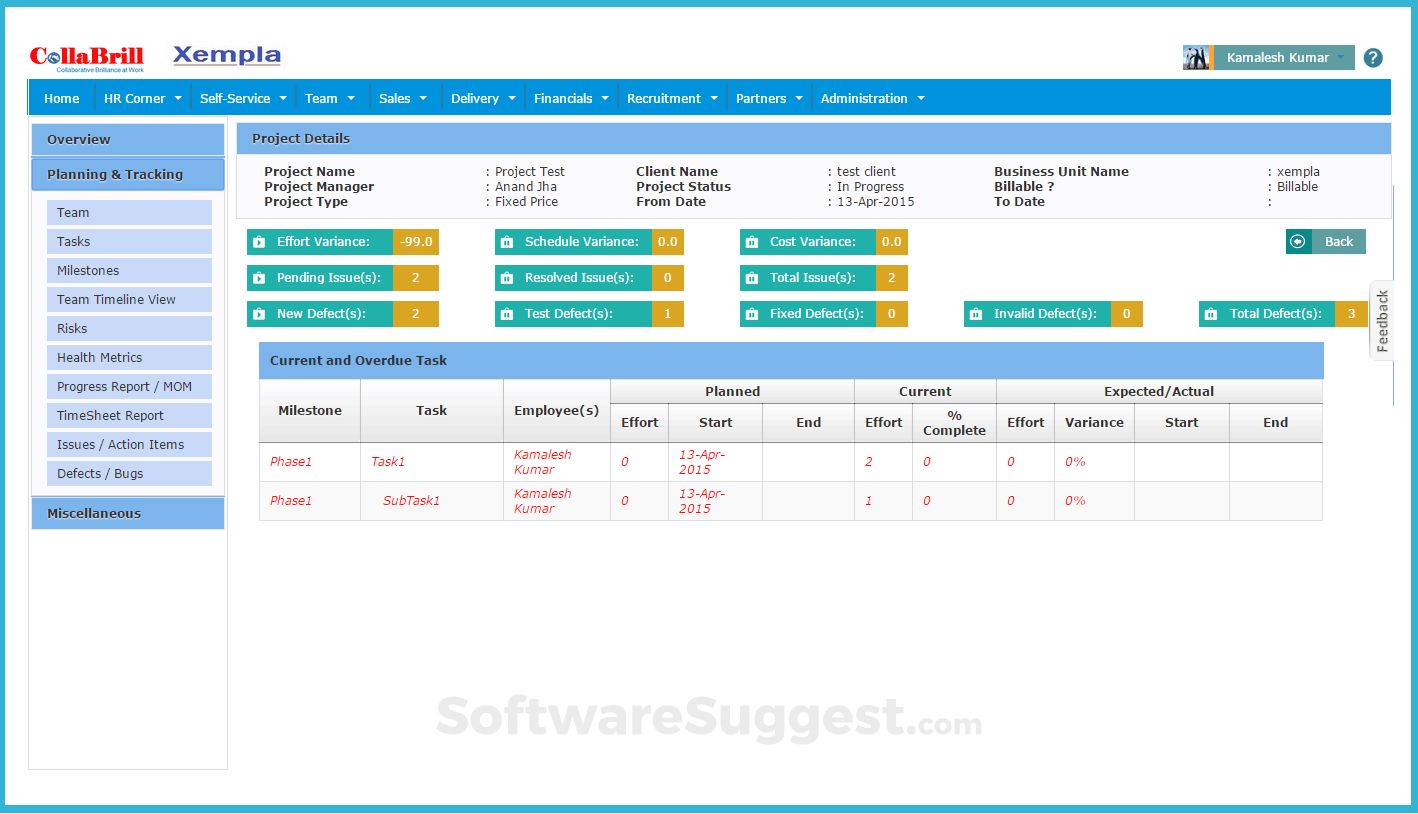
  • Milestone Tracking
  • Portfolio Management
  • Project Budgeting
  • Project Templates
  • Requirements Management
  • Resource Management
  • Status Tracking
  • Time Tracking

Key Specification

Other Categories: CRM Software HR Software Payroll Software Project Management Software HCM software Enterprise HR software HR software for Startups Employee Onboarding Software HR Analytics Software HRIS Software
Deployment: Cloud Hosted
Customer Support: Phone,Email,Live Chat,Online (Ticket)
Customization: Yes
Languages Support: English

Who uses CollaBrill

StartUps
StartUps
SMEs
SMEs
Agencies
Agencies
Enterprises
Enterprises

Company Details

Company Name: Lumbini Software Pvt Ltd
Headquarter: Bangalore, Karnataka India
Social Media:

CollaBrill Description

Why Choose CollaBrill?

CollaBrill stands out as a modern collaboration and project management software solution that combines robust task coordination with seamless team communication. Its modular design lets you activate only the features you need—whether it’s task tracking, file sharing, or video meetings—so you won’t pay for unused functionality. Advanced automation rules can assign tasks, send reminders, and update statuses automatically, freeing your team from repetitive admin work. CollaBrill’s drag-and-drop interface requires virtually no training, while granular permissions and audit logs keep your data secure. With mobile and desktop apps, your team can stay connected and productive whether they’re at the office, working remotely, or on the road. All of this makes CollaBrill the go-to project management software for teams looking to collaborate smarter, not harder.

Benefits of CollaBrill

  • Unified Workspace: All projects, files, and conversations in one place.
  • Real-Time Collaboration: Edits and comments appear instantly for all team members.
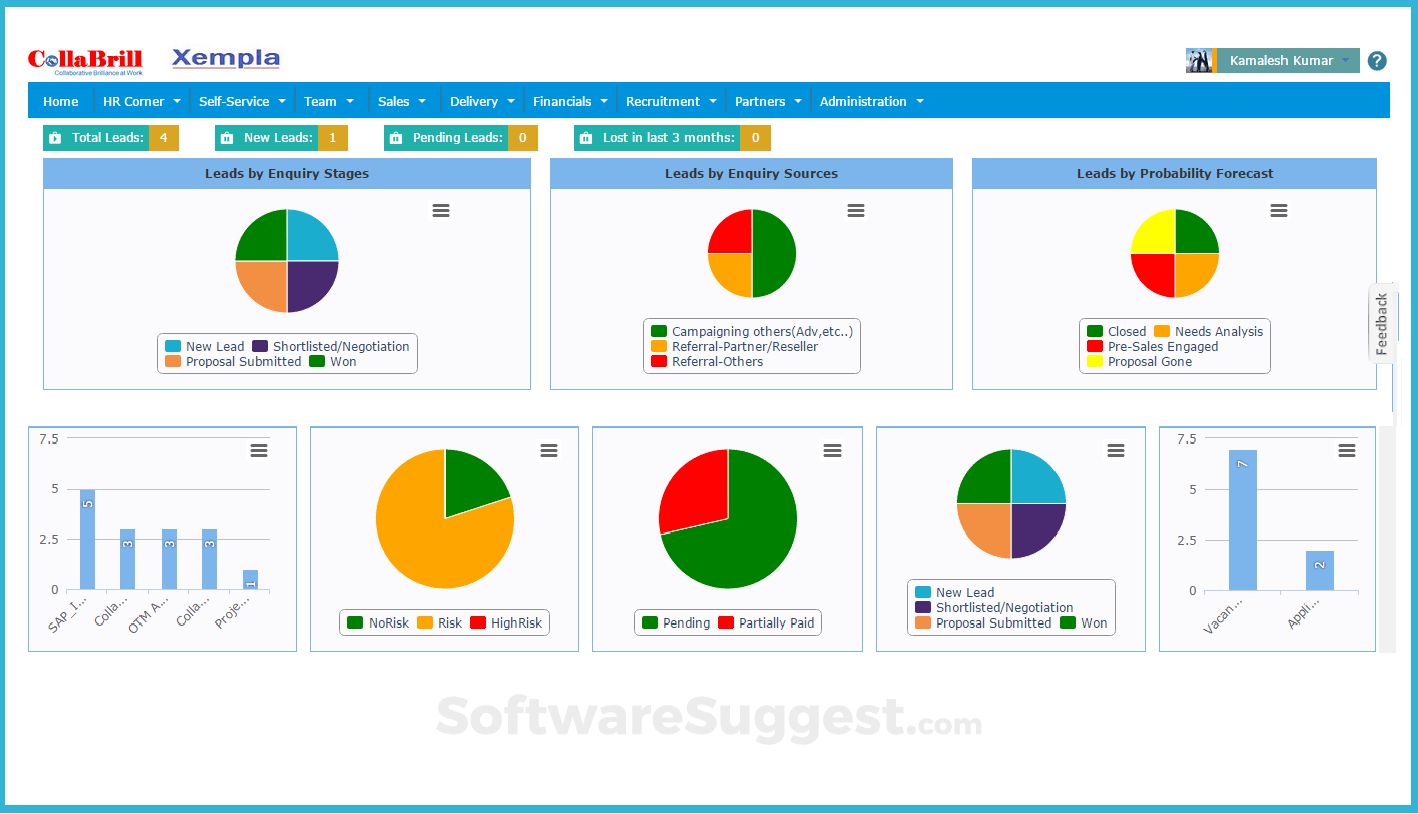
  • Customizable Dashboards: Tailor your view to show only what matters.
  • Automation Rules: Automate routine tasks like notifications and status updates.
  • Integrated Communication: Built-in chat, audio, and video eliminate context-switching.
  • Mobile Access: Full functionality on iOS and Android keeps teams agile.
  • Security & Permissions: Role-based access controls and data encryption protect sensitive information.
  • Insightful Analytics: Track project health, team productivity, and bottlenecks with visual reports.

How to Use CollaBrill

  1. Sign Up & Onboard: Create your organization account and invite team members via email.
  2. Set Up Projects: Use templates or start from scratch to define project goals, milestones, and deadlines.
  3. Create Tasks & Assign: Break work into tasks, assign owners, set due dates, and add attachments or checklists.
  4. Customize Views: Switch between Kanban boards, Gantt charts, and calendars to plan and monitor progress.
  5. Collaborate in Real Time: Share documents, leave comments, and jump into chat or video calls without leaving a task.
  6. Automate Workflows: Define automation rules—like moving tasks on completion or sending reminders—to reduce manual steps.
  7. Track & Adjust: Use analytics dashboards to spot roadblocks and reallocate resources as needed.
  8. Deliver & Archive: Mark projects complete, export reports, and archive old boards for future reference.

Features of CollaBrill 

  • Task Management: Kanban boards, lists, and calendars to organize work visually.
  • File Collaboration: Version control, commenting, and simultaneous editing.
  • Built-in Communication: Chat channels, @mentions, and one-click video conferencing.
  • Automation Engine: Triggers and actions to automate repetitive processes.
  • Analytics & Reporting: Custom reports on task completion rates, time logs, and project health.
  • Templates Library: Pre-built templates for marketing, IT, design, HR, and more.
  • Mobile & Desktop Apps: Full feature set across Windows, macOS, iOS, and Android.
  • Security & Compliance: SOC-2 compliance, single sign-on (SSO), and two-factor authentication.

What Makes CollaBrill Different?

CollaBrill distinguishes itself through its balanced fusion of simplicity and power. Unlike rigid systems that force teams into pre-defined workflows, CollaBrill offers unparalleled flexibility: you can switch views, customize fields, and tailor notifications to your exact process. Its integrated communication suite means you never have to juggle multiple apps—chat, calls, file sharing, and project tracking all happen under one roof. The platform’s low-code automation engine is remarkably easy to configure, enabling non-technical users to automate complex workflows in minutes. Additionally, CollaBrill’s commitment to continuous improvement, driven by user feedback—ensures new features and enhancements roll out regularly, keeping you ahead of evolving business needs.

Who Can Benefit from CollaBrill?

CollaBrill is ideal for any team that thrives on collaboration:

  • Marketing Agencies: Coordinate campaigns, creative assets, and client feedback.
  • Software Development: Plan sprints, track bugs, and collaborate on documentation.
  • Remote & Hybrid Teams: Stay synchronized across locations with real-time updates.
  • Consultancies & Professional Services: Manage client projects, billing, and deliverables.
  • HR & Operations: Organize onboarding, training schedules, and policy rollouts.
  • Event Planners: Track vendors, venues, and schedules in one timeline.
  • Education & Nonprofits: Collaborate on curriculum design, fundraising campaigns, and grant applications.

If your work involves multiple stakeholders, deadlines, and shared resources, CollaBrill will keep everyone on the same page.

Is CollaBrill Easy to Use?

Yes—CollaBrill prioritizes a low learning curve without sacrificing depth. From the moment you log in, its clean, uncluttered interface guides you through essential workflows. Drag-and-drop task management, intuitive menus, and contextual help tips mean new users can become productive in minutes. The mobile app mirrors desktop functionality, so switching devices doesn’t slow you down. CollaBrill also offers interactive walkthroughs and tooltips that adapt as you explore new features. For teams transitioning from other platforms, bulk import tools and dedicated migration support make the switch seamless. Overall, CollaBrill’s design philosophy is “powerful simplicity,” ensuring both tech-savvy users and novice collaborators feel confident using the system.

What Support Does CollaBrill Offer?

CollaBrill backs its product with a robust support ecosystem:

  • 24/7 Help Desk: Around-the-clock email and chat support with guaranteed SLAs.
  • Onboarding & Training: Personalized setup sessions, live webinars, and self-paced tutorials.
  • Knowledge Base: Comprehensive documentation, how-to guides, and best practices library.
  • Community Forums: Peer-to-peer support, feature request voting, and user groups.
  • Dedicated Customer Success: Assigned success managers for enterprise plans to ensure ROI.
  • Regular Updates: Monthly release cycles with release notes and early access programs.

Alternative

Quickbase

Meet Quickbase AI! The future of dynamic work is now

4.0
Rating out of 5 Based on 10 reviews

AFAS Software

One solution for your entire organization

4.3
Rating out of 5 Based on 20 reviews

Clockwise

Overview and convenience in your time tracking

4.2
Rating out of 5 Based on 10 reviews

CollaBrill Video/Screenshots

User Reviews

no-reviews
Share your experience! Be the very first reviewer. Write a Review

Frequently Asked Questions (FAQs)

The user group of CollaBrill are as follows :

  • Startups
  • SMEs
  • Agencies
  • Enterprises

CollaBrill has 0 plans.

CollaBrill is allowed 14 Days Free Trial.

CollaBrill pricing model : Yearly,Monthly,Onetime(Perpetual License)

CollaBrill is Online Software.

Yes

CollaBrill offers Phone,Email,Live Chat,Online (Ticket) support.

CollaBrill provides Video Guides,Blogs,Webinars,Infographics,Case Studies for the software training.