


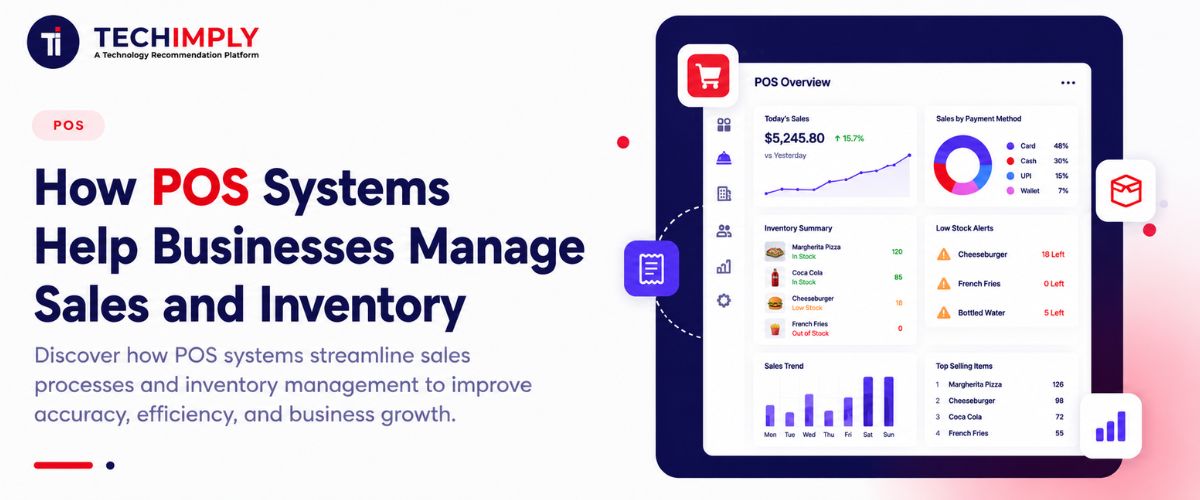
A modern POS system does much more than process payments. It gives businesses a real-time view of what they sell, what they have in stock, and how their company is performing.
Key Takeaways
- POS Full Form: POS stands for Point of Sale.
- Core Function: POS systems combine hardware and software to process transactions and accept payments.
- Inventory Automation: Modern platforms automatically adjust stock levels with every single sale.
- Industry Adaptability: Retail stores, restaurants, and hotels rely on specialized POS modules tailored to their workflows.
- Strategic Value: The right POS system aligns with business size, transaction volume, and growth objectives.

Looking for POS Software?
Check out Techimply's POS Software. for your business.
What Is a POS System?
A POS (Point of Sale) system is a combination of hardware and software that businesses use to execute transactions, accept payments, record sales, and monitor business data.
What Is the POS System Full Form?
The POS system full form is Point of Sale. Historically, this referred to the physical cash register where a retail transaction occurred. Today, a point of sale system functions as a central command hub linking sales, inventory, customer data, and back-office reporting.
How Does a POS System Work?
Transactions move through a simple 4-step digital workflow:
- Selection: A product or service is chosen via barcode scanning, a manual catalog touch, or a digital menu button.
- Calculation: The POS software instantly computes the item price, applicable taxes, and any active discounts.
- Payment: The customer pays via cash, debit/credit card, mobile wallet, or contactless NFC method.
- Recording: The system processes the payment, triggers a digital or printed receipt, and simultaneously updates sales records and stock counts.
How POS Systems Help Businesses Manage Sales
Accelerating checkout speeds is important, but capturing accurate sales data is where a POS system transforms daily operations.
Faster Checkout and Payment Processing
Modern hardware terminals and cloud software support multiple payment avenues—including traditional cash, chip cards, mobile wallets, and contactless tap-to-pay options. This flexibility eliminates bottlenecks and shortens customer queues.
Automatic Sales Tracking
Every transaction instantly creates a digital ledger entry. This eliminates human error associated with manual logbooks and ensures clear tracking of cash drawers, shift handovers, and employee sales performance.
Real-Time Sales Reporting
POS analytics engines compile comprehensive reports covering:
- Daily, weekly, and hourly sales volume
- Top-performing and slow-moving product lines
- Individual employee productivity and commission metrics
- Multi-location performance comparisons
Better Customer Management
Integrated customer relationship management (CRM) tools allow businesses to build buyer profiles, track purchase histories, execute loyalty programs, and send targeted promotions.
Ginesys One
How POS Systems Help Businesses Manage Inventory
Inventory optimization represents one of the highest returns on investment for modern operations.
Real-Time Inventory Tracking
When a product sells, inventory metrics update automatically across the system. If an item is purchased at a physical storefront, online e-commerce channel, or mobile popup, stock counts adjust immediately, ensuring absolute visibility.
Low-Stock Alerts
Businesses can program custom thresholds for individual stock-keeping units (SKUs). When supplies dip near a critical minimum, the system triggers automated low-stock warnings to prompt timely replenishment.
Reduce Overstock and Stockouts
By analyzing historical sales data, purchase trends, and seasonal spikes, managers can make data-driven reordering decisions—preventing costly dead stock while avoiding empty shelves.
Track Product Movement
POS systems categorize inventory behavior by velocity. Business owners can easily segment fast-moving impulse items from slow-moving inventory that occupies valuable warehouse space.
Manage Inventory Across Multiple Locations
Multi-site retailers can view stock balances across every warehouse or retail branch simultaneously, facilitating smooth stock transfers between stores without manual guesswork.
Improve Inventory Accuracy
Replacing paper spreadsheets and physical manual counts with barcode-driven automation drastically reduces discrepancy rates, shrinkage, and inventory loss.
Key Benefits of POS Systems for Businesses
| Feature Benefit | Operational Impact |
| Faster transactions | Shorter queues and improved customer satisfaction |
| Automated inventory updates | Fewer stock errors and zero stockout surprises |
| Granular sales reporting | Data-backed pricing and purchasing decisions |
| Centralized database | Effortless multi-location management |
| Employee tracking | Better accountability and streamlined payroll calculation |
| Customer insights | Higher retention through personalized loyalty rewards |
Types of POS Systems for Different Businesses
Retail POS System
Designed for brick-and-mortar storefronts, a retail pos system emphasizes fast barcode scanning, product catalogs, flexible return handling, customer loyalty structures, and omnichannel stock syncing.
Restaurant POS Systems
Restaurant pos systems feature specialized layouts including table management, visual floor plans, kitchen display system (KDS) routing, split-bill logic, tip adjustments, and online ordering integrations.
Hotel POS System
A hotel pos system unifies hospitality touchpoints connecting restaurants, bars, room service, spas, and gift shops directly to centralized guest billing portfolios.
Mobile POS System
A mobile pos system leverages tablets or smartphones, empowering staff to process payments, check inventory, and assist customers anywhere on the sales floor or at outdoor events away from a fixed checkout counter.
Traditional POS Systems
Traditional POS systems rely on legacy local servers and hardwired terminals. While durable for static checkout desks, they lack the remote cloud visibility inherent in modern applications.
What Is a POS System for a Restaurant?
A what is pos system for restaurant search intent focuses on food-service workflows. A restaurant POS manages food and beverage orders, routes ticket requests instantly to kitchen prep screens, handles complex table shuffling, processes split check payments, and logs precise menu-item sales trends. Unlike retail setups centered on barcode tracking, restaurant POS configurations prioritize table turnaround speed and ingredient-level recipe tracking.
How to Operate a POS System
- Log In: Enter secure employee credentials to establish shift accountability.
- Navigate Catalog: Select items via touch-screen categories or scan product barcodes.
- Apply Modifications: Add manual discounts, tax exemptions, or custom order notes where applicable.
- Review Order: Verify total costs, taxes, and customer cart accuracy on the display screen.
- Process Payment: Execute the transaction via card swipe, digital wallet, or cash entry.
- Complete & Issue Receipt: Print or digitally email the receipt to finalize the sale.
- Perform End-of-Day Close: Run summary reports to reconcile cash drawers and review total daily revenue.
How Much Do POS Systems Cost?
POS pricing depends on a combination of distinct components rather than a flat fee:
- Hardware: Touchscreens, cash drawers, receipt printers, and barcode scanners.
- Software Subscriptions: Monthly or annual cloud licensing tiers.
- Payment Processing Fees: Percentage or flat rates applied per transaction.
- Implementation Support: Optional setup, data migration, and staff training modules.
Are Free POS Systems Good for Small Businesses?
Free POS systems for small business models can work well for early-stage startups with minimalist transaction needs. However, business owners must review hidden expenses—such as elevated payment processing markups, restricted customer support access, and caps on advanced inventory features.
How to Choose the Right POS System for Your Business
- Consider Your Business Type: Match the platform directly to your vertical (retail vs. food service vs. hospitality).
- Check Inventory Capabilities: Look for robust multi-location tracking, automated low-stock triggers, and variant management.
- Evaluate Payment Options: Confirm support for emerging contactless mobile wallets and secure card encryptions.
- Check Integrations: Ensure the software syncs seamlessly with your accounting suite, e-commerce platform, and payroll tools.
- Consider Scalability: Verify whether the system can support upcoming branch expansions, higher transaction volumes, and expanded staff numbers.
POS Systems vs. Traditional Cash Registers
|
Feature |
Traditional Cash Register |
Modern POS System |
|
Sales Tracking |
Basic cash drawer totals |
Granular per-item sales tracking |
|
Inventory Management |
Manual counts |
Automated real-time deduction |
|
Reporting |
Limited Z-reports |
Deep analytics and multi-channel metrics |
|
Customer Data |
None |
Built-in CRM profiles and purchase histories |
|
Multi-Location Support |
Impossible |
Centralized cloud dashboard |
|
Third-Party Integrations |
Restricted |
Broad accounting and e-commerce syncing |
Conclusion
A POS system acts as the operational bridge connecting daily sales and inventory management. By unifying transaction processing, automated stock deductions, and performance reporting, businesses gain the visibility required to operate efficiently and scale cleanly. Selecting the right platform requires evaluating your exact industry, transaction volume, inventory complexity, and long-term growth roadmap.
Are you currently comparing POS options for a retail storefront, restaurant, or service business?


.png "How to Enhance Employee Efficiencies With An HR Mobile App")



