
ManageEngine Remote Access Plus

ManageEngine Remote Access Plus

Enterprise Remote Control and IT Support Software for Instant, Secure IT Troubleshooting – Anytime, Anywhere.

0.0
Rating out of 5 Based on 0 reviews

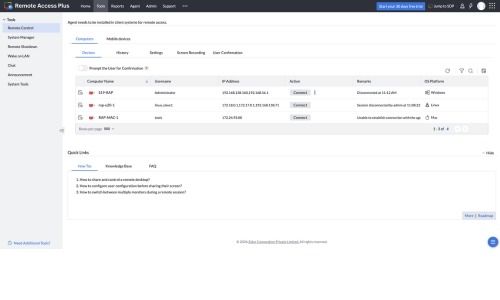
ManageEngine Remote Access Plus is an enterprise remote control solution that helps IT help desk technicians and system administrators troubleshoot Windows, Mac, and Linux computers from a single, centralized console. It combines secure remote desktop sharing with a suite of 12+ diagnostic tools including remote command prompt, file manager, registry editor, system manager, and Wake on LAN, to resolve issues without on-site visits.

Pricing of ManageEngine Remote Access Plus

Standard Edition

USD 1
USD 0.00

device/month

Buy Now
  • Starts at Less than $1/device/month

Professional Edition

USD 1
USD 0.00

device/month

Buy Now
  • Starts at Less than $1/device/month

Key Features of ManageEngine Remote Access Plus

Key Features:
  • Remote Desktop Control
  • Remote control for Android devices
  • Secure File Transfer / Remote File Manager
  • Advanced Remote Desktop Sharing (screen blanking, session shadowing, multi-technician collaboration)
  • Remote Command Prompt with system-level privileges
  • Remote Registry Editor
  • System Manager
  • Wake-on-LAN
  • Voice, Video & Text Chat with end users
  • Multi-Platform Support (Windows, Mac, Linux)
  • Remote Shutdown
  • Two-Factor Authentication & Role-Based Access Control
  • Attended & Unattended Remote Access
  • Real-Time Performance Monitoring
  • Mobile Device Support
  • Audit-ready Reporting & Session Recording

Key Specification

Other Categories: Remote Support Software Remote Work Software IT Asset Management Software Free Remote Access Software Remote Access Software Remote Access Software For Free Remote Access Software For Mac Remote Access Software For PC Remote Monitoring And Management (RMM) Software
Deployment: Cloud Hosted,On Premise
Customer Support: Phone,Email,Live Chat,Online (Ticket)
Customization: Yes
Languages Support: Chinese, Czech, Danish, Dutch, English, Finnish, French, German, Hungarian, Italian, Japanese, Korean, Polish, Portuguese, Russian, Spanish, Swedish, Turkish

Who uses ManageEngine Remote Access Plus

Personal

Personal
StartUps
StartUps
SMEs
SMEs
Agencies
Agencies
Enterprises
Enterprises

Company Details

Company Name: ManageEngine
Headquarter: Chennai, Tamil Nadu India
Website: Visit Website go-to-link
Social Media:

ManageEngine Remote Access Plus Description

Managing a distributed workforce across multiple locations, operating systems, and device types is one of the biggest challenges IT teams face today. ManageEngine Remote Access Plus was built specifically to solve this problem by giving system administrators and help desk technicians a single, centralized platform to remotely access, diagnose, and resolve endpoint issues across Windows, Mac, and Linux fleets, regardless of where those devices are located.

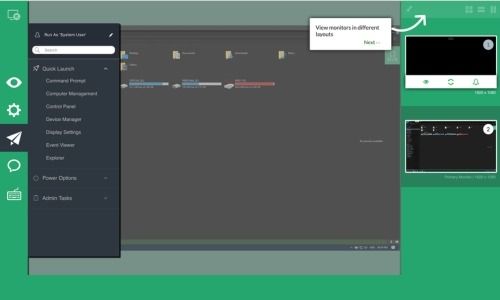
At its core, Remote Access Plus offers advanced remote desktop sharing that goes beyond basic screen-sharing tools. Technicians can take full control of an end user's machine, blank the screen during sensitive operations, silently shadow user activity for training or oversight, and even bring in multiple technicians to collaborate on complex issues in real time. This makes it especially useful for organizations that need fast, reliable resolution without disrupting the end user's workflow.

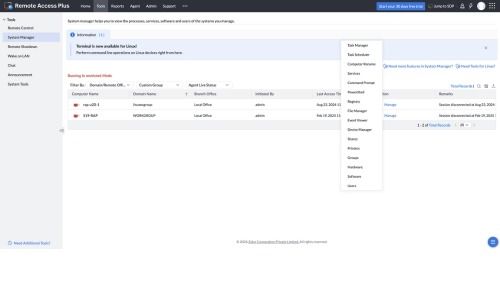
Beyond remote control, the platform bundles more than a dozen troubleshooting tools into one interface. IT staff can open a remote command prompt with system-level privileges, edit the Windows registry directly, manage running processes and services through the System Manager, transfer files securely between endpoints, and monitor Windows event logs, all without needing to be physically present at the machine. A built-in file manager and remote task manager further reduce the need for on-site visits, cutting resolution times significantly.

One of the platform's standout capabilities is the Wake on LAN feature, which lets IT administrators power on remote computers individually or in bulk before initiating a session. This is ideal for after-hours patching or maintenance windows. Another complementary feature is the smart remote shutdown feature, which identifies idle machines with no active users and shuts them down, locks them, or puts them to sleep, helping organizations control energy costs and enforce endpoint hygiene policies at scale.

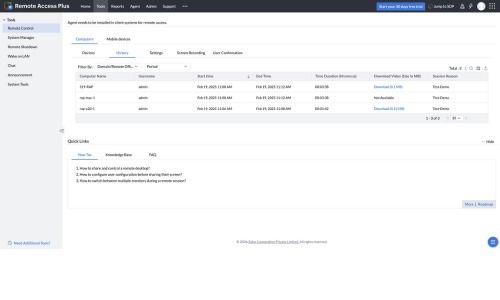
Security and compliance are built into the product's foundation. Remote Access Plus supports HIPAA and ISO/IEC 27001 compliance requirements and encrypts every session using 256-bit AES encryption over TLS 1.2. Two-factor authentication, role-based access controls, and detailed session logging ensure that only authorized technicians can initiate remote sessions, and that every action taken is recorded for audit purposes. Session recordings and exportable, audit-ready reports give IT leadership complete visibility into technician activity across the organization.

Collaboration features are also central to the experience. Technicians can chat with end users via voice, video, or text directly from the remote control screen, helping them understand the problem faster and walk users through fixes in real time. Session recordings can later be used to train new technicians on handling complex troubleshooting scenarios.

Remote Access Plus is available in multiple editions, including a free edition for up to 10 computers as well as Standard and Professional tiers, in both on-premises and cloud deployment models. This flexibility makes it suitable for small businesses managing a handful of endpoints as well as large enterprises supporting thousands of devices across a Windows domain infrastructure.

For IT teams looking to reduce downtime, cut support costs, and deliver consistent, secure remote troubleshooting across their entire endpoint fleet, ManageEngine Remote Access Plus offers a comprehensive, compliance-ready solution built for the modern distributed workplace.

Alternative

Zendesk Remote

By Zendesk Remote

0.0
Rating out of 5 Based on 0 reviews

Getscreen.me

Access Anywhere: Instant Browser-Based Remote Desktop Software

0.0
Rating out of 5 Based on 0 reviews

Laplink

Don't Wait

0.0
Rating out of 5 Based on 0 reviews

ManageEngine Remote Access Plus Video/Screenshots

User Reviews

no-reviews
Share your experience! Be the very first reviewer. Write a Review

Frequently Asked Questions (FAQs)

The user group of ManageEngine Remote Access Plus are as follows :

  • Personals
  • Startups
  • SMEs
  • Agencies
  • Enterprises

ManageEngine Remote Access Plus has 2 plans,

  • Standard Edition USD 1 device/month
  • Professional Edition USD 1 device/month

ManageEngine Remote Access Plus is allowed 30 Days Free Trial.

The key featuers of ManageEngine Remote Access Plus are as follows :

  • Remote Desktop Control
  • Remote control for Android devices
  • Secure File Transfer / Remote File Manager
  • Advanced Remote Desktop Sharing (screen blanking, session shadowing, multi-technician collaboration)
  • Remote Command Prompt with system-level privileges
  • Remote Registry Editor
  • System Manager
  • Wake-on-LAN
  • Voice, Video & Text Chat with end users
  • Multi-Platform Support (Windows, Mac, Linux)
  • Remote Shutdown
  • Two-Factor Authentication & Role-Based Access Control
  • Attended & Unattended Remote Access
  • Real-Time Performance Monitoring
  • Mobile Device Support
  • Audit-ready Reporting & Session Recording

ManageEngine Remote Access Plus pricing model : Yearly,Monthly,Onetime(Perpetual License)

ManageEngine Remote Access Plus is Cloud Hosted,On Premise Software.

Yes

ManageEngine Remote Access Plus offers Phone,Email,Live Chat,Online (Ticket) support.

ManageEngine Remote Access Plus provides Help Guides,Video Guides,Blogs,Webinars,Infographics,Case Studies,Whitepapers,On-Site Training for the software training.