Attach2Dynamics

Integrate Dynamics 365 CRM with Azure, Dropbox and SharePoint

0.0
Rating out of 5 Based on 0 reviews

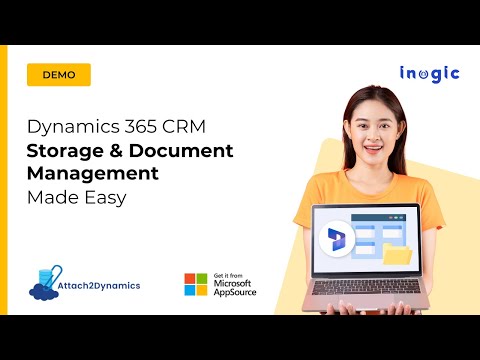
Attach2Dynamics is a Microsoft Dynamics 365 CRM/Dataverse storage app that seamlessly integrates with external cloud stores like SharePoint, Dropbox, and Azure Blob Storage. It moves all your Dynamics 365 CRM attachments, notes, documents, and other files to your preferred cloud storage in real-time.

Pricing of Attach2Dynamics

no-pricing
For get detailed pricing as per your requirements.

Awards & Badges Received

Get More Awards & Badges from Techimply
Badge-1
Badge-2
Badge-3

Key Features of Attach2Dynamics

Key Features:
  • Document Management
  • CRM integration
  • Partner Cloud (VAR or Service Provider)
  • Application Security
  • Document Storage

Key Specification

Other Categories: CRM Software Document Management Software
Deployment: Cloud Hosted
Customer Support: Email,Online (Ticket)
Customization: Yes
Languages Support: English

Who uses Attach2Dynamics

Personal
Personal
StartUps
StartUps
SMEs
SMEs
Agencies
Agencies
Enterprises
Enterprises

Company Details

Company Name: Inogic
Headquarter: Navi Mumbai, Maharashtra India
Social Media:

Attach2Dynamics Description

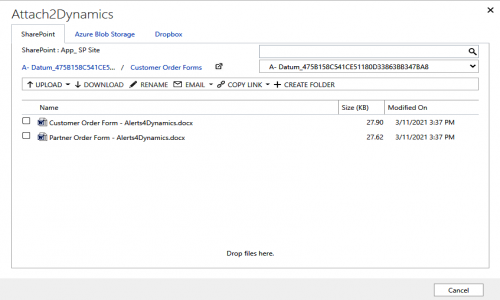
Integrate Microsoft Dynamics 365 with SharePoint, Dropbox, and Azure Blob Storage for managing documents with Attach2Dynamics. Leverage an Intuitive and easy-to-use UI to drag and drop, upload, download, delete and perform many other actions on files and folders in your cloud storage from within the Dynamics 365 environment. Attach2Dynamics can also bulk migrate attachments from your Microsoft Dynamics 365 CRM history.

Attach2Dynamics provides document management for all Entities within Dynamics 365 CRM and is available for all deployment models beginning Dynamics 365 9.X and Dataverse (PowerApps).

Key Features


  • Drag and Drop: Drag and drop files and folders to Dropbox, SharePoint, and Azure Blob Storage.
  • File Management: Upload/ Download multiple Microsoft Dynamics 365 CRM files and a single folder to storage on all three clouds.
  • Create Folders: Create folders in cloud storage from within Microsoft Dynamics 365 CRM
  • Anonymous Link: Generate anonymous links of files and folders to share multiple files/attachments from Microsoft Dynamics 365 CRM
  • Search: Deep Search files in the current and child folders to easily find a specific file
  • Email: Directly attach files or link file(s) from cloud storages to a Microsoft Dynamics 365 CRM email
  • Copy/Move Attachments: Copy/Move Notes, Email, and Sales Literature Attachments to cloud storage systems
  • Bulk Move Attachments: Bulk Move history Notes/Email/Sales Literature attachments to cloud storages
  • Access Control of Actions: Set user permissions for various features such as Upload, Download, Email, etc. with Security Templates
  • Delete: Delete unwanted files from any of the three cloud storage
  • View Files: Preview files with a single click without downloading it
  • Multiple instances of Cloud Storage: Create multiple instances of the same cloud storage such as SharePoint_1, SharePoint_2, Dropbox_1, Dropbox_2, etc.
  • Single Sign-on: Perform all actions in the context of logged-in user
  • Open Folder: Open folders present on SharePoint Site directly using Attach2Dynamics UI.

Alternative

Zoho CRM

World's Favorite CRM

4.8
Rating out of 5 Based on 24 reviews

Salesforce

Salesforce for SMBs Now at Special Pricing

5.0
Rating out of 5 Based on 21 reviews

Twozo CRM

Deals in your pocket

4.9
Rating out of 5 Based on 4 reviews

Attach2Dynamics Video/Screenshots

User Reviews

no-reviews
Share your experience! Be the very first reviewer. Write a Review

Frequently Asked Questions (FAQs)

The user group of Attach2Dynamics are as follows :

  • Personals
  • Startups
  • SMEs
  • Agencies
  • Enterprises

Attach2Dynamics has 0 plans.

Attach2Dynamics is allowed 15 Days Free Trial.

Attach2Dynamics pricing model : Yearly,Monthly,Transaction

Attach2Dynamics is Online Software.

Yes

Attach2Dynamics offers Email,Online (Ticket) support.

Attach2Dynamics provides Help Guides,Video Guides,Blogs,Webinars,Infographics,Whitepapers for the software training.