Zangi

The New Era Messenger

0.0
Rating out of 5 Based on 0 reviews

What is Zangi?

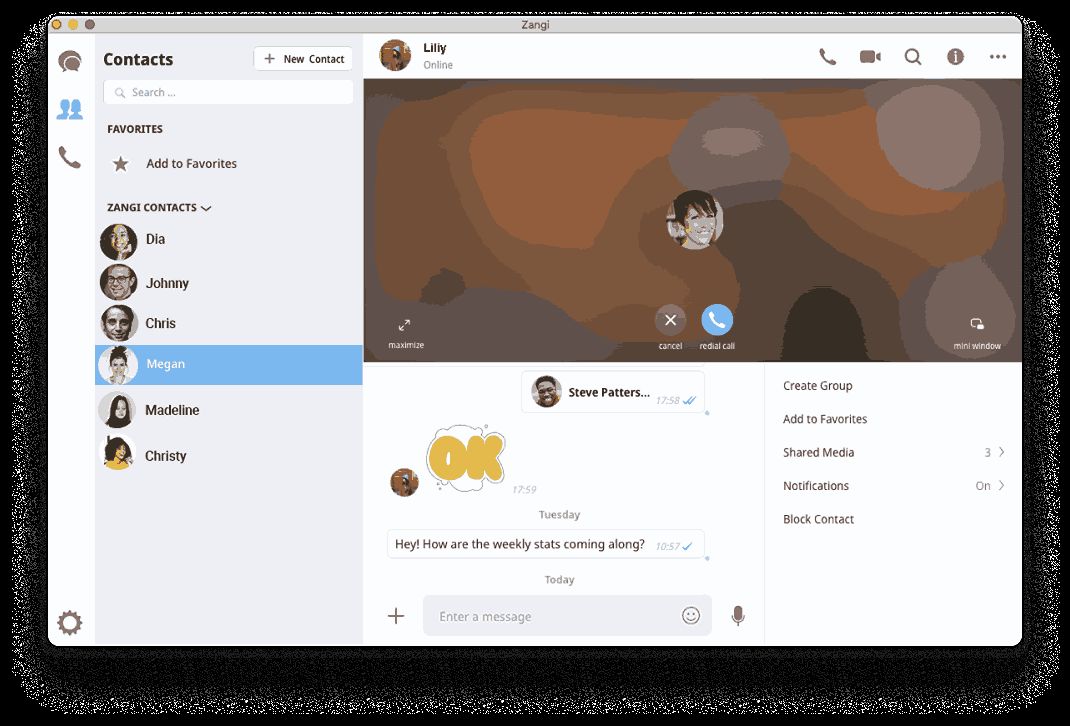
Zangi is a secure messaging service that makes sure communication between its customers leaves the most secure privacy and data highly protected. It functions properly in case of slow internet, has encrypted messaging, and secure phone/video calling features with no data uploaded to servers while file transfer.

Pricing of Zangi

no-pricing
For get detailed pricing as per your requirements.

Key Features of Zangi

Key Features:
  • Live Chat
  • Progressive Dialer
  • Predictive Dialer
  • Hd Voice And Video Calls
  • Voice Mail
  • Call Waiting
  • End To End Encryption
  • Conference Calling
  • Voip
  • File Sharing
  • Call Recording
  • Contact Management
  • Screen Sharing
  • Call Transfer
  • White Label Solution
  • Webrtc

Key Specification

Other Categories: Call Center Software Business Instant Messaging Software
Deployment: Cloud Hosted
Customer Support: Phone,Email
Customization: Yes
Languages Support: English

Who uses Zangi

Personal
Personal
SMEs
SMEs
Agencies
Agencies
Enterprises
Enterprises

Company Details

Company Name: Zangi
Headquarter: Santa Clara, California United States
Social Media:

Zangi Description

Benefits of Zangi

Here are 5 key benefits of Zangi:

  • No data collection or storage on servers: Zangi uses serverless and decentralized architecture where user data is stored locally on user devices but not on servers, which helps in enhancing security and privacy.

  • No Backdoors or Profiling: Zangi prioritizes user privacy by not keeping backdoors for accessing user data or selling usage data to third-parties.

  • Low Data Usage: Zangi uses smart technology that uses extremely less mobile data than most other messaging apps making it an ideal choice for people with limited data or the ones travelling.

  • Fast File Transfer: Zangi offers efficient and faster file transfer capabilities than other messaging apps, with features such as resume failed downloads.

  • Ad-free Experience: Zangi provides uninterrupted user experience without displaying ads because it is a free application.

How to use Zangi?

To use Zangi, follow these steps

1. Download and Install

  • Download Zangi Private Messenger from Google Play Store if you’re on Android or from Apple App Store if you’re on iOS.

  • Open the app after install.

2. Register or Sign In

  • You’ll need to register if you’re a new user. You can anonymously register with Zangi as the app allows users to register without providing your phone number or personal contacts. For that, you will receive a “Zangi Number” upon registration.

  • Existing users can sign in with email id or Zangi Number and password. You might have to use your own phone number or email to sign in if you registered before Zangi Number system was introduced.

3. Connect with Friends

  • Share your unique Zangi Number with your trusted friends.

  • Send a special connection link via SMS or social media channels to send invitations to friends. If they have downloaded the app already, then they will be redirected to a new chat, if not, then they will be prompted to download the app.

  • You can call your friend's Zangi Number from the Calls section of the keypad or add it to an existing contact's profile if you know it.

4. Send Messages and Make Calls

  • Messaging: You can share voice messages, images, video, GIFs, and other content instantly. Zangi groups let you talk to a lot of people at once.

  • Voice and Video Calls: You can make audio or video calls to others for free. While Zangi is able to provide a better user experience with slow or crowded networks, it is still required to have a stable internet connection for calling.

  • Zangi-Out: You can use the paid "Zangi-Out" service with low rates to call people who don't use Zangi (landlines or mobile numbers). You need to add credit into your account before you can use Zangi-Out. Right now, this feature only works on iOS devices.

Features of Zangi

Zangi has a lot of features that make communication safe and easy.

1. Communication Features

  • HD Voice and Video Calls:  Provides excellent video and audio calls that function effectively across congested or slow networks.

  • Private Groups: Can create secure group chats for purposes such as family and work discussions.

  • Conference Calling: Multiple participants can do audio conference calling which is currently available as beta testing mode on both Android and iOS.

2. Security and Privacy Features

  • No Data Collection or Storage: Zangi favors privacy by not recording the history of communication between users.

  • Military-Grade Encryption: It protects messages, calls, and file transfers with end-to-end encryption, RSA-2048, AES-256, and other algorithms in three layered encryption systems.

  • Serverless and Decentralized: Operates independently of central servers, hence reducing the likelihood of cyberattacks and data breaches.

3. Performance and Network Features

  • Low Data Usage Mode: The option to reduce data usage while making calls, which is particularly useful for pricey or sluggish internet connections.

  • Fast File Transfer: Various file types can be quickly and safely transferred through Zangi.

  • Unbreakable Quality: Recovers lost voice and video data to keep call and messaging quality high even when the internet connection is bad.

4. User Experience Features

  • Show/Hide Online Status: Users have the option to restrict who can see their typing, online, and seen message statuses.

  • Pinning chats: Important chats can be pinned to the top of the chat list for convenient access.

  • Sending Messages to Myself: Just a similar feature to WhatsApp, you can send important messages to yourself in chat as reminders or saving notes.

Zangi Demo

Yes, Zangi offers a free demo.

Zangi Pricing

Contact Techimply for pricing.

Alternative

Freshcaller

Elevate care with fast and easy conversations

0.0
Rating out of 5 Based on 0 reviews

Zendesk AI

From closed tickets to real resolutions with AI agents

0.0
Rating out of 5 Based on 0 reviews

Nextiva

Build Amazing Customer Experiences

0.0
Rating out of 5 Based on 0 reviews

Zangi Video/Screenshots

User Reviews

no-reviews
Share your experience! Be the very first reviewer. Write a Review

Frequently Asked Questions (FAQs)

The user group of Zangi are as follows :

  • Personals
  • SMEs
  • Agencies
  • Enterprises

Zangi has 0 plans.

Zangi is not allowing Free Trial.

Zangi pricing model : Yearly,Monthly

Zangi is Online Software.

Yes

Zangi offers Phone,Email support.

Zangi provides Help Guides,Blogs for the software training.