What is TeamViewer
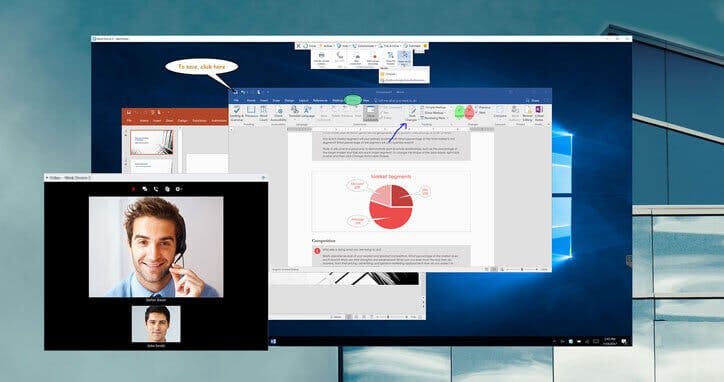
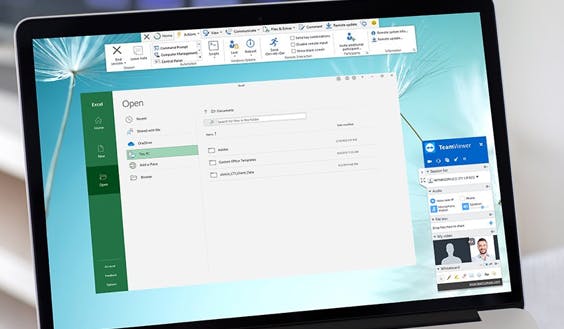
TeamViewer is a remote connectivity software that allows users to access desktops, mobile devices, and servers remotely. It facilitates file transfers, screen sharing, video conferencing, and remote device control. TeamViewer works across various platforms including Windows, macOS, Linux, Android, and iOS.
Pricing of TeamViewer
- 1 Licensed user
- 200 Managed devices
- 1 Concurrent connection
- Remote printing
- File transfer / queuing
- Phone support (in 33 languages)
- Mobile device support (add-on)
- Unlimited devices to connect to
- Record and playback sessions
- Switch sides
- Custom branding
- 15 Licensed users
- 300 Managed devices
- 1 Concurrent connection
- Remote printing
- File transfer / queuing
- Phone support (in 33 languages)
- Mobile device support (add-on)
- Unlimited devices to connect to
- Record and playback sessions
- Switch sides
- Custom branding
- Unlimited devices to connect from
- Outgoing connection reporting
- 30 Licensed users
- 500 Managed devices
- 3 Concurrent connections
- Remote printing
- File transfer / queuing
- Phone support (in 33 languages)
- Mobile device support (add-on)
- Unlimited devices to connect to
- Record and playback sessions
- Switch sides
- Custom branding
- Unlimited devices to connect from
- Outgoing connection reporting
- AI Session Insights
- Incoming connection reporting
- Mass deployment
- Standard integrations add-on (ServiceNow Freshworks Zendesk Jamf Miradore and others)
- Unlimited users
- Unlimited Managed devices
- Unlimited connections
- Everything in Corporate license plus
- MS Intune integration
- SSO (Single Sign-on)
- Fully customized license
- Conditional access
- Enterprise security
- Auditability
- Multitenancy
- Mobile SDK
Key Features of TeamViewer
Key Features:
Key Specification
| Other Categories: | Remote Support Software Collaboration Tool File Sharing Software File Sync Software File Converter Software File Transfer Software |
|---|---|
| Deployment: | Cloud Hosted,Hybrid,On Premise,Any |
| Customer Support: | Phone,Email,Live Chat |
| Customization: | No |
| Languages Support: | English |
Who uses TeamViewer

StartUps

SMEs

Agencies

Enterprises
Company Details
| Company Name: | TeamViewer |
|---|---|
| Headquarter: | Germany |
| Social Media: |
TeamViewer Description
Most Popular Software



ManageEngine Remote Access Plus
Enterprise Remote Control and IT Support Software for Instant, Secure IT Troubleshooting – Anytime, Anywhere.
 0.0
0.0


Alternative
ManageEngine Remote Access Plus
Enterprise Remote Control and IT Support Software for Instant, Secure IT Troubleshooting – Anytime, Anywhere.
0.0
TeamViewer Video/Screenshots

TeamViewer Key Clients


User Reviews

Frequently Asked Questions (FAQs)
The user group of TeamViewer are as follows :
- Startups
- SMEs
- Agencies
- Enterprises
TeamViewer has 4 plans,
- TeamViewer Business USD 17.38 per month / billed yearly
- TeamViewer Premium USD 35.93 per month / billed yearly
- TeamViewer Corporate USD 76.51 per month / billed yearly
- TeamViewer Tensor USD 0.00 Contact us
TeamViewer is allowed 0 Days Free Trial.
The key featuers of TeamViewer are as follows :
- Screen Sharing
- Real-Time Chat
- File Sharing
- Surveys & Feedback
- Session Recording
- Session Transfer
- Live Chat
- Recurring Task Management
TeamViewer pricing model : Yearly,Monthly,Onetime(Perpetual License)
TeamViewer is Cloud Hosted,Hybrid,On Premise,Any Software.
No
TeamViewer offers Phone,Email,Live Chat support.
TeamViewer provides Help Guides,Video Guides,Blogs,Webinars,On-Site Training for the software training.