SalesQL

By SalesQL

0.0
Rating out of 5 Based on 0 reviews

What is SalesQL?

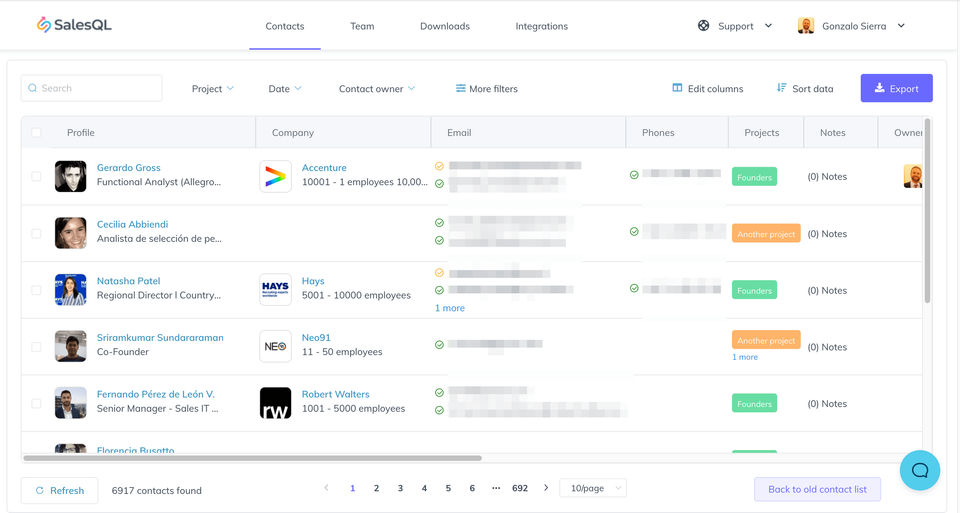
SalesQL is a effective LinkedIn email finder and lead technology device that facilitates customers extract demonstrated email addresses and phone numbers from LinkedIn profiles. With bulk export, CRM integration, and information enrichment functions, SalesQL streamlines prospecting for income, recruitment, and marketing professionals.

Pricing of SalesQL

Free

USD 0.00
USD 0.00

Buy Now
  • Contacts Manager
  • Direct & Company Emails
  • Contacts Manager
  • Direct & Company Emails

Starter

USD 39.00
USD 0.00

/Month

Buy Now
  • Contacts Manager
  • Direct & Company Emails
  • Direct & Company Phones
  • Export Contacts to CSV/Excel
  • Integrations with apps
  • Contacts Manager
  • Direct & Company Emails
  • Direct & Company Phones
  • Export Contacts to CSV/Excel
  • Integrations with apps

Advanced

USD 59.00
USD 0.00

/Month

Buy Now
  • Contacts Manager
  • Direct & Company Emails
  • Direct & Company Phones
  • Export Contacts to CSV/Excel
  • Integrations with apps
  • Multiple users - Upto 3
  • Contacts Manager
  • Direct & Company Emails
  • Direct & Company Phones
  • Export Contacts to CSV/Excel
  • Integrations with apps
  • Multiple users - Upto 3

Pro

USD 89.00
USD 0.00

/Month

Buy Now
  • Contacts Manager
  • Direct & Company Emails
  • Direct & Company Phones
  • Export Contacts to CSV/Excel
  • Integrations with apps
  • Multiple users - Upto 15
  • Contacts Manager
  • Direct & Company Emails
  • Direct & Company Phones
  • Export Contacts to CSV/Excel
  • Integrations with apps
  • Multiple users - Upto 15

Key Specification

Other Categories: Sales Intelligence Software
Deployment: Cloud Hosted
Customer Support: Online (Ticket)
Customization: No
Languages Support: English

Who uses SalesQL

SMEs
SMEs
Enterprises
Enterprises

Company Details

Company Name: SalesQL
Headquarter: london, London United Kingdom
Social Media:

SalesQL Description

Benefits of SalesQL

SalesQL belongs to the Lead Generation Software class, which allows companies become aware of, qualify, and connect to potential clients efficaciously.

  • Verified Contact Discovery Extract direct and work e mail addresses and make contact with numbers from LinkedIn profiles, improving outreach accuracy and lowering soar fees.
  • Bulk Export & Prospecting Download contact info in bulk from LinkedIn search pages to build scalable prospect lists for campaigns.
  • Data Enrichment Enhance contacts with over 40 information points together with corporation info, process titles, and location for deeper insights.
  • CRM Integration Seamlessly push enriched contact records into CRMs like HubSpot, Zoho, or Mailchimp to hold workflow continuity.
  • Browser Extension Capture contact information immediately from LinkedIn using a person-friendly browser plugin, saving effort and time.
  • Affordable Pricing Competitive plans beginning at $29/month make it reachable for small groups and startups.

How to Use SalesQL

  1. Install the browser extension from SalesQL’s website.
  2. Log into LinkedIn and begin surfing profiles or search effects.
  3. Click the extension icon to extract emails and speak to numbers.
  4. Export contacts to CSV or sync along with your CRM.
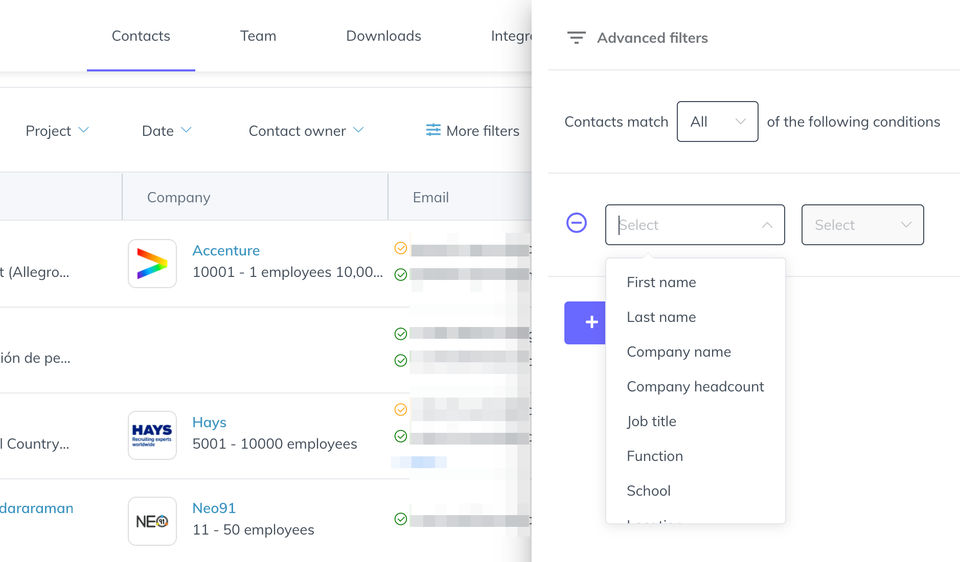
  5. Use filters and folders to organize leads and manipulate outreach.

Features of SalesQL

  • LinkedIn Email Finder Extracts established emails from 1st, second, and 3rd-diploma LinkedIn connections.
  • Phone Number Search through Address Locate business telephone numbers the use of enriched area records.
  • Bulk Contact Export Export hundreds of contacts with one click on for huge-scale campaigns.
  • CSV & XLSX Export Download enriched facts in more than one formats for flexible use.
  • API Access Automate lead enrichment and verification with strong API help.
  • Email Verification Built-in bulk e-mail verifier ensures high deliverability and smooth lists.
  • Multi-Seat Access Plans assist up to 15 users, best for sales and recruitment groups.
  • Folders & Pipeline Management Organize contacts into folders and track outreach development.

SalesQL Demo & Pricing

  • Demo: Available via YouTube tutorials and browser extension walkthroughs.
  • Pricing:
  • Free Plan: $zero/month, one hundred credits
  • Basic: $29/month, 24,000 credit
  • Professional: $fifty nine/month, 60,000 credits
  • Organization: $89/month, one hundred forty four,000 credit All plans consist of tested e mail addresses, telephone numbers, CSV enrichment, and CRM integrations2.

Alternative

Salesforce

Salesforce for SMBs Now at Special Pricing

5.0
Rating out of 5 Based on 21 reviews

Zendesk AI

From closed tickets to real resolutions with AI agents

0.0
Rating out of 5 Based on 0 reviews

Pipedrive

The easy and effective CRM for closing deals

5.0
Rating out of 5 Based on 19 reviews

SalesQL Video/Screenshots

User Reviews

no-reviews
Share your experience! Be the very first reviewer. Write a Review

Frequently Asked Questions (FAQs)

The user group of SalesQL are as follows :

  • SMEs
  • Enterprises

SalesQL has 4 plans,

  • Free USD 0.00
  • Starter USD 39.00 /Month
  • Advanced USD 59.00 /Month
  • Pro USD 89.00 /Month

SalesQL is not allowing Free Trial.

SalesQL pricing model : Onetime(Perpetual License)

SalesQL is Online Software.

No

SalesQL offers Online (Ticket) support.

SalesQL provides Help Guides,Video Guides,Blogs for the software training.