Homebase

Take control of everyday work.

0.0
Rating out of 5 Based on 0 reviews

What is Homebase?

Homebase is a workforce‑management software focused on scheduling, time tracking, payroll and basic HR functions — designed especially for small and medium‑sized businesses with hourly workers. It lets you build staff schedules, manage shift swaps, track clock‑in/out via mobile or shared devices (even with GPS‑based location‑checks), and automate timesheets and wage calculations.

It’s widely used by retail shops, restaurants, service providers, and other hourly‑staff businesses that need easy shift management and labor‑cost control.

Pricing of Homebase

Basic

USD 0.00
USD 0.00

/ location / month for 1 location, up to 10 employees

Buy Now
  • Basic scheduling
  • Basic time tracking
  • Point-of-sale integration
  • Payroll add-on available

Essentials

USD 27.00
USD 0.00

/ location / month unlimited employees

Buy Now
  • Advanced scheduling
  • Advanced time tracking
  • Team communication
  • Payroll add-on available

Plus

USD 63.00
USD 0.00

Boost your team's productivity and improve communication.

Buy Now
  • Hiring
  • PTO & time-off controls
  • Departments & permissions
  • Payroll add-on available

All-in-One

USD 108.00
USD 0.00

/ location / month unlimited employees

Buy Now
  • Employee onboarding
  • Labor cost management
  • HR & compliance
  • Payroll add-on available

Key Features of Homebase

Key Features:
  • Email Management
  • Scheduling
  • Task Management

Who uses Homebase

StartUps
StartUps
SMEs
SMEs
Agencies
Agencies
Enterprises
Enterprises

Company Details

Company Name: Homebase
Headquarter: South Carolina United States
Social Media:

Homebase Description

Why Choose Homebase?

  • Easy to use, with a straightforward drag‑and‑drop schedule builder and intuitive interface.

  • Combines scheduling, time tracking, team messaging, and payroll/time‑clock features — reducing the need for multiple tools.

  • Has a free plan (for small teams / one location) — good for startups or small businesses testing workforce management.

  • Offers mobile access: employees can view schedules, clock in/out, request time-off, and get shift notifications via phone.

  • Helps businesses control labor costs, monitor attendance, manage overtime and shifts more efficiently — useful especially for hourly‑wage staff. 

Benefits of Homebase

  • Simplifies shift scheduling and reduces administrative burden on managers.

  • Accurate time tracking & payroll-ready timesheets — reducing payroll errors.

  • Better team communication via built-in messaging & notifications (for shifts, changes, reminders).

  • Flexibility for employees: shift swaps, time-off requests, access to schedule from mobile.

  • Cost-effective for small businesses due to free/basic plan availability.

  • Useful for compliance and record-keeping (attendance logs, break/overtime monitoring).

How to Use Homebase

  1. Sign up and create your company account.

  2. Add employees, define roles and permissions.

  3. Build staff schedules using drag‑and‑drop scheduler.

  4. Employees clock in/out via mobile or shared kiosk — system records timesheets automatically.

  5. Managers review attendance, approve timesheets, manage overtime, shift swaps, and time-off.

  6. Use built-in messaging to communicate shift updates, announcements or alerts.

  7. (Optional) Add payroll integration or payroll add-on to automate wage processing.

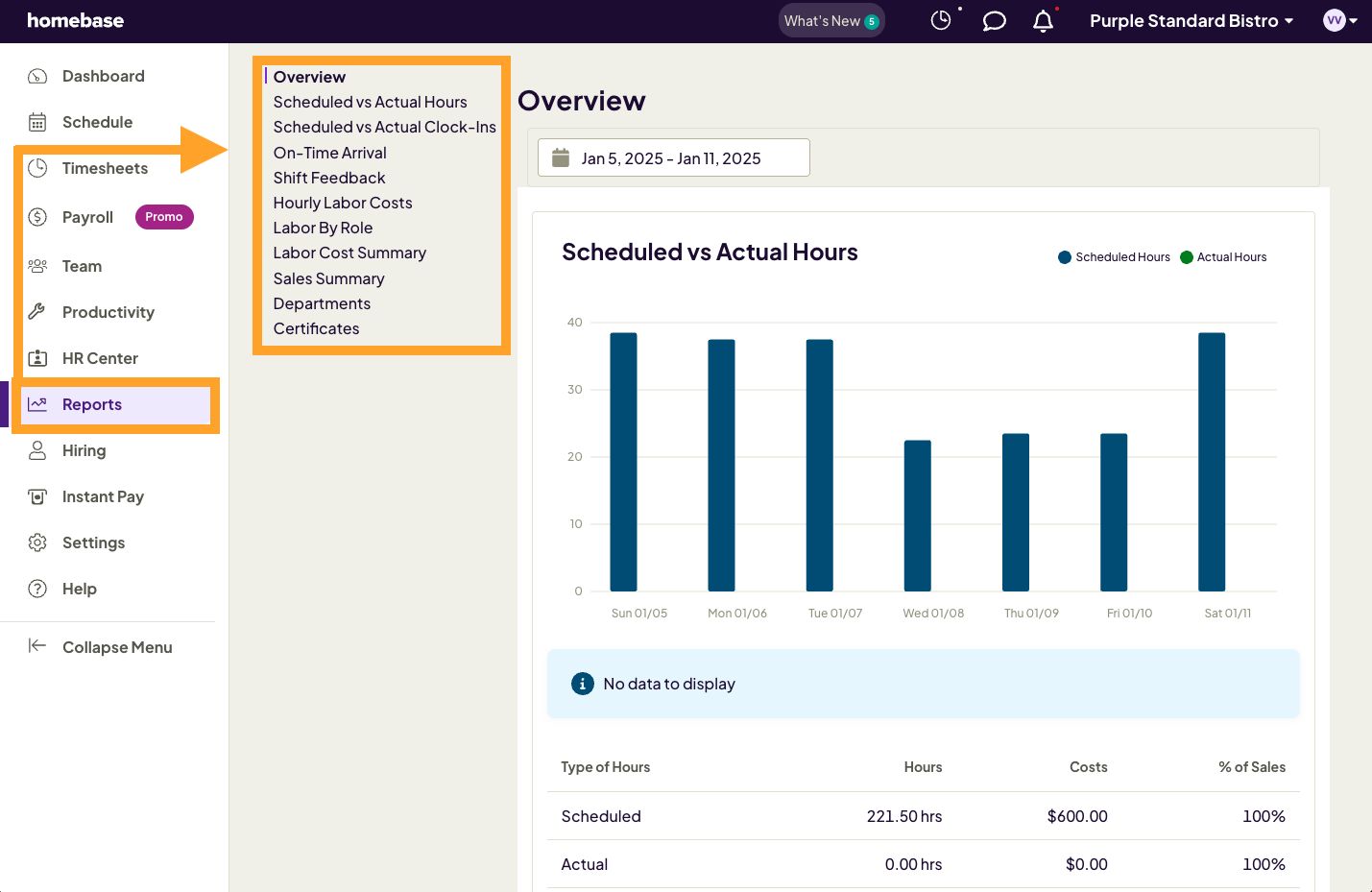
  8. Use reporting tools to track labor costs, attendance, and scheduling efficiency.

Features of Homebase

  • Shift scheduling with drag‑and‑drop interface.

  • Time clock: mobile clock‑in/out (with GPS geolocation), kiosk support, automatic timesheets.

  • Shift swaps, availability tracking and time-off requests via mobile app.

  • Built-in team communication and messaging system for announcements, reminders, group chat .

  • Attendance tracking, overtime calculation and labor cost analytics & reporting.

  • Integration with POS, payroll and accounting systems for streamlined payroll and wage processing.

  • Hiring & onboarding module (posting jobs, application handling, new‑hire paperwork) in higher-tier plans.

Homebase Demo

You can request a live or trial demo of Homebase to explore scheduling, time tracking, and workforce‑management features firsthand. For a guided demo and consultation — contact Techimply.

Homebase Pricing

Homebase offers a free plan for small teams (single location, up to ~20 employees) which covers basic scheduling and team communication. 

Paid plans (Essentials / Plus / All-in-One) add advanced features such as payroll, compliance, onboarding, labor-cost reporting, and more comprehensive HR tools.

For detailed pricing—especially for multiple locations or payroll add-ons—please contact Techimply for a tailored quote.

Alternative

TCP Humanity Scheduling

Dynamic employee scheduling software that works for everyone

0.0
Rating out of 5 Based on 0 reviews

Connecteam

Powerful Hubs, Flexible Pricing

0.0
Rating out of 5 Based on 0 reviews

When I Work

Scheduling for Shift Based Workplaces

0.0
Rating out of 5 Based on 0 reviews

Homebase Video/Screenshots

Homebase Key Clients

User Reviews

no-reviews
Share your experience! Be the very first reviewer. Write a Review

Frequently Asked Questions (FAQs)

The user group of Homebase are as follows :

  • Startups
  • SMEs
  • Agencies
  • Enterprises

Homebase has 4 plans,

  • Basic USD 0.00 / location / month for 1 location, up to 10 employees
  • Essentials USD 27.00 / location / month unlimited employees
  • Plus USD 63.00 Boost your team's productivity and improve communication.
  • All-in-One USD 108.00 / location / month unlimited employees

Homebase is allowed 0 Days Free Trial.

The key featuers of Homebase are as follows :

  • Email Management
  • Scheduling
  • Task Management

Homebase pricing model : Yearly,Monthly,Onetime(Perpetual License)

Homebase is Cloud Hosted,Hybrid,On Premise,Any Software.

Homebase offers Phone,Email,Live Chat support.

Homebase provides Help Guides,Video Guides,Blogs,Webinars,On-Site Training for the software training.