ezClocker

Small business employee time tracking software made easy

0.0
Rating out of 5 Based on 0 reviews

What is ezClocker?

ezClocker is a simple yet powerful time tracking and scheduling software designed primarily for small businesses and freelancers. It enables employees to clock in and out via mobile devices or web browsers, making it an ideal solution for remote teams, field workers, and businesses that do not operate from a central location.

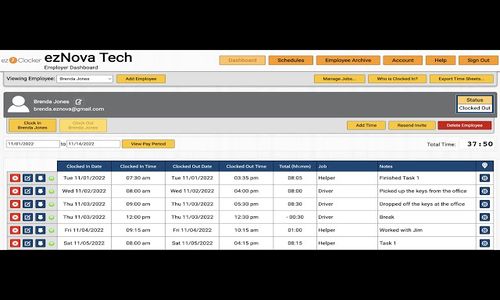
The platform offers an intuitive user interface that helps business owners track employee hours, manage schedules, and export timesheets for payroll—all in real time. ezClocker is especially popular among construction companies, cleaning services, healthcare providers, and other industries with mobile or hourly employees.

Its cloud-based system means there’s no need for expensive hardware or complicated installations. With GPS tracking, job codes, and labor compliance tools, ezClocker helps employers improve accountability and reduce time theft.

Pricing of ezClocker

Basic

USD 12.50
USD 0.00

/Month

Buy Now
  • Up to 15 employees
  • Web and mobile access
  • Employee scheduling
  • GPS verification
  • Export Pay Periods to CSV file

Standard

USD 25.00
USD 0.00

/Month

Buy Now
  • Up to 30 employees
  • Web and mobile access
  • Employee scheduling
  • GPS verification
  • Export Pay Periods to CSV file
  • Job Assignments
  • Overtime Reports
  • Payroll Integrations
  • $300 a year
  • Time Off

Premium

USD 50.00
USD 0.00

/Month

Buy Now
  • Up to 100 employees
  • Web and mobile access
  • Employee scheduling
  • GPS verification
  • Export Pay Periods to CSV file
  • Job Assignments
  • Overtime Reports
  • Payroll Integrations
  • $600 a year
  • Time Off

Awards & Badges Received

Get More Awards & Badges from Techimply
Badge-1
Badge-2
Badge-3

Key Features of ezClocker

Key Features:
  • Mobile Access
  • Employee Scheduling
  • Online Time Clock
  • Timesheet Management
  • Employee Scheduling
  • Employee Timeclock
  • Staff Notification
  • Employee Portal
  • Multi Location Support
  • Overtime Calculation

Key Specification

Other Categories: Payroll Software Time Tracking App & Software Small Business HR Software Employee Scheduling Software Time Tracking Software For PC Payroll Software For Small Business
Deployment: Cloud Hosted
Customer Support: Phone,Email,Live Chat,Online (Ticket),Business Hours
Customization: No
Languages Support: English

Who uses ezClocker

Personal
Personal
StartUps
StartUps
SMEs
SMEs
Agencies
Agencies
Enterprises
Enterprises

Company Details

Company Name: ezClocker
Headquarter: Dallas , Texas United States
Social Media:

ezClocker Description

Why Choose ezClocker? 

Businesses choose ezClocker for its exceptional simplicity, affordability, and mobile functionality. As a leading Time Tracking Software, it's built specifically for small business owners who may not have a dedicated IT team, offering a plug-and-play setup that takes only minutes. The platform is intuitive, so even employees unfamiliar with technology can clock in and out without confusion. Its GPS-enabled clock-ins improve accountability, while customizable settings allow business owners to tailor time tracking based on job codes or projects.

Unlike traditional timekeeping methods or bulky hardware systems, ezClocker operates completely in the cloud—saving both time and operational costs. Its seamless integration with payroll systems like QuickBooks or ADP also makes processing payments faster and more accurate. Whether you manage a small retail shop, remote team, or service-based crew, ezClocker delivers a powerful solution in a user-friendly format.

Benefits of ezClocker 

  • Improved Accountability: GPS tracking verifies employee locations at clock-in/clock-out.

  • Time-Saving Payroll: Exportable timesheets simplify payroll processing and reduce manual entry.

  • Labor Cost Control: Gain insights into employee hours and overtime to better manage payroll budgets.

  • Workforce Transparency: Managers can monitor real-time time logs and make schedule adjustments easily.

  • Regulatory Compliance: Maintain accurate records to comply with labor laws and audits.

  • Increased Flexibility: Cloud-based platform allows anytime, anywhere access for both staff and management.

  • Enhanced Team Coordination: Assign shifts and communicate schedule updates in real-time.

How to Use ezClocker 

Getting started with ezClocker is simple and takes only a few steps. First, sign up for an account via the ezClocker website or mobile app. Once registered, you can add employees manually or send email invites. Customize your business settings such as work hours, time zones, overtime rules, and job codes for project-based tracking.

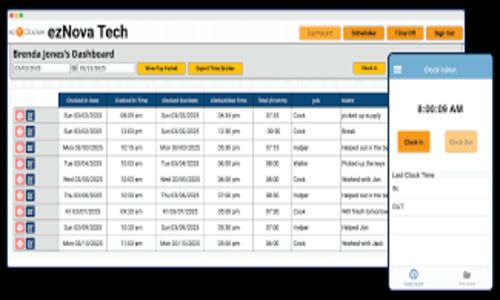
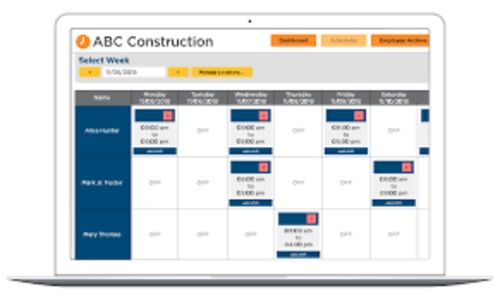
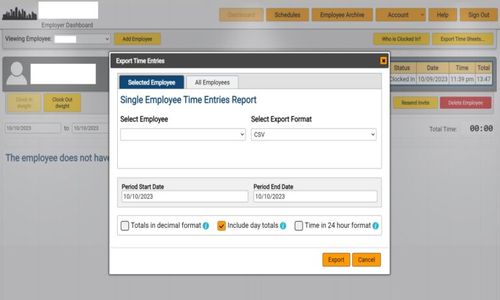
Employees download the mobile app (available on iOS and Android), where they can easily clock in and out. GPS tagging ensures their location is verified at every punch. You can create and publish schedules, monitor shift overlaps, and check availability. Timesheets are automatically generated and can be reviewed in the admin dashboard. When ready, export them in CSV format to integrate with your payroll provider. ezClocker makes the entire process smooth—from setup to payment.

Features of ezClocker 

  • Mobile Time Clock: Employees can clock in/out using iOS or Android apps.

  • GPS Location Tracking: View and verify the location of each clock-in for accountability.

  • Employee Scheduling: Easily assign and adjust work shifts with alerts for conflicts.

  • Timesheet Management: Real-time viewing and export options (CSV format).

  • Manual Time Entry: Managers can manually correct or add time entries.

  • Job Site Management: Assign job codes to locations and track time spent per site.

  • Payroll Reporting: Export data compatible with QuickBooks, Gusto, ADP, etc.

  • Overtime Alerts: Get notified when employees exceed scheduled work hours.

  • Offline Mode: Allows employees to clock in even without internet access.

  • Role-Based Access: Control who can view/edit data (admin vs. employee access).

What Makes ezClocker Different? 

What sets ezClocker apart is its commitment to simplicity without compromising functionality. Many time tracking solutions overwhelm users with features they don't need, but ezClocker focuses on what small businesses value most—ease of use, mobile accessibility, and accurate tracking. It requires no special hardware and works entirely through smartphones or web browsers, making it budget-friendly and highly portable.

Its GPS tracking feature ensures real-time accountability for remote or field employees, while the scheduling and overtime alert tools help prevent labor cost overruns. The software also integrates well with popular payroll providers, removing the stress of manual data entry. Most importantly, its customer-first approach ensures that even non-tech users feel confident using it, making it a standout option in the time tracking space.

Who Can Benefit from ezClocker? 

ezClocker is ideal for small to mid-sized businesses across various industries. Service-oriented businesses like cleaning companies, landscaping crews, construction teams, home healthcare providers, and retail stores find it especially useful. Any business that operates with hourly employees or distributed teams will benefit from its GPS-based time tracking and mobile accessibility.

It’s also a great solution for managers looking to reduce labor costs, increase scheduling transparency, and avoid payroll errors. Startups and entrepreneurs without dedicated HR departments can use ezClocker to automate timekeeping and stay compliant with wage regulations. With its easy setup, even first-time users can quickly adapt, ensuring every employee is accountable and every work hour is accurately recorded.

Is ezClocker Easy to Use? 

Yes, ezClocker is designed with ease of use as its top priority. From sign-up to day-to-day operations, every step is simplified for non-technical users. The dashboard is clean, intuitive, and clearly labeled, making it easy to navigate whether you're an admin or an employee. Setting up business preferences, adding employees, and configuring shifts can be done within minutes.

The mobile app provides a straightforward interface with simple “Clock In” and “Clock Out” buttons, along with location verification using GPS. Real-time updates and automated timesheet calculations further reduce administrative work. With built-in help options and user-friendly design, ezClocker ensures even those unfamiliar with time tracking tools can manage workforce operations confidently and independently.

 What Support Does ezClocker Offer? 

ezClocker offers reliable support designed to help small business owners resolve issues quickly. Users can access assistance through multiple channels including email support, in-app help, and a comprehensive FAQ documentation section. Their customer service is highly rated for being responsive, friendly, and solution-focused.

In addition to reactive support, ezClocker provides onboarding assistance and best practice guides to help new users get started. The platform is constantly updated to meet customer needs, and feature requests are often considered for future releases. With transparent communication and a customer-first approach, ezClocker makes sure you’re never left in the dark when managing your time tracking and scheduling needs.

Alternative

TimeMate

Get the Best Time & Attendance Solution for your Business

0.0
Rating out of 5 Based on 0 reviews

Shiftbase

Solve today's chaos, grow tomorrow.

0.0
Rating out of 5 Based on 0 reviews

Clockwise

Overview and convenience in your time tracking

4.2
Rating out of 5 Based on 10 reviews

ezClocker Video/Screenshots

ezClocker Key Clients
User Reviews

no-reviews
Share your experience! Be the very first reviewer. Write a Review

Frequently Asked Questions (FAQs)

The user group of ezClocker are as follows :

  • Personals
  • Startups
  • SMEs
  • Agencies
  • Enterprises

ezClocker has 3 plans,

  • Basic USD 12.50 /Month
  • Standard USD 25.00 /Month
  • Premium USD 50.00 /Month

ezClocker is allowed 30 Days Free Trial.

The key featuers of ezClocker are as follows :

  • Mobile Access
  • Employee Scheduling
  • Online Time Clock
  • Timesheet Management
  • Employee Scheduling
  • Employee Timeclock
  • Staff Notification
  • Employee Portal
  • Multi Location Support
  • Overtime Calculation

ezClocker pricing model : Monthly

ezClocker is Online Software.

No

ezClocker offers Phone,Email,Live Chat,Online (Ticket),Business Hours support.

ezClocker provides Help Guides,Video Guides,Blogs,Case Studies for the software training.