


 5.0
What is bill.com?
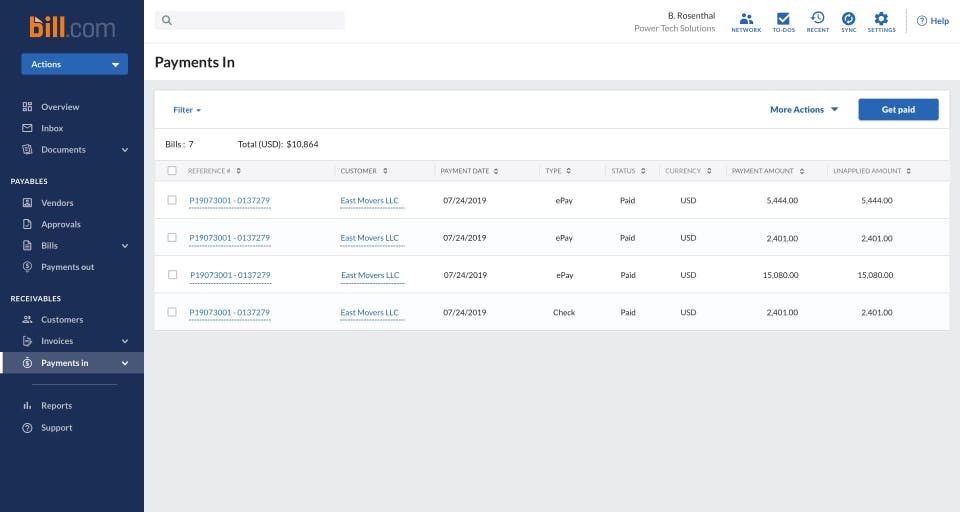
BILL is a financial operations platform designed for small and midsize businesses. It automates accounts payable, invoicing, accounts receivable, and spend and expense management while integrating with leading accounting software. According to BILL, customers spend 50% less time on accounts payable and get paid twice as fast, based on its 2021 survey of more than 2,000 customers. Additionally, eligible businesses can apply for credit lines ranging from USD 1,000 to USD 5 million.
Pricing of Bill.com
- Manually integrate with accounting software via CSV file import/export
- Easily enter bills
- Automate approval workflows
- Pay by ACH
- virtual card
- credit card
- Set auto-charge and auto-pay
- Manage bills from a centralized inbox
- Securely connect with +4M vendors via the BILL network
- Set standard approval policies
- Access 6 standard user roles
- Create professional
- custom invoices
- Send invoices flexibly
- Track invoices flexibly
- Automate payment reminders
- Get paid by ACH and credit card
- Set auto-charge and
- Automatic 2-way sync with QuickBooks Online
- QuickBooks Pro
- Quickbooks Premiere
- Set auto-charge and auto-pay
- Easily enter bills
- Automate approval workflows
- Pay by ACH
- virtual card
- credit card
- Get paid by ACH and credit card
- Manage bills from a centralized inbox
- Securely connect with +4M vendors via the BILL network
- Access custom user roles
- Create professional
- custom invoices
- Send invoices flexibly
- Track invoices flexibly
- Set up automated payment reminders
- Automatic 2-way sync with QuickBooks Online
- QuickBooks Pro
- Quickbooks Premiere
- Set up automated payment reminder
- Manage bills from a centralized inbox
- Easily enter bills
- Connect with +4M vendors via the BILL network
- Access unlimited document storage
- Pay by ACH
- virtual card
- credit card
- Track payment status with ease
- Set custom approval policies
- Set custom user roles
- Get discounts for approver-only users
- Create professional
- custom invoices
- Send single or recurring invoices
- Automatic 2-way sync with QuickBooks Enterprise
- Oracle NetSuite
- Sage Intacct
- Microsoft Dynamics
- Priority support
- Sync purchasing orders and automatic 2 and 3-way matching2
- Single Sign-On
- Dual control
- Multi-entity
- multi-location accounting capabilities
- API access
Awards & Badges Received
Get More Awards & Badges from Techimply


Key Features of Bill.com
Key Features:
Key Specification
Who uses Bill.com

StartUps

SMEs

Agencies
Company Details
| Company Name: | Bill.com |
|---|---|
| Headquarter: | San Jose, California United States |
| Website: |
Visit Website 
|
| Social Media: |
Bill.com Description
Most Popular Software



Alternative





Bill.com Key Clients

User Reviews
Write a ReviewBILL Makes Financial Operations Easy and Efficient
Using BILL.com has been a very positive experience for our team. It simplifies our financial workflows by automating key processes like invoice approvals and payments. The interface is clean and easy to navigate, which makes onboarding new team members quick. I also like how it integrates well with other tools we use, like QuickBooks and NetSuite. It helps us stay organized, track payments accurately, and save time on repetitive tasks. Overall, it has improved the way we manage cash flow and vendor relationships.
What you like the most about Bill.com?
BILL.com has been a game-changer for managing our financial operations. The platform is user-friendly and makes handling accounts payable and receivable much more efficient. I really appreciate the automation features from invoice processing to approval workflows, everything feels smooth and streamlined. It saves us a lot of time and reduces the risk of manual errors. Integration with other accounting software like QuickBooks is also seamless, which makes reconciliation effortless. If you’re looking for a reliable solution to simplify your finance tasks, BILL is definitely worth considering!
What you like the least about Bill.com?
While BILL.com is a powerful tool, the thing I like least is that the platform can sometimes feel a bit slow when loading larger sets of data or invoices. Additionally, some features like more advanced reporting or customization could be improved to give users more control. Lastly, the pricing might be a bit high for small businesses or startups with limited budgets.
Rating breakdown
- Fahmid Azad At uSERP
Frequently Asked Questions (FAQs)
The user group of Bill.com are as follows :
- Startups
- SMEs
- Agencies
Bill.com has 4 plans,
- Essentials USD 49 user/ month
- Team USD 65 /User/Month
- Corporate USD 89 user/ month
- Enterprise USD /User/Month
Bill.com is allowed 0 Days Free Trial.
The key featuers of Bill.com are as follows :
- Expense Management
- Billing & Invoicing
- Recurring/Subscription Billing
- Customer Statements
- Online Payments
- Overpayment Processing
- Partial Payments
- Payment Collection
- Receivables Ledger
- ACH Payment Processing
- Check Processing
Bill.com pricing model : Yearly,Monthly,Onetime(Perpetual License)
Bill.com is Online Software.
Yes
Bill.com offers Email,Live Chat,Online (Ticket) support.
Bill.com provides Help Guides,Video Guides,Blogs for the software training.




