A new hire in Bengaluru shows up on day one and cannot log into the company email until an IT ticket clears two days later. None of this is unusual. It is what happens in most organizations that never built a real process around identity management software, where access decisions depend on someone remembering to act rather than on a system that acts by itself. When these transitions depend on manual IT tickets, trouble quickly follows.

Looking for Identity Management Software?
Check out Techimply's List of the Best Identity Management Software in India for your business.
A new developer waits five days for repository access. A promoted regional manager retains sensitive payroll permissions from their old role. A former employee logs into a corporate SaaS app three weeks after leaving the company. Automating this workflow through modern identity management software eliminates these security vulnerabilities. Understanding what occurs across the workforce lifecycle helps Indian enterprises protect sensitive assets while maintaining operational speed.
What is Identity Management Software?
Essentially, identity management software is a centralized security architecture that generates, maintains, modifies, and cancels digital identities for users across the network of an organization. Usually included with larger identity and access management software, these systems synchronize direct feeds from human resources information systems (HRIS) to IT directories, therefore guaranteeing access permissions reflect real-world company roles.
IT teams manage a single central identity rather than separate user profiles inside accounting suites, CRM solutions, or single databases. The program automatically assesses real-time identification data, confirms user settings, and applies access policy regulations across all business applications.

Pro-tip
Map your organization's role hierarchy and access requirements inside your HR software before deploying automated identity tools. When job roles match your access permissions accurately, automated provisioning works seamlessly on day one.
What Happens When an Employee Joins
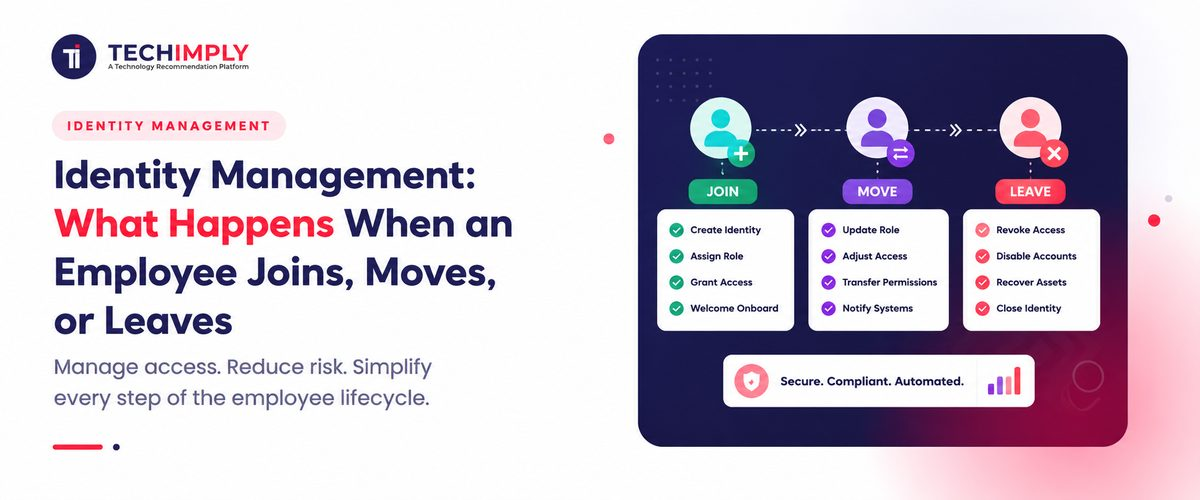
Usually, with their name, department, title, and starting date, a new hire's file is first created in the HR system. From there, access provisioning should happen naturally: an email account, an HRMS login, tool access for their job, and nothing more.
In companies without identity management software, this handoff happens through email threads and manual tickets. The new hire spends their first two or three days unable to do real work; IT waits to hear from HR; HR waits to hear from the reporting manager. Though it is also a quiet security risk, as hurried, manual provisioning usually over-grants access just to get someone working fast, this is a negative first impression.
Birthright access
Most identity management software solves this with birthright access, meaning a predefined access package tied to a role or department that gets granted automatically the moment HR confirms a joining date. A finance executive gets finance-relevant tools on day one, not admin access to everything because nobody had time to scope it down.
What Happens When an Employee Moves
Role changes are where access usually builds up gradually. An employee who is promoted, moved to another department, or given a short-term assignment usually needs fresh access. Usually, their past access is not erased; this difference is among the most often discovered problems in any internal audit.
Role-based access control helps here. By configuring a centralized identity and access management system around specified roles rather than manually providing and revoking individual permissions, moving someone from one role to another automatically modifies what they can view. Without this, businesses just forget to check and end up with staff members technically still having access to tools from two or three companies ago inside the same company.
Digital identity management solutions that enable role-based access control turn this into a rules-based process instead of a memory-dependent one, most crucial for companies with frequent internal changes or fast-growing teams.
What Happens When an Employee Leaves
Of the three, the leaver phase poses the most danger. Every account linked to an individual's identity- email, HRMS, CRM, cloud storage, internal chat tools has to be revoked when they leave or are dismissed, preferably on their last working day rather than weeks later. In reality, this hardly ever occurs perfectly.
Indian businesses frequently handle notice periods spanning weeks, during which an employee may be working elsewhere yet retain access to company systems. Add shared logins and personal devices used for work apps, and offboarding becomes more complicated than the neat checklist it seems like on paper.
Identity management software addresses this by connecting the HR system's exit date directly to access deprovisioning across every integrated app, so the account is disabled the moment the exit is confirmed rather than whenever an admin gets around to it. This is really the reverse of access provisioning during employee onboarding, and companies that automate one side of the identity lifecycle usually end up automating the other.
Why This Process Breaks Down in Most Indian Companies
The same common failure occurs among joiners, movers, and leavers: HR and IT operate on independent systems that do not communicate with one another. HR updates a spreadsheet or an HRMS entry; IT learns through a phone call, a WhatsApp message, or an email that sinks in an inbox.
- Darwinbox, Keka, or greytHR, among other HR solutions, hold the ultimate truth about who left, moved, or joined.
- The actual access is held in IT systems like Active Directory, Google Workspace, or in-house SaaS applications.
- Every access change without a link between the two relies on a human noting and responding.
This difference gets bigger the more the company grows. A 30-person firm can get by with manual alignment; a 300-person organization with a dozen SaaS solutions usually cannot; hence, most companies start thinking about identity management solutions in earnest.
How Identity Management Software Closes the Gap
At its core, identity management software connects the HR event, a join date, a role change, an exit date, to the corresponding access action across every connected system. Good identity access management software does this without adding extra approval steps for routine changes. Instead of IT reacting to a ticket, the system reacts to the HR record itself.
Usually combined with identity access management software, or IAM software for short, this offers the authentication and authorisation layer on top: single sign-on, multi-factor authentication, and access approval processes. Combined, identity management and IAM software give a firm a real-time tool for enforcing it as well as a record of who ought to have access.
The practical advantages show up in a few regular locations: new hires can start working from day one; internal transfers don't leave behind unwanted permissions; and leaving employees lose access the same day they leave instead of whenever someone recalls removing it.
The Compliance Angle Indian Businesses Cannot Ignore
India's Digital Personal Data Protection Act, 2023 treats employee information, names, contact details, and payroll record as personal data that companies are legally responsible for protecting. A former employee whose account remains active for months after they leave is not just an operational oversight anymore; it is a live compliance exposure under the law.
Identity management is usually framed as a security or productivity issue, but rarely connected to the specific compliance standards it now carries for Indian companies handling employee identity data for businesses under the DPDP Act.
Do You Know?
Under India's DPDP Act, 2023, penalties for failing to implement reasonable security safeguards, including situations where stale employee accounts lead to a data breach, can reach up to ₹250 crore per instance.
What to Look for in Identity Management Software
Not every business needs an enterprise-grade platform, and not every business needs full IAM software on day one. But a few capabilities matter regardless of company size:
- Direct integration with the HRMS already in use means that join and leave dates will automatically trigger access modifications.
- Role-based access control connects permissions to a work role instead of an individual
- Not just email and the main directory, same-day deprovisioning for leavers across every linked software
- An audit trail that shows who had access to what and when, useful for both internal reviews and regulatory checks
- Support for digital validation of user identity during login, particularly for remote and hybrid teams
What is identity management software worth to a company that already has an HR team handling this manually? The honest answer is that manual handling works until it doesn't, usually right around the point a company scales past a few dozen employees or starts working with distributed teams across cities.
Businesses are not required to change everything at once. Mapping the actual joiner, mover, and leaver process as it happens today, not as the policy document specifies it, and spotting the gaps will help to start at a reasonable point. Most businesses find the leaver stage is the weakest link, simply because there is no urgency attached to removing access compared to granting it.
Conclusion
Dealing with user access across onboarding, departmental transfers, and offboarding influences how safely a company runs. Allowing manual processes to run increases needless security concerns, slows down daily operations, and makes compliance checks more challenging. Using organised identity management helps to run the lifecycle from day one. Ensuring every employee has the precise access required for their job helps businesses to avoid access creep, safeguard sensitive information, and keep their IT staff concentrated on high-value projects instead of regular ticket lines.