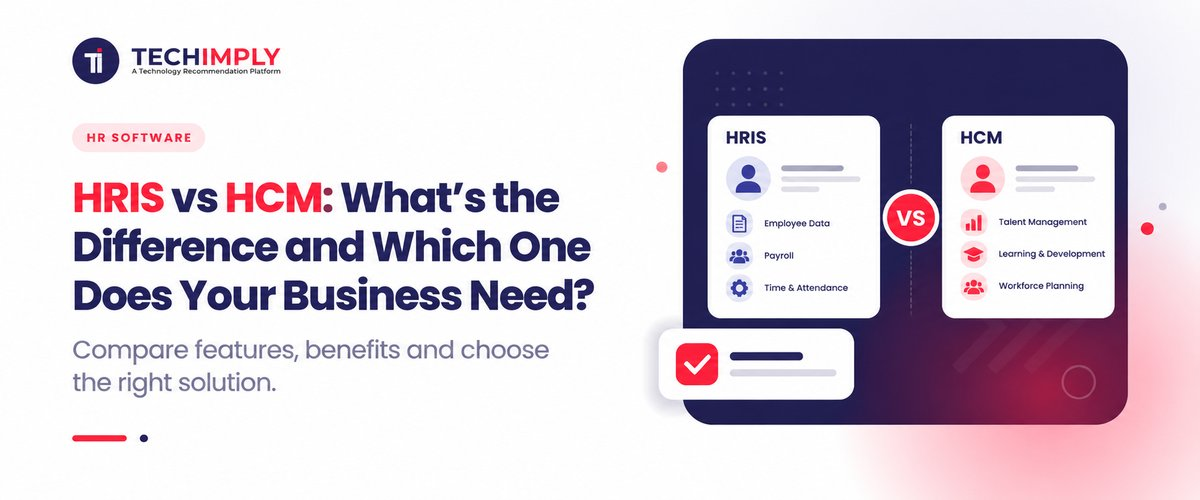
Figuring out how HRIS and HCM tools differ is often the part that decides which HR software fits best. A Human Resource Information System (HRIS) mostly concentrates on core administrative data, core personnel records, and fundamental compliance, even if both systems simplify workforce administration. Human capital management (HCM) software, on the other hand, provides a more comprehensive and strategic package that addresses every aspect of the employee lifecycle, from advanced workforce analytics to talent acquisition and performance monitoring. An HRIS is usually used by small-to-midsize companies to effectively automate daily tasks. However, in order to match their talent strategy with long-term business objectives, expanding businesses and complex organizations frequently need an HCM solution.
What is HRIS Software vs HCM Software all about?
In India, HRIS and HCM are not treated as the same thing. The gap comes from quick tech shifts, state-level labor rules, and how big a firm is. A lot of Indian SMEs and newer startups start with HRIS. They want to shift routine people work away from paper. This usually means saving employee details, running biometric attendance, and tracking leave. They also need payroll that fits local requirements. Those requirements include PF, ESI, and TDS. When a team uses only spreadsheets or paper registers, things can turn chaotic fast. HRIS puts the key data in one place. It helps smaller firms keep records in order, handle daily HR work with less strain, and meet the basic compliance checks without major tech spending.
When firms get bigger and spread across India, or when tech teams grow fast, they usually end up needing a full HCM stack. HCM is not just a simple HR system. It covers parts of workforce work that are more complex. You may see shift scheduling for people in the field. There are also review cycles for employees, and some tools use AI in that process. Many vendors bundle learning features for regular training. Some platforms also help plan who can take over for key roles later. In India, this shows up in IT services, manufacturing, retail, and BFSI. Managers use HCM software when teams work from different sites or follow hybrid schedules. They can also model attrition and see early warning signs. Hiring plans can be linked to longer business targets, like how much revenue the company aims to hit.
Do You Know?
An HRIS is mostly for keeping employee details in one place. It also covers time tracking and attendance, often through biometric checks. It applies payroll rules in India too, such as PF, ESI, and TDS, which is helpful for many growing SMEs. An HCM does more than that. It supports workforce planning beyond basic records. It can run performance reviews and use built-in tools for that. It also backs succession planning when a firm wants to expand. This gap shows up when the company shifts to hybrid work. It matters even more when staff are in the field. It also shows in sectors like IT, manufacturing, and BFSI. For a bigger Indian firm that upgrades from an HRIS to an HCM platform, there is a chance to connect people decisions like hiring and retention to the wider company targets over time.
What are the Key differences in HRIS Software vs HCM Software?
Primary focus: database work or overall strategy:
- HRIS: Main job is day-to-day records. It keeps employee details in one place. This includes demographics and policy-related info.
- HCM: Main job is bigger than records. It treats people as key business value. The goal is to improve how the workforce performs over the full employee timeline.
Core functions and what each covers:
- HRIS: Standard admin tasks. It stores staff files. It handles time off requests. It supports normal benefit sign-ups. It also logs basic rules and compliance items.
- HCM: Includes everything in HRIS. It also adds wider tools. These can include LMS for training. It also covers reviews and goal checks. It can add plans for future leadership as well.
Recruitment and hiring:
- HRIS: A lot of HRIS software products include an ATS right away. Some groups later add a second system. That added system may bring its own job board. Once the initial setup is complete, the company can post openings as needed. In some cases, it also supports the drafting of offer letters.
- HCM: the hiring work from the first touch through the end. It starts at the beginning and stays with each step. Applicants are put into the system, then tracked as they move along. Recruiters can keep top prospects in a shortlist. They can also jot down short updates as each phase runs. The same place can support matching skills to open roles. When someone is hired, it can also cover onboarding. Onboarding can start sooner and help keep the team on pace until every required step is done.
Analytics and reporting:
- HRIS: tools include basic reporting for jobs. On those pages, you can see how many people sit in each role or department at the moment. Some systems also show PTO totals. Other screens may include churn data or other shifts in headcount.
- HCM: builds further on that. It brings people analytics and dashboard views. These dashboards can combine data from more than one team. They can also flag staffing gaps earlier, rather than waiting for a late surprise. The aim is to give leaders clear metrics when they plan the next move.
How does Pricing Compare for HRIS Software vs HCM Software in India?
- Pricing and License Options
- HRIS: Setup is light in many cases. Many plans land between ₹0 and ₹25,000. This is for common cloud setup and remote onboarding.
- HCM: Setup can cost a lot more at the start. It may include workflow changes, multiple entities, and moving old records. The one-time fee is commonly ₹75,000 to above ₹5,00,000.
-
One-time Setup Costs
- HRIS: Usually around ₹30 to ₹100 each month per person. This is for the usual basics like attendance, leave, simple onboarding, and standard payroll.
- HCM: Often about ₹150 to ₹450+ per employee each month. Mid-market tools sit in this bracket. Bigger global suites can go much higher because they cover the full talent journey from start to finish.
-
PEPM Cost Band (per employee, per month)
- HRIS: Usually charges on a per-user basis. Most plans are billed as Per Employee Per Month (PEPM). Some offerings also use a flat monthly base price for standard employee ranges. For example, there may be a base plan for up to 50 employees, plus a small extra cost for each added user.
- HCM: Often works in a different way. It tends to be tiered by module. In some cases, it is handled through a custom deal for large organizations. The client pays for basic employee access first. After that, pricing changes based on which add on modules are chosen. Examples include an LMS, advanced performance tools, and workforce analytics.
Which business needs suit HRIS Software vs HCM Software best?
1. Businesses That Need an HRIS Best
HRIS solutions cater to companies where the primary HR software objective is operational efficiency, basic digitization, and error-free compliance.
- New firms and small companies with 10 to 150 staff: They are done with copying data in Excel sheets, texting on WhatsApp, and keeping simple registers. They want one clear place for employee details, making letters, and storing routine documents.
- Local SMEs with lots of compliance work: These businesses run in one or a few states. Their main need is smooth monthly payroll, along with Indian statutory work like PF, ESI, Professional Tax, and LWF.
- Firms with typical office schedules: These teams follow a regular 9 to 6 routine. They use normal leave rules and do not have many changes in shifts.
- Companies that must watch costs: They want affordable software. They also want a fast setup, and they do not want ongoing consulting fees.
- Tools that work well in India: HR, Pocket HRMS, and SalaryBox can fit well for payroll-focused SMB needs.
2. Businesses That Need an HCM Software Best
HR solutions are designed for expanding businesses where complicated operations, personnel optimization, and workforce strategy have a direct influence on the bottom line.
- Mid-market businesses to huge corporations with more than 200–10,000 employees: They are quickly expanding. This can occur in many locations, states, or even foreign nations. They often want one clear way to manage hiring, roles, and rules.
- Multi-shift teams across manufacturing, retail, hospitality, and logistics: These groups deal with changing appointment scheduling. They also track who clocks in at different places. Overtime rules matter here. Field staff need visibility too, not guesswork.
- Tech and IT service companies that grow quickly: Some teams lose staff at a high rate. To keep things steady, they need ongoing checks on output. They also want frequent one-on-one input. OKRs need to be followed. They should also plan who will take over when roles open.
- Companies that want talent tools in one flow: They want recruiting, learning management, reviews, and exit steps handled together. The goal is to use one platform. They do not want to stitch together multiple outside tools.
How do HRIS Software vs HCM Software Handle Indian Compliance Rules?
1. Statutory Deductions and Tax Returns (EPF, ESI, PT, TDS)
- HRIS Software: HRIS tools are built for monthly work with checks meant to cut errors. They can prepare ECR files for the Provident Fund (EPF). They also produce ESIC challans each month. For Professional Tax (PT), they follow the rules set by each state. For TDS, they create Form 24Q text files on a regular schedule.
- HCM software: HCM platforms cover the same main deductions, but they go further for large setups. They support more than one company and more than one legal establishment. Big groups can link different TAN and EPFO establishment numbers for each unit. They can also move employees between entities when needed. These systems can manage more Tax ladder setups, including for top executives.
2. Laws by State and Labour Welfare Fund (LWF)
- HRIS Software: HRIS tools are set up to match rules in each Indian state. This includes the Shops and Establishments Act. It also covers state-wise minimum wage rates. The system also follows Labour Welfare Fund work that changes from state to state. The submission timing can differ as well.
- HCM Software: HCM tools do more than store rules. They support live checks when audits happen. The software monitors shift limits in real time. It also watches required rest breaks. It adds checks for night shift rules in local areas. This matters more when teams include women working in IT and BPO environments.
3. Attendance, Overtime, and Biometric Sync
- HRIS Software: In HRIS, attendance mainly helps with payroll work. It is used for basic loss of pay (LOP) needs. The tool can connect to biometric machines. It can also link with simple geo-based mobile apps. These inputs help mark days as present or absent.
- HCM Software: HCM treats attendance as part of compliance for sites like factories and shops. This is based on the Factories Act of 1948. It calculates overtime with full detail and checks it against legal limits. It also supports rotating shift plans. The goal is to avoid mistakes like double shifts or overtime that was not approved.
Which Fits Growing Indian Startups: HRIS Software vs HCM Software?
1. Lower Cost, Less Cash Burn
Startups need runway. HRIS tools usually cost about ₹30 to ₹100 per person each month. Enterprise HCM often lands above ₹200 to ₹400+ per person monthly. It can also add big setup fees.
2. Faster Rollout
With a cloud HRIS, you can launch in 2 to 5 days. Setup is light. Enterprise HCM has a longer path. It may take 6 to 16 weeks. During that time, team leads spend hours on the implementation.
3. Keeping Compliance Simple
In India, wrong tax or statutory filings can bring serious penalties. HRIS helps with the basic work. It can create PF ECR files, ESIC challans, state PT entries, and TDS Form 24Q files.
4. Only What You Need
At Seed and Series A, most teams do not rely on heavy HR features. You likely do not use workforce modeling, succession maps, or an LMS. Buying those extra modules can add friction to day-to-day operations.
When does an Indian Startup need more than an HRIS and move to a full HCM Setup?
- Hiring is getting faster: Once you pass about 300 to 500 employees, hire across more than one tech hub in India, or start hiring outside India, a solid HCM can keep processes in sync.
- Day-to-day HR work is getting messy: If you run shift rosters that rotate, manage field sales teams, or operate across several factory or plant sites, you will need workflows beyond basic employee records.
- HR issues are slowing you down: When retention becomes the main pain point, you may need better feedback loops, clear links between skills and job roles, and goals that connect to OKRs. Retention risk flags can also help you act sooner.
- You expand into multiple entities: If you form new legal companies, set up overseas arms, or handle payroll in different ways under the same group, a stronger HCM is often a better fit than a basic HRIS.

Pro-tip
When you reach about 300 staff, or when you add new locations or new entities, do not wait. Move past a basic HRIS once you start to feel daily friction in how people get support. If you run rotating shifts, have teams in different cities, or handle payroll across countries, switch to a full HCM sooner. It helps keep OKRs organized and can send automated nudges about keeping workers. Getting a linked HR and payroll system early can also save you later. It reduces the chance of messy compliance work and payroll mismatches as you grow fast.
What Common mistakes happen When Choosing HRIS Software vs. HCM Software?
Buying an enterprise HCM too soon (Over-scoping):
- Mistake: Early-stage or growing startups grab a full HCM suite, expecting the rest to be a fit later.
- Impact: You end up paying high per-head fees for modules your staff never really needs. Things like succession planning, an LMS, and multi-region compliance can sit unused. You also take on extra admin steps that slow the team down.
Picking a basic HRIS that cannot grow (Under-scoping):
- Mistake: Teams choose a stripped-down HRIS just to cut costs, but they do not plan for hiring speed or day-to-day change.
- Impact: The company hits the limit in about 12 to 18 months. Then you have to move data to a new HCM or more complete HRMS. That switch is expensive and disruptive.
Falling for vendor tag words:
- Mistake: Thinking a product called HCM is automatically better than an HRIS, or trusting what a vendor says without checking.
- Impact: Many vendors swap these labels in their ads. An HCM might end up being mostly an HRIS plus a small talent feature. That can set you up for wrong expectations.
Conclusion
Most teams simply compare HRIS and HCM. They look at company size first. Then they ask what HR needs day to day. HRIS usually handles the everyday stuff. It updates employee details and runs the usual paperwork. HCM tends to be wider in scope. It pays attention to how the people in the company are doing overall. It is not just about keeping files. The aim is to back long-term business plans. Begin with a clear list of what you actually want. Next, check the cost for each choice. Also see if the tool can handle more hires later. If you want extra support, Techimply is there. Techimply is a software marketplace. It helps firms spot options, review differences, and buy software with less hassle. This can make it easier to choose an HR system that matches how your team works.