



Almost every CRM software vendor selling into field sales will tell you their mobile app "works offline." It's on the feature sheet. It's in the demo. And then a rep drives into a warehouse district, or a rural stretch between accounts, or the concrete basement of a distributor, and the thing that was supposed to work offline quietly doesn't. The gap is real, and it's specific: "works offline" can mean anything from a fully functional local app down to a thin cache that shows yesterday's data and refuses to save a new order. The label is the same. What's underneath is wildly different, and a rep won't discover which one they've got until they're standing in front of a customer with no bars, trying to log an order the app won't accept.

Looking for CRM software?
Check out Techimply's List of the Best CRM Software in India for your business.
This article is a diagnostic, not a feature list. What actually fails when connectivity drops, why each failure costs more than it looks like on the surface, and what genuine offline-first design does differently. If you're evaluating CRM software for a field team, or you already own one and your reps keep going quiet in the field, this is the part the marketing pages skip.
What Actually Breaks When Reps Go Offline
Connectivity loss doesn't fail one feature at a time. It tends to knock out a cluster of things at once, and the pattern is consistent enough across tools that it's worth walking through category by category.
Real-time visibility goes dark
The first thing to disappear is the manager's view. Live rep location, check-ins, pipeline changes, visit outcomes: all of it depends on the device streaming data back to the server. Cut the connection, and the dashboard freezes on whatever it last received, so a manager looking at the map sees a rep parked at a location they left two hours ago, or a pipeline that hasn't moved since morning even though three deals advanced.
Microsoft's own Dynamics 365 documentation is candid about this. When the app detects a weak or absent connection, it stops syncing new data, and network-dependent features like maps and Dataverse searches simply don't work until the signal returns. That's not a defect. It's the honest reality of what a device can do without a network, and it's worth respecting rather than papering over. Any decent sales tracking software has to be judged on what it does during that window, not just when everything is connected.
Order and pricing capture fails
This is the expensive one. When a rep builds an order, the app often needs to look up current pricing, apply the right discount tier, check promotion eligibility, and validate stock. If those calculations live on the server, an offline rep can't complete a valid order. Best case, they save a draft with placeholder numbers and fix it later. Worst case, the app blocks them entirely, and the sale doesn't happen. The rep in front of the customer then has two bad options: guess at the pricing and risk an incorrect order, or promise to "send it through later" and hope the moment doesn't cool. A good sales CRM software built for fieldwork carries the pricing logic on the device itself, so the order is complete and correct before the rep ever leaves the room.
Media and compliance capture gets stranded
Field sales runs on evidence. A photo of the shelf display. A signature on delivery. A snapshot proving the promotional stand went up where it was supposed to. In regulated categories, that evidence isn't optional, it's the audit trail. When the app can't store media locally and tie it to the right record, that evidence either doesn't get captured or floats loose, disconnected from the visit it belongs to. The rep takes the photo, the upload fails, and three weeks later nobody can prove the compliance check happened. The chain from visit to record to proof breaks at exactly the point you most need it intact.
GPS and route data arrives late or not at all
Location tracking is arguably most useful in precisely the places connectivity is worst: industrial zones, rural territories, and the edges of coverage maps. If the app depends on live geolocation services to record a check-in, it captures nothing in a dead zone, which means the visit that most needed proof of location is the one that has none. The better-designed tools keep recording GPS and visit data locally even with no signal, then attach it during the next sync, because a check-in logged an hour after the rep actually arrived isn't proof of anything. It's a guess with a timestamp.
Slow, heavy interfaces make on-site entry impractical
Even partial connectivity causes its own problem. A CRM screen that loads a bloated payload over a weak signal can take thirty seconds to open a single record. On-site, with a customer waiting, that's unworkable, so the rep gives up and scribbles notes on paper, promising to enter it all later. They usually don't, or they do it from memory at 9pm, and the record that results is thinner than what they'd have captured live. A responsive lead management software interface with lightweight forms and quick-add templates keeps the friction low enough that reps actually log things in the moment, which is the only time the detail is fresh.
Partial caching creates false confidence
|
Capability |
Cache-only ("works offline") |
True offline-first |
|
View recent records |
Yes |
Yes |
|
Create a new order offline |
Usually blocked |
Full creation, validated on-device |
|
Pricing & promotions |
Needs server call |
The rules engine lives on the device |
|
Photos & signatures |
Often fail to attach |
Stored locally, tied to the record |
|
GPS check-in in a dead zone |
Captures nothing |
Recorded locally, synced later |
|
Sync conflicts |
Often resolved invisibly |
Flagged for review |
|
Failure mode |
Blocks mid-visit, no warning |
Degrades gracefully |
The most dangerous failure is the one that looks like success. Some apps cache a slice of data so records appear to load offline, which feels like it's working, right up until the rep tries to do something that needs a server call. Then they're blocked, mid-visit, by a system they were told handled offline fine. This is worse than an app that's honestly online-only, because at least an online-only tool sets expectations correctly. A partial cache lets the rep believe they're covered, so they don't plan around the gap, and the failure lands at the worst possible moment.
Why These Failures Cost More Than They Look
It's tempting to file offline glitches under "minor inconvenience." The actual costs compound in ways a feature comparison never shows.
Lost and incorrect revenue. Every order a rep can't complete in the field is a sale you've pushed to chance. Some come back. Some don't. And the orders that go through with guessed pricing create their own cleanup: credits, corrections, and awkward calls about a number that was wrong.
Data quality erosion. When entering data in the field is painful, reps delay it or minimize it, and batch entry from memory at the end of the day is where detail goes to die. Visit notes get vaguer, fields get skipped, and the CRM slowly fills with records that are technically present but not actually useful. A pipeline built on half-remembered evening data entry isn't one you can forecast from.
Compliance and audit exposure. Missing photos, absent signatures, and gaps in the timestamp trail: in regulated categories, these aren't cosmetic. They're the difference between passing an audit and failing one. The cost of a compliance gap isn't felt until the moment it's felt, and then it's felt all at once.
Blind-spot management. Coaching depends on timely data. A manager who only sees yesterday's activity can't course-correct today's. The rep struggling in a territory, the account going cold, the pattern worth catching early: all of it stays invisible until the data finally syncs, by which point the window to act has often closed. Solid contact management software is only as valuable as the timeliness of what flows into it, and stale field data quietly undermines every decision built on top of it.
How Offline-First Architecture Actually Fixes It
The fix isn't a better cache. It's a different design philosophy, one where offline is the default state and connectivity is the bonus. Microsoft describes exactly this in its Dynamics 365 Field Service documentation: once the offline profile is set up and data is first downloaded, the app runs offline-first, prioritizing local use so performance stays consistent as technicians move in and out of coverage. That inversion is the whole game. Here's what it takes to build it.
A real local datastore
The foundation is a genuine database on the device, not a cache. It has to support full create, read, update, and delete operations plus the workflows reps actually run, so a rep can complete an end-to-end task in a dead zone and never hit a wall. This is the line that separates true offline capability from the partial-cache mirage.
Sync with real conflict resolution
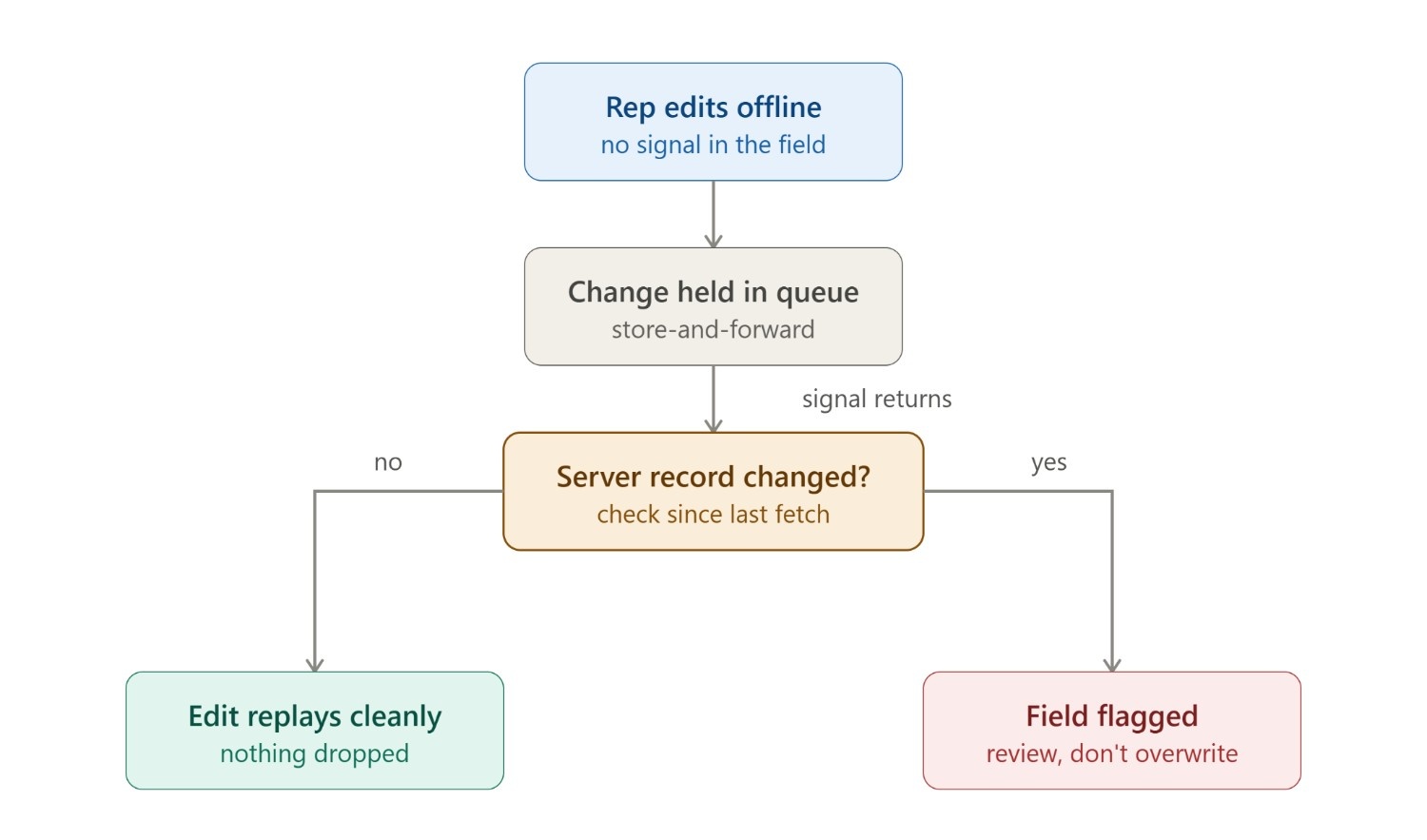
The moment you allow offline edits, you create the possibility of conflict: the same record changed on the device and on the server before they reconcile. Serious tools handle this deliberately. Store-and-forward queues hold offline actions and replay them to the server when connectivity returns, so nothing is silently dropped. Microsoft's documentation lays out the choices clearly: conflict handling can be configured so the client wins or the server wins, and when a record has changed on the server between the time the device fetched it and the time it tries to update, the app flags the conflicting field so the user can review and resubmit rather than blindly overwrite. What you don't want is a system that resolves conflicts invisibly and leaves you guessing which version survived.
A pricing and rules engine that ships to the device
For order capture to work offline, the product catalog, discount logic, promotions, and price hierarchies all have to live on the client. That way an order is fully validated on the device, with the right prices and promotions applied, before the rep leaves. No server round-trip, no guessing, and no drafts to fix later.
Offline media handling built in
Photos, signatures, and documents need to be captured and stored locally, associated with the correct record, and held until upload. The smart move is to schedule those uploads for Wi-Fi. Microsoft's offline sync settings do exactly this, letting admins allow sync on Wi-Fi only for teams working on metered or limited bandwidth, so evidence transfers reliably without burning cellular data or failing on a weak connection.
Selective, territory-based sync
Nobody needs the entire company database on their phone. Offline profiles let administrators define which tables sync, filtered to what each rep needs: their territory's accounts, active deals, and current promotions. Microsoft's implementation goes granular here, with per-table sync frequencies ranging from every five minutes to once a day, plus column-level selection to trim what gets downloaded. The default profile ships bookings for the next seven days rather than everything, which keeps the local dataset small, the sync fast, and the on-device lookups quick.
The Fixes That Aren't in the Software
Even a flawless offline-first CRM fails if the process around it is wrong. The technology is necessary but not sufficient, and the operational layer is where a lot of deployments quietly fall down.
Pre-day sync routines. The single highest-leverage habit is syncing before leaving base. Reps should pull down the day's accounts, pricing, and promotions while still on solid Wi-Fi, whether that's a required morning step or an automatic overnight prefetch. A rep who leaves with a full local dataset is covered all day; one who forgets is carrying yesterday's data into today's visits.
Offline training and SOPs. Reps need to actually understand offline mode: how to read the sync status indicator, what the queue is telling them, and how to handle a duplicate or a flagged conflict when it appears. Ten minutes of training on what the sync icon means saves hours of confused data cleanup later.
Device and connectivity strategy. The hardware has to hold up: enough storage for the local database, enough battery for a full day of capture, and tested devices rather than whatever the rep happened to bring. Where it's viable, SIM plans with carrier fallback and Wi-Fi in depots shrink the dead zones in the first place.
Monitoring the sync metrics. You can't fix what you can't see. Track offline usage, sync success and failure rates, time-to-sync, and the volume of delayed entries. Those numbers surface systemic problems early: a whole region with failing syncs, a device model that keeps choking, a rep who never syncs before heading out.
A Vendor-Evaluation Checklist
|
Question to ask |
What a real answer looks like |
Red flag |
|
Can reps create complete, validated orders offline? |
Full order with pricing/promotions, demoed in airplane mode |
"Just save a draft and fix it later." |
|
Are photos & compliance checks saved locally and tied to records? |
Captured offline, associated correctly, uploads cleanly |
Evidence floats loose or fails to attach |
|
Is it a true local database or just a cache? |
Full offline workflows end-to-end |
Only displays previously loaded records |
|
How does it resolve sync conflicts? |
Defined rule or visible manual reconciliation |
Conflicts resolved invisibly |
|
Can you control what's preloaded and how often it syncs? |
Territory/record filters + adjustable frequency |
Fixed, all-or-nothing sync |
When you're comparing field-sales CRM software, these are the questions that separate real offline capability from a marketing claim. Ask them directly, and ask for a live demonstration rather than a yes.
- Can reps create complete, validated orders offline? With correct pricing, discounts, and promotions applied on the device, not just a draft they patch up after syncing. Have them demo an order in airplane mode.
- Are photos, signatures, and compliance checks saved locally and tied to records? Confirm the evidence is captured and associated with the right visit while offline, then uploads cleanly later.
- Is it a true local database or just a cache? The tool should support full offline workflows end to end, not only display previously loaded records. This is the single most important distinction.
- How does it resolve sync conflicts? Look for a defined method, whether automatic rules like client wins or server wins or a visible manual reconciliation step. Invisible conflict resolution is a red flag.
- Can you control what's preloaded and how often it syncs? You want territory and record filters plus adjustable sync frequency.
Conclusion
If a vendor can demonstrate all five, in airplane mode, on a real device, you're looking at genuine offline-first design. If any of them turn into "well, that part needs a connection," you've found the crack that will open up in the field, and it will open at the worst possible moment: a rep in a warehouse basement, a customer waiting, an order that won't save. Ask the five questions, insist on the live demo, and you'll know which kind of CRM software you're dealing with before it costs you a quarter of clean field data.



.png "6 Reasons Why You Should Pick MEAN Stack For Enterprise Application Development")



