Where you have a large customer order you may find you have to be involved in sales, inventory, purchasing, finance and management. The use of these teams in their own systems can result in delays, duplicate entries and errors in order fulfilment and profitability.
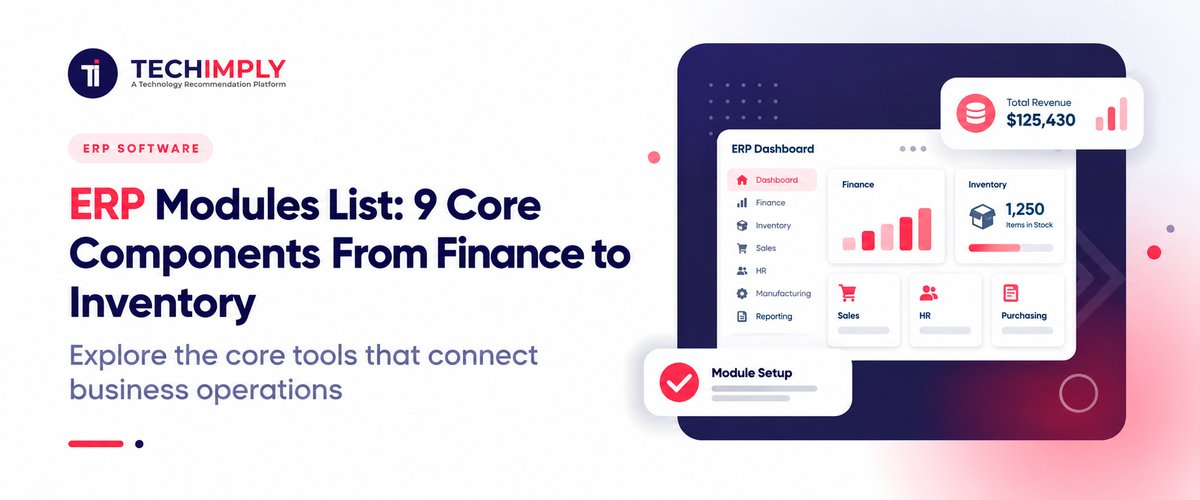
An ERP system combines all these functions, by sharing business information. You can get the idea of the available modules, features and how they address the different business requirements by looking at an ERP modules list.
In this guide, we will be talking about nine of the most important ERP modules, their usage and why you should choose them for your business.

Looking for ERP software?
Check out Techimply's best ERP software in India for your business.
What Are ERP Modules?
ERP modules are the functional components of an ERP system. The modules operate in a specific function of the business and communicate with other modules via a common platform.
For instance, when a sale is made, the system can verify if the stock is in or not, update your inventory once the item is sent, create an invoice and record the sale transaction. The exact process will vary from software to software and configuration to configuration.
Instead of having to use different applications for finance, purchasing, stock, and employee records, companies can tie these processes together with ERP software.
9 Core ERP Modules Every Business Should Understand
ERP platforms vary in how they group their features. The following nine modules cover common business requirements, although some vendors combine related functions into a single module.
1. Finance and Accounting Module
The finance module takes care of a company's financial transactions, outstanding payments, expenses and financial reports. It provides a better visibility into cash flow and financial performance for business owners and finance teams.
Key features include:
- General ledger and financial statements
- Accounts payable and accounts receivable
- Invoice and expense management
- Bank reconciliation
- Budgeting and cash flow reporting
- Tax-related records and reporting
For Indian businesses, suitable features could be GST-compliant invoicing, tax reporting, and accounting integration. Don't just take the word of the vendor that all ERP systems will support compliance features, but verify them directly.
When the raw material supplier sends the manufacturing company an invoice, it is applicable. The finance module logs the payable and the integration with procurement and inventory facilitates the team to check the bills against the purchase order and goods received.
2. Inventory Management Module
The inventory management module keeps track of the inventory levels, movement, location and product availability. It assists companies to identify what they possess, where it's located, and when they require replenishing.
Key features include:
- Real-time stock tracking
- Warehouse and location management
- Stock transfers and adjustments
- Reorder levels and low-stock alerts
- Batch and serial number tracking
- Inventory valuation and stock reports
This module is also beneficial to retailers, wholesalers, manufacturers and ecommerce companies with multiple products or warehouses.
Example: A distributor with warehouses in Ahmedabad and Pune can track the stocks in both the locations. The team checks availability at other warehouses before sending another purchase order if one is running low on a product.
3. Human Resource Management Module
The human resource management module – or HRM module, HR module – is used to manage employee information and to facilitate regular employee management.
Key features include:
- Employee records and onboarding
- Attendance and leave management
- Payroll processing
- Salary and deduction records
- Performance management
- Employee reporting
Payroll may include professional tax, ESI, PF, etc., for Indian companies. Check if the selected system meets the needs of your workforce and locations.
Example: An employee's approved leave and attendance records can flow into payroll calculations, reducing duplicate data entry. Additionally, HR teams can get information about their employees without going through several spreadsheets.
4. Procurement and Purchasing Module
Procurement module is used to streamline the process of buying materials and services from suppliers, from requesting materials to giving orders and following up on supplier invoices.
Key features include:
- Purchase requisitions and approvals
- Supplier records
- Purchase orders
- Goods receipt tracking
- Supplier pricing and comparisons
- Purchase history and reports
This module is valuable for businesses that buy raw materials, maintain resale inventory, or work with multiple suppliers.
For example, when a certain stock level is reached, the purchasing team could review the demand, enter a purchase request and place an accepted order. Receipt can be utilized to update stock and for verification of invoices when the goods are received.

Pro-tip
Prior to choosing a system, chart 1 purchase from initial request to supplier payment. Have each vendor explain how purchase approval, goods receipt, inventory and invoice matching are interrelated. Can identify features and integration gaps without going through a super long list of features.
5. Sales and Customer Relationship Management (CRM) Module
The sales and CRM module aids in managing customer information and sales activities. It can contain lead tracking, quotations, orders, customer communications, and after-sales service – all of which depend on the ERP platform.
Key features include:
- Lead and customer records
- Sales quotations and orders
- Customer interaction history
- Order status tracking
- Sales forecasts and reports
- Customer service records
Link sales and finance/inventory allow for checking product availability, monitoring order fulfilment, and preparing invoices based on the same information.
A sales representative makes a quotation for a retailer. Once the customer confirms the purchase the system will pass the information on to the inventory to be used for stock taking and pass it to the finance system for using in producing the invoice.
6. Manufacturing and Production Module
Manufacturing Module helps manufacturing companies to schedule production, track the status of production, manage the material and plan the manufacture. It can also contain material necessities plan (MRP) and bill of materials (BOM) management.
Key features include:
- Production planning and scheduling
- Bill of materials management
- Work orders and job cards
- Material requirements planning
- Work-in-progress tracking
- Production costing and quality checks
This unit is particularly applicable for manufacturers who require coordination of raw materials, machines, manpower, deliveries etc.
Example: If a furniture company orders 100 desks. The system can utilize the bill of material to calculate the required wood, hardware, etc., the available stock and assist in the production schedule.
Do You Know?
A bill of materials (BOM) can also include details of the number of components of each part that are needed to produce that product. This information can be leveraged with inventory and material planning to help manufacturers plan their materials requirements prior to manufacturing.
7. Supply Chain Management Module
The supply chain management module coordinates activities involved in sourcing, moving, and delivering goods. Depending on the ERP, it can connect procurement, inventory, demand planning, logistics, and supplier management.
Key features include:
- Demand and supply planning
- Supplier coordination
- Shipment and logistics tracking
- Order fulfilment monitoring
- Supply chain reporting
- Delivery and replenishment planning
Inventory relates to keeping records of inventory, the movement of inventory, while supply chain management is more comprehensive, and relates to the movement of materials and products from suppliers to warehouses, production facilities and to customers.
For example, a business selling consumer goods can utilise forecasts and inventory information to make buying decisions in advance of the seasonal sales surge. Helps the purchasing and logistics teams to plan for anticipated demand.
8. Project Management Module
The project management module has been created to work with businesses that use the projects to work with clients, carry out implementation tasks or track tasks against budgets and deadlines.
Key features include:
- Project planning and milestones
- Task and resource allocation
- Timesheets and work logs
- Project budgets and expenses
- Progress tracking
- Project profitability reports
This module is applicable to the consulting, IT service and engineering businesses and project-based organisations.
An IT services provider can monitor employee time, project costs, and billable time in one system, for example. In project records, they can correlate the costs with the budget that has been approved.
9. Reporting and Analytics Module
The reporting and analytics module transform operational and financial data into reports, dashboards and performance metrics. It automates the business performance assessment process without the need to manually merge multiple departments' reports.
Key features include:
- Financial and operational dashboards
- Sales and inventory reports
- Budget-versus-actual analysis
- Performance indicators
- Trend analysis
- Data exports and reporting tools
Some ERP solutions integrate analytics into the modules, and others offer a standalone business intelligence or analytics solution.
For example, an owner can view the information about sales, payments yet to be collected from customers, inventory and costs in combination to uncover any possible cash flow issues or stock that's not moving.
ERP Modules List at a Glance
Use this comparison to identify which ERP system modules are most relevant to your business.
|
ERP Module |
Main Purpose |
Best Suited For |
|
Finance and Accounting |
Manage transactions and financial reports |
All businesses |
|
Inventory Management |
Track stock and warehouse movements |
Retailers, distributors, manufacturers |
|
Human Resource Management |
Manage employee records and payroll |
Businesses with growing teams |
|
Procurement and Purchasing |
Control purchasing and supplier orders |
Manufacturers, traders, wholesalers |
|
Sales and CRM |
Manage customers, quotations, and orders |
Sales-driven businesses |
|
Manufacturing and Production |
Plan materials and production activities |
Manufacturers |
|
Supply Chain Management |
Coordinate sourcing, planning, and logistics |
Distributors and supply chain businesses |
|
Project Management |
Track project costs, resources, and deadlines |
IT, consulting, and engineering firms |
|
Reporting and Analytics |
Monitor performance and support decisions |
Managers and business owners |
How Do ERP Modules Work Together?
ERP software connects modules by sharing data across business processes.
For example, when an Indian manufacturer receives an order:
- Sales: Records the customer order.
- Inventory: Checks finished goods availability.
- Procurement: Arranges missing materials.
- Manufacturing: Plans production and tracks material usage.
- Finance: Records costs, invoices, and payments.
- Reporting: Tracks order status, stock, and profitability.
How to Choose the Right ERP Modules for Your Business
You don't have to start using all of the modules. Begin with business issues that need to be addressed.
For small businesses or start-ups, if financial issues, selling and stock control are the greatest challenges then begin with this. If they are not easy to manage with HR or Procurement, add them.
For manufacturers: Concentrate on finance, stocks, supply and production. If these are applicable to your company, then request bill of materials management, manufacturing scheduling, quality control and costing.
Retailers and distributors: Focus on stock, purchase, sales and finance. Multi-location stock tracking, order fulfillment, and replenishment planning can often be particularly significant.
For service oriented companies: Consider finance, CRM, project management and HR. The manufacturing features may not be as essential as project costing, timesheet administration, resource allocation and client billing.
Before selecting an ERP, evaluate these five areas:
- Business requirements: List the processes that cause the most delays, errors, or duplicate work.
- Integration: Check how modules share data and connect with your existing applications.
- Compliance: Verify relevant Indian tax, payroll, and reporting requirements.
- Scalability: Confirm that you can add users, locations, and modules as your business grows.
- Total cost: Consider implementation, migration, training, customization, support, and recurring subscription or maintenance charges.
Conclusion
It is not the number of features a vendor offers that determines the right ERP modules for your business. While finance and inventory are a good starting point for many companies, more specific requirements are handled by the other modules of manufacturing, HR, procurement, CRM and more.
First, identify the biggest processes that are slowing you down, and then select ERP software that integrates the processes that you need now and will support your business as it expands.
Also Read-
- What is ERP Software? A Beginner’s Guide for Buyers
- Free ERP vs Paid ERP Software in India (2026): Complete SME Guide
- Best Pharma ERP Software India 2026: Boost Efficiency & Growth
- Best Real Estate ERP Software for Small Builders in India 2026
- Top 10 Challenges in Implementing Pharma ERP System in India (2026)
- School ERP Systems Explained: How They Work & Why They Matter
- What is School ERP? 2026 Guide to Systems & Mobile Apps
- 10 Best ERP Software in UAE You Must Consider [2025 Guide]
- How ERP Software Can Improve Financial Management and Reporting


.jpg "How Live Chat Software Works? Key Benefits And Features")