Small companies do not decide to leave cloud data exposed. It happens a little at a time. Someone creates a public link for a client and forgets to close it. A contractor finishes the job, but the login survives. The backup exists, yet the same administrator can delete both the copy and the live files.

Looking for Cloud security software?
Check out Techimply's List of the Best Cloud security software in India for your business.
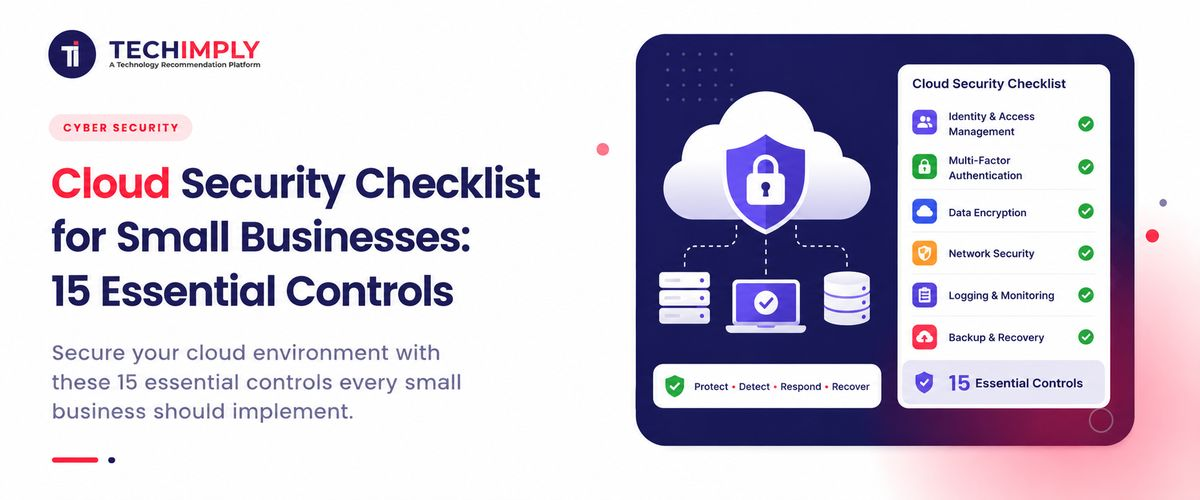
Cloud security software can help, but a small team must still own access, settings, logs and recovery. This cloud security checklist turns that work into 15 manageable controls.
What Is Cloud Security for Small Businesses?
Cloud security for small businesses is the everyday work of protecting online accounts, stored information and cloud-based systems. Business email and shared drives are part of it, but so are accounting tools, CRM platforms, virtual servers and collaboration apps.
The provider and the customer look after different layers. In a SaaS product, the vendor usually runs the application and underlying infrastructure; your team decides who may enter, what they may see and where information can be shared. With IaaS, the customer also takes on operating systems, firewall rules and workload configuration. The point of a cloud security checklist is to put a name beside every customer-owned task.
Why Do Small Businesses Need a Cloud Security Checklist?
A ten-person company can add three new cloud apps in an afternoon. Months later, nobody remembers who invited the guest user, why one folder is public or which app can read the company mailbox. The risk grows quietly because each choice looks harmless on its own.
A written cloud security checklist gives those loose ends a regular review. Before buying another dashboard, remove old users, switch on multi-factor authentication and restore one real backup. The NIST Cybersecurity Framework 2.0 small-business guide groups the same work under six areas, beginning with governance and protection and continuing through detection, response and recovery.
The 15 Controls, in Practical Order
The controls start with visibility and account access, then move into protection, detection and recovery. A team with limited time should deal with controls 1–5 and the backup control first.
1. Create an Inventory of Cloud Services, Data and Owners
You cannot secure cloud services that nobody knows the business uses. Create one list of approved SaaS applications, cloud accounts, subscriptions, domains, infrastructure, integrations and data stores.
For each item, record its purpose, owner, administrator, data type, privileged users, integrations, recovery contact, backup method and any compliance requirements.
Include free trials and tools purchased directly by individual departments. This “shadow IT” often contains business data but may sit outside normal account removal, backup and security review processes.
Review the inventory each quarter and whenever someone leaves. If a service has no owner, deciding whether it should remain is the first job.
2. Understand the Shared Responsibility Model
Draw a line between the provider’s work and yours. If an email account is taken over because an employee approved a fake login request, the email platform may still be operating exactly as designed. Passwords, MFA, user access and sharing rules remain customer decisions.
The line moves with the service. SaaS leaves most platform operation with the vendor. IaaS gives the customer control of virtual machines and networks, which also means responsibility for patches, firewall rules and storage settings. Write down the owner on your side rather than assuming the provider will notice every gap.
3. Require Strong Multi-Factor Authentication
Begin with accounts that can reset or unlock other accounts: email, the password manager and cloud administration. Add finance tools and remote access next. A password copied from a fake sign-in page is far less useful when the real account also asks for a separate proof of identity.
CISA’s small-business guidance says that any form of multi-factor authentication is better than none. For administrators, use security keys or passkeys when the service offers them. An authenticator app is a practical fallback; SMS may be the only option on some older products.
4. Give People Only the Access Their Work Requires
A marketing employee may need permission to update a product page. There is no reason for that account to open salary records. An outside designer can upload approved files without becoming an administrator. Least privilege simply means drawing those boundaries before an account is created.
Use separate standard and administrator accounts, and manage roles through identity and access management (IAM) software where practical. Review access when an employee changes position, a contractor’s project ends or an integration is no longer needed. CISA also recommends managing cloud permissions according to the principle of least privilege.
5. Standardise Joiner, Mover and Leaver Processes
Make account changes part of the normal HR routine. A new employee receives access from an approved role, not by copying a colleague’s permissions. When the role changes, old rights are removed as well as new ones added.
On the final working day, disable the main identity and active sessions first. Then work through email, SaaS apps, cloud consoles, devices, shared secrets and delegated mailboxes. Transfer ownership of files and automation before deleting anything the business must keep.
Disable the user first, preserve required business records and then remove access according to policy. Do not wait for each application owner to remember independently.
Run a scheduled report for inactive accounts, unaccepted invitations and users who have not signed in recently. Stale access is one of the easiest cloud risks to remove.
6. Use Secure Configuration Baselines
Cloud platforms often provide many choices, and default settings may prioritise convenience or broad compatibility. Define an approved baseline for identity, sharing, storage, networking, logging and recovery settings.
Examples include:
- Disable public storage unless there is an approved need.
- Restrict external file sharing by default.
- Block legacy authentication protocols.
- Limit the creation of administrator roles.
- Turn on audit logs and retain them for an appropriate period.
- Use private network access for internal services where practical.
- Enable provider security recommendations and configuration alerts.
Document exceptions with an owner, reason and review date. Check for configuration drift automatically where your provider supports it. A baseline is valuable only if you can detect when reality no longer matches it.
7. Protect Data With Classification and Encryption
Not every file needs the same treatment. A published menu can be public; a salary sheet cannot. Four labels—public, internal, confidential and restricted—are often enough if employees know what each one allows.
For every label, settle the practical questions: where may the file be stored, who may share it, when should it be deleted and may it be downloaded to a personal device? Use data encryption while information is travelling and while it is stored. Keep passwords, tokens and encryption keys out of source code and public repositories.
Provider-managed keys suit many routine workloads. A business handling especially sensitive or regulated information may need tighter control. Whichever model you choose, protect the key-management account with strong MFA and very limited access.
8. Secure Every Device That Accesses the Cloud
A strong cloud password does little when a thief opens an unlocked laptop that is already signed in. Set a basic device standard: supported software, automatic screen locking, full-disk encryption, malware protection and timely updates. Device management can apply those settings consistently and remove business data when equipment disappears.
Decide whether personal devices are allowed. If they are, define minimum controls and separate business data from personal apps. Restrict access to sensitive services from unmanaged devices when the platform supports conditional access.
Train staff to report a lost device quickly. Fast session revocation and remote action can matter more than the device’s purchase price.
9. Keep the Systems You Control Updated
A SaaS provider normally fixes the software running on its platform. That does not update the laptop used to access it, the office router, a cloud virtual machine or a library inside your own application. Make a simple list of the technology your team still controls so those updates have an owner.
When a vendor publishes a serious security notice, first ask whether the affected system faces the internet and whether attacks are already happening. A payment server deserves faster attention than an isolated test machine. Check sensitive updates before a wide rollout, then verify the installed version afterward. Vulnerability management software may keep flagging an old service; if nobody uses it, retirement may be safer than another patch.
10. Restrict Network Exposure and Protect Interfaces
Assume that a public web server may be attacked one day. Its permissions should stop well before payroll files or the production database. Keep dashboards and management ports behind private access, a VPN or a tightly limited allowlist.
Long-lived API keys are easy to forget, especially when somebody has pasted one into a shared spreadsheet. If a key appears where it should not, revoke it before investigating. Issue a replacement, find the remaining copies and remove them. A managed identity or short-lived credential leaves less old access to clean up later.
0.0.0.0/0 is not automatically a mistake; a public website may need it. The same rule on SSH, a database or an administration panel is a warning sign. Note why the rule exists, who approved it and when it will be checked again.
11. Enable Central Logging and Useful Alerts
Turn on audit, authentication, administrator, file-sharing, infrastructure and application logs before you need them. Logs that were never collected cannot explain an incident later.
Centralise important records so an attacker cannot easily remove every copy. Protect the log platform itself with restricted access and MFA. Retain logs according to investigation, contract and compliance needs.
Prioritise alerts for new administrators, MFA changes, repeated failed sign-ins, unusual login locations, public storage, large downloads, disabled logging and new access keys.
Tune alerts to your normal operation. A cloud security checklist should produce actionable signals, not a flood that nobody reads.
12. Maintain Separate, Tested Cloud Backups
File history can feel like a backup until the same compromised administrator can erase both the live data and its history. Provider availability is different again: it keeps the service running, but it may not recover a record that your team deleted weeks earlier.
Choose backup software and a schedule by asking how much recent work the business could afford to lose. Keep at least one protected copy outside the normal production administrator’s reach, and use deletion protection or immutability where it is available. Then practise restoring a small, representative set of data. The restore is the part that proves the cloud backup can help.
A cloud backup plan should cover:
- Databases and uploaded files
- SaaS records that the provider does not fully back up for customer recovery
- Configuration and infrastructure definitions
- Encryption keys and secret-recovery procedures
- Business documents and email where required
- Contact details and runbooks needed during an outage
Test restores on a schedule. Record how long recovery takes and whether the restored information is complete. A green “backup successful” message is useful, but a successful restore is the real proof.
13. Control External Sharing and Third-Party Integrations
Review public links, guest accounts, shared folders, OAuth applications, browser extensions and marketplace integrations. Each connection can become another path to business data.
Use expiration dates for guest access and links where supported. Restrict anonymous sharing, and label documents so employees understand what may leave the organisation.
Before approving an integration, check the data and permissions it requests, its owner, the vendor’s deletion practice and whether access can be limited or time-bound.
Remove unused applications and revoke their tokens. Changing a password may not revoke every connected app.
14. Assess Cloud Vendors and Contracts
Choose providers according to the sensitivity of the data and importance of the service. A low-risk scheduling tool does not need the same review as payroll, health or payment data.
Evaluate security documentation, data location, subprocessors, breach terms, availability, encryption, access controls, audit logs, backups, export options and the exit process.
Do not treat a certification logo as the full assessment. Confirm that its scope covers the service you plan to use. Record the business decision, known risks and renewal review date.
Cloud security for small businesses includes supply-chain risk because the business depends on its providers during both normal operation and incidents.
15. Decide What Happens During an Incident
Keep the incident plan to a few pages. Start with a call sheet. Put the names and numbers of the people who can disable an account, approve downtime and speak to the provider at the top. Add substitutes; incidents have an awkward habit of happening when the usual administrator is travelling or asleep.
After the call sheet, write short notes for the situations most likely to occur: a stolen admin account, a lost laptop, an exposed folder, ransomware, a provider outage or a leaked key. Keep an offline copy. A plan stored only in company email is not much help when that email is unavailable.
Assign the decision about outside contact as well. Legal advisers, insurers, affected customers, regulators or law enforcement may need to hear about an incident, depending on the information involved and the rules that apply.
Once a year, put a simple scenario on the table: “Our main administrator account is locked, and customer files may have been downloaded. What do we do in the first hour?” Walk through the answer without touching production. Missing phone numbers and unclear authority become obvious very quickly. This final cloud security checklist control turns a written plan into something the team has actually rehearsed.
Cloud Security: Pros and Challenges
Small business cloud security can provide managed data encryption, resilient infrastructure, and central identity controls without building everything internally. The trade-offs are provider dependence, complex responsibility boundaries, misconfiguration risk, and ongoing subscription costs. Strong cloud security best practices help, but cybersecurity software still needs an owner, regular review, and tested recovery.
Conclusion
A cloud security checklist helps a small business turn vague security concerns into specific, owned actions. Start by identifying services and data, securing every important account with MFA, limiting privileges and confirming that backups can be restored. Then improve device security, configuration, logging, vendor oversight and incident response.
Review the checklist after major technology changes and at least once each quarter. Cloud environments change quickly: people join, integrations are added, permissions expand and old resources