WinSCP

Free Award-Winning File Manager

0.0
Rating out of 5 Based on 0 reviews

What is WinSCP ?

WinSCP is a Windows file transfer tool that allows secure file copying using SFTP, SCP, etc. It has an easy-to-use graphical user interface, with advanced scripting and automation capabilities, so it's great for casual users or the IT professional. What’s more, you can download the WinSCP Demo to try its interface/browse and try its critical tools before rolling it out to use larger tasks. Likewise, with its transparent WinSCP Pricing and reliable WinSCP Reviews it is a practical choice for a lot of system administrators and developers.

Pricing of WinSCP

no-pricing
For get detailed pricing as per your requirements.

Key Features of WinSCP

Key Features:
  • Support For Sftp And Scp Protocols
  • Graphical User Interface
  • Session Management
  • Custom Commands
  • Background Transfers
  • Integrated Text Editor
  • Drag And Drop Functionality
  • Password And Key Authentication
  • Logging
  • File Encryption
  • Scripting And Task Automation
  • Batch File Transfers
  • Command Line Interface
  • Integration With Putty

Key Specification

Other Categories: File Sharing Software
Deployment: Cloud Hosted,Hybrid,On Premise,Any
Customer Support: Email
Customization: No
Languages Support: English

Who uses WinSCP

StartUps
StartUps
SMEs
SMEs
Agencies
Agencies
Enterprises
Enterprises

Company Details

Company Name: WinSCP
Headquarter: Prague, Czech Republic
Social Media:

WinSCP Description

Why Choose WinSCP ?

WinSCP - Because of its security protocols, automation tools, and user interface, WinSCP stands out as the clear winner here. WinSCP is capable of communicating in multiple languages too and it can be used with PuTTY and other SSH-related tools. As a trusted document management software aimed at secure file transfers, WinSCP helps users manage and migrate sensitive information easily, and gives users hands-on experience with the software using the WinSCP Demo prior to setting it up for live use. Flexible WinSCP Pricing and a wide depth of user documentation mean users from small businesses to major enterprises use this product. WinSCP Reviews tend to be effusive about the speed of it, reliability, and ease of use with secure file management techniques.

Benefits of WinSCP :

  • You can transfer files securely with SFTP, FTP, and SCP protocols. 
  • Script file transfer and automate repetitive transfer tasks.
  • Transfer files and perform file synchronization between local and remote systems
  • Use strong encryption to ensure data confidentiality
  • Utilize existing SSH clients and command-line tools
  • Lightweight and fast, easy on the system!
  • WinSCP pricing is optimistic enough for personal and enterprise use
  • WinSCP has a user-friendly GUI that will help the inexperienced and experienced user
  • Good community and documentation, based on jovial WinSCP Reviews
  • WinSCP Demo enables users to check compatibility with their systems

How to Use WinSCP ?

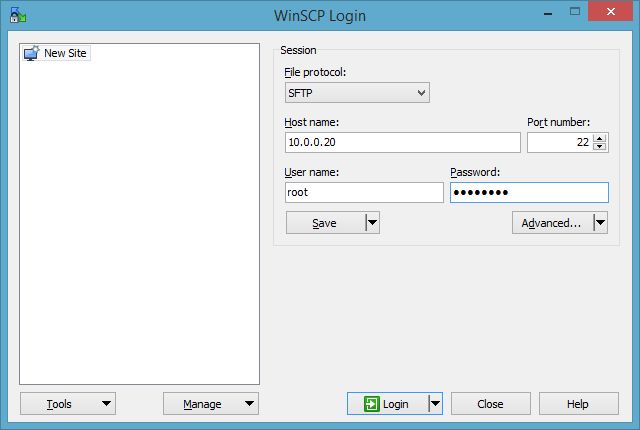
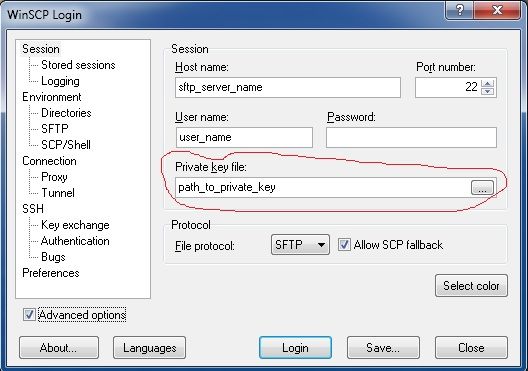
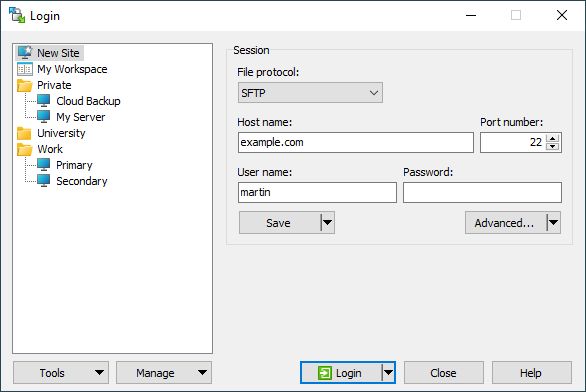
To begin using WinSCP, users simply download the application and install it on a Windows-based machine. Upon opening the software, users are prompted to input credentials for their remote server and a file transfer protocol (i.e. SFTP, SCP, etc...).Depending on which tool the user is using, files can either be transferred by "drag-and-drop," or the user will need to search the files manually. The WinSCP Demo allows users to test any number of aspects of the software, such as scripting, session logging, and file comparison tools. WinSCP Pricing accommodates a variety of licensing scenarios, and there is ample WinSCP Reviews that detail the best ways to use the tool.

Features of WinSCP :

  • Graphical User Interface with dual-pane file management
  • Supports protocols SFTP, SCP, FTP and WebDAV
  • Command-line interface and automation via script
  • Built in text editor and file compare application
  • Logs sessions and records errors
  • File synchronization (one or two-way)
  • Custom commands and task automation
  • Master password protection for saved sessions
  • Integration with PuTTY for SSH access
  • Portable version for USB
  • WinSCP features will work for manual and automated workflows
  • Flexible, transparent WinSCP pricing
  • Trusted by thousands based on ongoing WinSCP reviews

Alternative

MASV

The Fastest File Transfer for Media

0.0
Rating out of 5 Based on 0 reviews

Wrike

One platform to streamline all workflows

4.2
Rating out of 5 Based on 10 reviews

Atera

All-in-one IT management with built-in AI agents

0.0
Rating out of 5 Based on 0 reviews

WinSCP Video/Screenshots

User Reviews

no-reviews
Share your experience! Be the very first reviewer. Write a Review

Frequently Asked Questions (FAQs)

The user group of WinSCP are as follows :

  • Startups
  • SMEs
  • Agencies
  • Enterprises

WinSCP has 0 plans.

WinSCP is not allowing Free Trial.

WinSCP pricing model : Yearly,Monthly,Onetime(Perpetual License)

WinSCP is Cloud Hosted,Hybrid,On Premise,Any Software.

No

WinSCP offers Email support.

WinSCP provides Help Guides for the software training.