Salesflare

The CRM your team loves to use

5.0
Rating out of 5 Based on 1 reviews

What is Salesflare?

Salesflare is a powerful CRM (Customer Relationship Management) software designed specifically for small and medium-sized businesses (SMBs) that thrive on B2B sales. It automates much of the data entry and sales tracking process, allowing teams to focus on building customer relationships and closing deals. With its intuitive interface and seamless integration capabilities, Salesflare helps businesses manage leads, track communications, and streamline sales processes efficiently. The platform is known for its automation features that minimize manual data entry, making it particularly useful for startups and growing teams looking to scale their sales efforts effectively.

Pricing of Salesflare

Growth

USD 39.00
USD 0.00

Per Month

Buy Now
  • All CRM features you’d expect
  • Automate your CRM data input
  • Track emails links and website visits
  • Get a LinkedIn sidebar email sidebar & mobile app
  • Send personalized email campaigns
  • 25 email finding credits

Pro

USD 64.00
USD 0.00

/Month

Buy Now
  • All features on the Growth plan plus
  • Send workflows of multiple emails
  • Set user permissions
  • Create custom dashboards
  • 500 email finding credits

Enterprise

USD 124.00
USD 0.00

/Month

Buy Now
  • All features on the Pro plan plus
  • Full setup and tailor-made training
  • Data migration done for you
  • Dedicated account manager
  • Unlimited email finding credits

Key Features of Salesflare

Key Features:
  • Third Party Integrations
  • Pipeline Management
  • Dashboard
  • Data Extraction
  • Lead Notifications
  • Lead Nurturing
  • Lead Qualification
  • Lead Distribution
  • Business Card/Badge Scanning

Who uses Salesflare

Personal
Personal
StartUps
StartUps
SMEs
SMEs

Company Details

Company Name: Salesflare
Headquarter: Northwest Belgium Belgium
Website: Visit Website go-to-link
Social Media:

Salesflare Description

Why Choose Salesflare?

Salesflare is designed to simplify B2B sales management by combining customer relationship management, sales automation, contact enrichment, and email tracking in one platform. It helps businesses organize contacts, monitor sales opportunities, and maintain detailed records of customer interactions. One of its key advantages is automatic data collection, which captures relevant contact information, emails, meetings, and communication history from connected business accounts. Sales teams can manage opportunities through visual pipelines, schedule follow-ups, and monitor customer engagement without spending excessive time updating CRM records manually. The platform also integrates with Gmail, Outlook, LinkedIn, and other business applications. Its straightforward interface and automation capabilities make it particularly useful for small and medium-sized B2B sales teams.

Benefits of Salesflare

  • Automatic Data Entry: Collects customer information and communication activities from connected email accounts and calendars.
  • Improved Lead Management: Helps businesses organize prospects, contacts, companies, and sales opportunities.
  • Better Sales Visibility: Provides visual pipelines and dashboards to monitor deal progress and sales performance.
  • Efficient Follow-Ups: Uses task reminders and notifications to help sales representatives maintain regular customer communication.
  • Enhanced Customer Relationships: Keeps emails, meetings, notes, and customer activities organized in shared records.
  • Reduced Administrative Work: Automates CRM updates and minimizes repetitive manual data entry.
  • Improved Sales Collaboration: Allows teams to share customer information, manage responsibilities, and coordinate sales activities.

How to Use Salesflare?

To start using Salesflare, create an account and connect your business email and calendar through Gmail or Outlook. The platform can automatically collect relevant contact information and communication activities from connected accounts. Review suggested contacts and company records, then organize them into your CRM workspace. Create a sales pipeline with stages that represent your business sales process and add opportunities with their values, owners, and expected closing dates. Schedule tasks and follow-up reminders to maintain communication with prospects. You can also use email tracking to monitor opens, link clicks, and website visits where configured. Invite team members to collaborate on customer accounts and connect additional applications through available integrations. Finally, use dashboards and reports to review pipeline performance and sales activities.

Features of Salesflare

  • Automatic Contact Management: Collect and organize contact information from emails, signatures, and connected sources.
  • Company Management: Maintain business profiles, company information, and associated customer contacts.
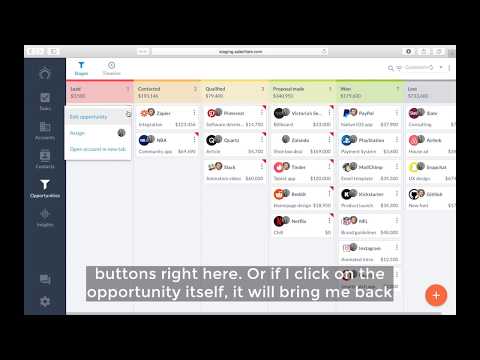
  • Sales Pipeline Management: Track opportunities through customizable sales stages and monitor deal progress.
  • Email Tracking: Monitor email opens, link clicks, and engagement activities.
  • Website Tracking: View prospect website activity through the configured tracking script.
  • Automatic Activity Logging: Record emails, meetings, and relevant customer interactions in CRM timelines.
  • Email Sequences: Create personalized email campaigns and automated multi-step follow-up workflows.
  • Lead Search: Discover potential business contacts and access available professional email information using lead credits.
  • Sales Analytics and Dashboards: Monitor sales performance, pipeline activity, forecasts, and conversion results.
  • Team Collaboration and Permissions: Share customer information, assign responsibilities, and control access to CRM records.

What Makes Salesflare Different?

Salesflare stands out through its focus on reducing manual CRM administration for B2B sales teams. Instead of requiring users to enter every customer interaction manually, the platform automatically captures relevant information from connected email accounts, calendars, signatures, and other sources. This helps maintain more complete customer records and provides sales representatives with a clearer history of their relationships. Its visual sales pipelines, automatic activity logging, email tracking, and follow-up reminders help teams manage opportunities more consistently. Salesflare also works alongside everyday business applications such as Gmail, Outlook, and LinkedIn, allowing users to manage customer information within familiar workflows. Its focused B2B approach makes it particularly suitable for businesses that prioritize relationship-driven selling and personalized customer communication.

Who Can Benefit from Salesflare?

Salesflare is suitable for organizations and professionals involved in B2B sales, prospecting, customer relationship management, and business development.

  • Small Businesses: Organize customer information, manage opportunities, and automate everyday sales activities.
  • Software Companies: Track business prospects, manage sales pipelines, and maintain communication with potential customers.
  • Marketing Agencies: Manage client relationships, monitor sales opportunities, and coordinate customer follow-ups.
  • Consulting Firms: Organize business contacts, track proposals, and manage long-term client relationships.
  • B2B Sales Teams: Monitor prospects, track email engagement, and manage opportunities throughout the sales cycle.
  • Startups: Build structured sales processes and reduce manual CRM administration.
  • Business Development Professionals: Identify potential customers, maintain relationship histories, and manage follow-up activities.

Is Salesflare Easy to Use?

Salesflare offers a clean and straightforward interface that helps users manage contacts, companies, opportunities, and customer interactions. Its automatic data collection reduces the need for manual record updates, making everyday CRM activities easier to manage. Users can start with a single sales pipeline, connect their business email accounts, and gradually customize fields, filters, and workflows as their requirements grow. The platform also provides email and calendar sidebars, a LinkedIn integration, and mobile applications for accessing customer information. Its visual dashboards help sales representatives understand deal progress and identify pending follow-ups. Although advanced permissions, custom dashboards, and multi-step email workflows may require some initial learning, the platform is designed to make B2B CRM management accessible to small teams.

What Support Does Salesflare Offer?

Salesflare provides customer support and educational resources to help users configure their CRM and understand its capabilities. Its online Help Center includes setup instructions, product guides, troubleshooting articles, and tutorials covering contact management, sales pipelines, email tracking, integrations, and automation. Users can also contact the support team through the website's chat and email support channels. Salesflare offers free onboarding assistance and can arrange personalized training sessions to help teams get started. Enterprise customers receive additional services, including customized team training, assisted data migration, and a dedicated account manager. These resources help businesses connect their existing applications, organize customer information, configure sales workflows, and use the platform more effectively.

Alternative

Salesforce

Salesforce for SMBs Now at Special Pricing

5.0
Rating out of 5 Based on 21 reviews

Creatio CRM

AI-Native Platform to Automate CRM and Workflows with No-Code

0.0
Rating out of 5 Based on 0 reviews

Monday CRM

The CRM software that's simple to set up and easy to use

5.0
Rating out of 5 Based on 21 reviews

Salesflare Video/Screenshots

User Reviews

Write a Review

Frequently Asked Questions (FAQs)

The user group of Salesflare are as follows :

  • Personals
  • Startups
  • SMEs

Salesflare has 3 plans,

  • Growth USD 39.00 Per Month
  • Pro USD 64.00 /Month
  • Enterprise USD 124.00 /Month

Salesflare is allowed 0 Days Free Trial.

The key featuers of Salesflare are as follows :

  • Third Party Integrations
  • Pipeline Management
  • Dashboard
  • Data Extraction
  • Lead Notifications
  • Lead Nurturing
  • Lead Qualification
  • Lead Distribution
  • Business Card/Badge Scanning

Salesflare pricing model : Yearly,Monthly,Onetime(Perpetual License)

Salesflare is Cloud Hosted,Hybrid,Any Software.

Yes

Salesflare offers Phone,Email,Live Chat support.

Salesflare provides Help Guides,Video Guides,Blogs,Webinars for the software training.