Pulseway Patch

An IT Management SolutionThat You Can Take Anywhere

0.0
Rating out of 5 Based on 0 reviews

What is Pulseway Patch?

Pulseway Patch is a feature within Pulseway's Remote Monitoring and Management (RMM) platform, also available as a standalone product. It's designed to automate and simplify the process of managing and deploying software patches and updates to operating systems (like Windows, macOS, and Linux) and third-party applications. This helps ensure systems are secure, compliant, and running efficiently by addressing vulnerabilities and bugs.

Pricing of Pulseway Patch

Basic

USD 67.00
USD 0.00

per month

Buy Now

Key Features of Pulseway Patch

Key Features:
  • Alerts/Notifications
  • Automatic Patch Deployment
  • Compliance Management
  • Customization
  • Dashboard
  • Patch Prioritization
  • Patch Testing
  • Remote Access/Control
  • Vulnerability Scanning

Key Specification

Other Categories: Patch Management Software IT Service Management (ITSM) Software Remote Monitoring And Management (RMM) Software
Deployment: Cloud Hosted,Hybrid,On Premise,Any
Customer Support: Phone,Email
Customization: Yes
Languages Support: English

Who uses Pulseway Patch

StartUps
StartUps
SMEs
SMEs
Agencies
Agencies
Enterprises
Enterprises

Company Details

Company Name: MMSOFT Design
Headquarter: Dublin Ireland
Social Media:

Pulseway Patch Description

Why Choose Pulseway Patch?

Choosing Pulseway Patch offers several advantages:

  • Automation: It automates the entire patching process, from discovering needed patches to deploying and reporting on their installation. This saves IT teams significant time and effort.
  • Comprehensive Patch Management: It handles patching for both operating systems and a wide range of third-party applications (over 300 out-of-the-box titles with the ability to add custom titles).
  • Enhanced Security: By automating the timely application of security patches, Pulseway Patch helps reduce the risk of cyberattacks that exploit known vulnerabilities.
  • Improved Compliance: Keeping systems up-to-date with patches helps organizations meet various regulatory and compliance standards.
  • Centralized Management: Pulseway Patch provides a single, unified platform to manage all patching tasks across the entire IT environment.
  • Remote Management: Through Pulseway's mobile-first design, you can manage and monitor the patching process from anywhere using the mobile app.
  • Visibility and Reporting: It offers insightful dashboards and ready-to-use reports that provide full visibility into patch statuses, compliance, and missed updates.
  • Customizable Policies: You can configure flexible patching policies and schedules to suit your specific environment and needs.
  • Cost-Effective: Automating patching reduces the need for manual intervention, potentially lowering IT operational costs and minimizing the risk of expensive security incidents.

Benefits of Pulseway Patch

The benefits of using Pulseway Patch include:

  • Increased Security: Proactively addresses security vulnerabilities, reducing the risk of data breaches and cyberattacks.
  • Improved System Stability: Ensures systems are running on the latest, most stable software versions, minimizing crashes and performance issues.
  • Enhanced IT Efficiency: Automates routine patching tasks, freeing up IT staff to focus on more strategic initiatives.
  • Better Compliance: Helps meet industry regulations and security standards by maintaining up-to-date systems.
  • Reduced Downtime: Minimizes potential downtime caused by unpatched vulnerabilities or system instability.
  • Greater Visibility: Provides a clear overview of the patching status across all managed endpoints.
  • Simplified Management: Centralizes and streamlines the entire patch management process.
  • Mobile Accessibility: Enables IT professionals to manage patching on the go via the Pulseway mobile app.
  • Cost Savings: Reduces the financial impact of security breaches and minimizes the labor costs associated with manual patching.
  • Access to New Features and Improvements: Ensures systems benefit from the latest software enhancements and functionalities.

How to Use Pulseway Patch?

Using Pulseway Patch generally involves the following steps:

  1. Create Patch Management Policies: Define rules and schedules for deploying patches based on criteria like severity, application, or release date. You can choose actions like "Approve and Install," "Reject and Hide," or "Skip and Review."
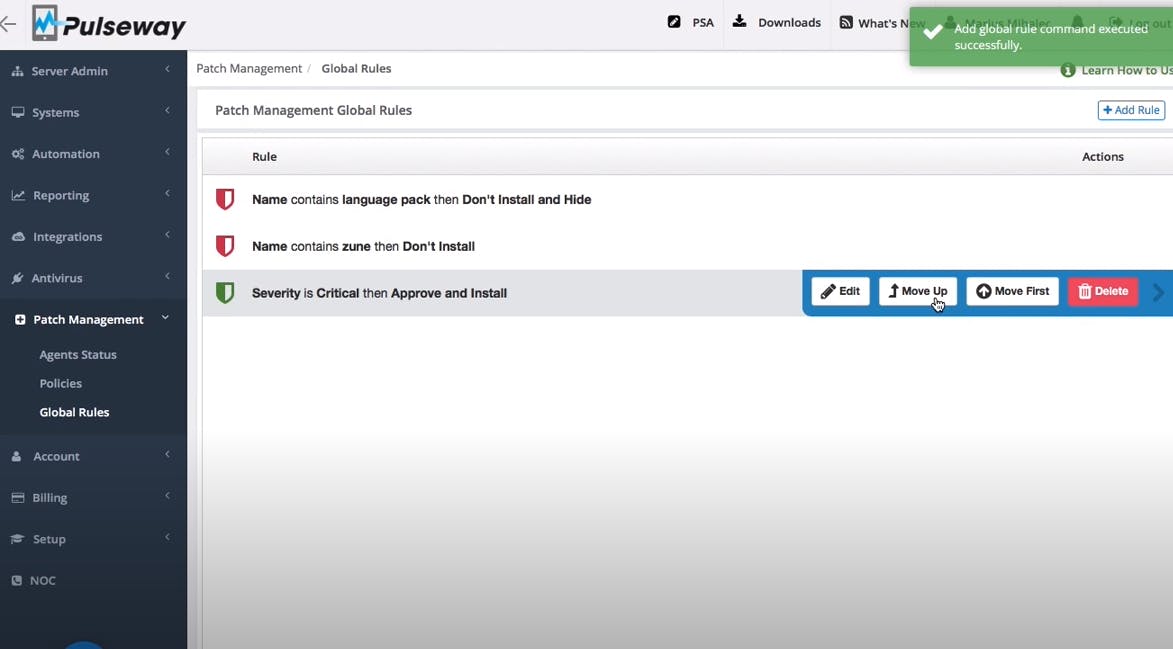
  2. Configure Global and Local Rules: Set up global rules that apply across all policies and local rules specific to individual policies. Global rules take priority.
  3. Assign Policies to Systems: Apply the created policies to specific workstations and servers. You can assign policies to individual systems or in bulk based on various search criteria.
  4. Monitor Patch Status: Utilize the Patch Status page to review the status of patches, including pending, approved, and rejected installations.
  5. Generate Reports: Use the reporting features to gain insights into patch compliance, identify missing updates, and track the history of applied patches.
  6. Manage Update Approvals: Approve or reject individual updates or groups of updates based on your policies and review.
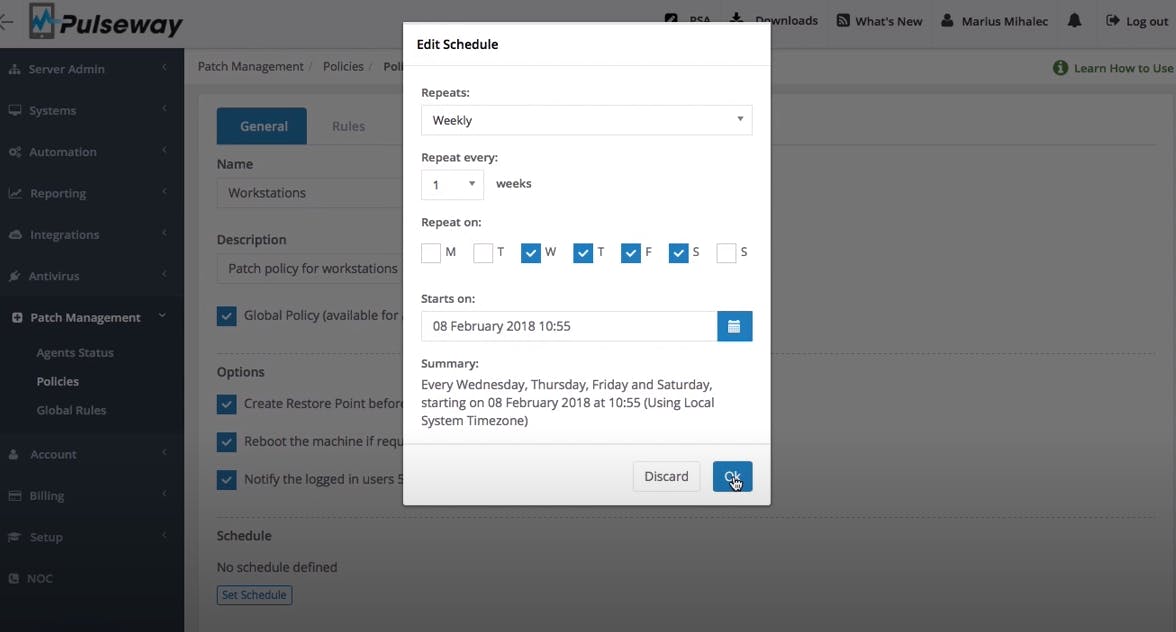
  7. Schedule Patch Installations: Define specific dates and times for patch deployments, taking into account local system times.
  8. Utilize Mobile App: Leverage the Pulseway mobile app to monitor, approve, or apply patches directly from your smartphone.
  9. Automate Patching: Configure policies to automatically download and install updates based on your defined schedules and rules.
  10. Customize Settings: Adjust settings such as notifications before installation, automatic creation of restore points, and delaying patching to avoid overwhelming the network.

Features of Pulseway Patch

Key features of Pulseway Patch include:

  • Automated Patch Discovery and Deployment: Automatically scans for and deploys missing patches for operating systems and third-party applications.
  • Support for Windows, macOS, and Linux Patching: Manages updates across different operating system environments.
  • Third-Party Application Patching: Supports a wide range of popular applications, with the ability to add custom titles.
  • Patching Policies and Scheduling: Allows for the creation of flexible policies and schedules for patch deployment.
  • Global and Local Rules: Enables granular control over patch management strategies.
  • Patch Compliance Reporting: Provides detailed reports on the patch status and compliance of managed devices.
  • Intuitive Dashboards: Offers a clear and centralized view of the patching environment.
  • Mobile App Integration: Allows for remote management and monitoring of patching activities.
  • Windows Server Update Services (WSUS) Management: Provides enhanced control over WSUS configurations and update approvals.
  • Customizable Alerts and Notifications: Keeps IT teams informed about the status of patching processes and any failures.
  • Automatic Creation of Restore Points (Windows): Enhances safety by creating system restore points before installing updates.
  • Patching Workflow Visibility: Provides a clear view of the patch installation process and status.
  • Flexible Deployment Options: Supports both on-demand and scheduled patching.
  • Integration with Pulseway RMM: Seamlessly integrates with other Pulseway RMM features for comprehensive IT management.
  • Ransomware Detection: While not directly a patching feature, Pulseway's overall platform includes ransomware detection capabilities that complement proactive patch management.

Alternative

ManageEngine Patch Manager Plus

All-around patching solution

0.0
Rating out of 5 Based on 0 reviews

ManageEngine Patch Connect Plus

Redefine SCCM and Intune management

0.0
Rating out of 5 Based on 0 reviews

NinjaOne

Automate the hardest parts of IT

0.0
Rating out of 5 Based on 0 reviews

Pulseway Patch Video/Screenshots

Pulseway Patch Key Clients
User Reviews

no-reviews
Share your experience! Be the very first reviewer. Write a Review

Frequently Asked Questions (FAQs)

The user group of Pulseway Patch are as follows :

  • Startups
  • SMEs
  • Agencies
  • Enterprises

Pulseway Patch has 1 plans,

  • Basic USD 67.00 per month

Pulseway Patch is not allowing Free Trial.

The key featuers of Pulseway Patch are as follows :

  • Alerts/Notifications
  • Automatic Patch Deployment
  • Compliance Management
  • Customization
  • Dashboard
  • Patch Prioritization
  • Patch Testing
  • Remote Access/Control
  • Vulnerability Scanning

Pulseway Patch pricing model : Yearly,Monthly,Onetime(Perpetual License)

Pulseway Patch is Cloud Hosted,Hybrid,On Premise,Any Software.

Yes

Pulseway Patch offers Phone,Email support.

Pulseway Patch provides Help Guides,Video Guides,Blogs for the software training.