CodeSandbox

Discover all CodeSandbox features.

0.0
Rating out of 5 Based on 0 reviews

What is CodeSandbox?

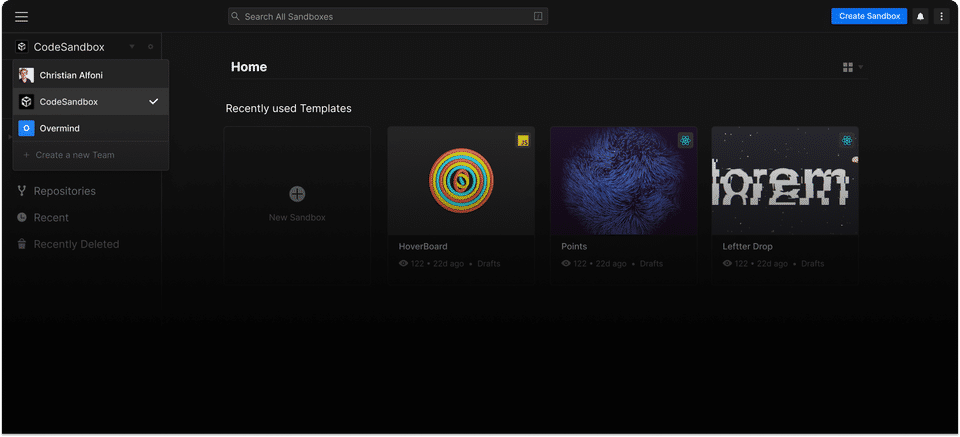
CodeSandbox is an online code editor and collaborative development platform designed for building web applications directly in the browser. It supports a wide range of JavaScript frameworks like React, Vue, Angular, and Node.js. Developers can instantly start coding without setting up a local environment, making it ideal for rapid prototyping, bug reproduction, learning, and sharing code. With real-time collaboration, integrated GitHub support, and deployment capabilities, CodeSandbox streamlines the entire development workflow. Whether you're experimenting with an idea or building full-stack applications, it offers a powerful and flexible development experience from any device with internet access.

Pricing of CodeSandbox

Build

USD 0.00
USD 0.00

Buy Now
  • For learning and experimenting
  • 5 members
  • 40 hours of monthly VM credits
  • Unlimited Browser & VM Sandboxes
  • CodeSandbox SDK lite
  • Private Sandboxes
  • VM specs up to 4 vCPUs + 8 GiB RAM
  • VS Code extension

Pro

USD 12.00
USD 0.00

per month per workspace

Buy Now
  • Pay as you go with a monthly subscription
  • Everything in Build plus:
  • Up to 20 members
  • 100 hours of monthly VM credits
  • Access to on-demand VM credits priced at $0.15 per hour
  • More VM tiers

Key Features of CodeSandbox

Key Features:
  • Refactoring
  • Syntax Highlighting
  • Code Completion
  • Real-time Collaboration
  • Debugger
  • Source code editor
  • Chat (Messaging)
  • Drag and Drop
  • Version Control

Key Specification

Other Categories: Online IDE
Deployment: Cloud Hosted
Customer Support: Online (Ticket),Business Hours
Customization: No
Languages Support: English

Who uses CodeSandbox

SMEs
SMEs
Enterprises
Enterprises

Company Details

Company Name: CodeSandbox
Headquarter: Amsterdam, North Netherlands Netherlands
Social Media:

CodeSandbox Description

Why Choose CodeSandbox?

CodeSandbox removes the barriers to starting a new project by offering a fast, cloud-based development environment. No installations are needed—just open the browser and begin coding. It’s perfect for developers who want to test ideas quickly, collaborate in real time, or share working code examples. With GitHub integration, automated deployments, and template libraries, it enhances productivity while reducing setup time. Its simplicity and versatility make it suitable for both beginners and professionals. Whether you’re building apps, creating tutorials, or reviewing pull requests, CodeSandbox provides an efficient and modern coding experience that fits into your workflow seamlessly.

Benefits of CodeSandbox

  • Instant Setup: Start coding immediately in the browser—no setup required.
  • Real-Time Collaboration: Work with teammates live on the same project.
  • GitHub Integration: Pull and push code directly to GitHub.
  • Cross-Platform: Accessible from any device with internet access.
  • Cloud-Based Storage: Automatically saves your projects online.
  • Built-In Terminal: Run commands just like in a local dev environment.
  • Supports Popular Frameworks: React, Vue, Angular, Node.js, etc.
  • Customizable Templates: Quickly spin up common project structures.
  • Instant Previews: See changes live as you code.
  • Link Sharing: Share working code via URL for demos or support.

How to Use CodeSandbox

To use CodeSandbox, go to  CodeSandbox and choose a template (e.g., React, Vue, Node.js). You can also import a GitHub repo. Start writing code in the browser—HTML, CSS, JavaScript, or other supported languages. The editor provides a file explorer, live preview panel, and terminal. You can collaborate with others by inviting them to your sandbox or sharing a link. Projects are autosaved in your account, and you can export them or deploy directly to services like Vercel. Its intuitive interface and cloud capabilities make it easy for anyone to prototype, teach, or build web apps from anywhere.

Features of CodeSandbox

  • Online Code Editor: Write code directly in your browser.
  • Live Preview: See your changes in real time.
  • GitHub Integration: Import/export repositories with ease.
  • Collaboration Tools: Invite others to edit code live.
  • Built-In Terminal: Execute shell commands in the browser.
  • Template Library: Pre-configured setups for various frameworks.
  • Sandbox Environment: Isolated, secure containers for each project.
  • Deployment Options: Deploy directly from CodeSandbox to the web.
  • Code Intelligence: Autocomplete, linting, and error highlighting.
  • Version Control: Save and revert to previous project states.

What Makes CodeSandbox Different?

CodeSandbox stands out as one of the Best Online IDEs by combining a fast, browser-based code editor with powerful collaboration and deployment tools. Unlike traditional IDEs, it requires zero setup—just open the website and start coding. Its real-time preview and live collaboration make it ideal for remote teams, coding interviews, and classroom use. Unlike other cloud IDEs, it’s deeply integrated with GitHub and supports a wide variety of modern frameworks. The ability to share working sandboxes instantly via URL makes it unique for debugging and demonstration purposes. Whether you’re teaching code, reviewing PRs, or hacking a prototype, CodeSandbox makes development quicker and more accessible.

Who Can Benefit from CodeSandbox?

CodeSandbox is ideal for web developers, educators, students, open-source contributors, and product teams. Developers can prototype apps quickly without configuring environments. Educators and learners use it to teach or practice coding in real time. Open-source contributors benefit from GitHub integration and quick reproduction of bugs. Product teams can use it for rapid UI/UX iterations and code reviews. Anyone needing a collaborative, accessible coding tool—whether for projects, tutorials, or demos—can benefit from its flexibility. Its user-friendly interface also makes it a great stepping stone for beginners transitioning into full-stack development.

Is CodeSandbox Easy to Use?

Yes, CodeSandbox is designed to be intuitive for both beginners and experienced developers. With a clean interface, drag-and-drop file support, and instant project previews, users can get started right away. Templates for popular frameworks reduce setup time, and features like auto-complete and error highlights make coding smoother. Beginners can explore programming without installing anything, while pros enjoy built-in terminal access and GitHub integration. Its real-time editing and sharing capabilities also make collaboration effortless. Whether you're experimenting with frontend components or testing backend logic, CodeSandbox simplifies the process and speeds up development.

What Support Does CodeSandbox Offer?

CodeSandbox offers helpful support resources through its Help Center, documentation, and GitHub Discussions. Users can access detailed guides, feature explanations, and troubleshooting steps. Community support is available via forums, GitHub issues, and Discord. For premium users or enterprise accounts, direct support and priority assistance may be available. The platform also publishes updates on its blog and social channels. While it doesn't offer live chat, its extensive self-service knowledge base and active developer community help users resolve issues quickly. Whether you're a beginner or an experienced coder, support is readily accessible and well-documented.

Alternative

AWS Cloud9

By AWS Cloud9

0.0
Rating out of 5 Based on 0 reviews

Eclipse Che

By Eclipse Che

0.0
Rating out of 5 Based on 0 reviews

CodePen

By CodePen

0.0
Rating out of 5 Based on 0 reviews

CodeSandbox Video/Screenshots

CodeSandbox Key Clients

User Reviews

no-reviews
Share your experience! Be the very first reviewer. Write a Review

Frequently Asked Questions (FAQs)

The user group of CodeSandbox are as follows :

  • SMEs
  • Enterprises

CodeSandbox has 2 plans,

  • Build USD 0.00
  • Pro USD 12.00 per month per workspace

CodeSandbox is not allowing Free Trial.

The key featuers of CodeSandbox are as follows :

  • Refactoring
  • Syntax Highlighting
  • Code Completion
  • Real-time Collaboration
  • Debugger
  • Source code editor
  • Chat (Messaging)
  • Drag and Drop
  • Version Control

CodeSandbox pricing model : Yearly,Monthly

CodeSandbox is Online Software.

No

CodeSandbox offers Online (Ticket),Business Hours support.

CodeSandbox provides Help Guides,Blogs for the software training.