Addigy

Apple Device Management Platform

0.0
Rating out of 5 Based on 0 reviews

What is Addigy?

Addigy is a full-featured, cloud-based IT management platform built exclusively for Apple devices. It provides a centralized console for managing, monitoring, and securing fleets of macOS, iOS, iPadOS, and tvOS devices in real-time. It's often chosen by Managed Service Providers (MSPs) and internal IT departments that have a significant presence of Apple devices. Addigy helps automate tasks such as device enrollment, configuration, software deployment, patch management, security policy enforcement, and remote troubleshooting, all tailored to the unique aspects of the Apple ecosystem.

Pricing of Addigy

Standard

USD 6.00
USD 0.00

Per Mac

Buy Now
  • Zero touch device deployment
  • OS updates and upgrades
  • App Store and third party app management
  • Identity provider based SSO
  • MDM and DDM configurations

Premium

USD 8.00
USD 0.00

Per Mac

Buy Now
  • Everything in Standard Pluse
  • Instant built in remote screen sharing
  • Prebuilt and configurable compliance benchmarks
  • Automated monitoring remediation
  • API access

Key Features of Addigy

Key Features:
  • Alerts/Notifications
  • Compliance Management
  • Remote Access/Control
  • Configuration Management
  • Contract/License Management
  • Inventory Management
  • Maintenance Management
  • Supplier Management
  • Compliance Tracking
  • Cost Tracking
  • Requisition Management
  • Audit Management
  • Procurement Management
  • Inventory Management

Key Specification

Who uses Addigy

StartUps
StartUps
SMEs
SMEs
Agencies
Agencies
Enterprises
Enterprises

Company Details

Company Name: Addigy
Headquarter: Miami, Florida United States
Social Media:

Addigy Description

Why Choose Addigy?

Organizations choose Addigy, especially for Apple device management, for several key reasons:

  • Apple-Centric Design: Unlike general-purpose RMM/MDM solutions that may have limited Apple support, Addigy is built from the ground up for Apple. This ensures deep integration with Apple's MDM framework, providing robust and reliable management capabilities.
  • Real-Time Device Management: Addigy offers immediate visibility and control over devices. IT administrators can access live device information, initiate remote control sessions, or use a live terminal from their browser to quickly address issues.
  • Automation and Efficiency: It automates numerous routine IT tasks, such as zero-touch deployment (with Apple Business Manager), software installations, OS updates, and security policy enforcement, significantly reducing manual effort and improving efficiency.
  • Security and Compliance: Addigy provides strong security features like FileVault encryption management, continuous security monitoring, and pre-built compliance benchmarks (e.g., CIS and NIST for macOS), helping organizations maintain a secure posture and meet regulatory requirements.
  • Simplified Workflows for MSPs: Its multi-tenant architecture and flexible billing models make it ideal for MSPs managing multiple clients with Apple devices. It streamlines management across different client environments from a single login.
  • Exceptional Support and Community: Addigy is known for its strong customer support and an active community, providing valuable resources and assistance for Apple IT professionals.
  • Integration Ecosystem: While specialized for Apple, Addigy integrates with other crucial IT tools, including Acronis Cyber Protect Cloud for comprehensive cyber protection, identity providers like Okta for seamless user authentication, and various PSA/ticketing systems.

Benefits of Addigy

The benefits of using Addigy for Apple device management include:

  • Reduced Administrative Burden: Automating device setup, software deployment, and maintenance frees up IT staff from time-consuming manual tasks.
  • Enhanced Security: Proactive security features, compliance benchmarks, and remote wipe/lock capabilities help protect sensitive data and devices from threats and loss.
  • Improved User Experience: Zero-touch deployment and automated onboarding allow users to get up and running quickly with pre-configured devices, reducing friction and increasing productivity.
  • Faster Troubleshooting and Support: Real-time device insights, remote access, and live terminal capabilities enable IT teams to diagnose and resolve issues more rapidly.
  • Better Compliance Posture: Built-in compliance features and continuous monitoring help organizations adhere to industry regulations and internal security policies.
  • Cost Savings: By streamlining operations and reducing the need for multiple disparate tools, Addigy can lower the total cost of ownership for managing Apple fleets.
  • Scalability: Easily manage a growing number of Apple devices without a corresponding increase in IT overhead.
  • Centralized Control and Visibility: A single console provides comprehensive visibility and control over all Apple devices, regardless of their location.

How to Use Addigy?

Using Addigy generally follows these steps:

1. Initial Setup and Apple MDM Configuration:

  • Sign up for an Addigy account.
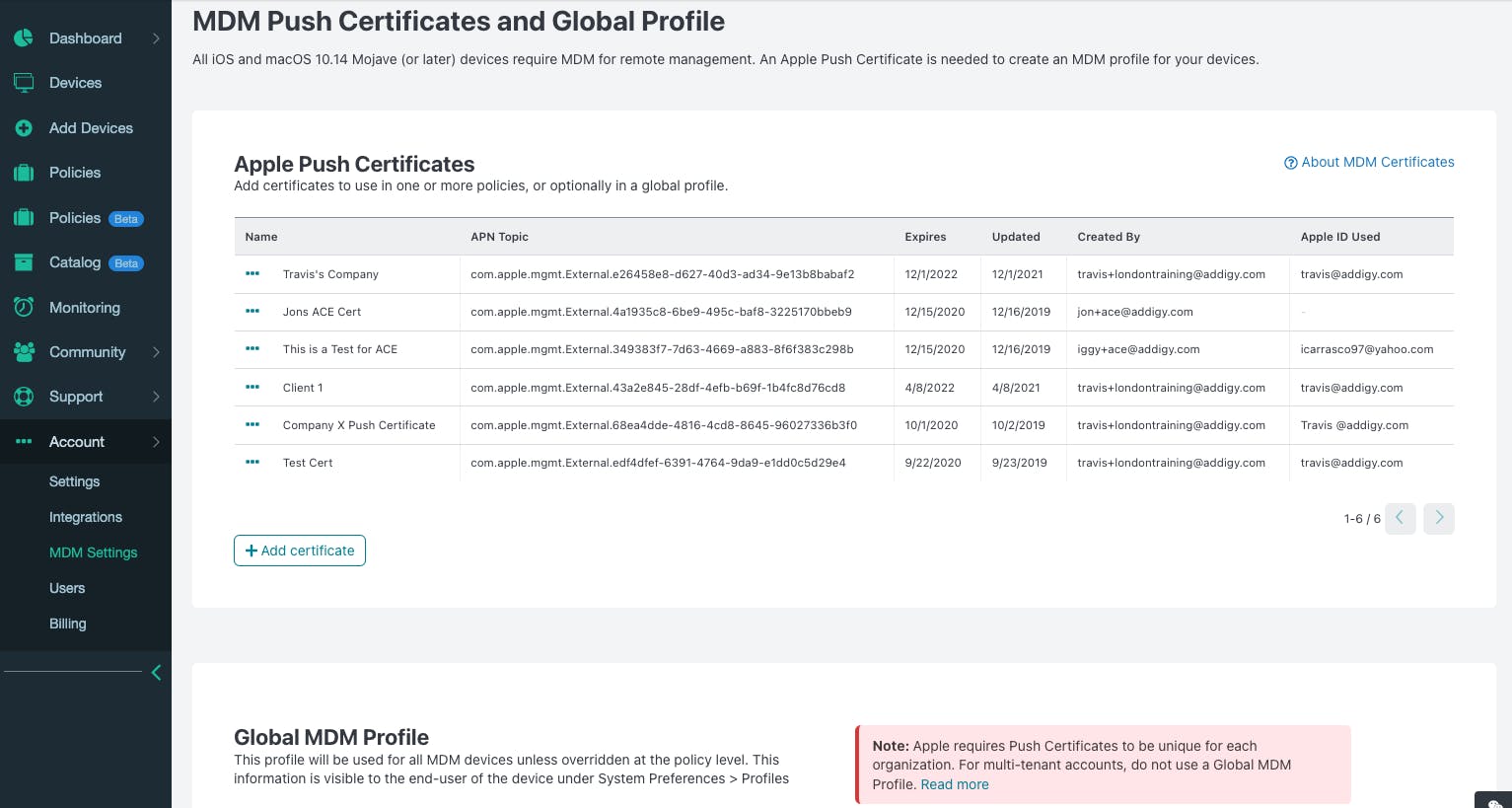
  • Configure Apple MDM settings within Addigy, which often involves creating and uploading an Apple Push Certificate.
  • For zero-touch deployment and easier bulk enrollment, integrate with Apple Business Manager (ABM) or Apple School Manager (ASM).

2. Device Enrollment:

  • Automated Device Enrollment (ADE) / Zero-Touch: For new devices purchased through Apple or authorized resellers, enroll them directly into Addigy via ABM/ASM. This allows devices to be pre-configured out-of-the-box.
  • Manual Enrollment: For existing devices or those not enrolled in ABM/ASM, you can enroll them by installing the Addigy agent and/or MDM profile directly on the device (via a package installer, terminal command, or an enrollment link).
  • User Enrollment (BYOD): For personally-owned devices, Addigy supports user enrollment, which provides more limited management capabilities focused on corporate data.

3. Policy Creation and Assignment:

  • Create "Policies" in Addigy. These are containers for settings, software deployments, scripts, and security configurations.
  • Assign devices or groups of devices to specific policies. Addigy will then automatically apply and enforce these configurations.
  • Examples of policies include Wi-Fi settings, security configurations, application deployments, and OS update rules.

4. Software Deployment and Patch Management:

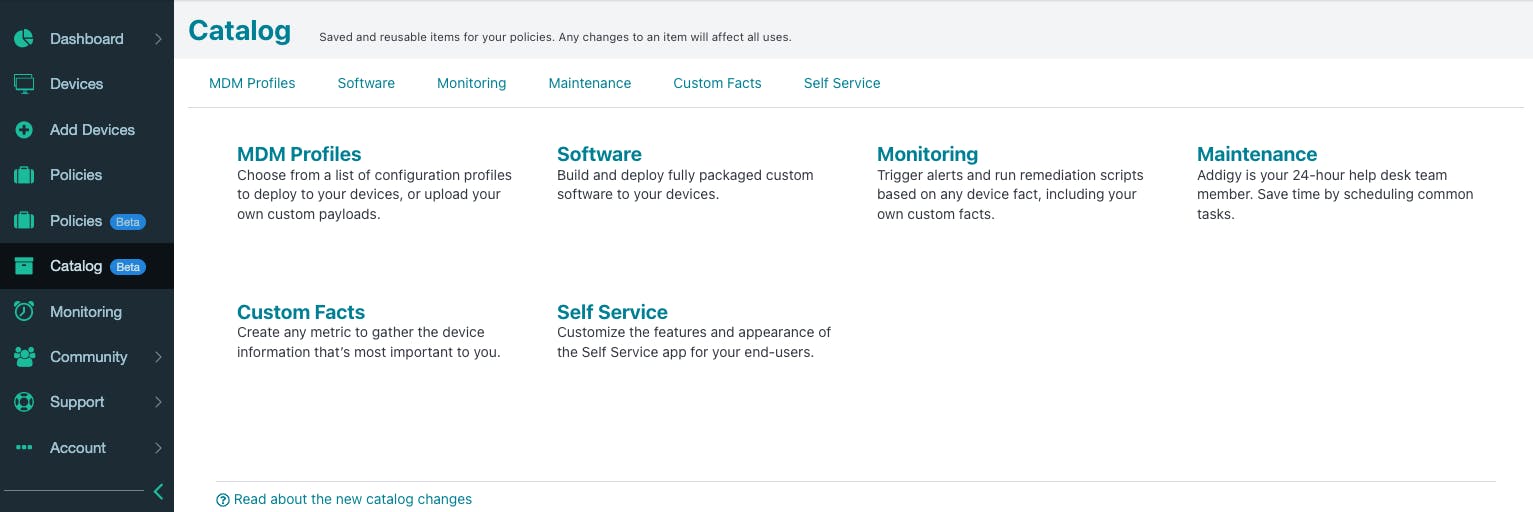
  • Use Addigy's "Software" feature to deploy pre-built applications from their catalog or upload custom software packages.
  • Configure automated patch management for macOS and third-party applications to keep devices secure and up-to-date.

5. Monitoring and Troubleshooting:

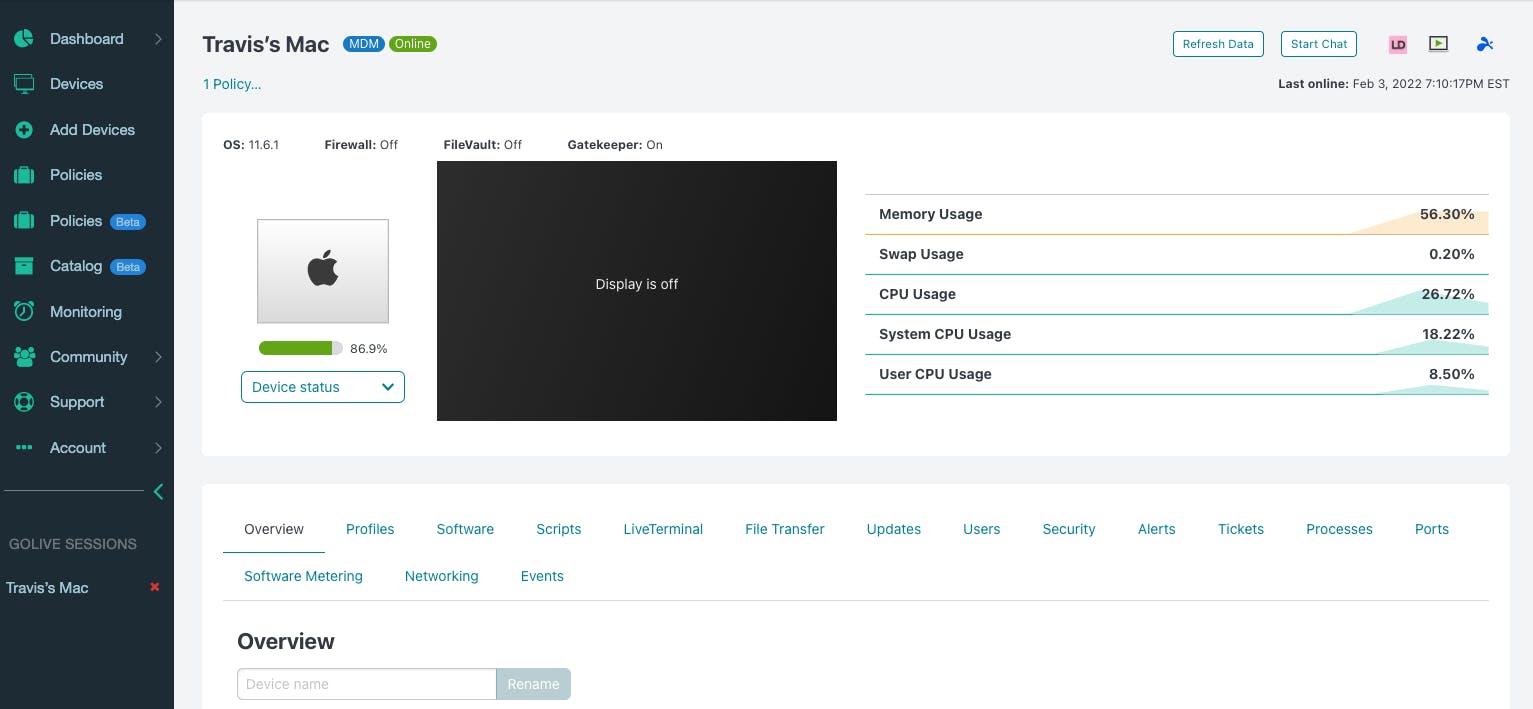
  • Utilize the "Devices" page and "GoLive" feature to view real-time information about any device, including hardware status, installed software, and compliance posture.
  • Use "LiveDesktop" for remote control, "LiveTerminal" for command-line access, and "LiveChat" for direct communication with end-users to resolve issues.
  • Set up custom alerts and automated remediation workflows based on monitoring data.

6. Reporting and Compliance:

  • Generate reports on device inventory, software installations, compliance status, and security vulnerabilities.
  • Leverage built-in CIS and NIST compliance benchmarks to assess and enforce security standards.

7. Integration (e.g., Acronis Cyber Protect Cloud):

  • If using Acronis Cyber Protect Cloud, deploy its protection agent to macOS devices through Addigy's custom software deployment capabilities.
  • Monitor the protection status and manage cyber protection plans for these devices directly within the Addigy interface, leveraging Addigy's native alerting mechanisms.

Features of Addigy

Addigy offers a comprehensive suite of features for Apple device management, including:

  • Mobile Device Management (MDM): Core capabilities for managing device configurations, security policies, and app distribution leveraging Apple's MDM framework.
  • Remote Monitoring and Management (RMM): Real-time monitoring of device health and performance, remote troubleshooting tools, and automated maintenance tasks.
  • Zero-Touch Deployment: Seamless device enrollment and configuration for new devices via integration with Apple Business Manager (ABM).
  • Automated OS & Third-Party Patch Management: Efficiently manage and deploy macOS updates and patches for commonly used third-party applications.
  • Software Deployment: Deploy pre-built applications, custom software packages, and scripts to individual devices or groups.
  • Policy Management: Create and assign flexible policies to enforce settings, security configurations, and software installations across devices.
  • Security & Compliance:
    • FileVault encryption management with key escrow.
    • Built-in CIS and NIST compliance benchmarks.
    • Continuous security monitoring and automated remediation.
    • Remote lock and wipe capabilities for lost/stolen devices.
    • Integration with Conditional Access for trusted device access.
  • Live Features:
    • GoLive: Real-time device details, hardware/software status, and quick actions.
    • LiveDesktop: Remote screen sharing and control.
    • LiveTerminal: Secure, in-browser command-line access.
    • LiveChat: Real-time communication with end-users.
  • Self Service Portal: Empower end-users to install approved applications, run scripts, and request support.
  • Custom Facts: Collect custom data points from devices for advanced reporting and automation.
  • Integrations: Connects with other essential IT tools like Acronis Cyber Protect Cloud, Microsoft Intune, Okta, Google Workspace, Azure AD, Malwarebytes, and various PSA/ticketing systems.
  • Multi-Tenant Support: Ideal for MSPs to manage multiple client environments from a single console.
  • Detailed Reporting: Generate various reports on device inventory, compliance, software, and more.

Alternative

ManageEngine Patch Manager Plus

All-around patching solution

0.0
Rating out of 5 Based on 0 reviews

ManageEngine Patch Connect Plus

Redefine SCCM and Intune management

0.0
Rating out of 5 Based on 0 reviews

NinjaOne

Automate the hardest parts of IT

0.0
Rating out of 5 Based on 0 reviews

Addigy Video/Screenshots

User Reviews

no-reviews
Share your experience! Be the very first reviewer. Write a Review

Frequently Asked Questions (FAQs)

The user group of Addigy are as follows :

  • Startups
  • SMEs
  • Agencies
  • Enterprises

Addigy has 2 plans,

  • Standard USD 6.00 Per Mac
  • Premium USD 8.00 Per Mac

Addigy is allowed 14 Days Free Trial.

The key featuers of Addigy are as follows :

  • Alerts/Notifications
  • Compliance Management
  • Remote Access/Control
  • Configuration Management
  • Contract/License Management
  • Inventory Management
  • Maintenance Management
  • Supplier Management
  • Compliance Tracking
  • Cost Tracking
  • Requisition Management
  • Audit Management
  • Procurement Management
  • Inventory Management

Addigy pricing model : Yearly,Monthly,Onetime(Perpetual License)

Addigy is Cloud Hosted,Hybrid,On Premise,Any Software.

Yes

Addigy offers Phone,Email,Live Chat support.

Addigy provides Help Guides,Video Guides,Blogs,Webinars,On-Site Training for the software training.