Acronis Cyber Protect Cloud

By Acronis

0.0
Rating out of 5 Based on 0 reviews

What is Acronis Cyber Protect Cloud?

Acronis Cyber Protect Cloud is an industry-first solution that unites cybersecurity, data protection (backup and disaster recovery), and endpoint management in a single, integrated platform. It's designed to provide comprehensive cyber protection for businesses, particularly managed service providers (MSPs), by offering a unified approach to safeguarding workloads across various environments (physical, virtual, cloud, and mobile). Instead of relying on separate, disparate tools for backup, anti-malware, and endpoint management, Acronis Cyber Protect Cloud brings these functionalities together under one agent and a single management console. This integration aims to simplify operations, reduce complexity, lower costs, and enhance overall security.

Pricing of Acronis Cyber Protect Cloud

no-pricing
For get detailed pricing as per your requirements.

Key Features of Acronis Cyber Protect Cloud

Key Features:
  • Alerts/Notifications
  • Automatic Patch Deployment
  • Automatic Scans
  • Compliance Management
  • Customization
  • Dashboard
  • Network Wide Management
  • Patch Prioritization
  • Patch Testing
  • Remote Access/Control
  • Vulnerability Scanning
  • Approval Process Control

Key Specification

Other Categories: Patch Management Software Msp Software
Deployment: Cloud Hosted,Hybrid,On Premise,Any
Customer Support: Phone,Email,Live Chat
Customization: Yes
Languages Support: English

Who uses Acronis Cyber Protect Cloud

StartUps

StartUps
SMEs
SMEs
Agencies
Agencies
Enterprises
Enterprises

Company Details

Company Name: Acronis
Headquarter: United States
Social Media:

Acronis Cyber Protect Cloud Description

Why Choose Acronis Cyber Protect Cloud?

Organizations choose Acronis Cyber Protect Cloud for several compelling reasons:

  • Unified Cyber Protection: It consolidates essential security and data protection functions (backup, anti-malware, vulnerability assessment, patch management, etc.) into a single solution. This eliminates the need for multiple vendors and disparate tools, reducing complexity and potential conflicts.
  • Proactive Threat Prevention: It goes beyond traditional backup by integrating advanced, AI-based anti-malware, anti-ransomware, and zero-day attack protection. This proactive approach helps prevent threats before they can cause damage.
  • Simplified Management: With a single agent and a centralized management console, it significantly streamlines IT operations. MSPs, in particular, can manage multiple clients and their diverse workloads from one interface, reducing administrative overhead and training time.
  • Faster Recovery: In the event of a cyberattack or data loss, it enables rapid recovery with near-zero Recovery Point Objectives (RPOs) and Recovery Time Objectives (RTOs), minimizing downtime and ensuring business continuity.
  • Cost Efficiency: Consolidating multiple services into one platform can lead to significant cost savings by reducing licensing fees, operational expenses, and the need for specialized personnel to manage separate solutions.
  • Enhanced Efficiency: Automation capabilities, such as automated patch management and incident response playbooks, free up IT staff to focus on more strategic tasks.
  • Compliance Support: Its comprehensive data protection and security features help organizations meet various regulatory compliance requirements (e.g., GDPR, HIPAA, SEC, FINRA).
  • Scalability and Flexibility: It's built for scalability, allowing businesses to easily protect a growing number of workloads across different platforms, including Windows, Linux, Microsoft 365, Google Workspace, Hyper-V, VMware, and more.
  • Remote Work Protection: Provides robust protection for remote workers and their devices, which is crucial in today's distributed work environments.

Benefits of Acronis Cyber Protect Cloud

The benefits of implementing Acronis Cyber Protect Cloud are numerous:

  • Reduced Downtime and Data Loss: By combining robust backup and recovery with advanced cybersecurity, it significantly minimizes the risk of data loss and system downtime due to cyberattacks, hardware failures, or human error.
  • Improved Security Posture: The integrated AI-driven threat detection and prevention capabilities offer a higher level of protection against modern and emerging cyber threats, strengthening the overall security posture.
  • Operational Simplicity: A unified platform simplifies deployment, configuration, and ongoing management, leading to less complexity and fewer management headaches.
  • Lower Total Cost of Ownership (TCO): Consolidating security, backup, and management functions reduces software licensing costs, hardware requirements, and the need for specialized IT staff.
  • Faster Incident Response: Automated responses and integrated recovery capabilities enable quicker detection, containment, and remediation of security incidents.
  • Enhanced Productivity: Streamlined workflows and automated tasks free up IT resources, allowing them to focus on higher-value activities.
  • Business Continuity: Ensures that critical business operations can continue even after a disaster or cyberattack, thanks to efficient backup and disaster recovery capabilities.
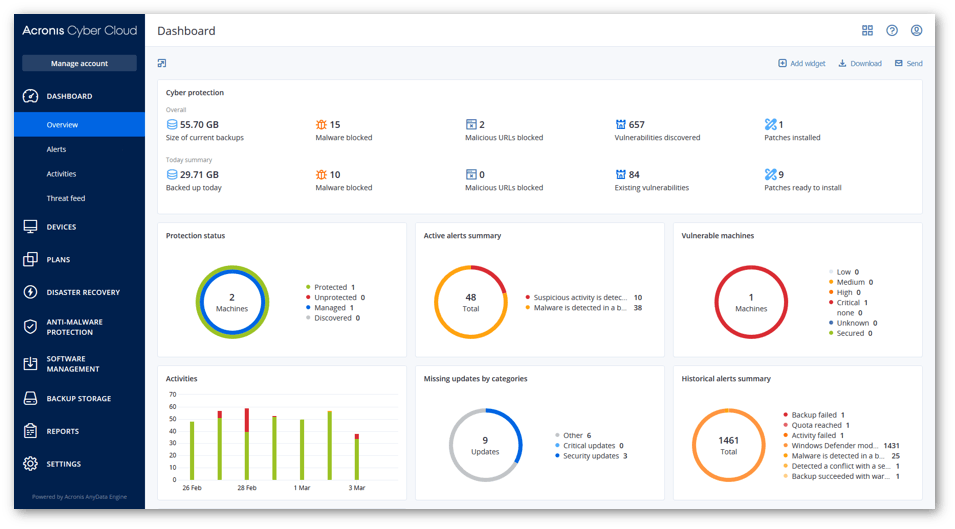
  • Centralized Visibility: Provides a single pane of glass for monitoring the protection status of all workloads, offering complete visibility and control.

How to Use Acronis Cyber Protect Cloud?

Using Acronis Cyber Protect Cloud generally involves these key steps:

1. Deployment and Agent Installation:

  • Access the Acronis Cyber Protect Cloud management console (typically web-based).
  • Deploy the Acronis agent to your endpoints (servers, workstations, virtual machines). This agent is a single piece of software that handles all protection tasks (backup, security, management).
  • The platform can often auto-discover machines on your network for easier deployment.

2. Configuration of Protection Plans:

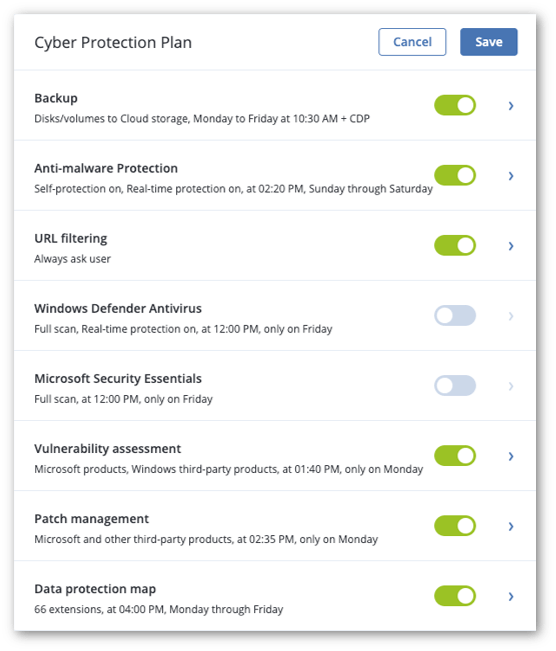
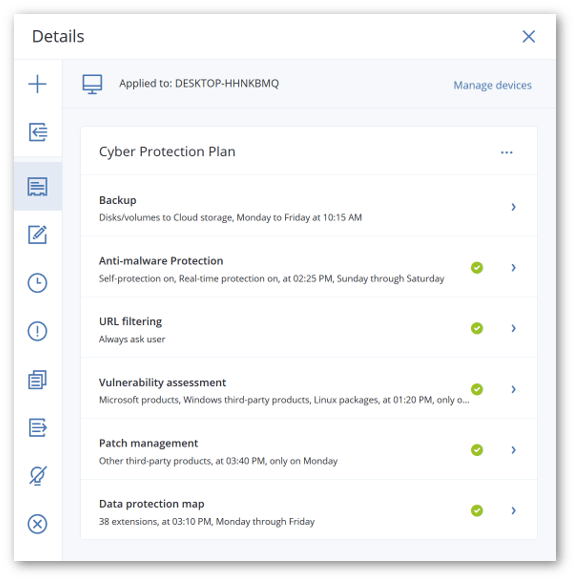
From the centralized console, create and configure protection plans. These plans define:

  • What to back up: Entire machines, specific files/folders, system states, applications (e.g., Microsoft 365 data like Exchange Online, OneDrive, SharePoint, Teams), virtual machines, databases.
  • Where to back up: To Acronis Cloud storage, local storage, public cloud storage (e.g., AWS S3), or private cloud storage.
  • When to back up: Set schedules for full, incremental, or differential backups.
  • Retention policies: Define how long backups are kept.
  • ​​​​​​​Security settings: Configure anti-malware, anti-ransomware, URL filtering, vulnerability assessments, patch management, and other security policies.

3. Monitoring and Reporting:

  • Monitor the status of your protection plans and devices through dashboards and reports in the management console.
  • Receive alerts and notifications for successful backups, failed attempts, security incidents, or any issues requiring attention.
  • Track the #CyberFit score to assess the protection status of your devices.

4. Recovery Operations:

  • In case of data loss or system failure, use the console to initiate recovery.
  • Restore entire systems (bare-metal recovery), specific files or folders, or applications.
  • Leverage features like Acronis Instant Restore (booting a system as a VM directly from a backup) for rapid recovery.
  • Utilize Acronis Universal Restore to recover to dissimilar hardware.

5. Endpoint Management Tasks:

  • Perform remote management tasks such as patch management, software deployment, and remote desktop assistance.
  • Conduct vulnerability assessments to identify and close security gaps.

Features of Acronis Cyber Protect Cloud

Acronis Cyber Protect Cloud boasts a comprehensive set of features across its integrated pillars:

1. Data Protection (Backup & Recovery):

  • Comprehensive Backup: Full-image, file-level, application-aware backups for over 20 platforms (Windows, Linux, macOS, Hyper-V, VMware, Azure, AWS, Microsoft 365, Google Workspace, etc.).
  • Near-Zero RPO/RTO: Capabilities like Acronis Instant Restore allow booting backups as VMs in seconds.
  • Flexible Storage Options: Backup to Acronis Cloud, local storage, network shares, public cloud (AWS S3, Azure), and private cloud.
  • Deduplication and Compression: Optimize storage space and network usage.
  • Encryption: AES-256 encryption for data in transit and at rest.
  • ​​​​​​​Disaster Recovery (DR): Spinning up client systems in the Acronis Cloud for immediate availability during disasters.

2. Cybersecurity:

  • Next-Generation Anti-Malware: AI-based static and behavioral analysis for protection against malware, ransomware, cryptojacking, and zero-day attacks.
  • Acronis Active Protection: Proactive, behavioral-based anti-ransomware technology that detects, blocks, and automatically rolls back malicious activities.
  • Vulnerability Assessment: Scans systems for known vulnerabilities (unpatched software, misconfigurations).
  • Patch Management: Automates patching of operating systems and applications to eliminate security weaknesses.
  • URL Filtering: Blocks access to malicious websites.
  • Exploit Prevention: Protects against vulnerabilities being exploited by attackers.
  • Forensic Backup: Collects forensic data during backups to aid in incident investigation and analysis.
  • Data Loss Prevention (DLP): Prevents leakage of sensitive data from endpoints through various channels (e.g., USB drives, clipboard).
  • ​​​​​​​Email Security: Protects against spam, phishing, BEC, and other email threats.

3. Endpoint Management:

  • Centralized Management Console: Single pane of glass for managing all protected devices and services.
  • Remote Monitoring and Management (RMM): Remotely assist clients, assess system vulnerabilities, and manage devices.
  • Device Control: Granular control over user access to local devices and ports (e.g., USB drives).
  • Software Inventory and Deployment: Track software installed on devices and deploy new applications.
  • Disk Health Monitoring: Proactive monitoring of hard drive health to prevent failures.
  • ​​​​​​​Acronis #CyberFit Score: Provides a quick assessment of a device's protection status.

4. Automation and Integration:

  • Automation of Routine Tasks: Streamline operations through scripting and automated workflows.
  • Integration with PSA/RMM: Seamless integration with professional services automation (PSA) and remote monitoring and management (RMM) systems commonly used by MSPs (e.g., ConnectWise, Kaseya, Autotask).
  • API for Custom Integrations: Allows for custom integration with other business systems.
  • ​​​​​​​Acronis Copilot (GenAI Assistant): (Recently introduced) Helps MSP technicians respond to incidents more effectively and quickly using natural language.

5. Other Advanced Features:

  • File Sync & Share: Securely create, share, and collaborate on content from anywhere.
  • Notarization and E-signature: Blockchain-based services for data integrity and authenticity.
  • Flexible Licensing: Per-workload or consumption-based (per-GB) licensing models.
  • ​​​​​​​White-labeling: MSPs can brand the platform with their own identity.

Alternative

ManageEngine Patch Manager Plus

All-around patching solution

0.0
Rating out of 5 Based on 0 reviews

ManageEngine Patch Connect Plus

Redefine SCCM and Intune management

0.0
Rating out of 5 Based on 0 reviews

NinjaOne

Automate the hardest parts of IT

0.0
Rating out of 5 Based on 0 reviews

Acronis Cyber Protect Cloud Video/Screenshots
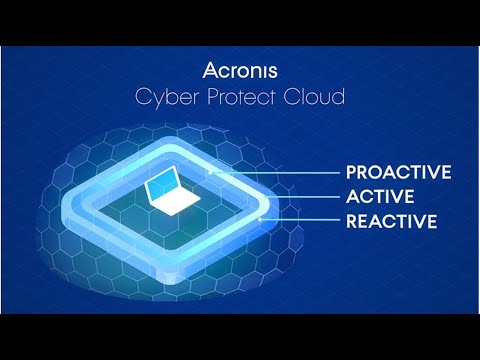
Acronis Cyber Protect Cloud Key Clients

User Reviews

no-reviews
Share your experience! Be the very first reviewer. Write a Review

Frequently Asked Questions (FAQs)

The user group of Acronis Cyber Protect Cloud are as follows :

  • Startups
  • SMEs
  • Agencies
  • Enterprises

Acronis Cyber Protect Cloud has 0 plans.

Acronis Cyber Protect Cloud is allowed 0 Days Free Trial.

Acronis Cyber Protect Cloud pricing model : Yearly,Monthly,Onetime(Perpetual License)

Acronis Cyber Protect Cloud is Cloud Hosted,Hybrid,On Premise,Any Software.

Yes

Acronis Cyber Protect Cloud offers Phone,Email,Live Chat support.

Acronis Cyber Protect Cloud provides Help Guides,Video Guides,Blogs,Webinars for the software training.