The landscape of artificial intelligence is shifting from isolated large language models (LLMs) to fully interconnected, agentic ecosystems. At the heart of this evolution is MCP, or the Model Context Protocol.
If you’ve been tracking the rapid advancements in AI development, you’ve likely heard the terms MCP AI or MCP servers thrown around by engineers and tech leaders. But what is MCP exactly, and why is it suddenly the most talked-about framework in software engineering?
This comprehensive guide breaks down the MCP meaning, how the model context protocol MCP works, why Anthropic pioneered it, and how MCP servers are fundamentally changing how we build and interact with MCP artificial intelligence.

Looking for Artifical Intelligence Tool?
Check out Techimply's Artificial Intelligence Tool for your business.
MCP Meaning: What Does MCP Stand For?
When developers ask what does MCP stand for in the context of modern technology, the answer is the Model Context Protocol (MCP).
Historically, "MCP" stood for various things depending on the industry ranging from Microsoft Certified Professional in IT to metacarpophalangeal joints in medicine. However, in 2026, the dominant MCP definition belongs firmly to the world of MCP artificial intelligence.
Simply put, the Model Context Protocol is an open-source standard that enables developers to build secure, bidirectional connections between AI models (like LLMs) and their data sources or development tools. Think of it as a universal USB-C port, but designed specifically for data delivery to AI applications.
What is MCP in AI? The Core Problem It Solves
To understand what is MCP in AI and why it’s a massive breakthrough, we have to look at the historical bottleneck of building MCP LLM applications.
Until recently, LLMs operated inside isolated sandbox environments. They were brilliant at reasoning but completely blind to your actual data. If you wanted an AI assistant to read your local codebase, query a PostgreSQL database, or check your company's Slack channels, developers had to build custom, fragile integration pipelines for every single tool.
Every new enterprise AI application required:
- Writing bespoke APIs to fetch context.
- Building custom data parsers to feed information to the LLM.
- Managing fragmented authentication schemas.
This fragmentation meant that data was trapped inside silos. An AI tool that worked perfectly inside VS Code couldn't easily access data from your terminal or your cloud infrastructure without rewriting the integration from scratch.
The mcp artificial intelligence framework solves this exact problem. By introducing a standardized protocol, MCP allows developers to expose data sources through a unified interface. Once an MCP server is built for a data source, any compatible AI client can immediately understand, query, and use that data.
The Origin: Model Context Protocol MCP Anthropic
The model context protocol MCP was originally introduced as an open-source standard by Anthropic. Recognizing that the true value of advanced models like Claude lies in their ability to act on real-world context, Anthropic designed MCP to move the industry away from fractured, fragmented integrations.
By open-sourcing the model context protocol mcp anthropic ensured that the standard wouldn't remain locked within a single ecosystem. Instead, it has grown into an industry-wide open standard embraced by developers across various AI platforms, IDEs, and enterprise infrastructure tools.
Anthropic’s vision for MCP was clear: instead of forcing developers to write unique code to connect an AI to GitHub, Jira, Postgres, and Google Drive, they could just implement an MCP server for each tool once, allowing any LLM client to securely interact with them.
How Does the Model Context Protocol Work? (The Architecture)
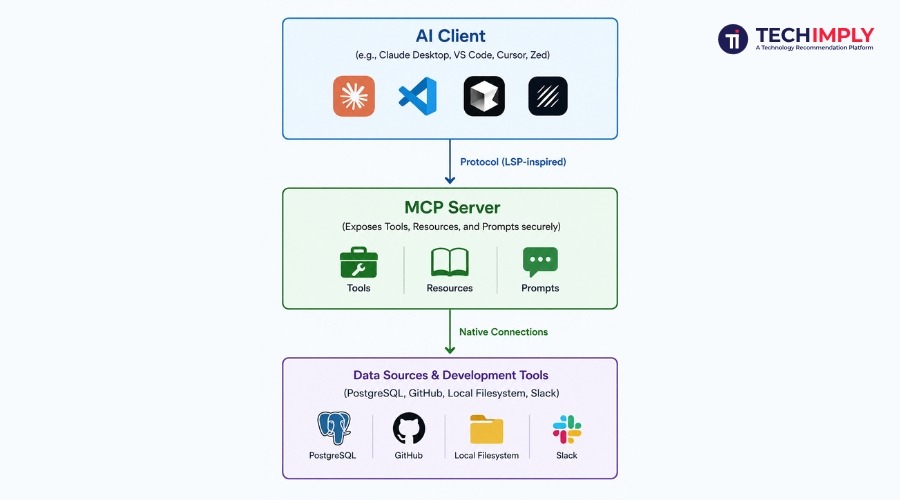
The architecture of the model context protocol mcp relies on a clean, decoupled, client-server model. Understanding how these pieces fit together is essential to grasping how MCP AI operates in production.
The ecosystem is split into three core components:
1. MCP Clients
An MCP client is the AI application or interface that the user interacts with. Examples of MCP clients include Claude Desktop, advanced IDEs like Cursor or Zed, or developer command-line tools. The client is responsible for managing user interactions, handling the foundational LLM, and initiating connections to various servers.
2. MCP Servers
What is an MCP server? An mcp server is a lightweight, specialized application that exposes specific capabilities, data, or files to an MCP client. The server sits directly on top of the underlying data source (like a database, an API, or a local directory) and translates that data into a standardized format that the AI client can understand natively.
3. Data Sources
These are the native applications, environments, and databases where your business or development data lives. Examples include your local file system, a remote Git repository, a production database, or SaaS tools like Notion and Slack.
What is an MCP Server and How Does It Function?
To truly master mcp servers, it helps to understand exactly what they provide to the AI model. An mcp server serves three primary types of primitives over the protocol:
1. Resources (Data Reading)
Resources are text or binary data schemas that the AI client can read. They act like URLs for your AI. A resource could be the contents of a local log file, a live dump of a database schema, or real-time documentation pulled from an external API. When an AI client requests a resource, the mcp server fetches it and formats it instantly for the LLM's context window.
2. Tools (Action Taking)
Tools are executable functions that allow the AI model to perform actions in the physical or digital world. Instead of just reading data, tools allow the MCP LLM to write data or execute commands. Examples of tools exposed by an mcp server include:
- Creating a new branch or submitting a pull request on GitHub.
- Running a specific SQL write query inside a secure database sandbox.
- Sending an alert message to a DevOps Slack channel.
3. Prompts (Pre-built Templates)
Prompts are reusable, structured templates provided by the server to guide the AI client's reasoning process. For example, a development-focused mcp server might provide a "Code Review" prompt template that automatically guides the LLM on how to analyze code structure, check for vulnerabilities, and conform to style guidelines based on the exact repository context.
Why the Tech Industry is Rushing to Adopt the MCP Library
The sudden explosion in volume for queries like mcp library and mcp servers stems from how simple the protocol makes development.
Historically, protocols like the Language Server Protocol (LSP)—pioneered by Microsoft to standardize how IDEs talk to different programming languages—completely transformed code editors. Before LSP, a text editor needed a custom plugin for Python, a completely separate custom plugin for C++, and another for Java. LSP standardized that communication, meaning a language server built for Python works automatically across VS Code, Vim, Sublime Text, and Emacs.
The Model Context Protocol is doing the exact same thing for AI context.
By utilizing an official mcp library (available in languages like TypeScript, Python, and Java), software companies no longer have to build custom "AI plugins" for every new LLM or AI chat interface that hits the market. They build an MCP-compliant server once, and it instantly becomes compatible with every major AI client in the ecosystem.
Key Benefits of Using MCP AI in 2026
Implementing mcp artificial intelligence frameworks yields significant advantages for both indie developers and enterprise engineering teams.
1. Superior Context Relevance
Because mcp servers dynamically pull exactly what the LLM needs at the moment of the request, the context fed into the model is highly precise. This drastically reduces AI hallucinations, as the model relies on factual, real-time data retrieved straight from the server rather than memorized training data.
2. Enterprise-Grade Security and Control
Security is the biggest barrier to enterprise AI adoption. Companies are terrified of sending proprietary code or customer data to public LLM APIs.
The model context protocol mcp addresses this by maintaining a strict boundary. The mcp server runs inside the organization's secure infrastructure or local environment. The server dictates exactly what files, directories, or tools the AI client is allowed to touch. If an enterprise wants to revoke an AI's access to a sensitive database table, they simply adjust the permissions on the local MCP server without needing to touch the central LLM architecture.
3. Developer Velocity and Reusability
Using a standardized mcp library eliminates hundreds of hours of boilerplate integration code. Developers can clone open-source mcp servers from repositories, configure environmental variables, and instantly grant their AI assistants access to complex tools like memory vector databases, Kubernetes clusters, or complex financial APIs.
Step-by-Step: The Ultimate Guide to Configuring an MCP Server
If you are looking to tap into mcp-use, configuring your first local server is remarkably straightforward. Most modern AI clients, such as Claude Desktop or Cursor, read from a centralized configuration file where you declare your active mcp servers.
Here is an example of how an mcp server configuration looks inside a claude_desktop_config.json file:
JSON
{
"mcpServers": {
"filesystem": {
"command": "npx",
"args": [
"-y",
"@modelcontextprotocol/server-filesystem",
"/Users/username/projects/my-app"
]
},
"postgres-db": {
"command": "docker",
"args": [
"run",
"-i",
"--rm",
"mcp/postgres-server",
"postgresql://localhost:5432/production_db"
]
}
}
}
Breakdown of the Configuration:
- Server Declaration: You give your server a recognizable name (e.g., filesystem or postgres-db).
- Command Execution: Specify the runtime execution command, such as npx for Node.js modules or docker to spin up isolated containerized servers.
- Arguments and Permissions: Pass the explicit arguments, paths, or connection strings that define the boundaries of what that specific mcp server can access. In the filesystem example above, the AI client is explicitly locked to the /my-app directory and cannot look anywhere else on your operating system.
Conclusion
The rapid adoption of the Model Context Protocol marks a definitive shift in how intelligent software is built. By standardizing the layer between reasoning engines and data environments, MCP eliminates the fragmentation that historically crippled enterprise AI development.
Moving forward, the power of an LLM will no longer be measured solely by the size of its training data, but by the depth and agility of its connections. Implementing MCP infrastructure today ensures that your applications remain secure, contextually precise, and fully prepared for the next generation of autonomous agentic workflows.

.png "5 Essential Actions That Should Be Considered When Creating Healthcare Software")