
Ensuring and Managing Tax Deducted At Source (TDS) entries in Tally is a key aspect of the business to ensure correct accounting and compliance with the tax laws in force. Tally is easy to TDS journal entry, allowing users to debit, make payments, and return very smoothly and easily. Whether you need to record TDS payable under which head in Tally, handle TDS receivable entry in Tally, or integrate GST TDS, a structured approach is key. This blog will walk you through the step-by-step process of managing TDS under GST, making billing and invoicing seamless.
What is TDS?
In India, TDS (Tax Deducted at Source) is a system where tax is deducted upfront on payments like salaries, rent, and professional fees, then deposited with the government. In accounting, a TDS journal entry records deductions and payments. In Tally, TDS payable is under "Duties & Taxes," while TDS receivable entry in Tally falls under "Loans & Advances." For GST transactions, TDS under GST is deducted at 2% on specific supplies. Businesses using billing and invoicing or GST software can automate TDS calculations for accuracy and compliance.
Step for Make TDS Entry in TallyPrime
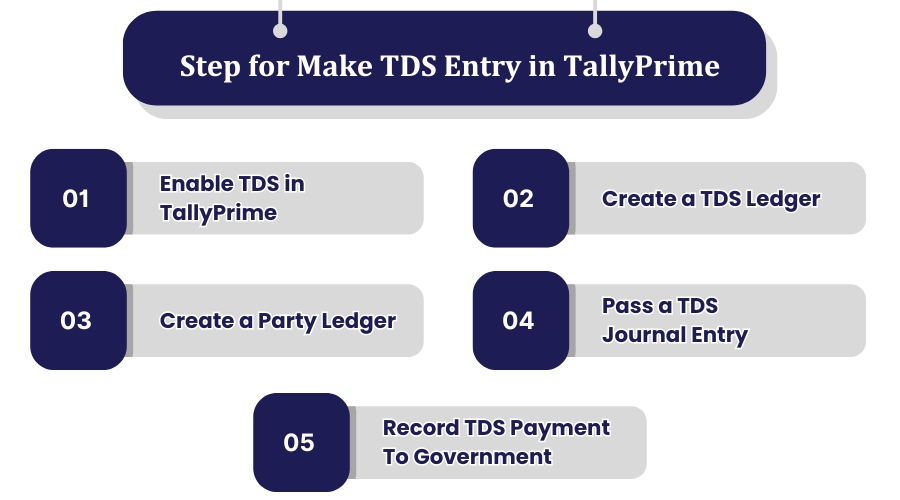
Managing TDS in TallyPrime doesn’t have to be complicated! Whether you're deducting tax on payments, recording TDS payable, or generating TDS reports, following the right process ensures error-free accounting and compliance with tax regulations.
With TallyPrime’s intuitive features, you can automate calculations, reduce manual errors, and streamline your financial records. By properly recording TDS entries, you not only stay tax-compliant but also maintain accurate cash flow tracking for your business. Follow this step-by-step guide and get it done with ease!
1. Enable TDS in TallyPrime
-
Go to F11 (Features) > Statutory & Taxation
-
Enable TDS and set the required details.
2. Create a TDS Ledger
-
Go to Accounts Info > Ledgers > Create
-
Select Duties & Taxes as the group (TDS payable under which head in Tally).
3. Create a Party Ledger
-
Define TDS applicable for the vendor.
4. Pass a TDS Journal Entry
-
Go to Accounting Vouchers > F7 (Journal)
-
Debit the expense account, credit TDS payable, and the remaining balance to the vendor.
5. Record TDS Payment to Government
-
Go to Accounting Vouchers > F5 (Payment)
-
Debit TDS payable and credit the bank account.
For businesses dealing with GST, TDS under GST must also be recorded correctly. Using billing and invoicing software or GST software can streamline tax compliance and reduce errors.
Step for TDS Receivable Entry in TallyPrime
A vital procedure for businesses to keep accounts of tax deductions at the source and to correctly claim refunds is Recording TDS Receivable Entry in TallyPrime. TallyPrime, with its structured approach, prevents this process from being cumbersome and therefore has record-clarifying compliance with tax laws as its main goal. If on your income TDS has been cut you should make sure to record a TDS receivable entry. Follow these steps:
1. Enable TDS in TallyPrime
-
Go to F11 (Features) > Statutory & Taxation
-
Enable TDS and set details.
2. Create a TDS Receivable Ledger
-
Go to Accounts Info > Ledgers > Create
-
Name it TDS Receivable and select "Loans & Advances (Asset)" as the group.
3. Pass a TDS Journal Entry
-
Go to Accounting Vouchers > F7 (Journal)
-
Debit TDS receivable (deducted amount)
-
Credit the income account (e.g., professional fees)
-
Credit the party/vendor account for the net amount received.
4. Adjust TDS Receivable Against Tax Liability
-
When filing returns, adjust GST TDS or TDS on GST (if applicable) with tax payable.
-
Recording TDS journal entries correctly ensures you claim the deducted tax while maintaining accurate accounts.
Step for TDS Payable Entry in TallyPrime
Handling TDS Payable Entry in TallyPrime doesn’t have to be a complicated task. With the right approach, you can seamlessly record tax deductions, track liabilities, and stay compliant without any last-minute hassles.To record TDS entry in TallyPrime and track the tax deducted on payments, follow these steps:
1. Enable TDS in TallyPrime
-
Go to F11 (Features) > Statutory & Taxation
-
Enable TDS and configure details.
2. Create a TDS Payable Ledger
-
Go to Accounts Info > Ledgers > Create
-
Name it TDS Payable and select "Duties & Taxes" (TDS payable under which head in Tally).
3. Pass a TDS Journal Entry
-
Go to Accounting Vouchers > F7 (Journal)
-
Debit the expense account (e.g., professional fees).
-
Credit TDS Payable (deducted amount).
-
Credit the vendor account (net amount payable).
4. Record TDS Payment to Government
-
Go to Accounting Vouchers > F5 (Payment)
-
Debit TDS Payable and credit the bank account for tax deposit.
TDS Entry in Tally with GST
When making a TDS entry in TallyPrime with GST, the process remains largely the same, except that TDS is deducted only on the taxable value, excluding the GST amount. This ensures precise tax calculations, proper input tax credit (ITC), and compliance with regulatory guidelines. Businesses must carefully account for both GST and TDS components to maintain accurate financial records and avoid discrepancies during tax filings.
Just consider this with an example- Suppose your business receives services worth ₹1,00,000 from a website designing agency, and an 18% GST is applied to the contract value. The total payable amount becomes ₹1,18,000. However, TDS is calculated only on ₹1,00,000, not the GST component. At a 10% TDS rate, the deductible amount would be ₹10,000.
Journal Entry in TallyPrime:
Expense Account Dr – ₹1,00,000
CGST ITC Account Dr – ₹9,000
SGST ITC Account Dr – ₹9,000
To Agency Account – ₹1,08,000
To TDS Payable Account – ₹10,000
By recording the entry this way, businesses ensure proper GST input credit utilization while accurately reflecting TDS deductions in their books. It also simplifies reconciliation of TDS liabilities and GST returns, ensuring smooth tax compliance. Using TallyPrime’s automated features, businesses can efficiently track TDS deductions, generate reports, and file returns, minimizing manual errors and improving financial accuracy.
Conclusion
The proper recording of TDS entry in Tally plays an important role in maintaining tax compliance normally and prevents the imposition of penalties. Whether it be the case of TDS on GST, TDS Receivable, or vendor payments, the obtaining of the right process is critical. By the employment of the most appropriate approach, and making use of the best tools that GST software provides, businesses can enjoy a more efficient way of operating tax calculations and filing. Mastering TDS journal entries in Tally will help you maintain error-free financial records and hassle-free tax filing.