Running a successful food and beverage business requires more than great food and a welcoming atmosphere; it demands razor-sharp operational efficiency. At the heart of every thriving eatery is a reliable restaurant POS system. Modern point-of-sale platforms do much more than simply process cash or credit card transactions. They serve as the central nervous system of your business, coordinating front-of-house service, streamlining kitchen workflows, tracking inventory, and delivering actionable data insights.

Looking for Restaurant POS Software?
Check out Techimply's Restaurant POS Software for your business.
What Is a Restaurant POS System?
What Is POS and How Does It Work?
At its core, a what is POS system for restaurant inquiry points to a combination of hardware and software designed to handle sales, track inventory, and manage daily operations. When a customer orders a meal, the transaction is logged into the POS terminal. The software instantly records the sale, updates inventory quantities, deducts components based on recipes, and routes order details directly to the kitchen or bar.
Restaurant POS System Meaning Explained
A restaurant point-of-sale system is a specialized ecosystem tailored specifically to the hospitality industry. Unlike retail software, a restaurant-grade platform is built to handle complex modifiers (e.g., "extra cheese, no onions, dressing on the side"), split bills across multiple diners, track table turns, and manage open tabs.
What Is the Difference Between POS and Traditional Billing Systems?
Traditional billing systems are glorified electronic cash registers. They print paper receipts and calculate daily totals, but they operate in isolation. In contrast, a dynamic point-of-sale platform integrates your online ordering, delivery apps, kitchen displays, employee scheduling, and financial accounting into a single, cohesive dashboard.
How Does a POS System Work in a Restaurant?
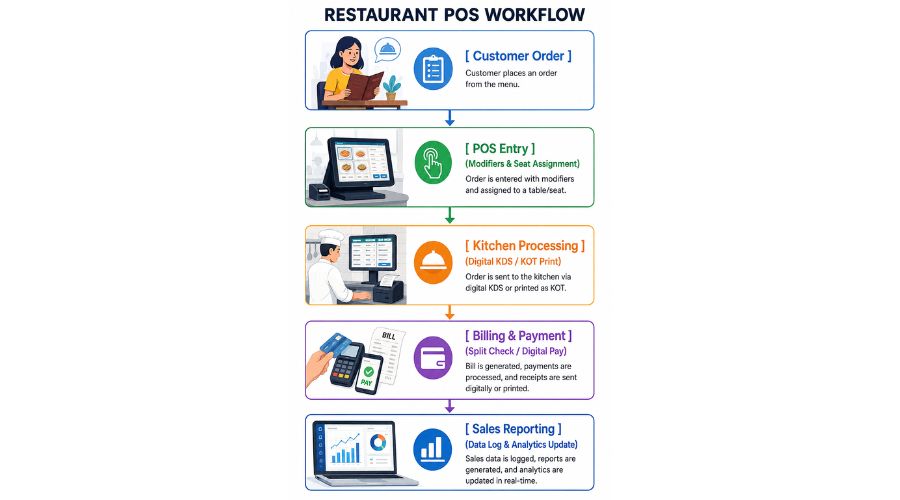
Customer Order Entry Process
The journey begins when a server or customer inputs an order. Using fixed terminals, mobile handhelds, or customer-facing QR codes, items are selected alongside necessary modifiers.
Kitchen Order Management and Communication
Once submitted, the platform routes the items electronically. Traditional paper Kitchen Order Tickets (KOTs) or digital Kitchen Display Systems (KDS) light up with the order details, complete with timestamps and special requests, eliminating miscommunication between the floor and the line cooks.
Billing and Payment Processing Workflow
When guests are ready to leave, the software retrieves their tab instantly. It accommodates split payments, contactless tap-to-pay, gift cards, and mobile wallets, ensuring a smooth check-out experience.
Sales Data Collection and Reporting Process
With every completed transaction, the system logs the data behind the scenes. It records peak hours, most popular menu items, labor percentages, and cash flow metrics, providing deep visibility into business performance.
Why Do Restaurants Need POS Systems?
Improve Restaurant Operational Efficiency
By automating repetitive administrative tasks and streamlining communication loops, a smart setup minimizes bottlenecks and keeps service running smoothly.
Increase Table Turnover Speed
Quick order entry, tableside payment processing, and instant kitchen transmission drastically cut down ticket times, allowing you to seat more guests during peak dining windows.
Reduce Order and Billing Errors
Forced modifiers (e.g., prompting a server to select a meat temperature before proceeding) prevent costly kitchen remakes, while automated billing eliminates manual math errors.
Improve Customer Experience
Faster service, accurate orders, personalized promotions, and flexible payment methods leave diners feeling valued and eager to return.
Increase Restaurant Revenue and Profitability
By optimizing inventory waste, accelerating table turns, and providing menu-engineering analytics, these platforms directly protect and expand your profit margins.
Benefits of POS Systems in Restaurants
- Faster Order Processing: Minimizes the gap between a customer stating their preference and the kitchen receiving it.
- Better Inventory Management: Tracks stock levels down to the ingredient level, preventing stockouts and shrinkage.
- Real-Time Sales Analytics: Gives managers instant access to hourly revenue, labor cost ratios, and top-selling categories.
- Improved Employee Management: Simplifies shift scheduling, tracks hours worked, and restricts access permissions by role.
- Better Customer Relationship Management: Captures guest contact data, birthdays, and dietary preferences for targeted marketing.
- Reduced Food Waste and Operating Costs: Highlights shrinkage patterns and ingredient variances to optimize purchasing.
Essential Restaurant POS System Features to Look For
When evaluating your options, ensure your software includes a robust set of restaurant POS system features:
- Order Management System: Centralizes dine-in, takeout, and delivery channels.
- Table and Reservation Management: Visual floor plans that display table status (available, seated, dirty).
- Kitchen Display System Integration: Paperless kitchen routing to optimize speed and accuracy.
- Inventory Management and Food Cost Tracking: Automated ingredient deductions and low-stock triggers.
- Digital Payment Integration: Secure handling of EMV chips, near-field communication (NFC), and mobile payments.
- Sales Reports and Analytics: Comprehensive financial reporting dashboards.
- Customer Loyalty and CRM Features: Built-in reward structures to drive repeat business.
- Employee Management and Permissions: Secure pin codes and role-based access restrictions.
- Multi-Location Restaurant Management: Centralized control over menus and reporting for scaling concepts.
Different Types of POS Systems Used in Restaurants
Cloud Restaurant POS System
A cloud restaurant POS system stores your operational data safely on remote servers, allowing you to check live sales reports from your smartphone anywhere, anytime.
Cloud-Based POS Systems for Restaurants
These platforms offer automatic updates, minimal upfront hardware costs, and seamless remote management capabilities.
iPad-Based POS Systems for Restaurants
Leveraging lightweight tablet hardware, these solutions are sleek, budget-friendly, and highly intuitive for staff training.
Mobile POS System for Restaurants & Handheld POS Systems
Compact devices that empower servers to take orders and accept payments right at the table, significantly cutting down table turn times.
Traditional Desktop POS Systems
Heavier, legacy terminal setups anchored to a counter. While durable, they often lack the remote flexibility of modern cloud options.
Online Restaurant POS System
Integrates third-party delivery services and web-based storefronts directly into your core operational stream.
Best POS System for Quick Service Restaurants (QSR)
Why QSR Restaurants Need Specialized POS Systems
Quick-service environments thrive on sheer volume and speed. The best POS system for quick service restaurants must minimize transaction friction during heavy rushes.
Fast Order Processing Features
Look for lightning-fast user interfaces that allow cashiers to complete orders in just a few taps.
Counter Ordering and Queue Management
Optimized display cues to manage walk-up lines, counter pickups, and drive-thru lanes seamlessly.
Kitchen Integration for Faster Service
Instant order transmission to ensure that food assembly begins the moment payment is secured.
Digital Payment Support for QSR
Frictionless tap-and-go options that process payment in seconds to keep lines moving.
Self-Service Ordering and QR Ordering
Empowers customers to order independently via kiosks or mobile phones through a digital menu, increasing convenience and average ticket sizes.
Best POS System for Restaurant and Bar
Food and Beverage Order Management
The best POS system for restaurant and bar combinations must seamlessly bridge kitchen food orders with high-velocity drink tabs.
Alcohol Inventory Tracking
Precise tracking by the ounce or pour to minimize loss, monitor heavy pour rates, and manage high-value stock.
Split Billing and Multiple Payment Options
Advanced check-management tools that allow bartenders to split open tabs across multiple cards or merge tables effortlessly.
Table Management for Bars and Restaurants
Dynamic floor plans that track standing crowds, open bar seats, and traditional dining rooms on one screen.
Staff Control and Permission Management
Granular manager permissions for issuing comps, voids, and applying happy hour discounts.
Best POS System for Small Restaurant: Complete Buying Guide
Features Small Restaurants Actually Need
When shopping for the best POS system for small restaurant environments, focus on simplicity, space-saving hardware, and essential reporting without paying for bloated enterprise add-ons.
Simple POS System for Restaurant Operations
An intuitive interface ensures that training new staff takes minutes rather than days.
Affordable POS Systems for Restaurants
Look for transparent pricing structures, low entry-level software tiers, and minimal long-term contracts.
Easy Setup and Employee Training
Plug-and-play hardware components that let you get up and running quickly without hiring an IT consultant.
Inventory Management for Small Restaurants
Straightforward ingredient tracking that helps independent operators keep a close eye on food costs.
Restaurant POS System Cost and Pricing Guide
How Much Does a Restaurant POS System Cost?
Understanding the restaurant POS system price requires looking at both upfront and recurring expenses. Typically, software subscriptions range from low monthly fees per terminal to comprehensive multi-user plans.
Factors That Affect Restaurant POS System Price
- Number of terminals and handheld devices needed.
- Complexity of inventory and multi-location setups.
- Advanced add-on modules (e.g., advanced labor scheduling, custom loyalty apps).
Software Subscription Costs
Monthly or annual licensing fees required to access the cloud software platform, updates, and cloud backups.
POS Hardware Costs
Upfront investments in touchscreens, cash drawers, receipt printers, kitchen impact printers, and card readers.
Installation and Training Costs
Professional setup services, menu programming assistance, and staff onboarding sessions.
Support and Maintenance Costs
Ongoing customer support tiers, software patches, and hardware warranty protections.
How to Buy a POS System for Restaurant Business
To successfully buy POS system for restaurant operations, follow a structured evaluation path:
Identify Your Restaurant Requirements
Outline your specific business model (e.g., fine dining, cafe, food truck, bar) and list your primary operational pain points.
Compare POS Systems for Restaurants
Weigh features, user reviews, hardware ecosystems, and contract flexibility across top vendors.
Check Required Features and Integrations
Ensure the platform connects cleanly with your existing accounting software, delivery channels, and reservation books.
Evaluate Ease of Use
Request live product demonstrations to test how fast your staff can navigate order entry workflows.
Consider Future Scalability
Choose a software architecture that can scale with you if you plan to open additional locations down the road.
Review Customer Support Quality
Verify that the vendor offers 24/7 technical support, since restaurant tech emergencies can happen at any hour.
How to Choose the Best POS System for Restaurant?
Choose Based on Restaurant Type
Match your concept to the right software architecture - quick-service concepts need speed, while full-service operations need robust table and reservation layouts.
Consider Cloud vs Traditional POS
Prioritize cloud options for real-time remote access and lower startup costs.
Check Security and Data Protection
Ensure the software complies with industry standards for payment security and data privacy.
Evaluate Hardware Requirements
Select commercial-grade hardware designed to withstand grease, heat, and liquid spills.
Test User Experience Before Buying
Always run a hands-on trial to evaluate the speed and responsiveness of the interface.
Cloud POS vs Traditional POS System: Which Is Better?
|
Feature |
Cloud-Based POS |
Traditional Legacy POS |
|
Data Access |
Real-time, remote via cloud dashboard |
Restricted to on-site local terminal storage |
|
Upfront Costs |
Lower (often subscription/hardware bundles) |
High initial capital investment |
|
Updates |
Automatic background updates |
Manual patches requiring technician visits |
|
Internet Dependency |
Requires internet (with offline fallback modes) |
Works locally without internet connection |
Which POS System Is Better for Growing Restaurants?
Cloud systems win out for growing concepts because they allow you to deploy new terminals, add locations, and sync menus centrally with a few clicks.
Restaurant POS System Comparison: Important Factors
- Features Comparison: Breadth of inventory tools, table layouts, and employee controls.
- Pricing Comparison: Total cost of ownership, including transaction processing fees and monthly subscriptions.
- Ease of Use Comparison: Speed of order entry and simplicity of training new team members.
- Support and Reliability Comparison: Uptime history and responsiveness of customer assistance.
- Scalability Comparison: How easily the platform adapts to multi-unit growth.
Best POS System for Restaurant in India: Key Requirements
When searching for the best POS system for restaurant in India, local market features are critical:
GST Billing and Tax Management
Accurate handling of CGST, SGST, and IGST breakdowns, multi-slab tax configurations, and tax-compliant invoicing.
UPI and Digital Payment Support
Seamless integration with popular local payment gateways, QR codes, and digital wallets.
Local Restaurant Business Requirements
Support for regional menu variants, local modifier structures, and robust offline sync modes to handle variable internet connectivity.
Affordable Pricing Options in India
Cost-effective plans tailored for independent cafes, dhabas, cloud kitchens, and multi-outlet chains.
Restaurant POS System Flowchart: Complete Order Journey
Future of Restaurant POS Systems
- AI-Powered Restaurant Analytics: Predictive labor forecasting and automated menu engineering based on historical sales trends.
- Automated Inventory Management: Machine learning tools that monitor invoice drift and predict optimal reorder quantities.
- Self-Service Ordering Technology: Expanded kiosks, mobile web apps, and immersive tableside ordering.
- Voice Ordering and Smart Assistants: Natural language speech processing to take phone and drive-thru orders automatically.
- Personalized Customer Experiences: Automated loyalty rewards and tailored promotions triggered by individual guest purchase histories.
Final Thoughts: Choose the Right Restaurant POS System for Long-Term Growth Improve Restaurant Efficiency With Smart POS Technology
Investing in the right restaurant POS systems transforms day-to-day operations from a chaotic juggling act into a streamlined, high-performance machine.
Increase Profitability Through Better Operations
By tightening inventory controls, speeding up table turns, and leveraging real-time data insights, your chosen technology platform will lay a rock-solid foundation for long-term business success.