
Every mobile CRM demo goes well. That's the problem. The salesperson is sitting in an office on strong wifi, running a scripted flow on a device with a full battery and a clean dataset. Everything is instant. Records load the moment they're tapped, the map snaps to the right pin, and sync happens before you can blink. You walk away impressed, sign the contract, and then your reps take the thing into the field, where none of those conditions hold.

Looking for CRM software?
Check out Techimply's List of the Best CRM Software in India for your business.
That gap between the demo and the parking lot is where buying decisions go wrong. A field rep's real day looks nothing like the demo. Weak signal in a warehouse, no signal in a rural stretch, a phone that's been open twelve hours, and a customer standing right there waiting. The features that dazzle on WiFi are exactly the ones that quietly break when the connection drops, and by then you've already paid.
This is a pre-purchase evaluation guide, not a list of the best apps. The goal is to teach you what to actually test before you commit to any CRM software, so you can see past the polish. Three things matter most and almost never surface in a demo: whether the app is genuinely offline-first or just caching, how accurately its GPS check-ins prove a visit, and what happens to your data when sync resumes after a rocky patch. Get those right, and the rest of the evaluation gets a lot easier.
Offline-First vs. Cache-Only: The Distinction Buyers Miss
This is the single most important thing to understand, and it's the one demos are structured to obscure. Two apps can both claim to "work offline" and mean completely different things.
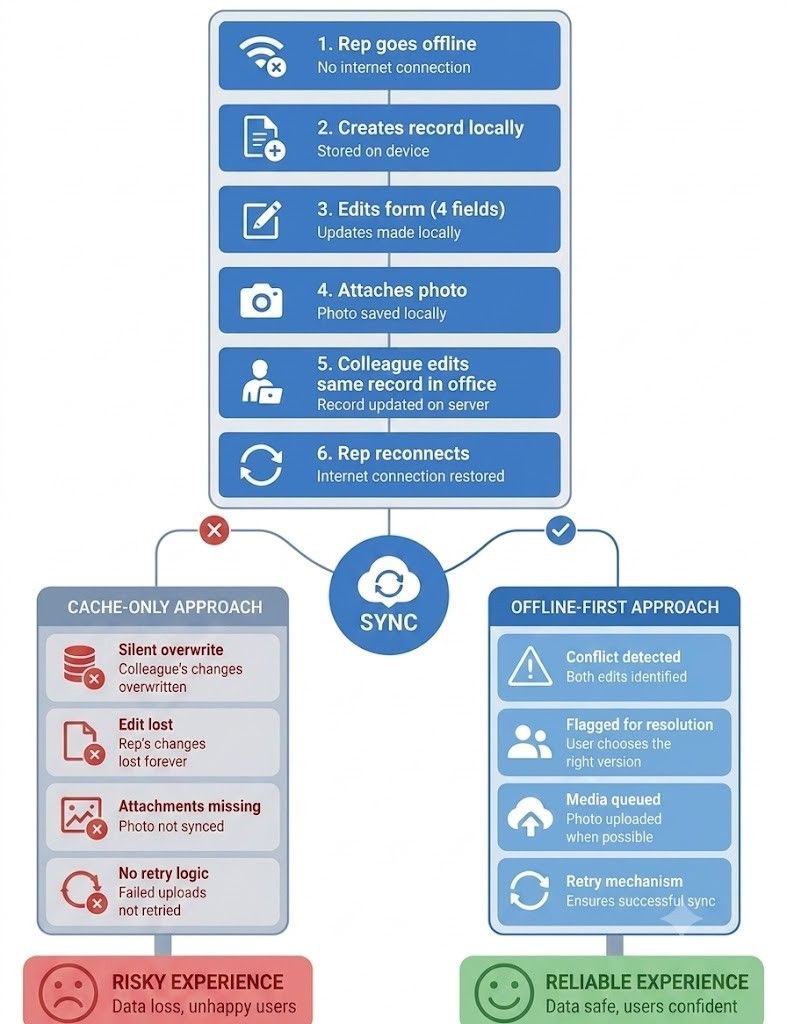
A cache-only app stores a slice of recently viewed records so you can look at them without signal. That feels like offline support until you try to do something. Create a new order, edit a complex form, and attach a photo, and the limits show up fast. The cache is for reading, not working, and the moment a rep needs to actually accomplish a task in a dead zone, they hit a wall. Because a demo mostly shows records being viewed, a thin cache can look like full offline capability when it isn't. This is exactly where a purpose-built sales CRM software for field teams separates itself from a general tool that added a cache and called it offline mode.
An offline-first app is architected the other way around. It keeps a real working set of data on the device and treats offline as the normal state, so reps can create records, run full workflows, and capture media whether or not there's a signal and then sync in a structured way when the connection returns. The difference isn't a feature you can spot on a spec sheet. It's a design philosophy, and it shows up only when you actually take the app offline and try to do a full day's work.
Here's the comparison that matters, laid out simply:
|
Capability |
Cache-only mobile CRM |
Offline-first mobile CRM |
|
Read access offline |
Usually yes, but limited to recent records |
Broader working set, more predictable |
|
Create new records offline |
Often no, or limited |
Yes, full record creation |
|
Sync behavior |
Depends on reconnect, may lag |
Structured sync with conflict handling |
|
Data freshness |
Can be stale until manual refresh |
Better local consistency while offline |
|
Field execution |
Basic viewing, some edits |
Full workflows, forms, and media |
The practical test is to hand the vendor a scenario, not accept a slide. Ask them to create a new record offline, edit a form with several fields, attach a photo or signature, stay offline for a while, and then sync, ideally with a conflicting edit made by someone else in the meantime. What happens in that moment tells you everything. A real field tool handles it cleanly. Demo software gets awkward, and better to see that awkwardness before you buy than after your reps discover it on a Tuesday afternoon.
GPS Check-in Accuracy: What Actually Affects It
GPS check-ins look simple in a demo. The rep taps a button, a green tick confirms they're at the customer site, done. In the field it's messier, because "at the site" is a harder thing to prove than it looks, and the accuracy depends on several factors that never come up in the sales pitch.
The core mechanism is a geofence, a virtual radius around the customer's saved location. Tap inside it and the check-in verifies; tap outside and it doesn't. The size of that radius is the first thing to interrogate. Different tools default to very different values, and you'll find field apps ranging from tight radii of a few dozen meters up to several hundred or more, with some workforce platforms allowing anywhere from 50 to a few thousand meters. That range matters enormously, because a wide radius hides errors and a narrow one creates false alerts. What you want is control: a configurable geofence you can tune to your workflow rather than a fixed radius someone else chose. A dependable sales tracking software will let an admin set that radius per your needs, not lock you into a default that's too loose to mean anything.
Signal quality is the next variable, and it's the one that causes the most confusion in the field. GPS drifts. Near tall buildings, indoors, or in a basement, the reported position can shift by a meaningful distance, so a rep who's genuinely on-site can show up outside the fence through no fault of their own. A good app has an answer for this, whether that's hybrid positioning that blends wifi and cellular signals with GPS, or a clear rule for what happens when the signal is weak. Ask the vendor directly how the app behaves indoors or with a poor signal. Vagueness here is a warning.
Pin accuracy is the failure mode nobody anticipates. A check-in can look wrong even when the rep is standing in the right place, simply because the customer's location was saved incorrectly when the account was created. If the map pin sits a block away from the actual entrance, every legitimate visit looks off. So you want a tool where admins can correct customer coordinates on the map after the fact, because a bad pin is common and fixable, but only if the app lets you fix it. This kind of location hygiene is where solid beat planning software earns its keep, keeping the underlying account locations accurate so the check-ins built on top of them actually hold up.
Then there's the audit trail. A check-in is only useful later if it's verifiable, which means the app should record the timestamp, the coordinates, and the account tied to the visit, so a manager can review what happened rather than take it on faith. Stronger systems go further and add fraud resistance, flagging when a rep is well outside the allowed range or adding extra verification, though how much of that you need depends on your workflow. The failure modes to keep in mind are the two ends of the same problem: a check-in can read as inaccurate when the rep really was on-site if the pin was wrong or the GPS was drifting, and some apps only prove "close enough" rather than actual presence, so a loose radius can quietly mask errors while a tight one throws false alarms.
The Questions to Ask in Every Vendor Demo
The best defense against a polished demo is a set of pointed questions the salesperson can't answer with a slide. These cut straight to the things that break in the field. Bring this list to every demo you sit through.
On offline capability, ask the one question that separates real field tools from demo software: can a rep complete the full job offline, and what exactly happens when sync resumes? Then make them show it, not describe it. Have them create a record, edit a detailed form, attach media, go offline for a stretch, and sync afterward with a conflicting change in play.
|
What to Ask |
What a Real Answer Looks Like |
Warning Sign |
|
Can a rep complete the full job offline? |
Live demo: create record, fill form, attach photo, stay offline, sync |
Describes it verbally, pivots to a slide |
|
What's the default check-in radius, and can we change it? |
Named figure, admin-configurable per workflow |
Fixed default, no answer on the number |
|
Can you show a failed check-in from outside the geofence, live? |
Does it without hesitation, explains the handling |
Redirects to a successful check-in |
|
How does the app behave indoors or with weak GPS? |
Hybrid positioning, or a stated rule for low signal |
Vagueness, "It usually works fine." |
|
Can admins edit a customer's coordinates after creation? |
Yes, correctable on the map |
No, it requires a support ticket |
|
Do check-ins store coordinates, timestamps, and map evidence? |
Full audit trail a manager can review |
Timestamp only, or check-in status alone |
|
Does the app refresh in the background or wait for a manual reconnect? |
Background sync, stated freshness behaviour |
"It syncs when you open it." |
|
What happens to conflicting edits on sync? |
Named conflict-handling rule |
Silence, or "last write wins." |
Notice that most of these ask the vendor to demonstrate a failure, not a success. Anyone can show a check-in that works. What you're testing is whether the app handles the messy, realistic cases: the drifting signal, the bad pin, the rep who's just outside the fence. A vendor who can comfortably show you a failed check-in and explain how the system handles it is a vendor whose product has actually been used in the field. Hesitation, or a quick pivot back to the happy path, tells you the opposite. The same logic applies to sync and data freshness. A rep working from yesterday's data is a quiet source of errors, and no demo will ever surface it on its own.
How Current Mobile CRM Apps Compare
A quick, honest caveat before the names: what follows is drawn from review roundups and app-comparison write-ups, not an independent field benchmark. Several of the most enthusiastic mobile write-ups come from vendors describing their own products, so treat the framing as "commonly cited strengths" rather than verified fact. The point isn't to rank these CRM software options, it's to show how the popular ones tend to be positioned so you know where to point your own testing.
Salesflare comes up repeatedly for mobile completeness, with reviews (including its own) noting the phone app keeps the full feature set rather than a stripped-down version. That's a genuine differentiator if it holds up for your workflow, though it's worth verifying yourself given the source. HubSpot is consistently described as easy to use with a clean, approachable interface, which makes it a low-friction choice for teams that want quick adoption. Pipedrive earns near-universal praise for simplicity and a visual, pipeline-driven flow, though several reviewers note the mobile app is more limited than its desktop counterpart. A capable lead management software foundation underneath any of these matters more than the app's polish, since a clean interface on top of messy lead data still produces messy results.
Zoho CRM tends to be positioned as the feature-rich, highly configurable option, and notably it's one of the apps most often singled out for genuine offline access, letting reps view and add records without a connection, which is exactly the field-relevant capability this guide keeps returning to. Freshsales is generally presented as a solid all-rounder with a clean interface and reliable syncing, and its mobile app is frequently noted for punching above its weight with check-ins, offline access, and voice notes. The through-line across all of these, and the most useful thing the roundups reveal, is that "highest rated" usually means easiest to set up and least frustrating on a phone, which is not the same as best for fieldwork. An app can top the ratings on usability and still disappoint a field team the moment the signal drops.
To make the fit concrete without pretending it's a ranking: Salesflare is the pick reviewers reach for when a team wants the strongest possible phone experience with minimal compromise. HubSpot and Pipedrive are the easiest to adopt quickly, HubSpot for clean daily use and Pipedrive for simple pipeline-driven selling. Zoho is the one to look at when you need heavy configuration plus real offline capability, and Freshsales sits in the middle as a balanced choice with solid mobile depth. But every one of those positionings should be tested against your own dead zones, because the best-reviewed app in the world can still fall over in a warehouse basement.
The Buying Rule That Cuts Through Everything
If you take one thing from this guide, make it a single question to ask of any mobile CRM software you're evaluating: can a rep complete the full job offline, and what exactly happens when sync resumes? That question does more work than any feature comparison, because it forces the two things demos are built to hide, real offline execution and clean sync behavior, out into the open.
Everything else follows from it. If a rep can genuinely finish their work with no signal, the app has a real local datastore rather than a cache. If sync resumes cleanly, with conflicting edits handled predictably rather than silently overwritten, the app was built for the field rather than the office. And if the GPS check-ins prove presence reliably, with a configurable radius, honest handling of weak signals, correctable pins, and a real audit trail, then the location data your managers depend on will actually hold up.
So before you sign anything, run the test the demo won't. Turn off wifi and cellular, and put the app through a full day's motion: create records, fill out the detailed forms, attach the photos and signatures, and log the check-ins, then reconnect and watch what happens to all of it. The app that handles that gracefully is the one worth buying. The one that stumbles just showed you, for free, the problem your reps would otherwise have discovered the hard way, in the field, with a customer waiting.
Conclusion
A vendor demo is a performance staged on the vendor's terms: full signal, clean data, and a device that hasn't been running since 7am. Your reps work under the opposite conditions, which is why the smoothest demo tells you almost nothing about how the app holds up in a warehouse basement with a customer waiting. So make the decision on your terms instead, using the one question that cuts through everything: can a rep complete the full job offline, and what exactly happens when sync resumes? If the answer is genuine, the app has a real local datastore rather than a cache, conflicting edits get handled predictably rather than silently overwritten, and the GPS check-ins your managers rely on will actually prove presence, with a configurable radius, honest handling of weak signal, correctable pins, and a real audit trail. Before you sign anything, run the test. The demo won't: turn off wifi and cellular. Put the app through a full day's motion, then reconnect and watch what happens to all of it. The one that handles that gracefully is worth buying, and the one that stumbles just showed you, for free, the problem your reps would otherwise have found the hard way.