In the digital age, original content is king. Whether you are a student submitting a thesis or a digital marketer publishing an article, ensuring your work is unique is vital. Using a plagiarism checker is now a non-negotiable step to avoid unintentional copying and maintain professional integrity.

Looking for Plagiarism Checker Software?
Check out Techimply's List of Best Plagiarism Checker Software in India for your business.
In 2026, a plagiarism checker for students is the best safeguard against academic penalties, while a plagiarism checker AI helps writers navigate the complexities of AI-generated content. Using a free plagiarism checker ensures your voice remains authentic and your SEO rankings stay protected.
What Is a Plagiarism Checker and Why Do You Need One?
A plagiarism checker is a specialized tool that scans your text against a vast database of web pages, academic papers, and published books to identify similarities and ensure originality. It helps maintain academic integrity by preventing accidental plagiarism, improves SEO since search engines like Google penalize duplicate content, and enhances writing quality by encouraging proper paraphrasing and accurate citations. Many modern tools also include advanced detection features to identify non-original or automated content, making them essential for students, writers, researchers, and businesses who want to verify authenticity, build credibility, and produce high-quality, original work.
Knowing how to check plagiarism effectively helps you:
-
Maintain Academic Integrity: Avoid accidental "patchwriting" in essays.
-
Improve SEO: Search engines penalize duplicate content.
-
Detect AI Writing: Many modern tools now function as a plagiarism checker AI, identifying text generated by LLMs.
-
Verify Sources: Ensure all citations are correctly attributed.
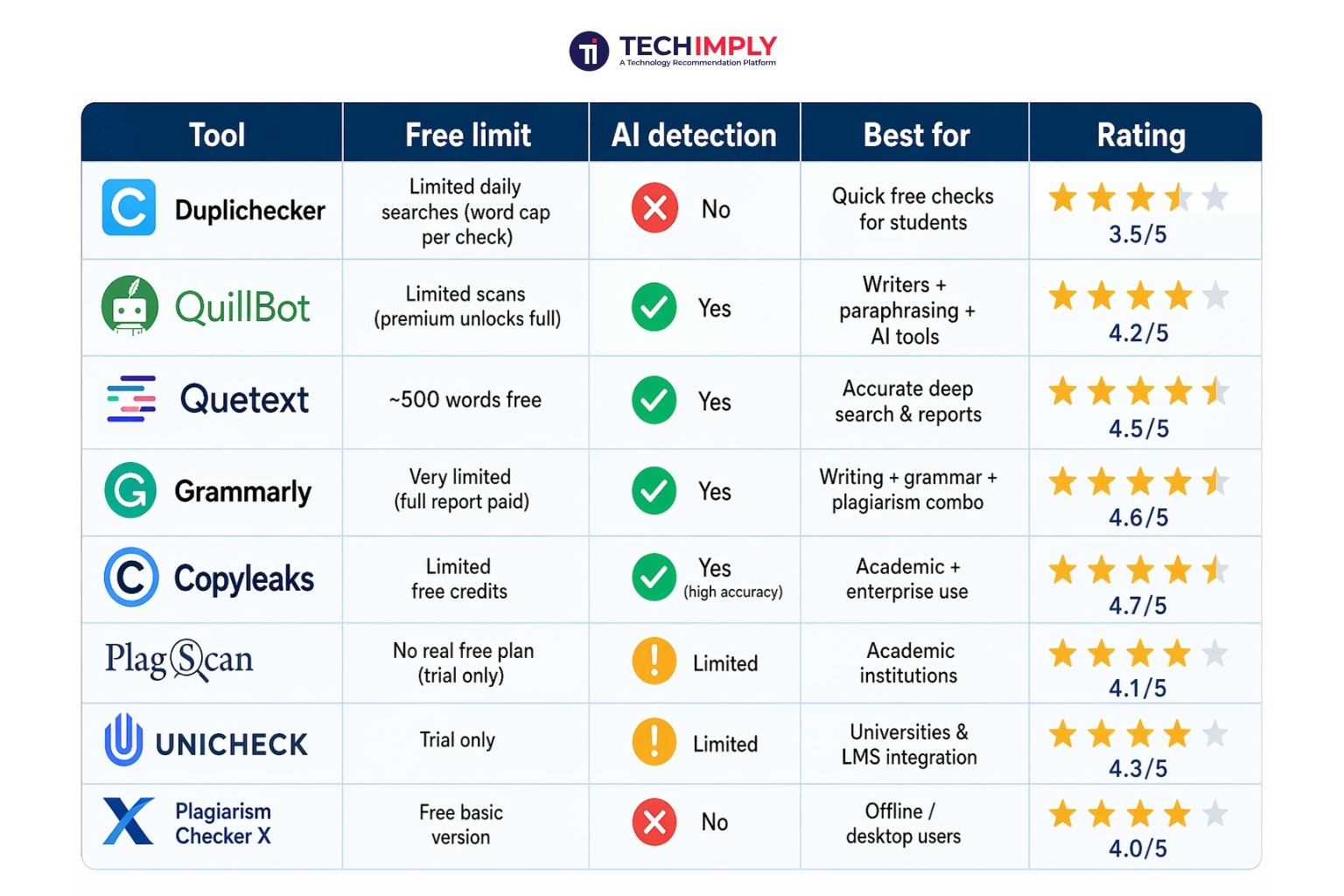
Best Free Plagiarism Checker Software: Quick Comparison
If you are looking for the best plagiarism checker for your specific needs, this table breaks down the top contenders available in 2026 based on our rigorous testing.
8 Best Free Plagiarism Checkers Tested & Ranked (2026)
Choosing from a massive plagiarism software list can be overwhelming. We’ve tested the top 8 tools to see which provides the most accurate results, focusing on database size and detection speed.
1. Duplichecker
Duplichecker remains a fan favorite because it is a plagiarism checker free of cost for small tasks. In 2026, it has introduced an advanced AI detector that provides a clear percentile preview of both human-written and AI-written content, making it useful for quick checks. It’s especially helpful for beginners who are learning how to check plagiarism efficiently.
-
Key Features: Supports 50+ languages and allows direct imports from Google Drive and Dropbox.
-
Accuracy: Performs "Deep Scans" by breaking down sentence structures rather than just matching word-for-word.
-
Limit: The free version allows up to 2,000 words per search but requires a reCAPTCHA for every check.
2. QuillBot
While famous for paraphrasing, QuillBot’s plagiarism checker software is highly sophisticated and ideal for academic use. It provides a deep scan of academic journals and web sources, ensuring that even "spun" content is flagged, making it a strong option in any plagiarism software list.
-
Key Features: Integrated with a Citation Generator (APA, MLA, Chicago) and a Co-Writer workspace that helps you rewrite flagged content in real-time.
-
Accuracy: Excellent at identifying "patchwriting" where a student might have swapped a few words but kept the original sentence structure.
-
Limit: The free tier is largely focused on grammar; the plagiarism scan often requires a premium subscription or a limited "page credit" system.
3. Quetext
Quetext uses proprietary DeepSearch™ Technology, making it one of the best plagiarism checker tools for research papers. It is particularly good at spotting "mosaic plagiarism," where ideas are blended from multiple sources, and works effectively as a plagiarism checker AI.
-
Key Features: The ColorGrade™ feedback system highlights exact matches in red and "fuzzy" (paraphrased) matches in orange.
-
Accuracy: It uses advanced probability scoring to determine if a sentence was likely copied, even if the words were changed significantly.
-
Limit: The free version provides a 500-word allowance and a basic similarity report without deep academic database access.
4. Grammarly
Grammarly is arguably the best plagiarism checker for overall writing quality, acting as an all-in-one academic assistant. It not only checks plagiarism but also improves tone and clarity, making it a reliable plagiarism checker software for students and professionals.
-
Key Features: Beyond scanning 16 billion web pages, it includes an AI Grader that gives students feedback on how a professor might score their essay.
-
Accuracy: Extremely fast; it provides line-by-line matches with direct links to the source material found in ProQuest databases.
-
Limit: Free users get a "Plagiarism Found" alert but must upgrade to see the specific source and percentage.
5. Copyleaks
Copyleaks is a leading plagiarism checker AI designed to detect advanced AI-generated and humanized content. It is widely trusted by institutions and is considered one of the most accurate tools for modern plagiarism detection.
-
Key Features: It can detect Cross-Language Plagiarism (e.g., text translated from Spanish to English to hide the source).
-
Accuracy: Known for having the lowest false-positive rate in the industry, making it trusted by many 2026 educational institutions.
-
Limit: Offers a limited trial for new users, focusing more on a credit-based system for high-accuracy scans.
6. PlagScan
PlagScan is built for organizations and researchers who prioritize data security and secure document handling. As a professional plagiarism checker software, it is widely used in academic environments and fits well in any trusted plagiarism software list.
-
Key Features: Offers Side-by-Side Comparison reports and allows you to exclude specific domains (like your own blog) from the scan.
-
Accuracy: Matches content against 20,000+ scientific journals and your own personal repository of past documents.
-
Limit: New users can sign up for a Free Trial that provides enough credits to check a standard-length assignment.
7. Unicheck
Unicheck is a cloud-based free plagiarism checker for students when accessed through institutions, making it highly convenient for academic workflows. It integrates directly with platforms like Moodle and Google Classroom, helping users easily understand how to check plagiarism in real-time.
-
Key Features: Features a Minimap that gives a bird's-eye view of where plagiarism is concentrated in a 50-page document.
-
Accuracy: Updates its index in real-time, meaning it can find matches from news articles published just minutes ago.
-
Limit: Often provided free through schools; individual users get a limited trial scan.
8. Plagiarism Checker X
Plagiarism Checker X is a desktop-based plagiarism checker software that keeps all data offline, making it ideal for privacy-focused users. It allows bulk comparisons and detects self-plagiarism, offering a different approach compared to cloud-based service tools.
-
Key Features: Includes a Bulk Search feature that allows you to compare two different folders of documents to find "self-plagiarism."
-
Accuracy: Uses a color-coded system (Green/Yellow/Red) to indicate the severity of the similarity relative to the total word count.
-
Limit: The Basic Version is free forever but has daily search limits and doesn't support the most advanced deep-web scans.
How to Check Plagiarism: Step-by-Step Guide
If you are new to using these tools, here is a simple workflow to ensure your document is clean before you hit "submit."
Step 1: Choose the right tool
Select a tool from our plagiarism software list based on your document length and the need for AI detection. If you're checking a creative blog post, Duplichecker is fine. For a medical thesis, use Copyleaks or Grammarly.
Step 2: Upload or paste your document
Most plagiarism checker software allows you to either copy-paste text or upload .docx and .pdf files directly. Effective Document Management makes it easier to locate and organize your files before scanning. Ensure you remove your bibliography or references section first, as these will often trigger false positives for similarity.
Step 3: Read the similarity report
Wait for the scan to finish. The tool will provide a percentage (e.g., 5% similarity). A "safe" score is usually below 10-15%. Look for the highlighted sections that show exactly which websites or papers match your text.
Step 4: Fix flagged content
If you find flagged text that isn't a common phrase, you have three options:
Paraphrase: Rewrite the idea entirely using your own unique voice and sentence structure.
Quote: If the original wording is essential, put it in quotation marks.
Cite: Use the tool's built-in citation generator to add a proper source according to your required style guide (APA, MLA, etc.).
Conclusion
Finding a reliable plagiarism checker in 2026 is easier than ever, but accuracy varies. For quick, daily tasks, Duplichecker is a solid plagiarism checker free option. However, if you are a researcher or a student working on a high-stakes thesis, investing in a plagiarism checker AI like Copyleaks or Grammarly ensures your reputation remains spotless. Always remember: the goal isn't just to "pass" the scan—it's to ensure your voice is truly your own and your contributions to your field are authentic.