


 0.0
0.0
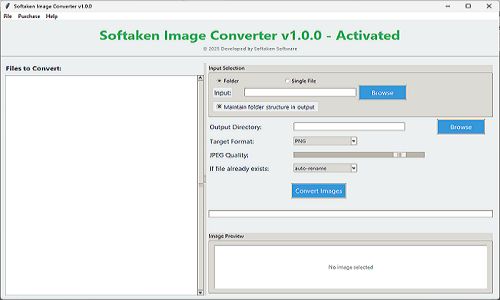
The Softaken Image Converter is a 100% safe and secure solution for converting multiple image files to other formats without compromising the quality. This tool supports multiple image formats like PNG, WebP, JPEG, and others.
Pricing of Image Converter
- Support bulk conversion
- Get 1 year customer support
- 1 year validity of license
Key Features of Image Converter
Key Features:
Key Specification
| Other Categories: | Image Optimization Software |
|---|---|
| Deployment: | On Premise |
| Customer Support: | Email,Live Chat |
| Customization: | No |
| Languages Support: | English |
Who uses Image Converter

Personal

StartUps

SMEs

Agencies

Enterprises
Company Details
| Company Name: | Softaken |
|---|---|
| Headquarter: | Orlando, Florida United States |
| Social Media: |
Image Converter Description
Most Popular Software


Alternative



Image Converter Video/Screenshots
User Reviews

Frequently Asked Questions (FAQs)
The user group of Image Converter are as follows :
- Personals
- Startups
- SMEs
- Agencies
- Enterprises
Image Converter has 1 plans,
- Personal INR 29 Single operating system
Image Converter is allowed 0 Days Free Trial.
The key featuers of Image Converter are as follows :
- WebP Format
- Effects and Filters
- Image Analytics
- Privacy Control
- remove background
- remove watermark
- Intelligent Crop
Image Converter pricing model : Onetime(Perpetual License)
Image Converter is Offline Software.
No
Image Converter offers Email,Live Chat support.
Image Converter provides Help Guides,Video Guides,Blogs,Infographics for the software training.


