Skillshare for Teams

All the Skills Your Creative Team Needs for Today and Tomorrow

0.0
Rating out of 5 Based on 0 reviews

What is Skillshare for Teams

Skillshare for Teams is a teamwork-focused learning platform made for companies and groups that want to boost their employees' skills. It offers thousands of on-demand courses on creativity, efficiency, management, and other topics. Businesses usually check out the Skillshare for Teams Demo first to see what's available, and then look at the Skillshare for Teams Pricing and plans.

Pricing of Skillshare for Teams

For Teams of 2+

USD 199
USD 0.00

/seat annually

Buy Now
  • Contact Us

For Teams of 30+

USD 0
USD 0.00

Contact Sales

Buy Now
  • Special discounts available

Key Specification

Other Categories: Learning Management System (LMS) Software Talent Management Software
Deployment: Cloud Hosted
Customer Support: Online (Ticket)
Customization: No
Languages Support: English, French, German, Portuguese, Spanish

Who uses Skillshare for Teams

SMEs
SMEs
Enterprises
Enterprises

Company Details

Company Name: Skillshare for Teams
Headquarter: New York,
Social Media:

Skillshare for Teams Description

Why Choose Skillshare for Teams?

In quick work settings, team development often gets sidelined by project timelines. Skillshare for Teams addresses this by providing accessible, adaptable, and motivating learning that naturally integrates into your team's routine.

Whether your staff wants to explore visual design, boost communication abilities, or refine leadership methods, Skillshare delivers curated material crafted by real-world creators and experts. Learning becomes a voluntary activity, not a mandatory one.

This is particularly beneficial for creative departments, marketing teams, product designers, and even HR professionals looking to foster growth, inspiration, and employee retention.

Benefits of Skillshare for Teams

  • Unlimited Class Access: Your team can learn from over 35,000 expert-led classes covering design, business, technology, and more.
  • On-Demand Learning: Classes are accessible whenever, so team members can learn at their own pace.
  • Progress Monitoring: Admin tools enable team leaders and managers to track usage, course progress, and involvement.
  • Personalized Learning Paths: Customize learning journeys around team roles or business objectives.
  • Inspiration from Professionals: All classes are taught by actual industry professionals — not just academics.
  • Collaborative Culture Enhancement: Teams can watch, learn, and discuss together, boosting group progress and innovation.
  • Cost-Effective Development: Skip expensive in-person training while gaining high-quality digital learning experiences.
  • Fully Remote-Friendly: Whether your team is in-office or dispersed, Skillshare scales to accommodate flexible work.
  • Creative Emphasis: Perfectly suited for design, branding, illustration, copywriting, and creative strategy departments.

How to Use Skillshare for Teams

  • Select Your Plan: Pick a plan that matches your team's size and training goals.
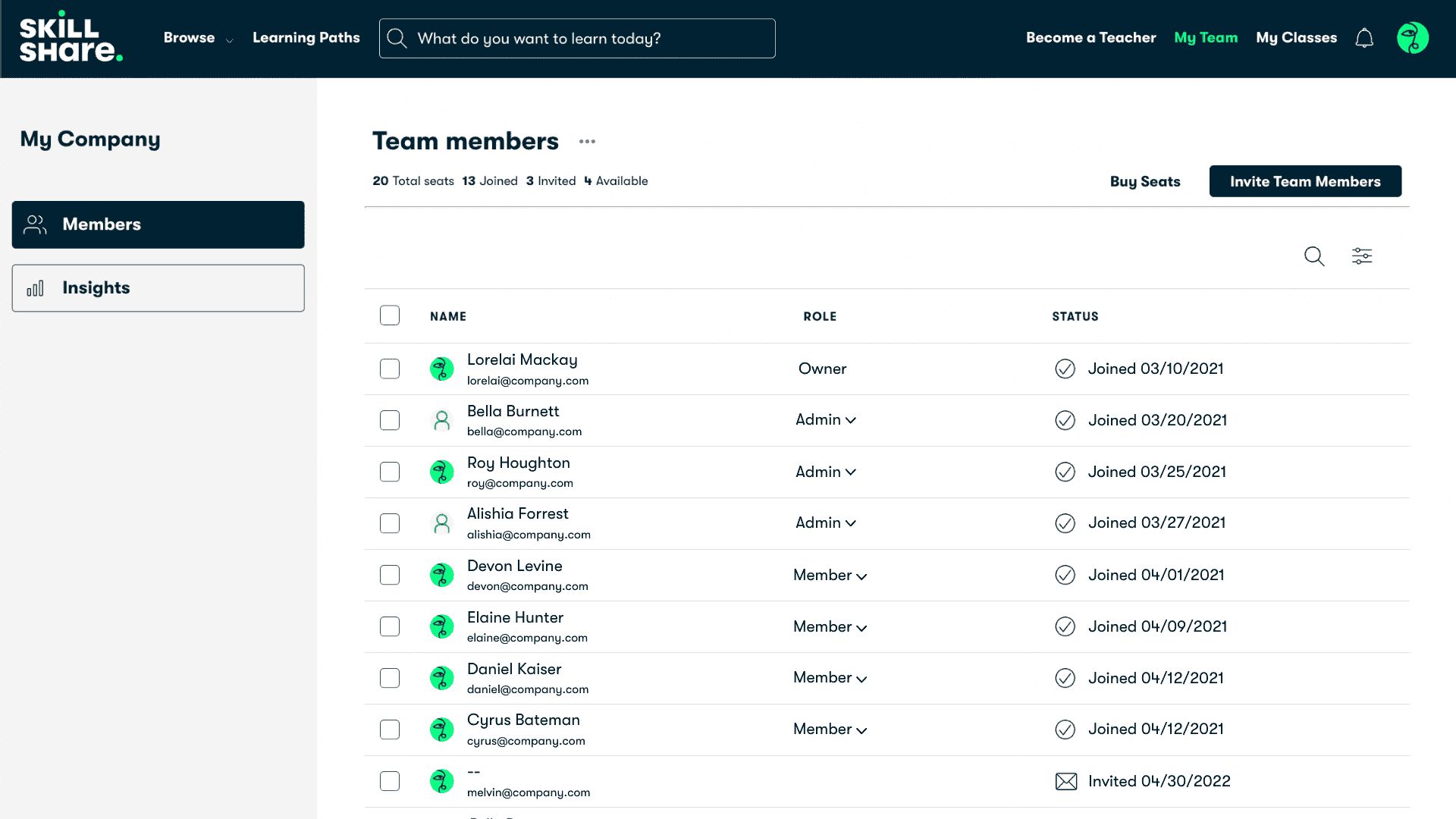
  • Invite Team Members: Admins can add users and easily manage seats.
  • Browse Classes: Members can explore creative and business courses based on their interests or roles.
  • Start Learning: Watch bite-sized lessons at your own schedule, with options to download for offline viewing.
  • Track Engagement: Managers can evaluate participation, see which courses are completed, and gain insights on impact.
  • Use Group Learning: Organize team learning days or collaborative study sessions around targeted classes.

Features of Skillshare for Teams

  • Full access to Skillshare’s complete class catalog
  • Centralized admin dashboard for license management
  • Engagement monitoring and reporting tools
  • Team progress overview
  • Custom playlists and learning paths
  • Simple onboarding with bulk seat allocation
  • Available mobile and desktop apps
  • Offline viewing for learning without an internet connection
  • Strong emphasis on creativity, business innovation, and personal improvement
  • Premium support for account administrators

Skillshare for Teams Demo

A free trial or team consultation is often available upon request to help organizations explore how Skillshare for Teams operates. This gives managers and HR leads a chance to test the platform’s usability, browse class content, and evaluate if it aligns with company development goals.

Skillshare for Teams Pricing

Pricing for Skillshare for Teams varies based on the number of users and the plan:

  • Starter Plan (2–19 users): Designed for smaller teams, with flexible billing and access to all standard features.
  • Enterprise Plan (20+ users): Includes advanced admin tools, data insights, onboarding assistance, and customized learning experiences.
  • Custom Quotes: Larger organizations can request tailored pricing based on usage, features, and expansion needs.

Skillshare’s approach is generally more economical than high-end training platforms, providing full access at a flat rate per user.

Skillshare for Teams Reviews

Reviews for Skillshare for Teams are generally positive across industries. Companies value its ease of deployment, and teams enjoy the creativity-focused learning environment. Most praise the platform’s ability to offer engaging, relevant content without the formality of standard corporate learning systems.

Managers report stronger team morale, enhanced teamwork, and increased motivation to upskill across departments. For fast-paced businesses, it’s seen as a modern approach to employee learning that employees actually enjoy.
 

Alternative

Trainual

Get everyone aligned on how work gets done.

0.0
Rating out of 5 Based on 0 reviews

Absorb LMS

By Absorb

0.0
Rating out of 5 Based on 0 reviews

iSpring Learn

Corporate LMS to onboard, train, and certify teams

0.0
Rating out of 5 Based on 0 reviews

Skillshare for Teams Video/Screenshots
Skillshare for Teams Key Clients

User Reviews

no-reviews
Share your experience! Be the very first reviewer. Write a Review

Frequently Asked Questions (FAQs)

The user group of Skillshare for Teams are as follows :

  • SMEs
  • Enterprises

Skillshare for Teams has 2 plans,

  • For Teams of 2+ USD 199 /seat annually
  • For Teams of 30+ USD 0 Contact Sales

Skillshare for Teams is not allowing Free Trial.

Skillshare for Teams pricing model : Onetime(Perpetual License)

Skillshare for Teams is Online Software.

No

Skillshare for Teams offers Online (Ticket) support.

Skillshare for Teams provides Help Guides,Video Guides,Blogs for the software training.