Prism live Studio

PRISM Live Studio

0.0
Rating out of 5 Based on 0 reviews

What is Prism Live Studio? 

Prism Live Studio is a free live streaming and video recording software designed to help creators, influencers, gamers, and professionals produce high-quality content across platforms like YouTube, Facebook, and Twitch. Developed by NAVER Corp., Prism offers real-time video effects, multi-streaming support, screen sharing, and easy integration with external devices. Whether you're going live for gaming, tutorials, or business presentations, Prism Live Studio gives you creative tools to enhance your content with custom overlays, filters, text, and music. With a user-friendly interface and powerful editing features, it empowers both beginners and professionals to go live like a pro—without spending a dime.

Pricing of Prism live Studio

no-pricing
For get detailed pricing as per your requirements.

Key Features of Prism live Studio

Key Features:
  • Video Capture
  • Video Editing
  • Audio Capture
  • Multistreaming
  • HD Video Streaming
  • Event Scheduling
  • Broadcast Recording
  • Audience Engagement
  • Audience Analytics
  • Customizable Branding
  • Live Chat
  • Video Annotations
  • Live Polling
  • Multi-camera feed
  • Text Overlay
  • Supports HD Resolution
  • Media Library
  • Brand Overlay
  • Audio Tools
  • Offline Editing

Key Specification

Other Categories: Webinar Software Social Media Management Software Influencer Marketing Software Video Editing Software Screen Recording Software Content Creation Software Live Streaming Software
Deployment: Cloud Hosted,Hybrid,On Premise
Customer Support: Email,Online (Ticket),Business Hours
Customization: Yes
Languages Support: English, Korean

Who uses Prism live Studio

Personal
Personal
StartUps
StartUps
SMEs
SMEs
Agencies
Agencies
Enterprises
Enterprises

Company Details

Company Name: Prism live Studio
Headquarter:
Social Media:

Prism live Studio Description

Why Choose Prism Live Studio?

Prism Live Studio is a top choice for content creators seeking a flexible, feature-rich live streaming platform that doesn’t come with a high learning curve or subscription cost. Whether you're streaming games, hosting webinars, conducting virtual classes, or just connecting with your followers, Prism makes it easy with its intuitive controls and robust tools. Its multi-streaming capability allows you to broadcast to multiple platforms simultaneously, saving time and maximizing your audience reach. Moreover, the software functions as a lightweight Video Editing Software as well, supporting real-time video editing, camera filters, and personalized effects that give your content a professional touch. From screen sharing and background music to chat overlays and donation alerts, Prism Live Studio packs everything you need into one lightweight app—ideal for creators on a budget.

Benefits of Prism Live Studio 

  • High-Quality Streaming: Deliver HD broadcasts without lags or crashes.

  • Multi-Platform Streaming: Simultaneously go live on YouTube, Facebook, Twitch, and more.

  • Live Effects & Filters: Apply beautification filters, stickers, and animations in real time.

  • Mobile & Desktop Support: Available on both Windows/macOS and Android/iOS for versatility.

  • Audio Mixing & Background Music: Add BGM and manage mic input effortlessly.

  • Free & Lightweight: No subscription required, yet packed with premium-grade features.

  • Screen & App Sharing: Ideal for tutorials, presentations, and game streaming.

  • Real-Time Chat Overlay: Engage with your audience without leaving the screen.

  • Easy External Device Integration: Use webcams, microphones, and capture cards seamlessly.

How to Use Prism Live Studio

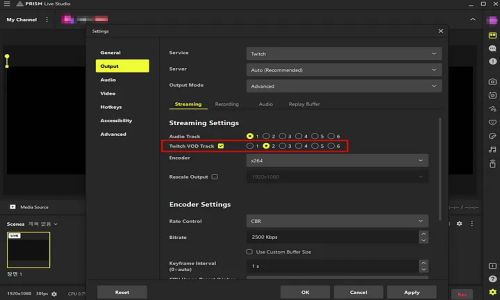
Using Prism Live Studio is simple, even if you’re new to streaming. First, download and install the software from the official website or app store. Once installed, log in using your preferred social media account. Set up your stream by choosing your platform(s), configuring resolution, and selecting your audio and video sources. Customize your broadcast with overlays, effects, music, and text. If you're using it on mobile, just open the app, grant camera/mic permissions, and go live instantly. For desktop users, connect your webcam, add media sources or screens, and click "Go Live." The intuitive dashboard helps you manage your live session in real time with scene transitions, chat interactions, and camera filters. Whether you're streaming games, hosting tutorials, or vlogging, Prism makes the process seamless.

Features of Prism Live Studio 

  • Multi-Streaming Support: Stream on multiple platforms simultaneously.

  • Real-Time Video Effects: Use filters, animations, and stickers during live sessions.

  • Custom Overlays: Add text, images, and alerts to personalize your broadcast.

  • Chroma Key (Green Screen): Replace your background with virtual scenes.

  • Screen Sharing: Share specific windows or your full screen for tutorials or presentations.

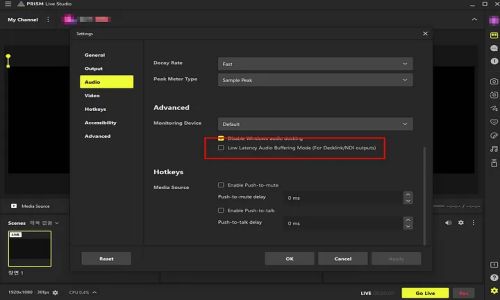
  •  Audio Input & Output Control: Mix mic, system audio, and BGM with ease.

  • Device Compatibility: Seamlessly integrates with webcams, microphones, and capture cards.

  • Mobile Live Streaming: Broadcast directly from your smartphone with high-quality effects.

  • Chat Overlay & Widgets: Display live chat, donations, or social handles on screen.

What Makes Prism Live Studio Different?

What sets Prism Live Studio apart from other streaming platforms is its combination of simplicity, professional-grade features, and affordability—all for free. While many live streaming apps require payment for premium tools, Prism offers robust features like chroma key support, multi-platform broadcasting, customizable overlays, and live effects at no cost. Its mobile app is equally powerful, giving creators on-the-go the ability to broadcast professional streams from their phones. Additionally, Prism’s real-time enhancements, low system requirements, and lightweight interface make it ideal for both novice streamers and seasoned broadcasters. The ability to schedule streams, preview setups before going live, and monitor viewer interaction on a single screen creates an all-in-one solution that prioritizes both usability and quality—making Prism a unique value-packed alternative to pricier tools.

Who Can Benefit from Prism Live Studio? 

Prism Live Studio is a perfect fit for content creators, educators, marketers, gamers, vloggers, and even small business owners. If you’re a YouTuber or Twitch streamer looking to level up your production value, Prism gives you the tools without the complexity. Teachers and coaches can use it for delivering online classes or webinars with screen sharing and real-time interaction. Social media managers and small brands can benefit from Prism’s multi-streaming and branding tools to connect with audiences on several platforms at once. Even podcasters and virtual event hosts can use it for live interviews, panels, and interactive sessions. Whether you're building a personal brand, educating an audience, or entertaining fans, Prism Live Studio is a free yet powerful tool to streamline your efforts and grow your presence.

Is Prism Live Studio Easy to Use? 

Yes, Prism Live Studio is designed to be beginner-friendly and easy to navigate, regardless of your experience with live streaming. The interface is clean and intuitive, with drag-and-drop features for media, text, and effects. Setting up a stream involves just a few steps—select your platform, configure your sources, customize your layout, and go live. Its preset templates and scene transitions simplify things even more for users who aren’t tech-savvy. The mobile version offers one-tap streaming, while the desktop version supports a more advanced layout for pros. Tutorials and guides are also provided within the app to help you master features like chroma key, overlay design, and audio mixing. With real-time preview and customizable scenes, you can produce professional-quality broadcasts without the learning curve often associated with similar tools.

What Support Does Prism Live Studio Offer?

Prism Live Studio offers robust support options to assist users at every stage. The official website features a dedicated Help Center, including FAQs, video tutorials, setup guides, and troubleshooting tips. For real-time assistance, users can submit support requests directly through the app or website. The software also has an active user community and social channels where creators share solutions, tips, and updates. Additionally, regular software updates ensure compatibility with the latest platforms and features, helping users stay ahead. While there is no 24/7 live chat, the combination of easy-to-understand documentation, YouTube tutorials, and responsive email support makes Prism’s assistance reliable. Whether you’re stuck on scene setup or multi-streaming, Prism’s resources are designed to guide you without frustration.

Alternative

OBS Studio

OBS Studio

0.0
Rating out of 5 Based on 0 reviews

Streamlabs OBS

By Streamlabs OBS

0.0
Rating out of 5 Based on 0 reviews

Restream

One live stream. 30+ destinations

0.0
Rating out of 5 Based on 0 reviews

Prism live Studio Video/Screenshots
User Reviews

no-reviews
Share your experience! Be the very first reviewer. Write a Review

Frequently Asked Questions (FAQs)

The user group of Prism live Studio are as follows :

  • Personals
  • Startups
  • SMEs
  • Agencies
  • Enterprises

Prism live Studio has 0 plans.

Prism live Studio is allowed 0 Days Free Trial.

Prism live Studio pricing model : Onetime(Perpetual License)

Prism live Studio is Cloud Hosted,Hybrid,On Premise Software.

Yes

Prism live Studio offers Email,Online (Ticket),Business Hours support.

Prism live Studio provides Help Guides,Video Guides,Blogs for the software training.