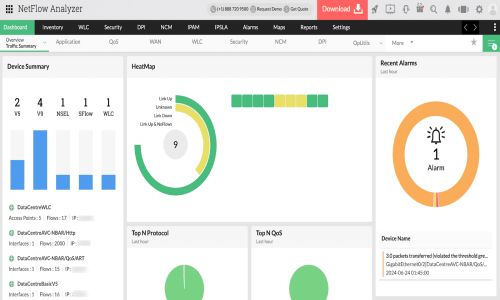
ManageEngine NetFlow Analyzer

Extensive network bandwidth monitoring and traffic analysis tool

0.0
Rating out of 5 Based on 0 reviews

NetFlow Analyzer is a tool that manages bandwidth by monitoring, collecting, and analyzing traffic to discover performance issues and security risks. Regardless of the organization's size, administrators can understand the details of bandwidth usage with real-time monitoring and traffic trend reporting.

Pricing of ManageEngine NetFlow Analyzer

no-pricing
For get detailed pricing as per your requirements.

Key Features of ManageEngine NetFlow Analyzer

Key Features:
  • Diagnostic Tools
  • Web Traffic Reporting
  • Bandwidth Monitoring

Key Specification

Other Categories: Network Mapping Software Network Monitoring Software Network Monitoring Software For Mac Free Network Monitoring Software
Deployment: Hybrid,On Premise,Any
Customer Support: Phone,Email,Live Chat,Online (Ticket),Business Hours
Customization: Yes
Languages Support: Chinese, Danish, Dutch, Finnish, French, German, Italian, Japanese, Korean, Norwegian, Polish, Portuguese, Russian, Spanish, Swedish, Turkish

Who uses ManageEngine NetFlow Analyzer

Personal

Personal
StartUps
StartUps
SMEs
SMEs
Agencies
Agencies
Enterprises
Enterprises

Company Details

Company Name: ManageEngine
Headquarter: Pleasanton, California United States
Social Media:

ManageEngine NetFlow Analyzer Description

NetFlow Analyzer is a comprehensive network bandwidth monitoring and traffic analysis solution designed specifically to address the performance issues of modern, dynamic IT infrastructures. NetFlow Analyzer provides visibility into hybrid and cloud networks, enabling administrators to analyze the bandwidth usage of every element, including applications and users. With its deep analysis of traffic by volume, speed, and utilization, network administrators can evaluate the quality and reliability of their networks and troubleshoot performance bottlenecks before they impact users.

How NetFlow Analyzer simplifies bandwidth monitoring?

  • Multi-vendor support: NetFlow Analyzer supports multiple flow technologies like NetFlow, sFlow, J-Flow, IPFIX, etc., allowing administrators to monitor the bandwidth usage of a wide range of devices and identify the root cause of issues affecting productivity.Application usage monitoring: NetFlow Analyzer enables administrators to monitor the traffic of specific applications, determining how each application is being used within the network and by whom. This visibility extends to Layer 4 and Layer 7 applications.
  • Traffic shaping: NetFlow Analyzer allows administrators to apply QoS policies to different applications or links, and evaluate the effectiveness of such policies with CBQoS, which shows pre-policy and post-policy traffic trends.
  • Anomaly detection: NetFlow Analyzer's network behavior anomaly detection (NBAD) feature detects unusual traffic behavior in the network and notifies administrators when suspicious IP addresses or traffic enters the network. Administrators can also configure custom thresholds based on encountered attacks.
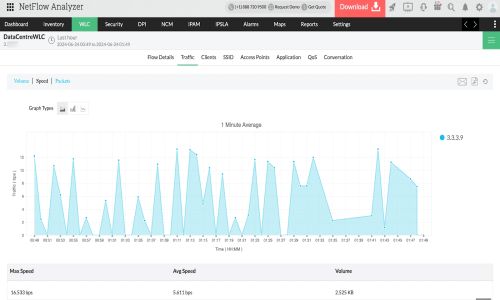
  • Wireless network traffic monitoring: NetFlow Analyzer provides information on wireless controllers and their real-time traffic. Additionally, administrators can monitor the number of users accessing their wireless network by individual access points, SSIDs, client IP addresses, and MAC addresses. This allows them to see how their bandwidth is being used and identify any rogue devices intruding into the network.
  • IPSLA monitoring: NetFlow Analyzer monitors VoIP, video, and WAN traffic to align it with SLAs and prioritize the user experience. The tool provides critical metrics such as jitter, packet loss, and MOS, enabling administrators to edit threshold details and receive alerts when the threshold exceeds.
  • Threshold-based alerts: NetFlow Analyzer offers different alert categories, such as real-time, aggregated, and security, allowing administrators to establish a baseline behavior and configure alert profiles with criteria and severity. When the performance or traffic behavior goes above or below or is abnormal, NetFlow Analyzer alerts administrators via their preferred notification mode.

Alternative

Auvik

By Auvik Networks

0.0
Rating out of 5 Based on 0 reviews

SaferVPN

The Virtual Private Network dedicated to providing a free and open Internet for all

0.0
Rating out of 5 Based on 0 reviews

LiveNX

By LiveAction

0.0
Rating out of 5 Based on 0 reviews

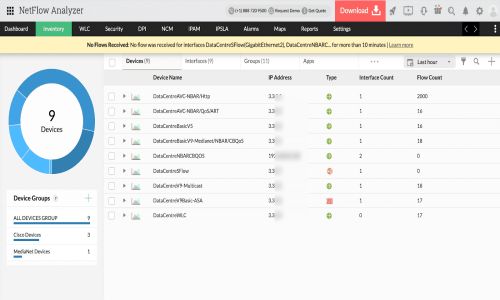
ManageEngine NetFlow Analyzer Video/Screenshots
User Reviews

no-reviews
Share your experience! Be the very first reviewer. Write a Review

Frequently Asked Questions (FAQs)

The user group of ManageEngine NetFlow Analyzer are as follows :

  • Personals
  • Startups
  • SMEs
  • Agencies
  • Enterprises

ManageEngine NetFlow Analyzer has 0 plans.

ManageEngine NetFlow Analyzer is allowed 30 Days Free Trial.

ManageEngine NetFlow Analyzer pricing model : Yearly,Monthly,Onetime(Perpetual License),Transaction

ManageEngine NetFlow Analyzer is Hybrid,On Premise,Any Software.

Yes

ManageEngine NetFlow Analyzer offers Phone,Email,Live Chat,Online (Ticket),Business Hours support.

ManageEngine NetFlow Analyzer provides Help Guides,Video Guides,Blogs,Webinars,Infographics,Case Studies,On-Site Training for the software training.