iBoysoft MagicMenu

A right-click enhancer to customize the Finder context menu on Mac for optimal productivity.

0.0
Rating out of 5 Based on 0 reviews

The default right-click menu on macOS merely offers a small number of options. Luckily, you can greatly expand your right-click options with iBoysoft MagicMenu.

Pricing of iBoysoft MagicMenu

iBoysoft MagicMenu

USD 20.00
USD 0.00

1

Buy Now
  • Auto-renewal
  • cancel anytime
  • 14 Days Money Back
  • Instant Delivery
  • Professional Tech Support

Key Specification

Other Categories: Document Management Software Personalization Software New Saas Software
Deployment: Cloud Hosted
Customer Support: Email,Live Chat
Customization: Yes
Languages Support: Chinese, English, French, German, Japanese, Portuguese, Spanish

Who uses iBoysoft MagicMenu

Personal
Personal
StartUps
StartUps

Company Details

Company Name: iBoysoft
Headquarter: China
Social Media:

iBoysoft MagicMenu Description

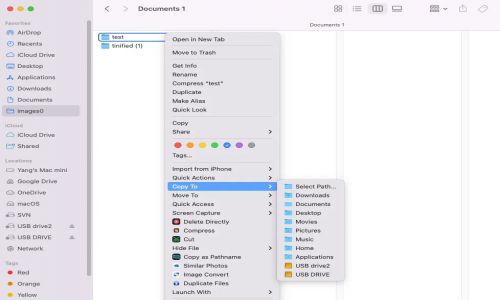
iBoysoft MagicMenu is a right-click context menu enhancer that enables you to add many practical right-click functionalities including new file creation, file transfer, quick access, complete app uninstallation, file launching with various apps, duplicate file detection, similar photo cleanup, file compression, image conversion, screen capture, permanent file deletion, file path copying, file airdrop, and more to your Mac right-click menu, improving your work efficiency as well as overall macOS experience. Specifically, iBoysoft MagicMenu provides a suite of convenient features:

1. This tool allows for new file creation of a wide range of file types (like TXT, RTF, Doc, XLS, WPS, PPT, Keynote, Markdown, Numbers, Pages, etc.) with just a right-click.
2. It enables users to add a folder shortcut to the Copy/Move To menu and quickly copy/move files to a designated location for streamlined file transfer.
3. It offers quick access to commonly used files, apps, and websites through a simple right-click.
4. It can efficiently remove unwanted software and its associated files.
5. It can easily locate and delete duplicate files and similar photos.
6. It also functions as an image converter to convert various formats of images to PNG, JPG, or WEBP.
7. It provides additional functionalities like file compression, screen capture, screen recording, file path copying, private file hiding, file airdrop, etc.

Alternative

Dynamic Yield

By Dynamic Yield

0.0
Rating out of 5 Based on 0 reviews

Personyze

By Personyze

0.0
Rating out of 5 Based on 0 reviews

Adobe Target

By Adobe

0.0
Rating out of 5 Based on 0 reviews

iBoysoft MagicMenu Video/Screenshots

User Reviews

no-reviews
Share your experience! Be the very first reviewer. Write a Review

Frequently Asked Questions (FAQs)

The user group of iBoysoft MagicMenu are as follows :

  • Personals
  • Startups

iBoysoft MagicMenu has 1 plans,

  • iBoysoft MagicMenu USD 20.00 1

iBoysoft MagicMenu is not allowing Free Trial.

iBoysoft MagicMenu pricing model : Yearly

iBoysoft MagicMenu is Online Software.

Yes

iBoysoft MagicMenu offers Email,Live Chat support.

iBoysoft MagicMenu provides Help Guides,Blogs for the software training.