Hoverwatch

Free mobile tracker

0.0
Rating out of 5 Based on 0 reviews

What is Hoverwatch?

Hoverwatch is a powerful monitoring software designed to track activities on smartphones, tablets, and computers. It operates silently in the background and allows users to monitor calls, messages, social media interactions, location, internet usage, and more. Hoverwatch is commonly used by parents for child monitoring, employers for employee supervision, and individuals for device protection. It works seamlessly on Android and Windows platforms and offers cloud-based data storage, enabling users to access logs remotely. The software ensures secure, real-time updates and is equipped with features that make digital tracking simple and reliable for various personal and professional purposes.

Pricing of Hoverwatch

Personal

USD 29.95
USD 0.00

/month

Buy Now
  • Track 1 Device All monitoring functions are available

Professional

USD 9.99
USD 0.00

/month

Buy Now
  • Track 5 Device All monitoring functions are available

Business

USD 6.00
USD 0.00

/month

Buy Now
  • Track 25 Device All monitoring functions are available

Key Features of Hoverwatch

Key Features:
  • Live Location Tracking
  • Auto Screenshot, Application Usage
  • Dashboard
  • Reports
  • App Usage
  • Real Time Analytics
  • Domain Blocking
  • Manual Snapshots
  • User Logs
  • Call Monitoring
  • Sms Tracking
  • Email Monitoring
  • Gps Location Tracking
  • Geofencing
  • Social Media Monitoring
  • Instant Messenger Monitoring
  • Multimedia Access

Key Specification

Other Categories: Employee Monitoring Software Time Tracking Software For PC
Deployment: Cloud Hosted,Hybrid
Customer Support: Email,Online (Ticket),Business Hours
Customization: No
Languages Support: English

Who uses Hoverwatch

Personal
Personal
StartUps
StartUps
SMEs
SMEs
Agencies
Agencies
Enterprises
Enterprises

Company Details

Company Name: Hoverwatch
Headquarter: Chennai, India
Social Media:

Hoverwatch Description

Why Choose Hoverwatch?

Hoverwatch stands out as a comprehensive monitoring solution for anyone seeking visibility into device activity. Whether you're a concerned parent, a business owner, or an individual wanting to secure your digital data, Hoverwatch provides a reliable platform that captures real-time information without being detected by the user of the device. Its setup is quick, and the dashboard is intuitive, enabling seamless access to collected data. With Hoverwatch, users can track locations, read messages, listen to call recordings, and monitor social media platforms through features similar to a Social Media Management Software. Its invisible operation ensures discreet surveillance, giving users peace of mind. Moreover, it offers flexible pricing plans suitable for individuals and organizations alike.

Benefits of Hoverwatch

  • Real-Time Monitoring: Keeps track of all activities as they happen, including messages, calls, and GPS location.

  • Stealth Mode: Operates invisibly, ensuring that the person being monitored remains unaware.

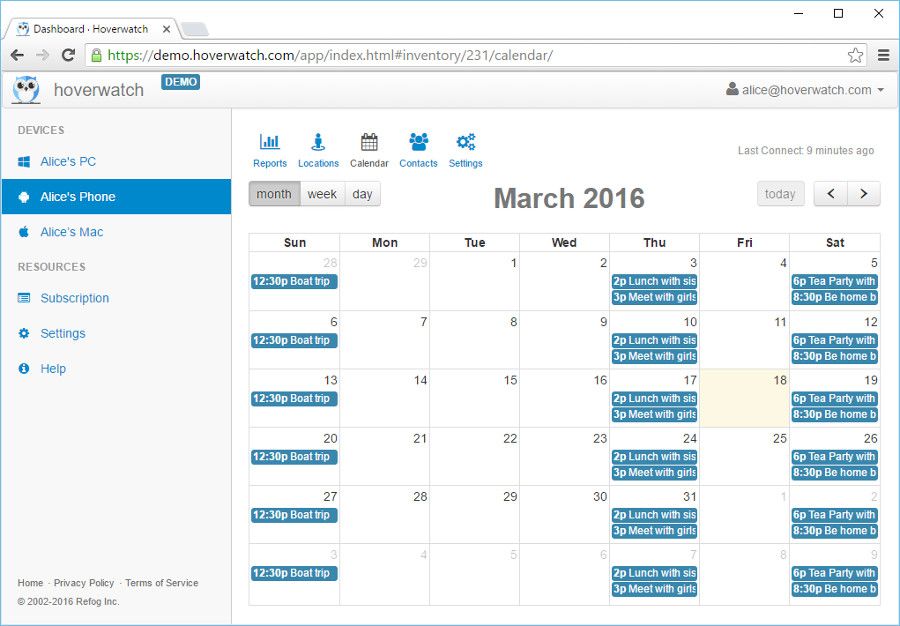
  • Comprehensive Tracking: Tracks text messages, call logs, browser history, social media apps, and even calendar entries.

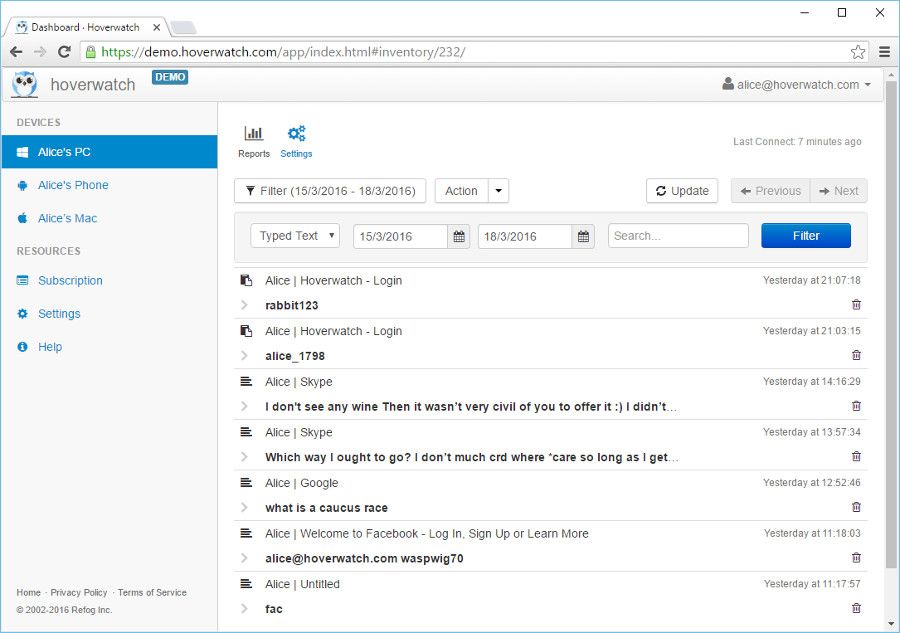
  • Data Access from Anywhere: Cloud storage allows users to view data remotely through a secure web portal.

  • Multi-Device Support: Monitor multiple devices under a single account, ideal for business or family use.

  • Affordable Pricing: Offers budget-friendly plans tailored for both personal and business use.

  • Screenshots and Camera Access: Takes periodic screenshots and captures camera activity for added insights.

  • Saves Time: Streamlines supervision without the need for physical checks or confrontations.

How to Use Hoverwatch

Using Hoverwatch is simple and straightforward. Start by creating an account on Hoverwatch’s official platform. Once registered, download and install the software on the target device. The installation process takes only a few minutes and operates in stealth mode. After installation, the software begins recording activities like calls, text messages, location history, and internet usage. All the collected data is then sent to your online account, where you can log in using any web browser to review it. Hoverwatch also allows customization of tracking preferences, ensuring that users only monitor the information most relevant to their needs. It’s user-friendly and secure.

Features of Hoverwatch

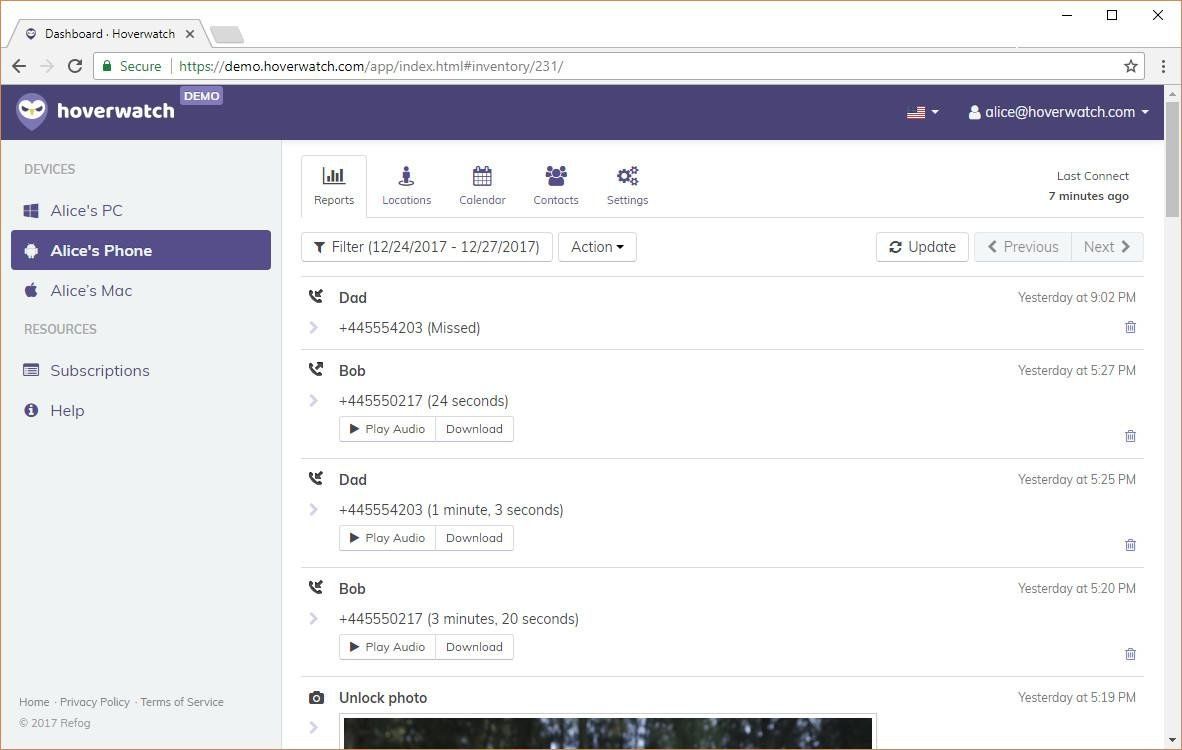
  • Call Recording and Logs: Records incoming and outgoing calls with time stamps.

  • SMS and MMS Monitoring: Captures all sent and received messages.

  • Location Tracking: Uses GPS, Wi-Fi signals, and cell towers to provide accurate real-time location.

  • Social Media Monitoring: Tracks WhatsApp, Facebook, Snapchat, Instagram, and more.

  • Web Browser History: Logs websites visited on the device.

  • Screenshots and Camera Use Tracking: Captures regular screenshots and monitors camera activity.

  • Calendar and Notes Access: Monitors schedules and notes saved on the device.

  • Stealth Mode Operation: Works invisibly on the target device.

What Makes Hoverwatch Different?

What sets Hoverwatch apart from other monitoring tools is its true invisibility mode combined with an extensive list of features. Unlike many apps that are easily detectable or require rooting/jailbreaking, Hoverwatch is easy to install and runs discreetly without altering device performance. Its ability to monitor social media, take screenshots, and even track SIM card changes makes it more versatile than standard trackers. The software is also designed with both personal and professional users in mind, allowing multi-device tracking under one account. Additionally, Hoverwatch keeps user data encrypted and secure, ensuring privacy throughout the monitoring process.

Who Can Benefit from Hoverwatch?

Hoverwatch is ideal for a wide range of users. Parents can use it to ensure their children’s online safety, tracking calls, social media interactions, and real-time locations. Employers benefit from Hoverwatch by monitoring company-issued devices, ensuring productivity and data security. Individuals concerned about phone theft or data breaches can also use the software to safeguard their devices. Educational institutions and small businesses may also find Hoverwatch valuable for monitoring digital tools issued to staff or students. Whether for personal peace of mind or professional oversight, Hoverwatch provides flexible solutions tailored to modern monitoring needs.

Is Hoverwatch Easy to Use?

Yes, Hoverwatch is designed with user convenience in mind. From installation to monitoring, every step is simplified. Users don’t need advanced technical skills to operate it. The intuitive dashboard provides access to all the collected information in an organized format. With real-time syncing and automatic data backups, users can rely on Hoverwatch for consistent updates. Its one-click login and responsive interface make data tracking hassle-free. Moreover, the software does not require rooting or jailbreaking, further easing the setup process. Whether you're managing one or multiple devices, Hoverwatch ensures a smooth, user-friendly experience for all.

What Support Does Hoverwatch Offer?

Hoverwatch offers reliable customer support to assist users throughout their monitoring journey. A dedicated support team is available via email to help with installation, configuration, or troubleshooting issues. The official website also includes a comprehensive FAQ section covering common questions and step-by-step guides. Hoverwatch regularly updates its software to ensure compatibility with the latest operating systems and to enhance performance. While the platform does not currently offer live chat or phone support, its prompt email response and detailed online resources make it easy for users to resolve concerns. Overall, the support system is sufficient and user-focused.

Alternative

When I Work

Scheduling for Shift Based Workplaces

0.0
Rating out of 5 Based on 0 reviews

Hubstaff

Time tracking software for the global workforce

0.0
Rating out of 5 Based on 0 reviews

Connecteam

Powerful Hubs, Flexible Pricing

0.0
Rating out of 5 Based on 0 reviews

Hoverwatch Video/Screenshots

User Reviews

no-reviews
Share your experience! Be the very first reviewer. Write a Review

Frequently Asked Questions (FAQs)

The user group of Hoverwatch are as follows :

  • Personals
  • Startups
  • SMEs
  • Agencies
  • Enterprises

Hoverwatch has 3 plans,

  • Personal USD 29.95 /month
  • Professional USD 9.99 /month
  • Business USD 6.00 /month

Hoverwatch is not allowing Free Trial.

The key featuers of Hoverwatch are as follows :

  • Live Location Tracking
  • Auto Screenshot, Application Usage
  • Dashboard
  • Reports
  • App Usage
  • Real Time Analytics
  • Domain Blocking
  • Manual Snapshots
  • User Logs
  • Call Monitoring
  • Sms Tracking
  • Email Monitoring
  • Gps Location Tracking
  • Geofencing
  • Social Media Monitoring
  • Instant Messenger Monitoring
  • Multimedia Access

Hoverwatch pricing model : Yearly,Monthly

Hoverwatch is Cloud Hosted,Hybrid Software.

No

Hoverwatch offers Email,Online (Ticket),Business Hours support.

Hoverwatch provides Help Guides,Blogs for the software training.