Filevine

Legal Tech That Changes Everything

0.0
Rating out of 5 Based on 0 reviews

What is Filevine?

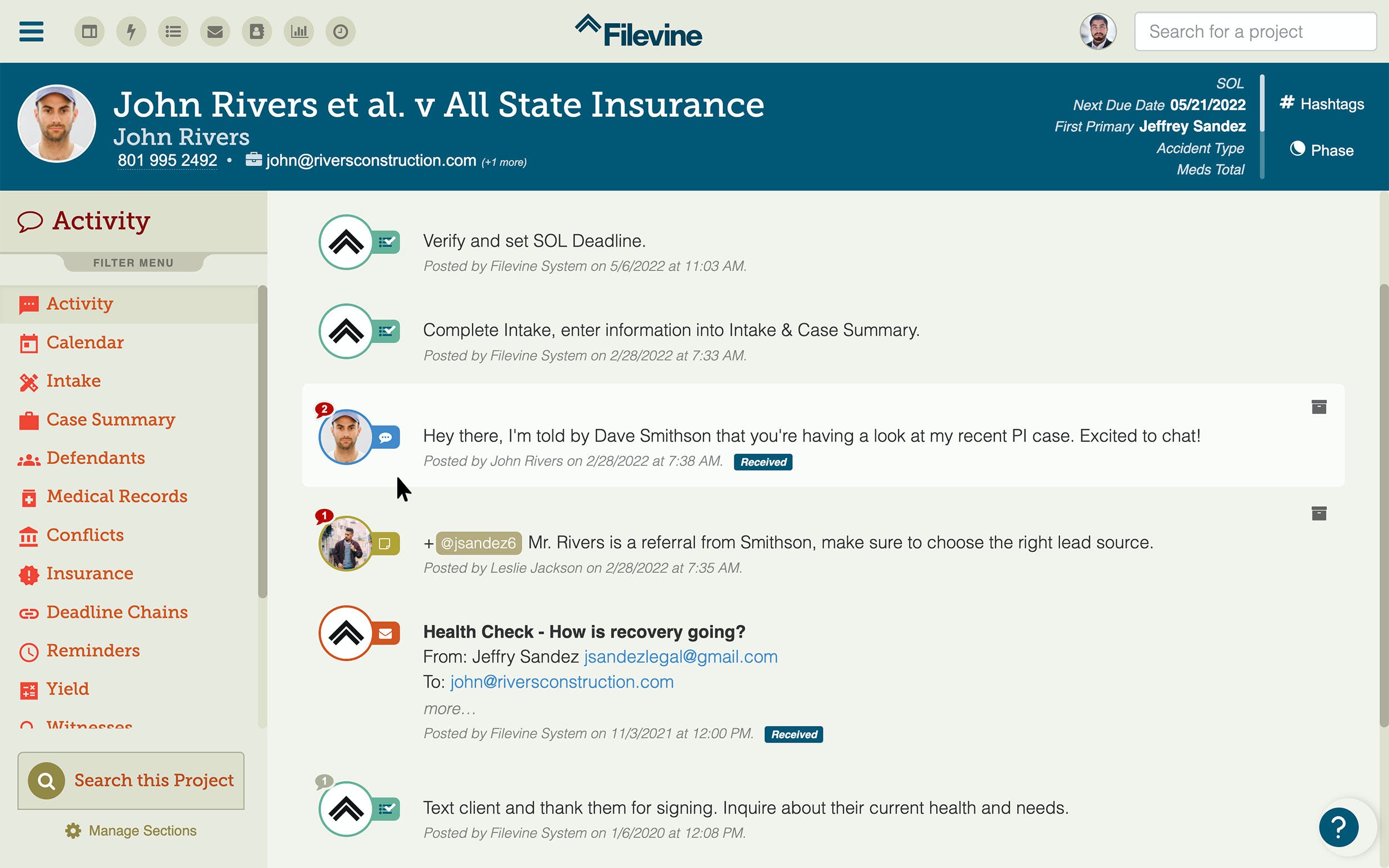
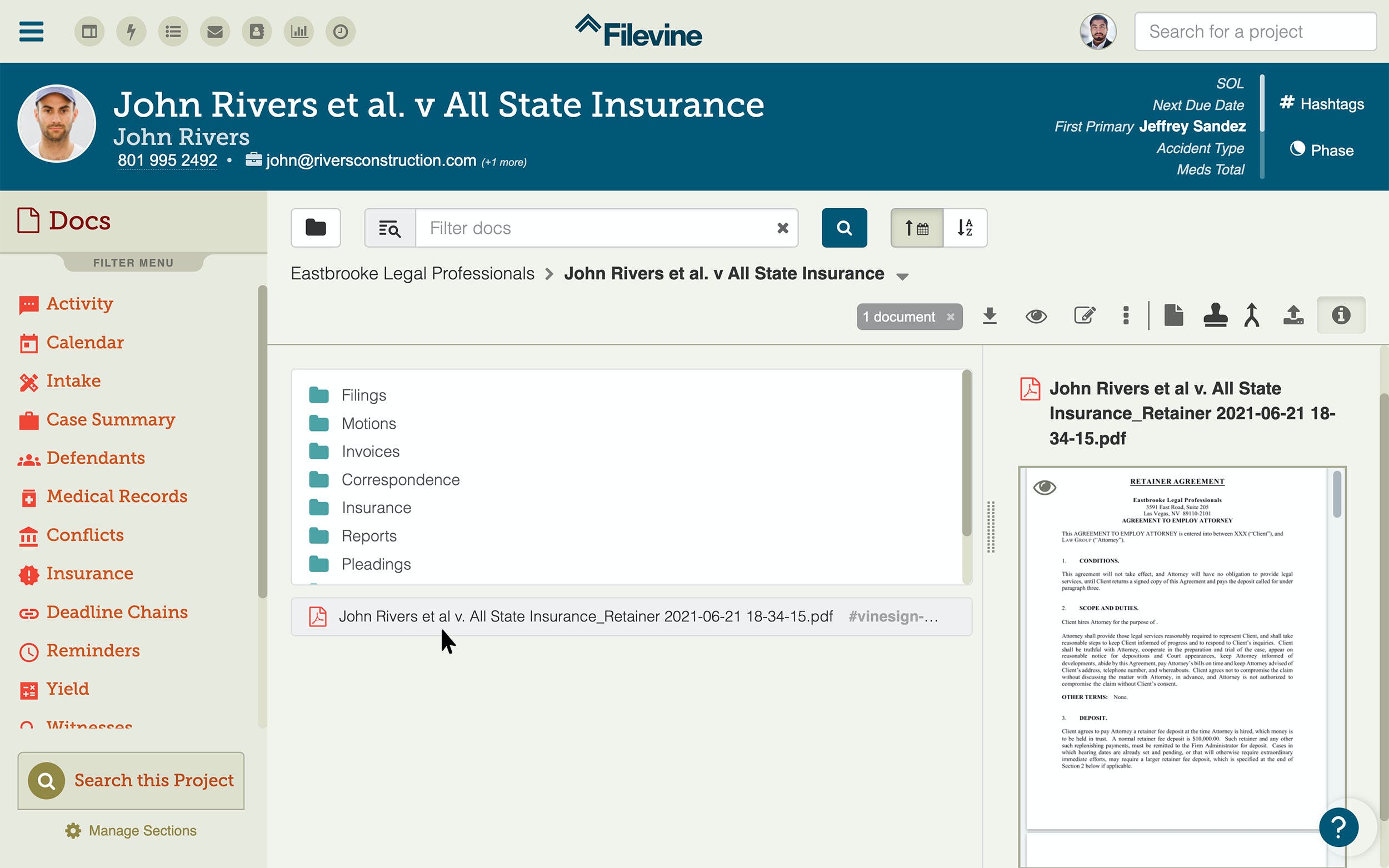
Filevine is a cloud-based legal case and project management software designed to help law firms streamline workflows, manage case files, automate documents, and collaborate across teams. It serves as a centralized hub for handling all aspects of legal work—from task assignments and client communication to document management and reporting. Filevine integrates seamlessly with tools like Outlook, Dropbox, and QuickBooks, ensuring efficiency and eliminating data silos. Its customizable interface allows firms to tailor workflows based on practice area, offering flexibility and control. Whether you're managing litigation, immigration, or corporate law, Filevine simplifies case handling with security, compliance, and productivity in mind.

Pricing of Filevine

Standard

USD 0.00
USD 0.00

Contact Us

Buy Now
  • Case management
  • Contact management
  • Calendar (Gmail & Outlook integration)
  • Email management (Gmail & Outlook integration)
  • Deadline management
  • Task management
  • Matter stages
  • Conflict Checker
  • SidebarAI Chat
  • Unlimited storage
  • Document management
  • Time tracking and billing
  • Payment processing

Premium

USD 0.00
USD 0.00

Contact Us

Buy Now
  • Everything in Basic PLUS
  • eSignature
  • Fax
  • Custom sections
  • Doc gen

À la carte

USD 0.00
USD 0.00

Contact Us

Buy Now
  • Intake
  • eSignature
  • AI Document Review
  • DemandsAI
  • Contract lifecycle management
  • Filevine University

Key Features of Filevine

Key Features:
  • Access Controls/Permissions
  • Activity Dashboard
  • Activity Tracking
  • Billing & Invoicing
  • Calendar Management
  • Client Portal
  • Conflict Management
  • Contact Management
  • Contract/License Management
  • CRM
  • Customizable Fields
  • Document Management
  • Email Management
  • Legal Case Management
  • Reminders
  • Task Management
  • Third Party Integrations
  • Time Tracking
  • Trust Accounting

Key Specification

Other Categories: Legal Billing Software Law Practice Management Software Immigration Software Law Firm and Advocates Software Dispute Management Software
Deployment: Cloud Hosted,Hybrid,On Premise,Any
Customer Support: Phone,Email,Live Chat
Languages Support: English

Who uses Filevine

StartUps
StartUps
SMEs
SMEs
Agencies
Agencies
Enterprises
Enterprises

Company Details

Company Name: Filevine
Headquarter: United States
Social Media:

Filevine Description

Why Choose Filevine?

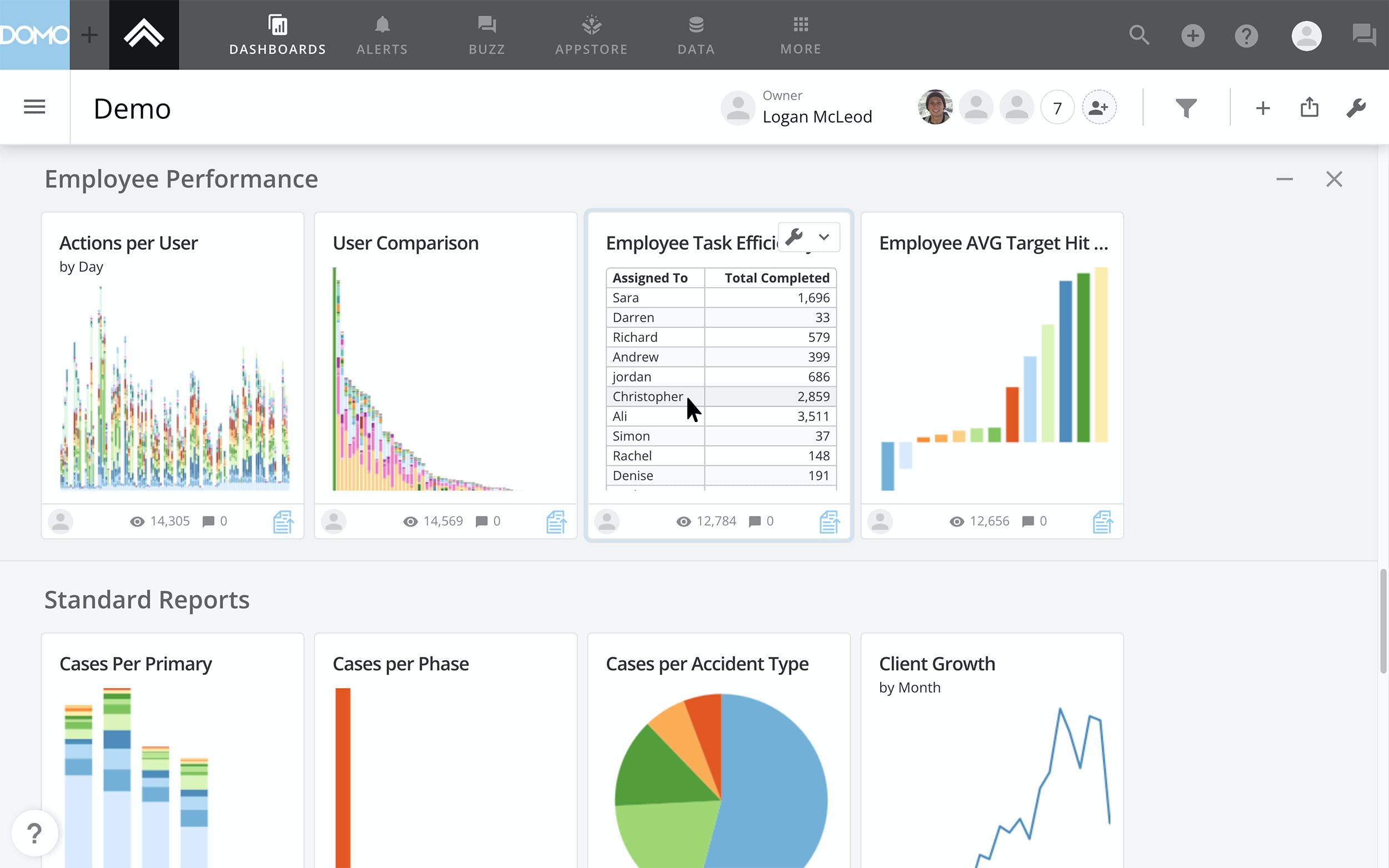
Choosing Filevine means investing in a modern legal tech platform that balances innovation with practicality. It’s purpose-built for legal professionals who require real-time collaboration, automation, and transparency across every case. Filevine allows teams to consolidate communications, automate document generation, and track project timelines within a unified platform. It supports integrations with leading third-party tools and features robust permissions settings to maintain data integrity. Its intuitive dashboards and customizable workflows enable law firms to improve operational efficiency and client outcomes. With powerful reporting features, firms gain insight into performance metrics and billing trends, allowing them to make data-informed decisions with ease.

Benefits of Filevine

Filevine offers a comprehensive suite of benefits tailored for modern legal teams. It helps centralize client communications, ensuring no details are missed, while automating repetitive tasks such as data entry and document drafting. This automation enhances productivity and allows teams to focus more on client service. With secure cloud storage and permission-based access, sensitive legal data remains protected. The software’s analytics features help law firms monitor case progress, staff efficiency, and financial performance. Filevine also improves client transparency through built-in communication tools, creating better relationships and retention. For growing firms, Filevine’s scalable infrastructure ensures long-term value and adaptability.

How to Use Filevine

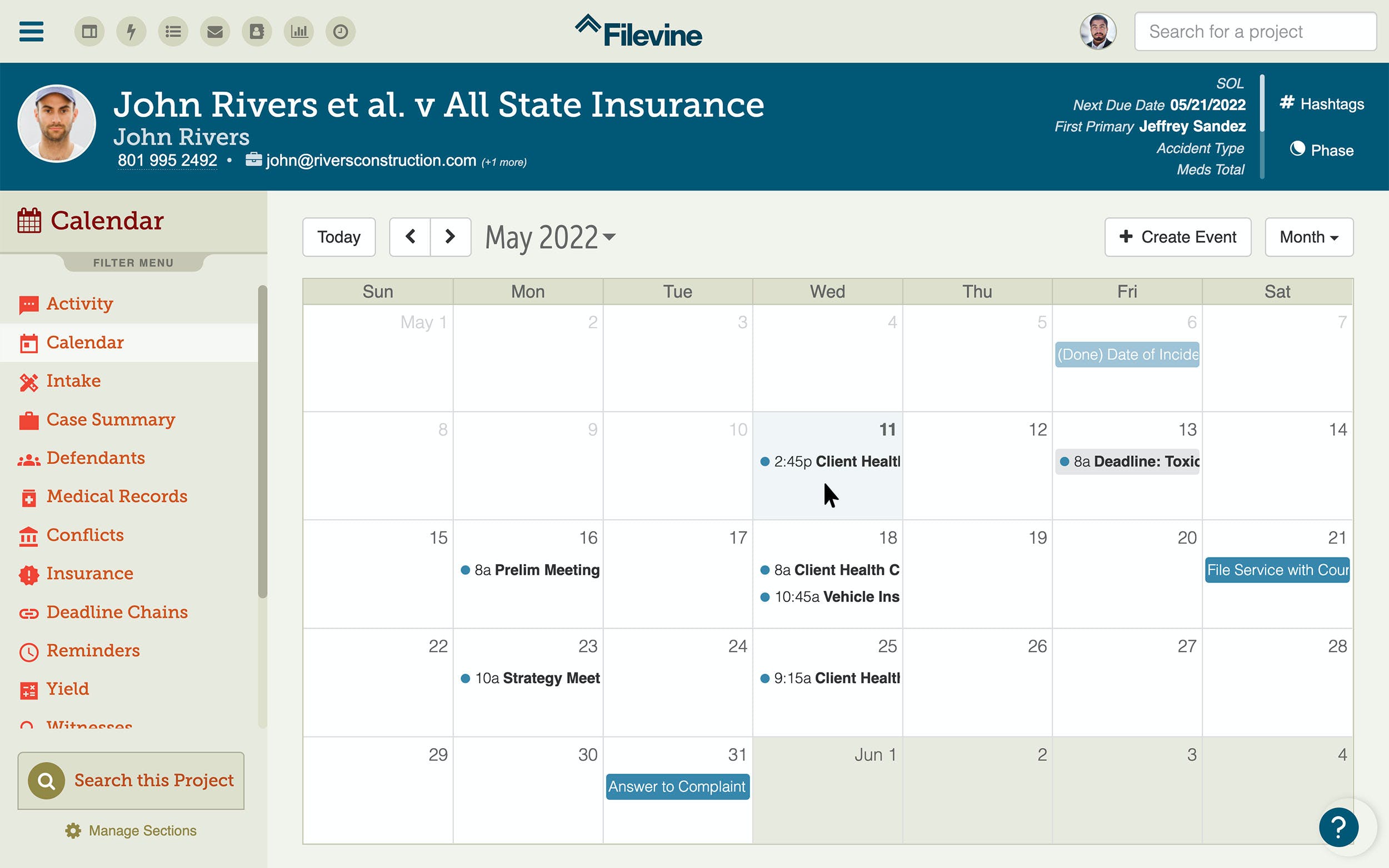
Using Filevine begins with setting up your firm’s unique workflows and permissions. Admins can configure case types, assign roles, and establish rules for document automation. Users then manage cases through a dashboard that consolidates to-do lists, messages, deadlines, and file access. Collaboration is streamlined with shared case notes, comment threads, and calendar syncing. Document templates allow users to auto-fill and send legal documents in seconds. The system tracks billable hours and task completion for accurate reporting. For data import and integration, Filevine offers tools to connect with CRM, billing, and document management systems—making it adaptable to your existing tech stack.

Features of Filevine

  • Case & Matter Management: Track every detail from intake to settlement.

  • Document Automation: Generate legal documents using smart templates.

  • Team Collaboration: Real-time updates, internal chat, and task assignments.

  • Calendar & Deadline Tracking: Court rules integration to prevent missed dates.

  • Time & Billing: Monitor billable hours and generate invoices with ease.

  • Reporting & Analytics: Visualize productivity, caseloads, and performance trends.

  • Custom Workflows: Tailor workflows to different legal practices.

  • Secure Cloud Storage: Compliant with legal data protection standards.

What Makes Filevine Different?

Filevine distinguishes itself with its legal-specific customization and automation capabilities. Unlike generic project management tools, it’s designed specifically for law firms, offering features like court deadline rules, auto-generated pleadings, and firm-branded client portals. Its scalability makes it equally valuable for solo practitioners and large legal teams. Filevine also places a strong emphasis on collaboration—allowing attorneys, paralegals, and administrative staff to communicate seamlessly within a shared case record. Additionally, its data security and compliance tools ensure firms stay ahead of evolving privacy regulations. The platform’s unique focus on automation, analytics, and seamless client communication makes it a future-ready legal solution.

Who Can Benefit from Filevine?

Filevine is ideal for legal professionals across various practice areas, including personal injury, family law, criminal defense, corporate law, and immigration. Solo attorneys benefit from its ease of use and workflow automation, while mid-size and large firms appreciate its scalability and integration capabilities. Legal operations managers can use its analytics tools to improve staffing decisions and resource allocation. Paralegals and assistants enjoy streamlined document generation and fewer administrative bottlenecks. Even law schools and legal clinics can use Filevine for managing client cases and improving experiential learning. Any legal organization aiming to enhance productivity and client satisfaction will find value in Filevine.

Is Filevine Easy to Use?

Yes, Filevine is known for its intuitive and user-friendly interface, even for legal teams without a tech background. Its dashboard displays everything users need at a glance, from case milestones to pending tasks. The drag-and-drop builder simplifies the customization of workflows, while onboarding tutorials and tooltips help new users learn quickly. Search and filter options allow teams to find case details instantly, and automated reminders keep everyone on track. The system also supports mobile access, allowing remote and in-court access to files and updates. Filevine’s balance of powerful functionality and usability makes it one of the most accessible legal software solutions today.

What Support Does Filevine Offer?

Filevine offers comprehensive customer support tailored to the needs of legal professionals. New users receive guided onboarding with a dedicated success manager. Ongoing support is available through live chat, email, and phone. The platform also offers an extensive knowledge base, including articles, video tutorials, and best practice guides. Regular webinars and training events help users stay updated with new features and compliance practices. For enterprise clients, Filevine provides priority support and advanced customization services. Whether you're launching your first campaign or migrating from another system, Filevine’s support ensures a smooth transition and ongoing success.

Alternative

CosmoLex

By Tabs3 Software

0.0
Rating out of 5 Based on 0 reviews

Smokeball

Smokeball Legal Practice‍Management Software

0.0
Rating out of 5 Based on 0 reviews

MyCase

Industry-Leading Legal Case Management Software and Solutions

0.0
Rating out of 5 Based on 0 reviews

Filevine Video/Screenshots

Filevine Key Clients

User Reviews

no-reviews
Share your experience! Be the very first reviewer. Write a Review

Frequently Asked Questions (FAQs)

The user group of Filevine are as follows :

  • Startups
  • SMEs
  • Agencies
  • Enterprises

Filevine has 3 plans,

  • Standard USD 0.00 Contact Us
  • Premium USD 0.00 Contact Us
  • À la carte USD 0.00 Contact Us

Filevine is not allowing Free Trial.

The key featuers of Filevine are as follows :

  • Access Controls/Permissions
  • Activity Dashboard
  • Activity Tracking
  • Billing & Invoicing
  • Calendar Management
  • Client Portal
  • Conflict Management
  • Contact Management
  • Contract/License Management
  • CRM
  • Customizable Fields
  • Document Management
  • Email Management
  • Legal Case Management
  • Reminders
  • Task Management
  • Third Party Integrations
  • Time Tracking
  • Trust Accounting

Filevine pricing model : Yearly,Monthly,Onetime(Perpetual License)

Filevine is Cloud Hosted,Hybrid,On Premise,Any Software.

Filevine offers Phone,Email,Live Chat support.

Filevine provides Help Guides,Video Guides,Blogs,Webinars,On-Site Training for the software training.