Email Backup Wizard

email backup solution, email backup program

0.0
Rating out of 5 Based on 0 reviews

Best Email Backup Solution for Windows and Mac

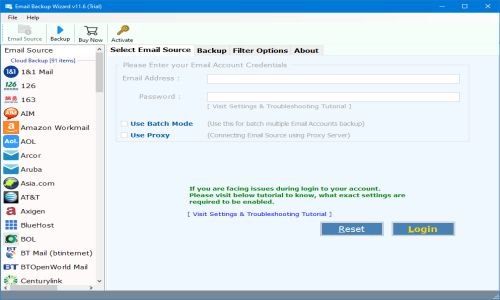
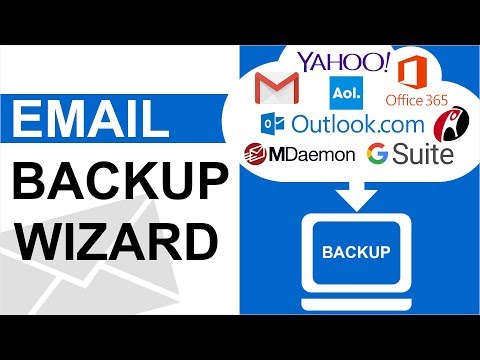
Email Backup Wizard is a reliable and straightforward email backup solution to back up emails from over 90 cloud and webmail services, including Gmail, Outlook.com, Office 365, Yahoo Mail, Zoho Mail, and IMAP servers. This software downloads and saves emails locally in multiple formats, including PST, MBOX, EML, MSG, and PDF.

While the email backup solution does make it easy to download emails in a straightforward manner, it also allows the user to filter emails for backup by date range, subject, sender, or folder; this is incredibly valuable for large mailboxes and allows users to backup their emails without having to retrieve unnecessary data. While preserving full folder hierarchy, formatting of emails, including security, and attachments, the email backup is globally acceptable, providing reliable and consistent access for users to back up their emails.

Batch mode functionality for backing up multiple accounts is particularly useful for IT administrators, organizations and individual users. Whether you wish to migrate, archive or just simply save your emails for safekeeping, you can rely on Email Backup Wizard to cover all of the bases.

With its clean interface, speedy operation and compatibility with many versions of Windows Operating Systems, this tool is a spam account user's best friend for both personal and professional purposes. Your emails need to be protected and available whenever you need them.

Pricing of Email Backup Wizard

Lite Edition For Personal Use

INR 0.00
INR 0.00

1

Buy Now
  • One-Year License with Free Upgrades & Support 90+ Source Email Services Limited Backup Options Selective backup option (Filter by Date Range
  • From
  • To & Subject) One by One Conversion of email accounts

Key Features of Email Backup Wizard

Key Features:
  • Incremental Backup
  • Cloud Storage
  • Backup Scheduling
  • Data Migration
  • Data Security
  • Customer Data

Key Specification

Other Categories: Email Management Software Business Email Software Backup Software For Mac Backup Software For PC Backup Software For Free Backup Software
Deployment: On Premise
Customer Support: Email
Customization: Yes
Languages Support: Dutch, English, Finnish, French, German, Italian, Norwegian, Spanish, Swedish

Who uses Email Backup Wizard

Personal

Personal
StartUps
StartUps
SMEs
SMEs
Agencies
Agencies
Enterprises
Enterprises

Company Details

Company Name: RecoveryTools
Headquarter: Delhi, Delhi India
Social Media:

Email Backup Wizard Description

Powerful Email Backup Software for Professionals

Protecting email data is very important. Email Backup Software is a trustworthy and easy-to-use solution to protect and access your emails from over 90 webmail and cloud services. It is designed for individuals, businesses, and IT pros to quickly and conveniently back up email data. Here, we'll take a look at some of the key features of the tool.

Key Features of the Email Backup Solution:

1. Wide Compatibility with Email Services

The email backup program allows backup of emails provided by over 90 popular email services, e.g. Gmail. Yahoo Mail, Outlook.com, Office 365, Zoho Mail, iCloud Mail, and any IMAP-enabled email account - if you can access it through a traditional client with IMAP access or web-based service, the program can back it up!

2. Multiple Export Formats

The email backup solution gives the user a lot of freedom in choosing the export file type, meaning many common formats are available to change your emails to file versions. Examples of this are; PST, a file type for users of Outlook, allowing a much easier import into Outlook as a .pst file; MBOX, a type of email exported that is commonly used in clients like Thunderbird and Apple Mail; EML & MSG, this file type is supported by any email client, making it easy to have portability; and PDF, probably the best file type to save emails for readability, archiving or printing purposes and can include attachments.

3. Selective Backup with Advanced Filters

The email backup program contains advanced filtering options to backup only the necessary data. Filters included are Date Range, which will only back up emails sent or received in a specific range of time; and Sender & Subject, which can be applied to back up a specific sender or subject so that only relevant content is saved. There is also Folder Selection so that specific folders can be chosen to be backed up while also reducing the amount of storage and processing time. Selective filtering options will help to maximize the backup capability with efficiency in mind.

4. Batch Mode for Multiple Accounts

If you're someone who uses many email accounts, the email backup solution has a batch mode option to backup multiple email accounts at the same time. This is useful to businesses, IT administrators, or anyone who needs to back up data from several accounts simultaneously, saving them time and effort. 

5. Preserving Metadata, Attachments, and Folder Hierarchy

One of the best features of the tool is the ability to maintain the integrity of your email data. When backing up your email, the email backup solution will maintain all metadata, including timestamps, sender, recipient, and the actual content of the email. You can also specify to back up any file attachments, so there is no opportunity for data loss. The backup has also maintained the folder hierarchy, so the backup is a replica of your original email structure, ensuring users get a full backup matching their original email account.

6. Support for Windows and Mac

The email backup program is aimed to be user-friendly and features a simple interface to make the backup experience as easy as possible. Users will enjoy the simplified layout, which walks them through every part of the process from setting up the backup to selecting the filters to exporting emails. The process is intuitive with concise instructions and a wizard-style layout, making it possible for users to backup emails without any technical know-how.

7. Email Backup Service

Along with the self-serve backup service, it also provides a unique email backup service. This email backup service has a team of professionals that will back up and migrate your email for you, with absolutely no work necessary on your end. The team will back up your personal email account or backup your corporate email archive, whatever is needed, from setup to completion.

Alternative

IDrive Online

By IDrive Online

0.0
Rating out of 5 Based on 0 reviews

Backblaze

Cloud storage built better

0.0
Rating out of 5 Based on 0 reviews

Carbonite

Titanium X is here

0.0
Rating out of 5 Based on 0 reviews

Email Backup Wizard Video/Screenshots
User Reviews

no-reviews
Share your experience! Be the very first reviewer. Write a Review

Frequently Asked Questions (FAQs)

The user group of Email Backup Wizard are as follows :

  • Personals
  • Startups
  • SMEs
  • Agencies
  • Enterprises

Email Backup Wizard has 1 plans,

  • Lite Edition For Personal Use INR 0.00 1

Email Backup Wizard is allowed 30 Days Free Trial.

The key featuers of Email Backup Wizard are as follows :

  • Incremental Backup
  • Cloud Storage
  • Backup Scheduling
  • Data Migration
  • Data Security
  • Customer Data

Email Backup Wizard pricing model : Onetime(Perpetual License)

Email Backup Wizard is Offline Software.

Yes

Email Backup Wizard offers Email support.

Email Backup Wizard provides Help Guides,Video Guides,Blogs for the software training.