DIALux

Lighting design made easy with DIALux

0.0
Rating out of 5 Based on 0 reviews

What is DIALux?

DIALux is a professional lighting design software used by architects, engineers, and lighting planners to create, calculate, and visualize lighting solutions for indoor and outdoor spaces. It helps users simulate real-world lighting conditions, ensuring optimal illumination, energy efficiency, and compliance with international lighting standards.

Pricing of DIALux

Free

USD 0
USD 0.00

/Month

Buy Now

Unlock Non-Members

USD 7.06
USD 0.00

/Month

Buy Now

Pro

USD 23.54
USD 0.00

/Month

Buy Now

Key Specification

Other Categories: 3D Modeling Software
Deployment: Cloud Hosted,Any
Customer Support: Phone,Email,Live Chat
Customization: Yes
Languages Support: English

Who uses DIALux

Personal
Personal
StartUps
StartUps
Enterprises
Enterprises

Company Details

Company Name: DIALux
Headquarter: North Rhine-Westphalia Germany
Social Media:

DIALux Description

Why Choose DIALux?

DIALux stands out as a trusted solution for accurate and realistic lighting planning. It allows users to design complex lighting layouts with precision while offering access to a wide range of real luminaire data from leading manufacturers. Its user-friendly interface combined with advanced calculation capabilities makes it suitable for both beginners and experienced professionals.

Benefits of DIALux

Using DIALux offers several advantages for lighting professionals and businesses:

  • Ensures precise lighting calculations and realistic visualizations
  • Supports energy-efficient lighting design and cost optimization
  • Helps meet international lighting standards and compliance requirements
  • Reduces errors in planning through detailed simulation
  • Improves project presentation with high-quality 3D renderings

How to Use DIALux

Getting started with DIALux is straightforward:

  1. Download and install the software from the official website
  2. Create a new project by selecting indoor or outdoor lighting design
  3. Add building layouts, rooms, or outdoor areas
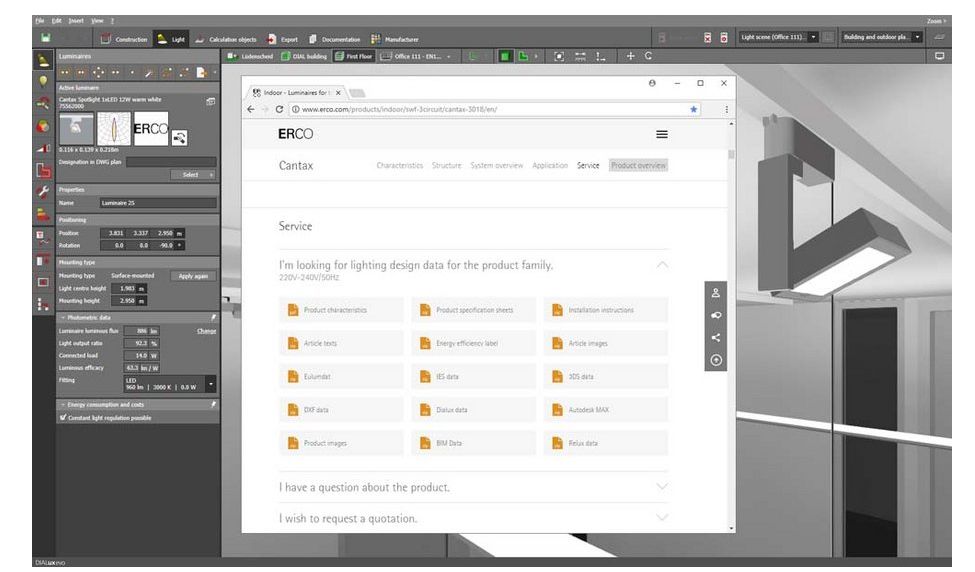
  4. Choose luminaires from the integrated catalog
  5. Position lighting fixtures and adjust settings
  6. Run lighting calculations to analyze illumination levels
  7. Generate reports and visual presentations for clients or stakeholders

Features of DIALux

DIALux comes packed with powerful features to simplify lighting design:

  • Advanced 3D lighting visualization
  • Extensive luminaire database from top brands
  • Indoor and outdoor lighting planning capabilities
  • Daylight simulation for realistic analysis
  • Energy consumption and efficiency calculations
  • Detailed documentation and reporting tools
  • Integration with CAD files for accurate layouts

DIALux Demo

DIALux offers a free version that allows users to explore its full functionality. Users can create sample projects, test lighting scenarios, and understand how the software works before implementing it in real projects. Demo tutorials and guides are also available to help users learn quickly.

DIALux Pricing

DIALux is generally available as a free software for core lighting design functionalities. However, for advanced features, plugins, or enterprise-level usage, pricing details may vary.

Alternative

Blender

WING IT

0.0
Rating out of 5 Based on 0 reviews

SketchUp

What’s new in SketchUp

0.0
Rating out of 5 Based on 0 reviews

Tinkercad

All you need is a ‘what if...’

0.0
Rating out of 5 Based on 0 reviews

DIALux Video/Screenshots

DIALux Key Clients

User Reviews

no-reviews
Share your experience! Be the very first reviewer. Write a Review

Frequently Asked Questions (FAQs)

The user group of DIALux are as follows :

  • Personals
  • Startups
  • Enterprises

DIALux has 3 plans,

  • Free USD 0 /Month
  • Unlock Non-Members USD 7.06 /Month
  • Pro USD 23.54 /Month

DIALux is not allowing Free Trial.

DIALux pricing model : Yearly,Monthly

DIALux is Cloud Hosted,Any Software.

Yes

DIALux offers Phone,Email,Live Chat support.

DIALux provides Help Guides,Blogs for the software training.