AnyMP4 Video Editor

Trusted By World's Leading Media

0.0
Rating out of 5 Based on 0 reviews

What is AnyMP4 Video Editor?

AnyMP4 Video Editor is a powerful and user-friendly multimedia software designed for video editing, slideshow creation, and visual storytelling. Whether you're working on travel footage, promotional videos, or educational content, this tool offers essential editing functions such as trimming, rotating, merging, and adding music or text. It supports a wide range of video formats and allows users to apply effects and transitions for a professional finish. Compatible with Windows systems, AnyMP4 Video Editor is perfect for beginners and casual users who want an easy yet effective editing solution without needing advanced technical skills.

Pricing of AnyMP4 Video Editor

no-pricing
For get detailed pricing as per your requirements.

Key Features of AnyMP4 Video Editor

Key Features:
  • Offline Editing
  • Content Library
  • Text Overlay
  • Supports HD Resolution
  • Merge video
  • Split Video
  • Video Speed Controller
  • Audio Tools
  • Templates
  • Fast Motion
  • Transitions
  • Timeline Editing
  • Video Cropping
  • Video Trimming
  • Aspect Ratio Adjustment
  • Upload Video Or Audio File
  • Picture In Picture
  • Voiceover Recording
  • Frame Accuracy
  • Drag and Drop
  • Audio Mixing
  • Video and Audio Filters
  • Batch Encoding
  • Unlimited Undo/Redo
  • Cross Platform
  • Resolution Support

Key Specification

Other Categories: Video Editing Software Content Creation Software Presentation Software Audio Editing Software
Deployment: On Premise
Customer Support: Email,Online (Ticket),Business Hours
Customization: No
Languages Support: Chinese, English, French, German, Japanese

Who uses AnyMP4 Video Editor

Personal

Personal
StartUps
StartUps
SMEs
SMEs
Agencies
Agencies
Enterprises
Enterprises

Company Details

Company Name: AnyMP4 Video Editor
Headquarter:
Social Media:

AnyMP4 Video Editor Description

Why Choose AnyMP4 Video Editor?

AnyMP4 Video Editor is an ideal video editing software for users who want quick, creative control over their video projects without navigating complex tools. Its intuitive drag-and-drop interface allows users to combine photos, video clips, music, and text in minutes. It supports HD and 4K formats, and lets you add real-time effects, transitions, and filters. The software is suitable for marketing teams, YouTubers, educators, and families looking to make personal projects like travel vlogs or birthday montages. Whether you're enhancing video quality or stitching together a slideshow, AnyMP4 Video Editor provides a comprehensive set of tools in a lightweight package.

Benefits of AnyMP4 Video Editor

  • Beginner-Friendly: No technical experience needed—just import, edit, and export.

  • All-in-One Tool: Combine videos, photos, music, and text in a single timeline.

  • Professional-Looking Results: Apply built-in transitions, themes, and effects.

  • Supports Multiple Formats: Works with AVI, MP4, MOV, MKV, and more.

  • High-Quality Output: Export in HD or even 4K for stunning visual clarity.

  • Customizable Templates: Save time with pre-designed slideshow templates.

  • Affordable Pricing: Offers great value compared to complex editors.

  • Fast Rendering: Efficient performance ensures minimal lag and faster processing.

How to Use AnyMP4 Video Editor

  1. Install and Launch the software on your Windows PC.

  2. Import media files including videos, photos, and music into the editor.

  3. Drag and drop items onto the timeline to begin editing.

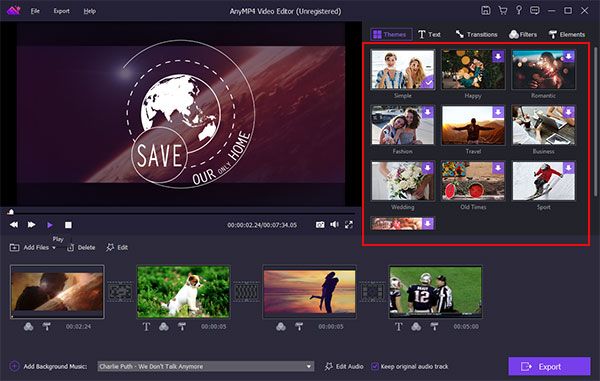
  4. Add transitions, effects, and text using the built-in library.

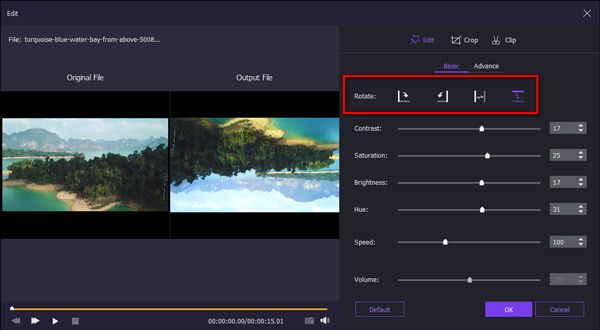
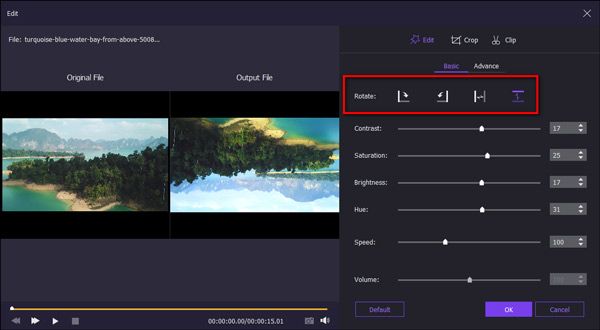
  5. Customize your video with background music, cropping, rotation, and speed control.

  6. Preview your edits and fine-tune as needed.

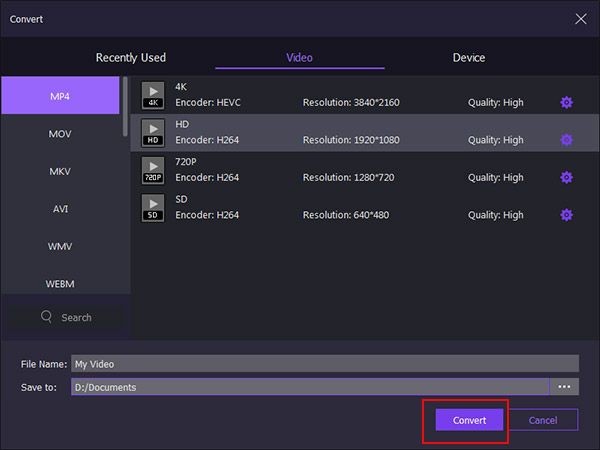
  7. Export the final video in your desired resolution and format.

The process is designed to be smooth, even for first-time editors.

Features of AnyMP4 Video Editor

  • Video Trimming and Merging – Easily cut, split, or combine video clips.

  • Photo & Video Slideshow Creation – Add photos, music, and transitions for quick slideshow creation.

  • Visual Effects Library – Includes filters, themes, and transitions to enhance creativity.

  • Text Overlay – Add subtitles, captions, or titles with customizable fonts.

  • Real-Time Preview – View changes instantly while editing.

  • Audio Editing – Add or replace background music, adjust volume, fade in/out.

  • Aspect Ratio Control – Adjust to 16:9, 4:3, and other formats.

  • HD/4K Output Support – Export high-resolution videos with no quality loss.

  • User-Friendly Timeline Interface – Drag-and-drop functionality for efficient editing.

  • Snapshot Tool – Capture frames as images during editing.

What Makes AnyMP4 Video Editor Different?

What sets AnyMP4 Video Editor apart is its focus on simplicity without sacrificing functionality. While many video editors overwhelm users with overly technical features, AnyMP4 balances usability with creativity. It combines video editing and slideshow creation into one streamlined application. The software offers real-time previewing, rich transition effects, and multiple file format support—all without requiring a steep learning curve. It’s also lighter on system resources, making it accessible to users on modest hardware. Its attractive price point and intuitive design make it a smart choice for casual users, marketers, and educators.

Who Can Benefit from AnyMP4 Video Editor?

  • Content Creators – YouTubers and vloggers can create engaging videos quickly.

  • Educators – Teachers can produce visual learning materials and presentations.

  • Marketing Teams – Great for making product promos or brand videos.

  • Families and Hobbyists – Create birthday, holiday, or wedding videos effortlessly.

  • Students – Easily compile academic projects and video essays.

  • Small Businesses – Make affordable promotional or training videos in-house.

It’s perfect for anyone who needs a basic yet capable editing solution.

 Is AnyMP4 Video Editor Easy to Use?

Yes—AnyMP4 Video Editor is designed with beginners in mind. It uses a simple drag-and-drop timeline interface and offers instant previews of your changes. All tools are clearly labeled and easily accessible from the dashboard. There’s no need for professional training or prior experience. Whether you’re cutting a clip, adding text, or merging multiple files, the actions are intuitive. Even exporting the final product involves just a few clicks. Its lightweight installation and guided workflow make it one of the most accessible video editors for casual users.

What Support Does AnyMP4 Video Editor Offer?

AnyMP4 provides helpful customer support through various channels. Users can access:

  • FAQs and Online Documentation – Covers installation, usage, and troubleshooting.

  • Email Support – Available for technical issues and licensing questions.

  • Software Updates – Regular bug fixes and feature enhancements.

  • Free Trial – Users can try the software before purchasing.

While it doesn’t offer live chat or phone support, its online resources and quick email response make it dependable for most needs.

Alternative

Riverside

Create your best content yet.

0.0
Rating out of 5 Based on 0 reviews

Flocksy

Dedicated Creative Team · Zero Overhead

0.0
Rating out of 5 Based on 0 reviews

Promo.com

Your Creative Video CoPilot For Business Marketing Success

0.0
Rating out of 5 Based on 0 reviews

AnyMP4 Video Editor Video/Screenshots
AnyMP4 Video Editor Key Clients

User Reviews

no-reviews
Share your experience! Be the very first reviewer. Write a Review

Frequently Asked Questions (FAQs)

The user group of AnyMP4 Video Editor are as follows :

  • Personals
  • Startups
  • SMEs
  • Agencies
  • Enterprises

AnyMP4 Video Editor has 0 plans.

AnyMP4 Video Editor is allowed 0 Days Free Trial.

AnyMP4 Video Editor pricing model : Yearly,Onetime(Perpetual License)

AnyMP4 Video Editor is Offline Software.

No

AnyMP4 Video Editor offers Email,Online (Ticket),Business Hours support.

AnyMP4 Video Editor provides Help Guides,Video Guides,Blogs for the software training.