Every phone that leaves a factory carries a hidden ID tag. It's a 15-digit code called the IMEI, and most people never think about it until something goes wrong. If you have ever wondered what is IMEI number, or searched how to find IMEI number in under a minute, this guide answers it in plain language. How do I get my IMEI number without digging through a closet full of old boxes? That's covered too. No confusing tech talk, just clear answers and steps you can follow right now.
What Is an IMEI Number?
Start with the basic question: what is IMEI number, really? IMEI stands for International Mobile Equipment Identity. Think of it as your phone's fingerprint. It's a unique string of numbers assigned to every mobile phone, tablet, or cellular device, and no two devices ever share the same one.
IMEI Meaning & Full Form
Break the term into its three parts, and the imei meaning falls into place. "International" means the number works the same way in every country. "Mobile equipment" refers to the physical device itself, your phone or tablet. "Identity" means it points to one specific unit and no other. Put those together, and imei meaning is simply the permanent ID number of your mobile device.
What Does an IMEI Number Look Like?
An IMEI is 15 digits long and usually shown in groups so it's easier to read, like 49 015420 323751 8. The first 8 digits form the TAC (Type Allocation Code), which reveals the brand and model. The next 6 are a serial number unique to that exact unit. That last digit is a check digit, a small mathematical safeguard confirming the rest of the number is valid. Dual-SIM phones normally carry two IMEI numbers, one for each SIM slot.
Why Every Phone Has a Unique IMEI Number
Manufacturers assign an IMEI the moment a device is built, and it stays with that unit for life. No transfers, no reuse on another handset. In this respect an IMEI works a lot like a car's VIN. Buy two phones of the exact same model on the same day from the same store, and they will still carry different IMEI numbers.
That permanence is why IMEI works as the anchor field in asset tracking software when an organization needs to know which employee holds which unit.
What Is an IMEI Number Used For?
An IMEI does far more than sit quietly inside a settings menu. Networks, manufacturers, insurers, and law enforcement all rely on it daily. So does any IT team running unified endpoint management software across a mixed fleet of phones and tablets.
Identifying Your Device Globally
Mobile networks use the IMEI to recognize exactly which device is connecting, regardless of country or carrier. A phone bought in one country still gets identified correctly by a network on the other side of the planet because of it.
Blocking a Lost or Stolen Phone
Report the IMEI to your carrier or the police after a phone goes missing, and most networks will add that number to a shared blacklist. The device then stops connecting to participating mobile networks. This alone is a strong reason to save your IMEI somewhere safe today, well before you ever need it.
Companies managing dozens of company-issued handsets handle this centrally instead. Mobile device management software can lock or wipe a device remotely the same day it goes missing.
Checking Phone Warranty & History
Manufacturers look up warranty status, activation date, and repair history through the IMEI. Buying a used phone? Checking the IMEI can reveal whether that exact unit was ever reported lost, stolen, or blacklisted, which is not information most sellers volunteer on their own.
Businesses are tracking warranty windows across a full fleet log, with every IMEI inside IT asset management software rather than a spreadsheet.
Network Carrier Unlocking
Carriers check the IMEI to confirm whether a phone qualifies to be unlocked, usually once a contract or installment plan has been fully paid off. Once unlocked against its own IMEI record, the phone will run on a SIM from a different carrier. That matters a great deal for anyone traveling internationally.
How to Find Your IMEI Number (All Methods)
Searching how to find IMEI number details fast? Or typing, how do I get my IMEI number into Google late at night? Every method below works, and none of them demand any technical skill. Pick whichever one fits your situation right now.
Method 1: Dial *#06# on Your Phone
This is the shortcut that works on nearly every phone ever made, Android or iPhone, new or ancient.
1. Open the Phone or Dialer app.
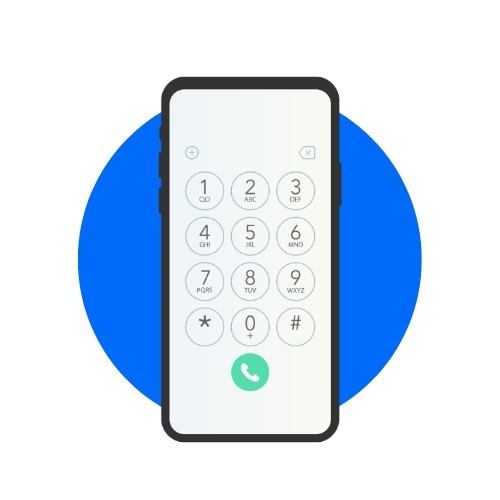
2. Type *#06# on the keypad.
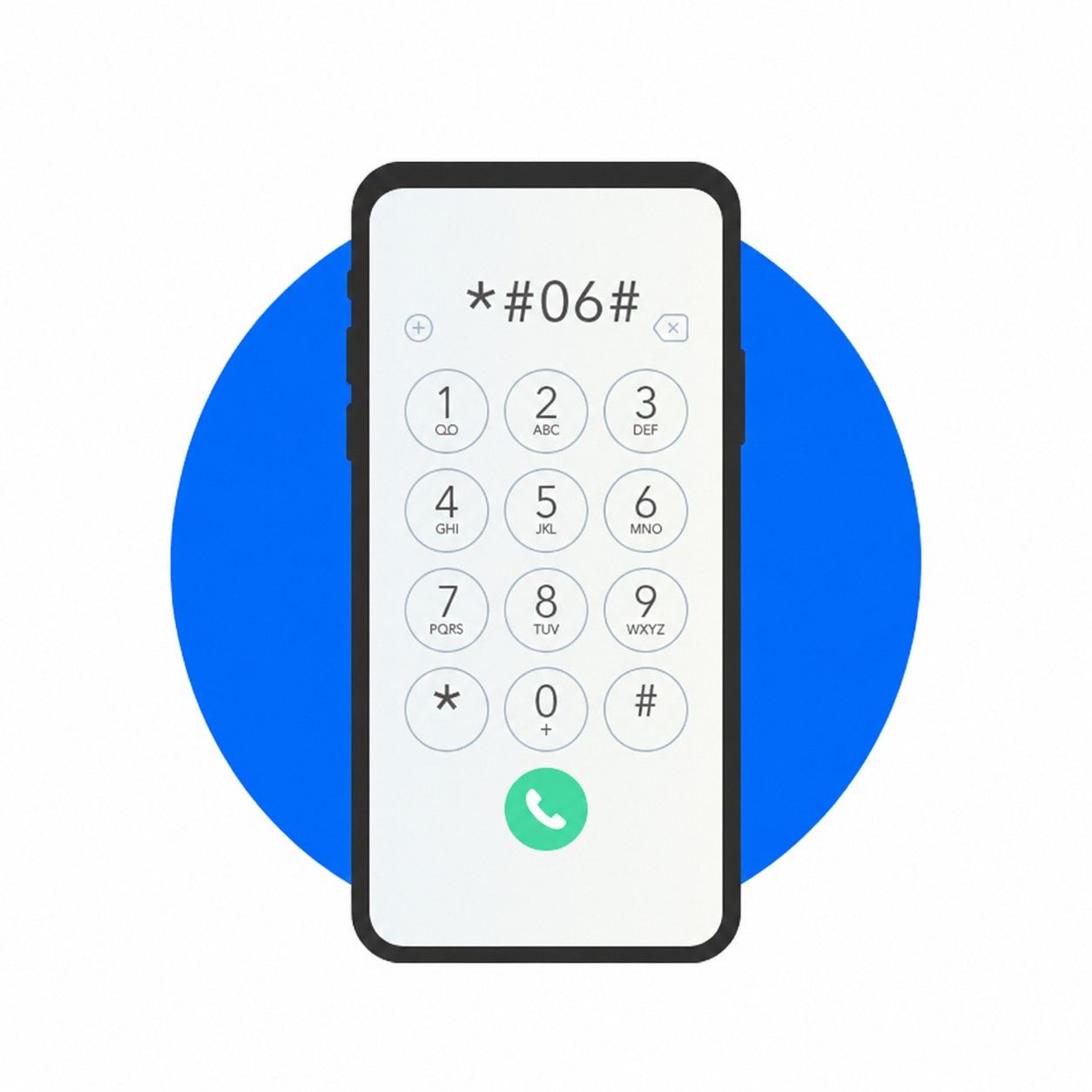
3. Your IMEI number appears on screen instantly.
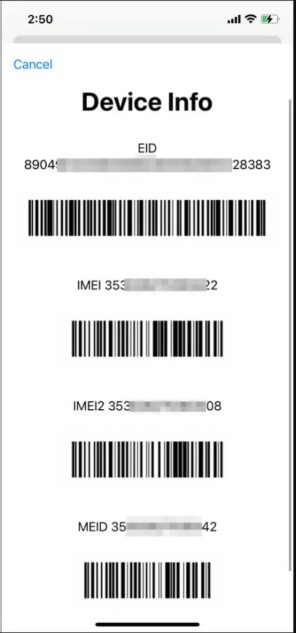
You don't even need to press the call button. On a dual-SIM phone, two IMEI numbers usually show up, one below the other.
Method 2: Check Phone Settings (Android)
Every Android phone stores its IMEI inside the settings menu.
1. Open Settings.
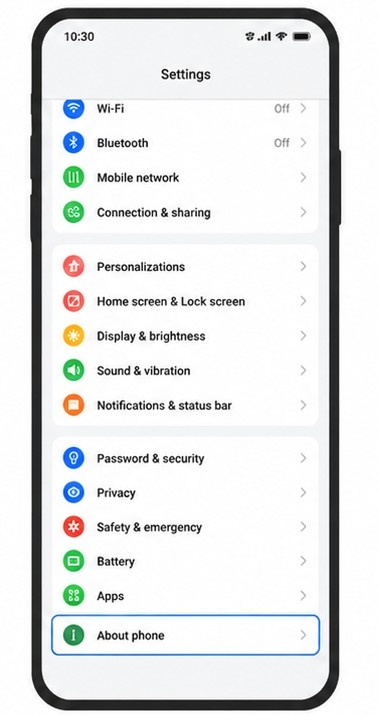
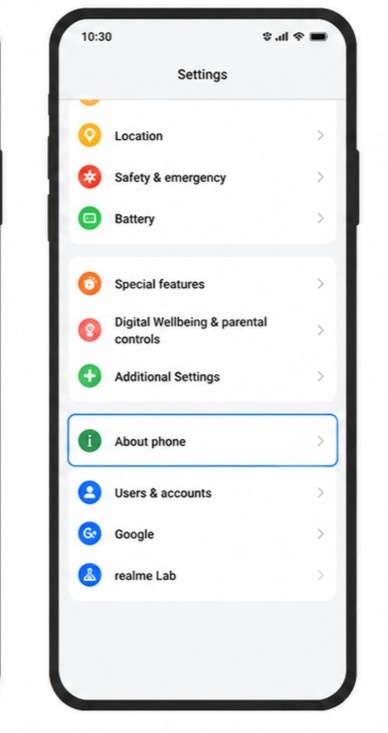
2. Scroll down and tap About Phone. Some brands label it About Device.
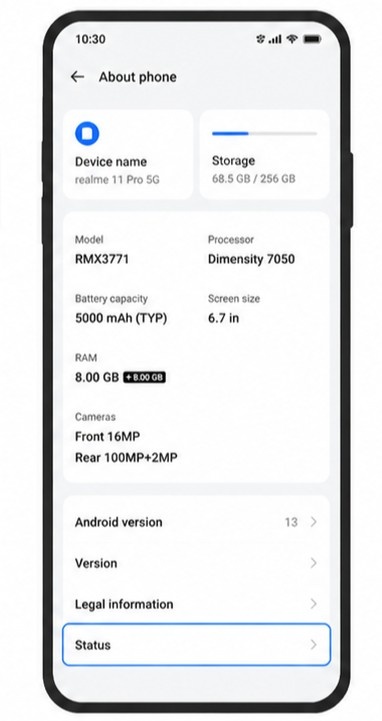
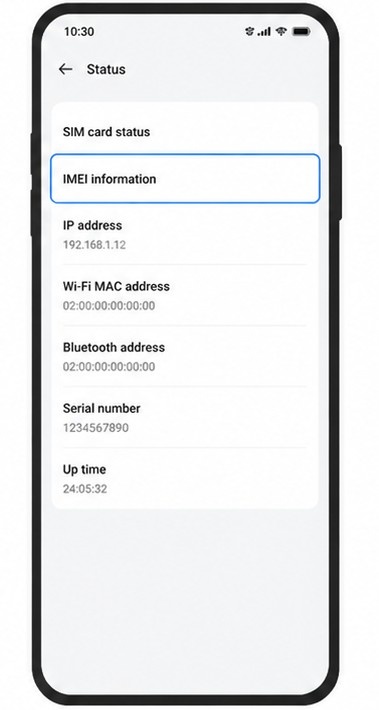
3. Tap Status or IMEI Information.
4. Your IMEI number, or both numbers on dual-SIM models, will be listed clearly.
Menu names shift slightly between Samsung, Xiaomi, OnePlus, and other brands. About Phone is almost always the starting point.
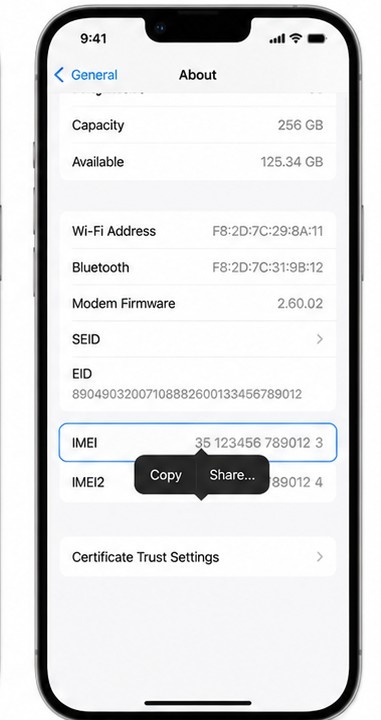
Method 3: Check Phone Settings (iPhone)
Probably the simplest method on this whole list.
1. Open Settings.
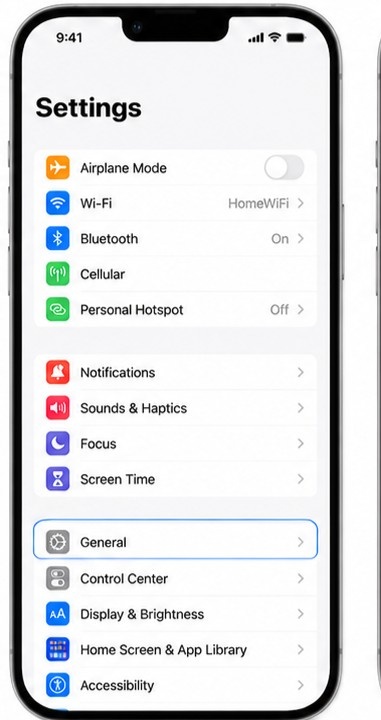
2. Tap General.
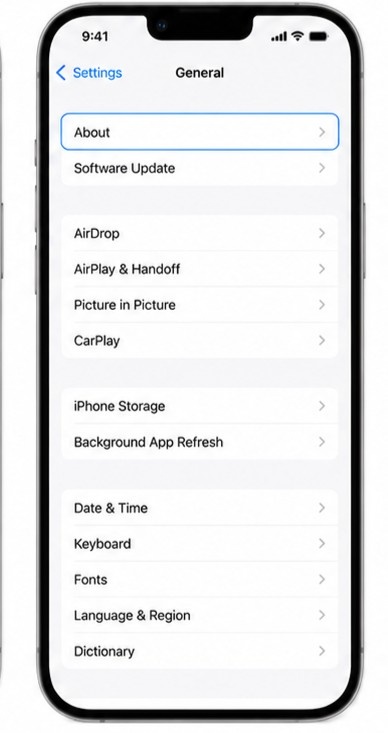
3. Tap About.
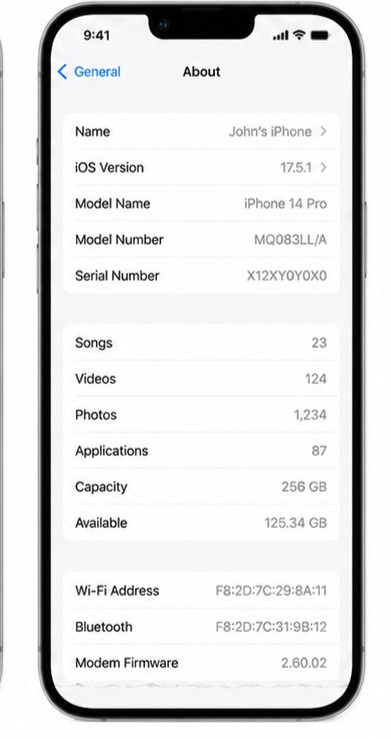
4. Scroll down until you see IMEI. Touch and hold the number to copy it.
Method 4: Find IMEI Number on the Box
Still have the original retail box? The IMEI is printed right on it.
1. Find the barcode sticker on the side or bottom of the box.
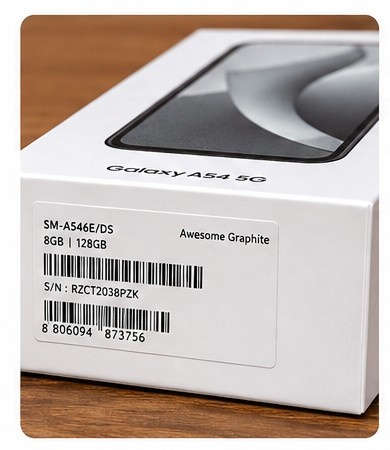
2. Look for a label reading IMEI, followed by a 15-digit number.
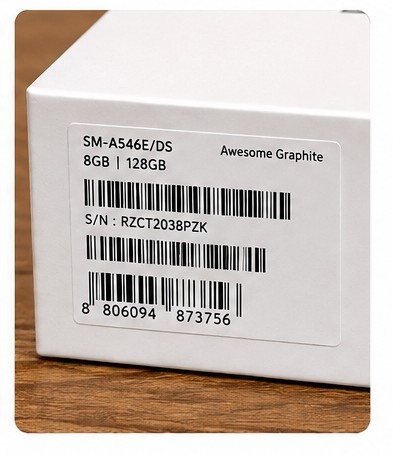
3. Dual-SIM boxes often print two IMEI numbers side by side, so check both.
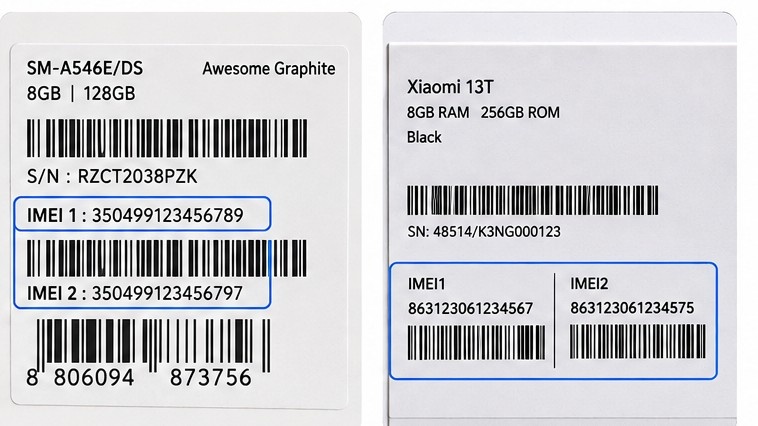
Want to know exactly where is the IMEI number on the box? There's a fuller breakdown further down this guide.
Method 5: Check the SIM Tray or Back of Device
This one depends entirely on your specific phone model.
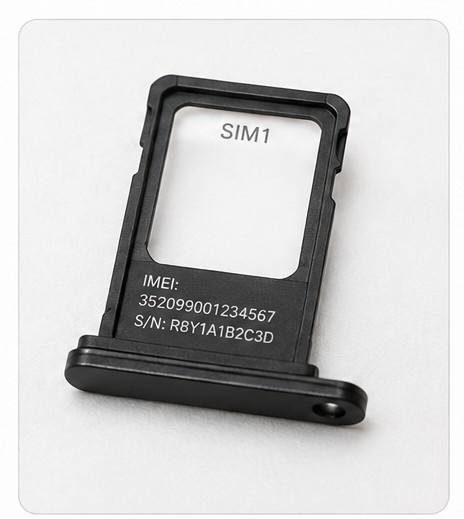
1. Eject the SIM tray using the small pin tool that came with your phone.
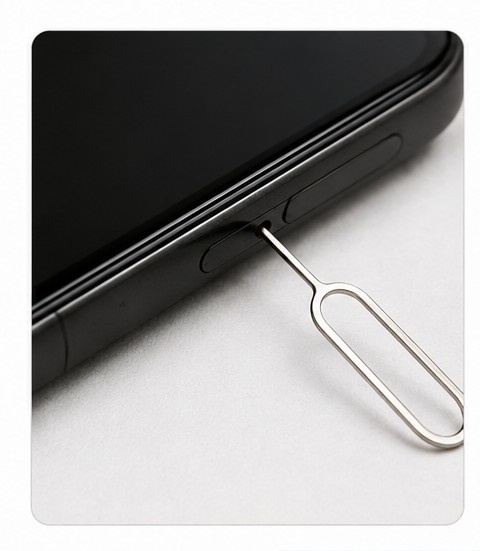
2. Check the tray itself, since some models print a short IMEI or serial code there.
3. If your phone has a removable back cover, look underneath it. Older devices frequently engraved the IMEI directly onto the casing.
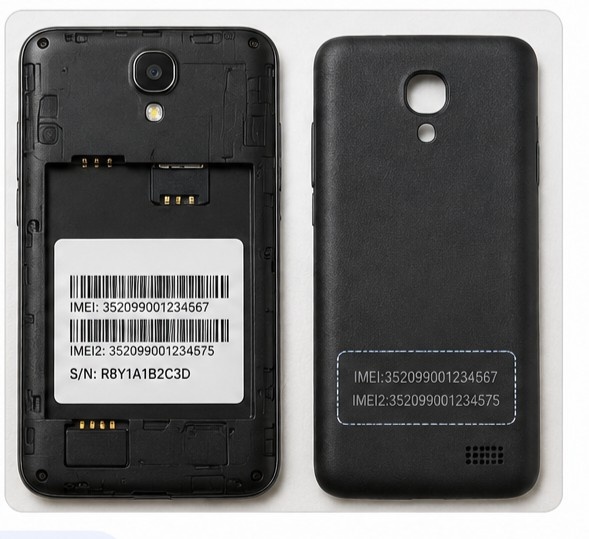
Worth knowing before you start hunting: several newer phones, including the iPhone 14 and later, no longer print or engrave the IMEI on the device at all. In that case, one of the other methods is your route.
Method 6: Find IMEI via Google Account (Android)
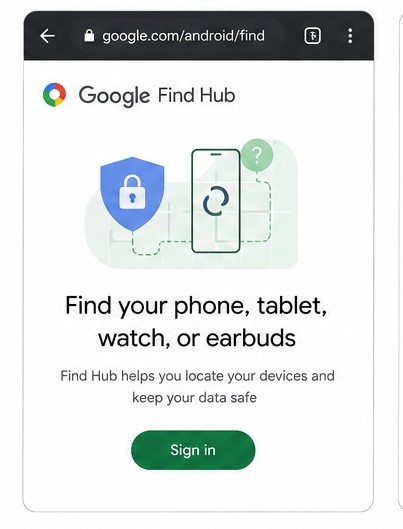
Works as long as your device is signed in to a Google account with Find Hub, formerly known as Find My Device, turned on.
1. On a computer or another device, go to google.com/android/find.
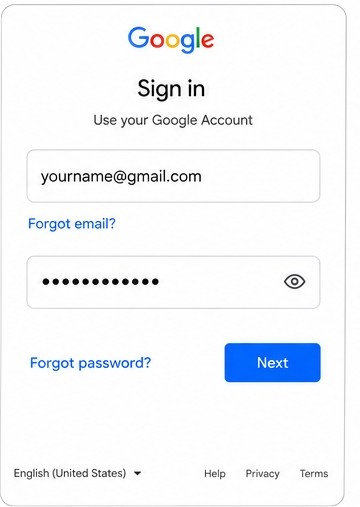
2. Sign in using the same Google account linked to your Android phone.
3. Select your device from the list on the left.
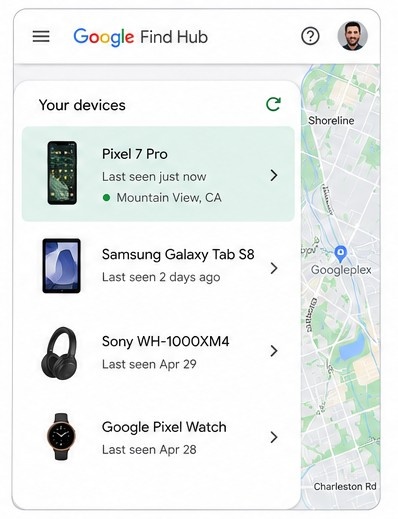
4. Tap the information icon next to the device name. Your IMEI appears under the device details.
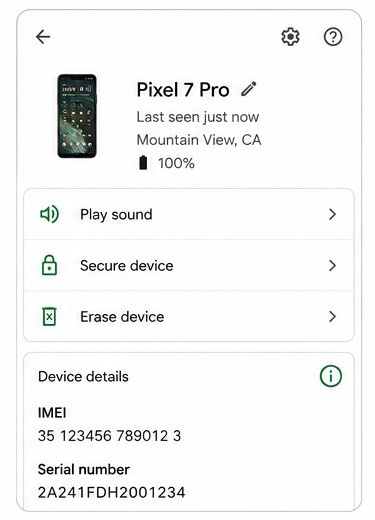
This is the method that saves you when the phone is lost, stolen, or simply out of reach. One caveat: a small number of Wi-Fi-only devices have no cellular service, and therefore no IMEI to show here at all.
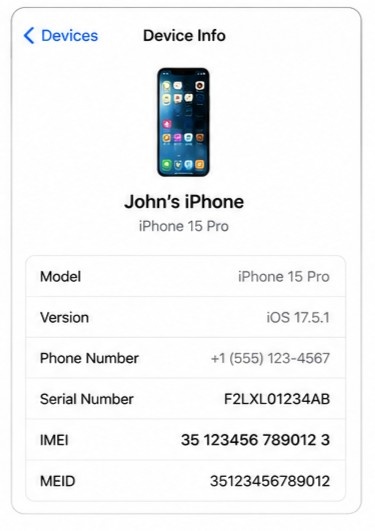
Method 7: Find IMEI via Apple ID (iPhone)
Apple now calls this an Apple Account, the same sign-in that used to be called Apple ID. It keeps a record of every iPhone linked to it.
1. Go to account.apple.com on any web browser.
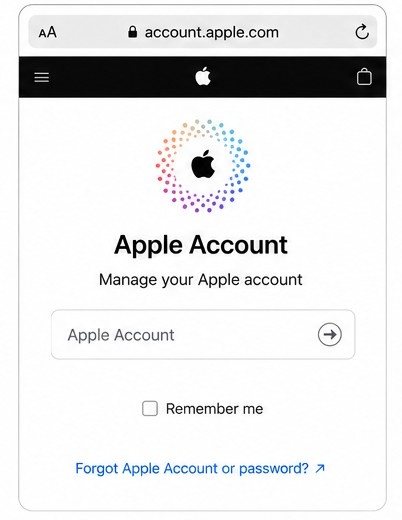
2. Sign in with your Apple account.
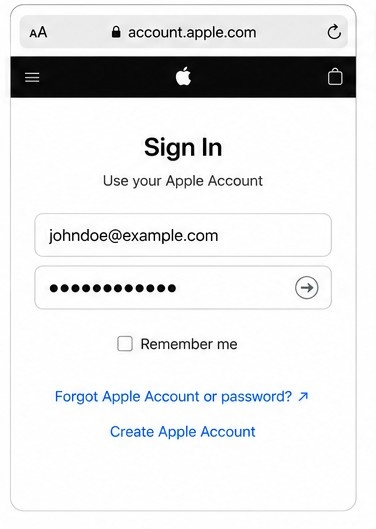
3. Scroll to the Devices section.
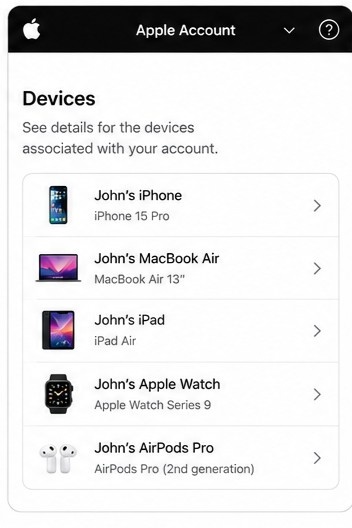
4. Select your iPhone from the list. Its IMEI/MEID and serial number will be displayed on the details screen.
Where Is the IMEI Number on the Box?
Plenty of people search specifically for where is the IMEI number on the box, usually right after unboxing a new phone or while verifying a second-hand purchase.
How to Read the IMEI Label on Retail Box
Look for it printed next to or below a barcode on one side of the box. The label reads "IMEI" or "IMEI/SN," followed by a 15-digit number. Dual-SIM phones typically list two entries here, marked IMEI 1 and IMEI 2.
What Other Numbers Appear on the Box?
Retail boxes also carry a Model Number and a Serial Number. Some cellular devices add an EID for eSIM, or an MEID, which is essentially the first 14 digits of the IMEI and used mainly on older networks. None of these replace the IMEI itself. The easiest way to spot the real one is the label, which always reads "IMEI" and always sits beside a number that is 15 digits long.
What Is a SIM IMEI Number?
The phrase sim imei number gets searched constantly, and it comes from a small mix-up worth clearing up.
Difference Between IMEI & ICCID (SIM Number)
Your IMEI identifies the physical device. Your SIM card carries a completely separate number instead, called the ICCID (Integrated Circuit Card Identifier), which identifies the SIM itself and not the phone. Short version: the IMEI belongs to the phone, the ICCID belongs to the SIM.
|
IMEI |
ICCID |
|
|
Identifies |
The physical device |
The SIM card |
|
Typical length |
15 digits |
19 to 20 digits |
|
Changes if you swap SIM cards? |
No |
Yes, it travels with the SIM |
|
Where to find it |
*#06#, Settings, or the box |
Printed on the SIM card itself |
Can a SIM Card Have Its Own IMEI?
No. A SIM card has no IMEI at all. It carries an ICCID, and in most cases an IMSI (International Mobile Subscriber Identity) too, which identifies your subscriber account with your carrier. The reason people search sim imei number is that both numbers tend to sit close together on carrier paperwork and receipts. They identify two completely different things, though. One is your phone, the other is your SIM.
How to Use an IMEI Checker
An IMEI checker is one of the fastest ways to learn more about any phone before you buy it, sell it, or troubleshoot it.
What Is an IMEI Checker Tool?
It's a free online tool. You type in a 15-digit IMEI number and get back details about that specific device within seconds.
What Can an IMEI Checker Tell You?
A solid IMEI checker will confirm the brand and model, basic manufacture details, and whether that IMEI has ever been reported lost, stolen, or blacklisted. Official carrier and manufacturer tools go further, often confirming warranty status or carrier lock status as well.
Best Free IMEI Checker Tools in 2026
Several independent IMEI checker sites still handle a free basic lookup well, returning device brand, model, and blacklist status at no cost. Deeper reports, meaning full warranty history or carrier lock details, sometimes sit behind a small paid tier. For a result you can actually trust, pair one of these with an official source such as your phone's manufacturer or your own carrier account. Those pull directly from carrier and GSMA blacklist records rather than a third-party copy of them.
How to Get an IMEI Number for a New Device
New phone owners often ask how do I get an IMEI number for a device fresh out of the box. The direct answer is that you don't need to get one at all. Every phone is assigned its IMEI at the factory, permanently, before it ever reaches a store shelf. That number is already printed on the box, already stored in your settings, already tied to the device from the moment it was manufactured. And if you're wondering how do I get an IMEI number for an imported or SIM-free phone, nothing changes: check the box, dial *#06#, or open your settings menu.
What to Do If Your IMEI Number Is Missing or Invalid
Sometimes a phone shows its IMEI as blank, "Unknown," or a row of zeros. Nearly always this points to a software glitch rather than a genuinely missing number, and it usually follows an unofficial firmware flash or a failed system update. A restart plus a check for official software updates clears many of these cases on its own. If the problem continues, contact the manufacturer directly or visit an authorized service center.
If the device belongs to a company, raise it with whoever administers your endpoint protection software first. A flagged or altered IMEI often surfaces there before anyone notices it in settings.
Steer clear of unofficial "IMEI repair" software from unknown websites. Altering an IMEI is illegal in many countries, and a botched attempt can permanently destroy a phone's ability to connect to any network.
Conclusion
Those 15 digits may be the most important numbers your phone owns. You now know what is IMEI number, why it matters, and how to find IMEI number details in seconds using any of the seven methods above. Write yours down somewhere safe today. It could save you real time, and real money, on the day your phone goes missing.