Creating videos is now easier than ever, thanks to artificial intelligence (AI). You no longer need to be a pro editor or hire a voice actor to make your content sound good. Today, you can use simple tools to create high-quality videos at home, fast and for free.
One of the best tools for this is text to speech AI. This amazing technology lets you type your words and turn them into a real-sounding voice. That means you don’t need a microphone or recording setup. With just a few clicks, your video can have a clear, human-like voice.
In this guide, we’ll show you how to use AI tools like CapCut to improve your videos. We’ll also share tips to make your content look and sound better. Whether you’re making TikToks, YouTube videos, or online lessons, this guide is for you.
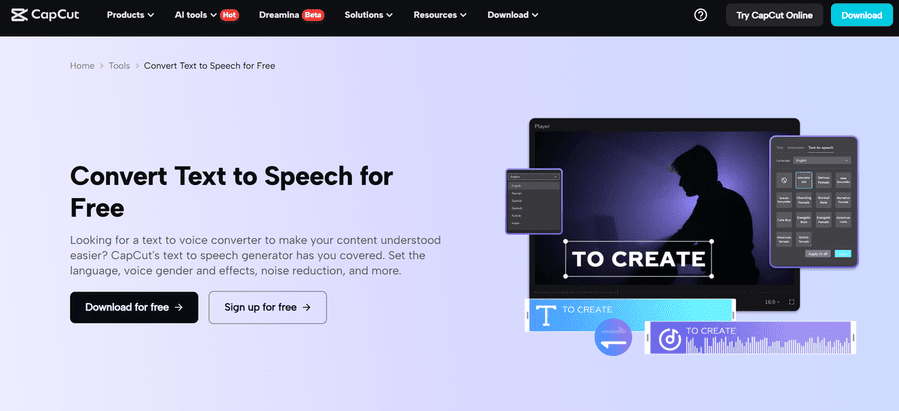
What Is Text to Speech AI?
Text to speech AI is a smart tool that reads out text in a human-like voice. You just type what you want to say, choose a voice, and the tool speaks it for you. It’s quick, easy, and sounds natural.
Many video creators use it for voiceovers, storytelling, or to explain things in their videos. It helps make your content more fun and clear, and it also helps people who can’t hear or prefer reading to enjoy your videos.
Why Add AI to Your Video Edits?
AI tools make your work easier and better. They save time and give your videos a pro touch. One very useful tool is the AI video upscaler.
Sometimes, your video may look blurry or low-quality, especially if it was shot on a phone or downloaded from the web. The AI video upscaler improves video quality. It sharpens the image, boosts color, and makes everything look clean and HD.
This tool is perfect if you want to post your content on YouTube, Instagram, or TikTok. People love watching clear and high-quality videos.
How to Use CapCut’s Text to Speech on Desktop
Let’s now look at how to create a video using CapCut’s desktop version. You can use this free tool to add voice to your video and make it look polished.
Here are the 3 easy steps:
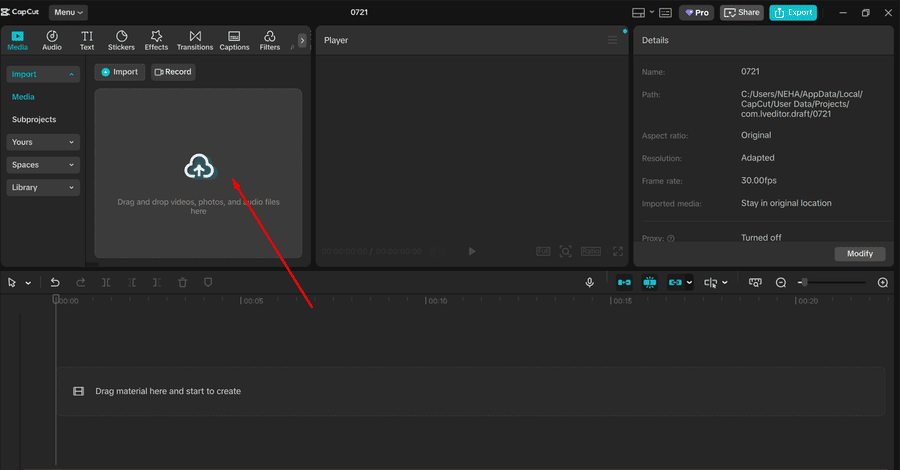
1. Import Video
Open CapCut on your desktop. Start a new project and import your video file. You can drag and drop it into the timeline.
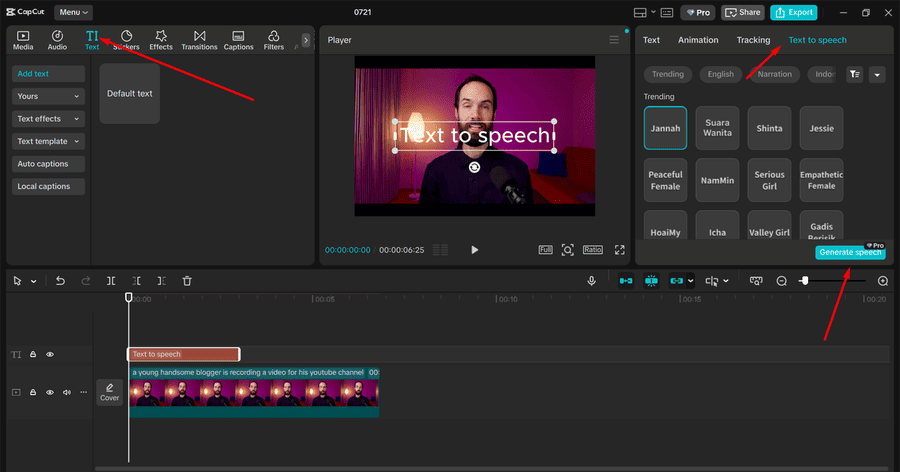
2. Use Text to Speech AI
Click on the “Text” tab. Type the words you want the video to say. Then click on the "Text to speech" option. Choose a voice and language. Once done, the voice will be added to your video timeline.
3. Export Video
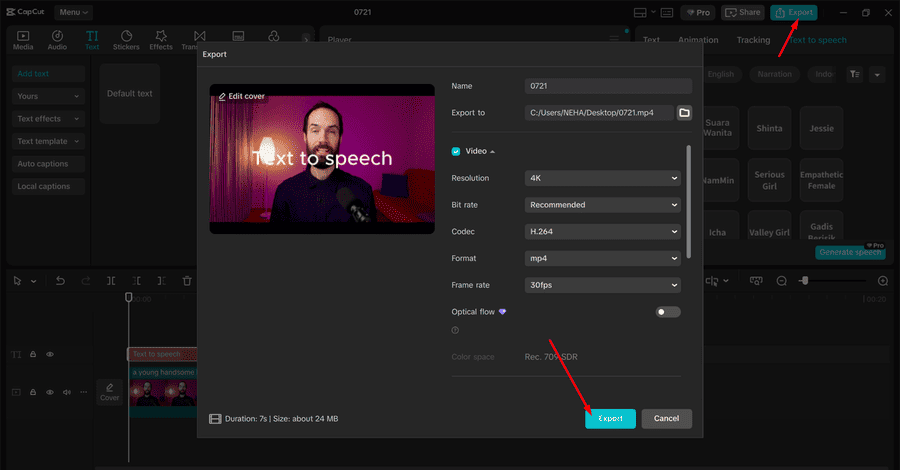
When you're happy with your video and voice, click on "Export". Choose the file type and resolution, then save the video to your computer. You’re done!
It’s really that simple.
Why Use an AI Voice Generator?
Another great AI tool is the AI voice generator. This tool is like text to speech, but it gives you more control over how the voice sounds. You can pick voices that sound excited, calm, serious, or even playful.
This is useful if you’re creating different types of content—like a fun video, a serious tutorial, or a product demo. A good voice helps people connect with your video.
Tips to Make Your Videos Even Better
Using AI tools is just the beginning. Here are a few more tips to help your videos stand out:
-
Write a good script: Keep your message simple and clear. Use friendly and natural words.
-
Choose the right voice: Pick a voice that matches your video style. Try a few options before picking the final one.
-
Use music and sound: Add soft background music or sound effects to make your video more fun and interesting.
-
Edit carefully: Trim extra parts and keep your video short and clean.
-
Use good visuals: Add images, captions, and animations to make the video more attractive.
-
Upscale when needed: If your video looks blurry, use the AI video upscaler to make it clearer before posting.
Who Can Use These Tools?
Anyone! These tools are great for:
-
Content creators who post on YouTube, TikTok, or Instagram
-
Teachers making online lessons
-
Businesses creating marketing videos
-
Gamers posting gameplay highlights
-
Students working on projects or presentations
You don’t need editing experience. CapCut’s tools are made for everyone, and most of them are free to use online.
Final Thoughts
Today, making great videos doesn’t have to be hard. With the help of text to speech AI, you can turn your words into clear, human-sounding voices. If your video needs a boost in quality, the AI video upscaler can sharpen and improve it. And with tools like the AI voice generator, you can create professional-level voiceovers without speaking a word yourself.
CapCut offers all these tools in one place. It’s free, simple to use, and works right in your browser or on your desktop.
So, are you ready to take your videos to the next level? Try these AI tools today and see how easy it is to transform your content!


.png "Differences Between Business and Personal Check Printing Software")