A five-page company website and a shopping app used in six countries do not need the same publishing setup. For the company site, an all-in-one traditional CMS is often the sensible starting point. The app may be better served by a headless CMS that can send the same product information to several screens.

Looking for CMS software?
Check out Techimply's List of the Best CMS Software in India for your business.
That is why there is no automatic winner in the headless CMS vs traditional CMS debate. “Headless” may sound newer, but newer is not the same as more suitable. Before choosing, look at what your editors publish, where that material has to appear and who will maintain the technology after launch. Budget matters too, not only the build cost but also the ordinary work of previews, updates, fixes, and staff training. The easiest way to compare CMS tools is to follow an ordinary publishing job through both systems and notice where the work ends up.
What Is a Traditional CMS?
Open a page, type the copy, add an image, choose a template and press Publish. If one system stores that material and also builds the page a visitor sees, you are working with a traditional content management system.
People who build websites may call this setup “coupled” or “monolithic.” In plain English, the editor, stored content and website theme live under one roof. Change a headline in the admin area and, in most cases, you can preview the new page there and then.
A traditional CMS usually bundles the editor, templates, media library, user roles, plugins, menus and page delivery.
For a blog, brochure site or small online publication, that all-in-one workflow can save a great deal of setup and maintenance. There is no separate frontend application for the business to commission and operate.
What Is a Headless CMS?
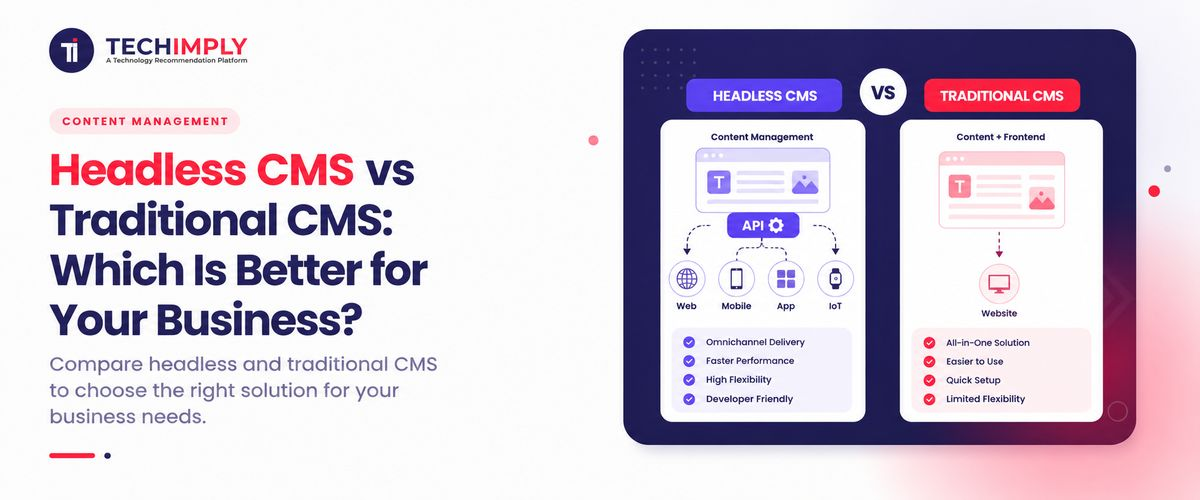
Picture a retailer using headless CMS software to change the price of a chair. In this headless content management system, an editor updates one product record. The CMS sends that record through an API, and the shop website and mobile app each decide where the price appears and what it looks like.
That is the idea behind “headless”: the CMS does not arrive with a fixed customer-facing website attached. An API-first CMS manages the material and makes it available; developers build the screens that customers use. Contentful explains the model in much the same way, with the presentation layer separated from the content backend.
Editors generally still get content fields, an asset library, permissions and approval tools. Developers get APIs and webhooks. Preview may be included, but it often needs to be connected to the separate website before an editor can rely on it.
The trade-off is easy to miss in a product demonstration. Frontend freedom is useful, yet the blank space has to be filled: a team must design, build, host and repair the website or app that sits in front of the CMS.
How Does Headless CMS vs Traditional CMS Architecture Differ?
Trace what happens when someone opens a page. A traditional CMS reads the content, applies its theme and returns the finished page. With a headless setup, the website asks the CMS for content or receives it during a scheduled buildand assembles the screen with its own code.
That is the practical difference in headless CMS vs traditional CMS architecture. It determines which team owns previews, search metadata and redirects. It also determines whether one application or several connected services must work correctly when a customer visits.
|
Area |
Traditional CMS |
Headless CMS |
|
Backend and frontend |
Connected in one system |
Separate systems |
|
Content delivery |
CMS templates render pages |
APIs deliver structured content |
|
Main use |
Websites and blogs |
Websites, apps and multiple channels |
|
Frontend choice |
Guided by CMS theme or framework |
Chosen by developers |
|
Setup |
Faster with themes and plugins |
Requires frontend development |
|
Preview |
Usually built in |
Varies; may require configuration |
|
Hosting |
Often one application stack |
CMS plus one or more frontends |
|
Updates |
CMS, theme and plugins may be linked |
CMS and frontend can change separately |
Headless CMS vs Traditional CMS: Quick Comparison
Use the table as a shortlist, not as the final verdict. A requirement in the left column should describe a real problem your team hasnot a feature you might use one day.
|
Decision factor |
Better fit in many cases |
Why |
|
Fast launch for one standard website |
Traditional CMS |
Ready-made themes and page tools reduce custom work |
|
Non-technical page building |
Traditional CMS |
Visual editing and preview are commonly integrated |
|
Content for web, mobile and other channels |
Headless CMS |
Structured content can be reused through APIs |
|
Complete frontend design freedom |
Headless CMS |
Developers control the presentation layer |
|
Small budget and no developer team |
Traditional CMS |
Lower initial build and maintenance complexity |
|
Complex product or app experience |
Headless CMS |
Frontend is not limited by the CMS theme system |
|
Independent frontend releases |
Headless CMS |
Presentation can be deployed separately from content management |
Advantages of a Traditional CMS
Traditional CMS benefits centre on speed of setup, familiar editing and an integrated operating model.
- Faster launch: Themes, page builders and plugins cover many common website requirements.
- Visual editing: Writers can often preview the final page while changing sections, menus and media.
- Lower initial cost: Existing components reduce the need for custom frontend development.
- Simpler operation: Content, presentation and extensions live in one familiar ecosystem.
- Mature support: Established platforms offer large communities, extensions and agency networks.
Disadvantages of a Traditional CMS
The trade-off becomes noticeable when the work stops looking like an ordinary website. A team building a customer portal, mobile app and in-store display may find itself pushing against a system designed around pages and themes.
- Theme boundaries: A design that falls outside the theme’s assumptions may need awkward overrides or specialist platform work.
- Page-shaped content: Copy stored as one finished page is difficult to split into useful pieces for an app, email or product screen.
- A growing plugin stack: Each extension solves a problem, but it also brings updates, compatibility checks and another vendor to trust.
- Connected releases: A change to the core system can affect templates, extensions and the public site at the same time.
- Heavy installations: Busy, dynamic sites still need thoughtful caching, database work and capable hosting.
Many traditional platforms expose APIs and support custom content types. Before ruling one out, ask a vendor to build your hardest real page and reuse one part elsewhere. The work required will tell you more than the product label.
Advantages of a Headless CMS
The clearest headless CMS benefits appear when one fact has several destinations. Change a product specification once, for example, and the new value can flow to the main website, the mobile app and a showroom screen without three rounds of copying and pasting.
- Omnichannel content delivery: A single approved item can feed a website, app, product screen or display.
- Frontend freedom: Developers choose the framework, hosting and interactions that fit the product.
- Parallel work: Editors and frontend developers can work and release more independently.
- Content reuse: Fields such as a product name, summary and features can appear differently across channels.
- Clear integrations: An API-first CMS can connect with commerce, search, translation and personalisation services.
Disadvantages of a Headless CMS
Headless does not remove complexity; it moves more responsibility to the implementation team.
- Higher initial cost: The business must build the presentation layer and connect it to the CMS.
- Developer dependency: New page types, components and previews may need engineering work.
- Fragmented workflow: Editors may switch between CMS, preview, analytics and optimisation tools.
- More systems to operate: The CMS, hosting, build pipeline and integrations all need monitoring.
- Usage-based cost: API traffic, seats, bandwidth and build services can raise the ongoing bill.
Which CMS Is Better for SEO?
Google does not award a ranking bonus for the type of CMS behind a site. It sees the result: the HTML, links, URLs, metadata, structured data and the speed of the page delivered to a visitor.
Imagine a marketer changes a page URL on Friday afternoon. A traditional CMS or SEO plugin may create the redirect and update the sitemap from the same admin area. In a headless build, the new address stored in the CMS does nothing by itself. Frontend code must print the right title and canonical tag, serve crawlable HTML, update the sitemap and send the old URL to the new one.
So the useful headless CMS vs traditional CMS SEO question is not “Which platform ranks better?” Ask who is responsible for each SEO task, and ask to see it working before launch. A flexible architecture helps only if someone has the time and skill to finish the details.
Which CMS Is Faster?
A well-made site can be fast on either system. Headless teams can prebuild pages and deliver them from the edge, but they can give that advantage away with a large JavaScript bundle, a slow API or too much work in the visitor’s browser. Traditional sites have their own familiar traps: oversized themes, dozens of plugins, uncompressed images and cheap hosting.
Test the page you expect customers to use, not an empty demonstration template. Load a product or article page on a mid-range phone, include the real analytics and consent tools, and watch Core Web Vitals after people begin visiting. Those results are more useful than a claim that one architecture is “fast by design.”
Which CMS Is More Secure?
Neither setup removes security work; it changes where that work appears. A traditional CMS puts much of the risk in one internet-facing application and its extensions. The owner needs to patch the core, theme and plugins, delete anything unused and keep administrator accounts well protected.
A headless backend may sit away from the public website, which limits some direct exposure. In return, the team has APIs, access tokens, build services and frontend packages to look after. A token pasted into a public code repository can undo that separation in minutes.
For either model, require administrator MFA, limit access, install updates, protect tokens and keep tested backups.
The safer option is usually the one your team will patch, review and monitor every monthnot the one with the cleaner architecture diagram.
Which CMS Costs More?
A traditional CMS usually costs less to launch for a standard website. A headless CMS often requires more initial design, frontend development, integration and testing. Over time, headless content reuse may reduce duplicated work across several channels.
Calculate total cost of ownership across three years. Include licences, development, frontend hosting, API usage, plugins, migration, training, security, monitoring and ongoing support.
Choose a Traditional CMS When…
A traditional CMS is usually the better choice when your priority is a straightforward website that marketers can operate with limited technical support.
Choose it when:
- You need one company website, publication or blog.
- A theme or website builder software package covers most design needs.
- You have a small budget or a short launch deadline.
- Your team does not have frontend developers.
- Most content will be published only on the website.
This is why the answer to headless CMS vs traditional CMS for many local businesses, early-stage companies and small marketing sites is still traditional CMS.
Choose a Headless CMS When…
A headless CMS is usually the better choice when content is a shared business asset used across several digital products and the organisation can support a custom frontend.
Choose it when:
- Omnichannel content must appear on websites, mobile apps and other channels.
- Several brands or regional sites share structured content.
- Developers need freedom to choose frontend technologies.
- Content and frontend releases should happen independently.
- Long-term reuse justifies higher initial implementation work.
Do not choose headless only because it sounds modern. Choose it when separation and structured content solve a real, measurable problem.
What Is a Decoupled or Hybrid CMS?
A decoupled CMS separates the backend and frontend but may still provide an optional presentation layer, preview tools or traditional page delivery. A hybrid CMSor a broader Digital Experience Platform (DXP)may support both coupled pages and API-driven experiences.
This middle ground can keep an existing website workflow while delivering selected content to an app or new frontend. Confirm the product’s rendering, API and preview capabilities instead of relying on its label.
Headless CMS vs Traditional CMS Decision Checklist
Answer these questions before selecting a platform:
- How many websites, apps, or channels need the same content?
- Do editors need to design pages without developers?
- Does the team have frontend and operational skills?
- Who will implement SEO, previews, redirects, and analytics?
- What is the three-year cost, including people and support?
- Can you export the content in a usable format if you leave?
Mark each answer as essential, useful, or unnecessary. Then bring an awkward piece of your own content to the vendor demo: a page with a table, a regional variation, an expiring offer or an unusual approval step. Ask the vendor to create it, preview it, publish it and correct it while you watch. A polished sales sample will not reveal where your editors are likely to struggle.
Conclusion
Here is a useful rule of thumb. If the job is one business website and the people publishing it are marketers rather than developers, the traditional CMS benefits of quick setup, visual editing, and fewer moving partsusually outweigh the limits. If the same content must support several sites, an app and a digital product, the headless CMS benefits become easier to justify. You gain API-based delivery and control over each frontend, but you also accept the cost of building and operating those frontends. Still torn between headless CMS vs traditional CMS? Test a hybrid or decoupled CMS as well. Choose the system your editors can use on a busy Monday and your technical team can still maintain three years from now. That is a more dependable standard than choosing the architecture with the newest reputation.