Getting a fresh hire on board is a fantastic milestone for any growing business, but the actual administrative desk work often translates to a massive paper trail. Between tracking down academic degrees, collecting previous job clearances, and organizing background checks, internal operations can grind to a complete halt. This operational bottleneck is exactly why forward-thinking firms are switching to dedicated Employee Onboarding Software. Moving away from archaic physical document folders toward an agile Digital Onboarding system allows your business to lock in essential new-hire profiles cleanly before day one.

Looking for Employee Onboarding Software?
Check out Techimply's List of the Best Employee Onboarding Software in India for your business.
Relying on open email attachments, WhatsApp scans, or physical printouts to manage confidential employee profiles drains company resources and opens up massive data leakage vulnerabilities. Revamping your entry-level pipeline with an intelligent cloud ecosystem changes how your back-office handles the complete onboarding process. Embracing a paperless onboarding architecture completely cuts out the typical manual administrative overhead. Your staff can easily execute mandatory compliance checks remotely, well before a new teammate ever walks through the office reception door.
What Is Digital Employee Onboarding?
Digital onboarding
Employee Management Software can give HR teams a centralized way to organize new-hire profiles, personal information, and required records before an employee officially starts work. Rather than making a new employee spend their entire first morning filling out physical bank declarations and sign-off sheets, this approach sets up a virtual staging area that they can securely complete from home. This modernization creates a completely fluid digital HR onboarding experience where typical operational delays disappear entirely.
How online employee onboarding works
The mechanics of a modern cloud-based portal are straightforward:
- The HR operations desk clicks a button to generate a secure welcome link from their core platform dashboard.
- The incoming worker receives an automated notification link on their phone or laptop.
- The hire keys in their personal baseline profile facts and snaps high-quality images of their identification certificates.
- The system performs automated data validation checks and maps the approved profiles directly into the company's active roster files.
Using online employee onboarding workflows lets your corporate hub coordinate talent onboarding loops across remote regional offices without shipping physical paperwork back and forth.
Benefits of paperless onboarding
Replacing old-school paper binders with a smart, unified web application offers massive, measurable corporate perks:
- Advancements in processing cycles: The software drastically speeds up the processing time while simultaneously eliminating the need for duplicate data entry, reducing a two-week processing time to minutes.
- Tighter document security: Document Management Software offers a secure way to store private tax and personal information in an encrypted cloud environment rather than leaving sensitive employee records vulnerable in physical folders.
- A far better new-hire impression: It frees your incoming talent from mind-numbing clerical tasks on day one, allowing their first official morning to focus on team bonding and role training.
What Documents Are Required for Employee Onboarding?
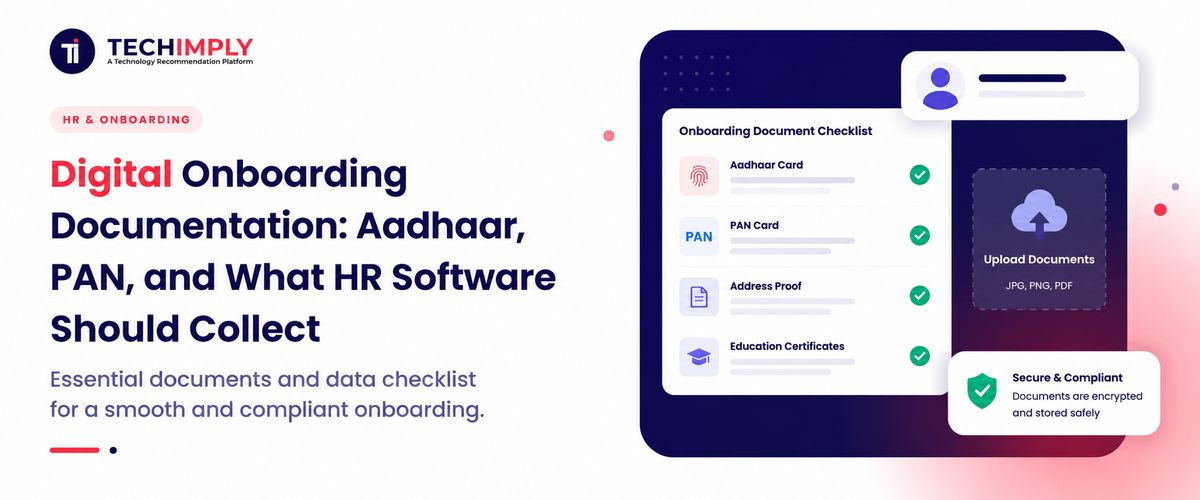
To ensure that your employees are fully compliant with Indian corporate regulations, your onboarding flow needs to collect and retain certain documents. The administrative profile file must cover personal identity logs, banking routing codes, academic histories, and past employment trails.
1. Aadhaar
Identity management Software can help HR teams validate employee Aadhaar details and establish a reliable identity record before the information is added to the company's workforce management database. Gathering this unique 12-digit number is vital for verifying an individual's legal name, establishing permanent residency metrics, and linking their account records smoothly inside the EPFO ecosystem.
2. PAN card
Securing the PAN card for employees is a non-negotiable legal requirement for corporate financial compliance. Tax Software can help finance teams use verified PAN information for accurate income tax filings and monthly TDS calculations while maintaining consistent employee tax records.
3. Bank account details
Your finance desk needs ironclad banking data to route monthly salary disbursements without hitches. Your system should require a crisp upload of a cancelled personal cheque or the front page of a bank passbook to confirm the exact account number and corresponding IFSC details, preventing costly payment bouncebacks.
4. Address proof
While an Aadhaar card handles most permanent address requirements, your operations desk may require extra documentation if an employee is working out of a rented flat in a different metro city. Collecting a registered rent agreement or a recent electricity bill ensures your company records show an accurate, active local communication address.
5. Educational certificates
Verifying technical competency requires a clear look at past academic credentials. The registration portal must safely archive high-resolution scans of graduation degrees, post-graduate diplomas, and specific trade certifications to confirm the person actually holds the credentials they claimed during interviews.
6. Previous employment documents
Protecting your business from hiring liabilities requires a thorough verification of past workplace track records. Your document flow must collect formal experience certificates, official relieving letters, and consecutive recent pay slips from the past employer to verify previous job titles and salary structures accurately.
7. Passport-size photograph
Digital corporate directories require a clean, high-resolution professional headshot. This image is essential for populating internal team charts, setting up workspace communication profiles, and printing company identity cards for office gate entry.
8. Emergency contact details
The application shall provide at least two separate emergency contact names, active cellular phone numbers, and designation to the worker. All this information shall be provided at any time in case of an emergency.
Why Are Aadhaar and PAN Collected During Employee Onboarding?
1. Employee identification
National identity cards offer foolproof, government-backed confirmation of who a worker is. Locking these records down on day one completely prevents administrative identity fraud and ensures every single individual on your monthly payroll register matches a real, verified tax-paying citizen.
2. Payroll processing
A modern, integrated employee document management suite streams verified profile fields directly over to your active payroll engine. Having these national identifiers permanently attached to the user profile means that all monthly financial transactions link up flawlessly with individual banking records.
3. Tax-related requirements
Every active corporate house in India must regularly submit detailed employee tax parameters to the central authorities. Archiving valid permanent account numbers guarantees your finance team deposits monthly TDS balances directly against the correct individual taxpayer profile, keeping you safe from steep financial audit fines.
4. Statutory and compliance processes
Managing retirement benefits like the Employee Provident Fund (EPF) and medical safety nets like Employee State Insurance (ESI) relies heavily on verified national identifiers. The EPFO requires these numbers to attach monthly corporate retirement contributions cleanly to a worker's unique Universal Account Number (UAN).
5. Verification requirements
Deploying a digital employee document verification workflow gives your HR specialists the power to cross-check credentials against live state databases within seconds. Matching employee KYC documents with live state registries guards your organization against credential forgery. This seamless approach accelerates your entire KYC verification routine, giving your operations group complete confidence in your historical compliance logs.
What Employee Information Should HR Software Collect?
1. Personal details
The portal needs to record full legal names, precise dates of birth, active marital status metrics, and gender details exactly as they appear on official government identification.
2. Contact information
Your database must store current mobile numbers, permanent personal email channels, and complete physical address records for both current local housing and permanent hometown locations.
3. Employment details
The system must log vital internal operational variables, including the worker's unique employee code, their assigned business department, direct reporting managers, work shift layouts, and their official date of joining.
4. Bank and payroll information
The configuration requires valid primary bank account numbers, corresponding branch IFSC data, exact bank names, and selected preferences regarding group health insurance benefits.
5. Tax and statutory information
The application must securely index permanent account numbers, active UAN details for provident fund routing, and the employee’s chosen tax regime path (Old vs. New framework) for the ongoing financial year.
6. Emergency contact information
The application should save at least two independent emergency contact names, their active cellular telephone numbers, and their explicit relationship to the worker, ensuring this vital safety data can be retrieved instantly.
7. Uploaded documents
The software needs to archive every high-resolution file submission, including clean PDFs of college degrees and digital images of identity cards in a secure, highly organized folder directly within the user’s master profile. Maintaining this structured onboarding documentation log establishes the core foundations of your long-term corporate records.
How Does Digital Employee Document Collection Work?
An automated new employee onboarding setup turns document collection into a simple, automated process that saves time for both HR teams and new hires. This shifts the operational strain over to an optimized onboarding automation framework.
Employee receives an onboarding link
The moment a candidate signs their official offer letter, the HR platform triggers a secure, unique system workspace link directly to the candidate's personal email address.
Employee enters personal information
The incoming worker logs in and fills out structured data inputs, entering their personal history, bank routing numbers, and residential details directly into the platform interface.
Documents are uploaded
The user uploads clean digital files or smartphone photos of their degree certificates, national identity cards, and previous employer release papers directly into the cloud workspace.
HR verifies the information
The human resource manager opens their admin panel to review the submitted files side by side with the typed fields, ensuring perfect data alignment.
Missing documents are flagged
If an uploaded file is blurry or incorrect, the reviewer flags that specific row inside the portal. The system instantly auto-alerts the employee to submit a clean replacement file.
Employee profile is created
Once every document check turns green, the platform updates the workspace status to complete, instantly shifting the verified data rows over into your core company HRIS database.
How HR Software Helps Manage Employee Documents
Transitioning to an automated corporate platform gives your personnel directors total control over your company's records while reducing daily administrative tasks.
Centralised document storage
An integrated platform houses all employee records within a single, highly structured cloud database, eliminating messy email threads and bulky physical document cabinets. This structural layout modernizes how you execute HR document management across diverse office locations.
Automated document collection
The application orchestrates the tracking process on its own, guiding your incoming workers through an optimized checklist tailored to their exact job profile or location without needing direct HR supervision. This streamlined employee document collection workflow completely removes the need for tedious manual check-ins.
Document verification
Enterprise-level onboarding setups use direct government API connections to validate data authenticity instantly. Running real-time validation checks for Aadhaar verification and PAN verification verifies document legitimacy in seconds. This architecture ensures that every layer of employee verification is completed with complete accuracy.
Missing-document reminders
Built-in automated alerts cut tracking time for your operations staff by reminding prospects via text/push or email of incomplete items on their application tracker dashboard.
Employee self-service
The built-in self-service portal gives your workers direct access to their records over the long term, allowing them to log address changes or add new training certifications on their own without contacting the HR helpdesk.
Digital records and audit trails
The system tracks every document upload, manager validation, and profile modification automatically, building a clean chronological history that makes compliance audits simple and stress-free.
How to Keep Employee Onboarding Documents Secure
Because your company manages sensitive personal data, keeping your employee documents and comprehensive employee documentation secure must be a top priority for your operations team.
- Role-based access: Make sure that the information in the database is accessible only to selected officials, such as authorized HR managers and payroll officers, to check sensitive information such as an individual’s Aadhaar or PAN details.
- Data encryption: Data center security software can help protect employees’ personal information by applying encryption during document uploads and while sensitive records remain stored in the company database.
- Secure document storage: Store all digital files in secure cloud drives to prevent data breaches as opposed to using less reliable local storage systems.
- Access logs: Develop a system that will permanently record information about who viewed, changed, or downloaded an employee’s documents and when this occurred.
- Data retention controls: Establish policies that automatically delete candidate information or employee files after a certain amount of time has passed since their termination or recruitment.
- Limiting unnecessary data collection: Store only the information that is required by law or necessary for the core business function.
Conclusion
Managing paperwork manually through spreadsheets and email threads creates unnecessary compliance risks and administrative bottlenecks for growing companies. Moving to a secure automated employee onboarding system protects sensitive employee data, improves tracking accuracy, and saves valuable time for your HR team. Investing in modern onboarding automation allows your business to ditch the paperwork and focus on giving new hires a welcoming, professional onboarding experience.