Ask a CRM vendor whether their platform is secure, and you'll get a yes. Of course you will. The question is doing no work, because "secure" without specifics is just reassurance, and reassurance isn't a control you can audit. What you need to know is different: where your customer data actually lives, who can reach it, how long it stays, and what happens when one of the dozen tools plugged into your CRM gets compromised.

Looking for CRM software?
Check out Techimply's List of the Best CRM Software in India for your business.
That last part is where most small and mid-sized businesses get caught. The 2025 and 2026 breach headlines weren't about attackers cracking Salesforce or breaking encryption. They walked in through a connected app that already had permission, a trusted integration nobody was watching. For an SMB running a lean stack, that's the uncomfortable truth: your CRM software can be perfectly secure, and your customer database can still walk out through a side entrance you forgot you'd left open.
This is a practical audit, not a scare piece. Two things ground it that generic checklists skip. First, India's DPDP Act and its 2025 Rules now put real obligations on how you handle CRM data, with actual penalties attached. Second, the recent breaches show exactly where the risk concentrates, and it isn't the core login. Work through the checks below, and you'll know whether your CRM software is genuinely ready to hold customer information or just says it is.
What the DPDP Act Actually Requires of Your CRM Data
India's Digital Personal Data Protection Act was passed in August 2023, and the operational DPDP Rules were notified by the Ministry of Electronics and Information Technology on 13 November 2025. The framework rolls out in phases, and the substantive compliance duties, including the security safeguards and consent requirements most relevant to CRM data, come into force on 13 May 2027. That gives SMBs a real runway, but the businesses that map their CRM to these rules early will be the ones not scrambling in 2027.
Here's what the Act asks of you as a data fiduciary, the term for whoever decides why and how personal data gets processed. If your business decides what customer data to collect and what to do with it, that's you.
Purpose limitation and minimization. You may only collect personal data for a specific, lawful, stated purpose, and only the data that purpose actually needs. The Act doesn't allow you to repurpose data later without fresh consent. In CRM terms, every field you store should trace back to a reason: capturing a customer's date of birth with no business use for it isn't thoroughness, it's a liability sitting in your database.
Consent, or a listed legitimate use. Consent is the primary basis for processing under the DPDP Act, and it has to be free, specific, informed, and unambiguous, backed by a plain-language notice describing what you collect and why. The Act does include a narrow set of "legitimate uses" that don't require consent, such as employment-related processing or data a person voluntarily handed over for a clear purpose. But the list is deliberately short, and India's framework has no broad "legitimate interests" basis like the GDPR. If you can't point to consent or a listed use, you don't have a basis to store the record. Retention limits and erasure. This is where SMBs most often fall down. You cannot keep personal data longer than the purpose requires; once the purpose is done or consent is withdrawn, the data must be erased, and you're expected to make your processor delete it too. A strong compliance management software layer helps here, turning "we should probably clean up old records" into an enforced, automated retention rule. One nuance worth knowing: the DPDP Rules require certain logs and traffic data to be retained for at least one year to support breach investigation, so erasing customer records and keeping security logs are two separate obligations, not a contradiction.
Reasonable security safeguards. The Rules explicitly name the measures expected: encryption and masking, access controls, logging and monitoring, and backups to preserve processing through an incident. These are the baselines against which a breach gets judged, and the maximum penalty for failing to protect data and suffering a breach runs up to ₹250 crore, which signals how seriously the obligation is meant to be taken.
Vendor and processor obligations. Under the DPDP Act, the data fiduciary stays accountable even when a processor, like your CRM vendor, handles the data on your behalf. The liability doesn't transfer with the data. So your contracts need to require the same privacy and security standards you're held to, and you need the ability to have data deleted at the processor when the time comes.
Children's data. If you handle data for anyone under 18, the bar rises sharply. Processing a child's personal data generally requires verifiable parental consent, with only narrow exemptions, so if minors could plausibly be in your CRM, this needs checking on its own rather than folding into your general consent flow.
|
Obligation |
What It Means for Your CRM |
In Force |
Penalty Exposure |
|
Purpose limitation & minimisation |
Every stored field traces to a stated purpose. No repurposing without fresh consent. |
13 May 2027 |
Up to ₹50 crore |
|
Consent or listed legitimate use |
Free, specific, informed, unambiguous consent, backed by plain-language notice. No broad "legitimate interests" basis. |
13 May 2027 |
Up to ₹50 crore |
|
Retention limits & erasure |
Delete once the purpose ends or consent is withdrawn. Processors must delete too. Security logs are retained separately for one year. |
13 May 2027 |
Up to ₹50 crore |
|
Reasonable security safeguards |
Encryption, masking, access controls, logging, monitoring, backups. |
13 May 2027 |
Up to ₹250 crore |
|
Vendor & processor obligations |
A fiduciary stays accountable. Contracts must mirror your standards and allow deletion at the processor level. |
13 May 2027 |
Up to ₹250 crore |
|
Children's data |
Verifiable parental consent for users under 18 years old, with only narrow exemptions. |
13 May 2027 |
Up to ₹200 crore |
The Practical CRM Data Checklist
Compliance and security both come down to knowing your own data. Most SMBs can't actually answer basic questions about what's in their CRM, and that gap is the real vulnerability. These steps close it.
Inventory every field. Start with a plain list of what your CRM stores: name, phone, email, address, purchase history, support notes, and whatever custom fields have accumulated over the years. You can't protect or justify data you haven't catalogued, and most databases hold more than anyone remembers.
Classify each field by purpose. Tag every field with why it exists, whether that's sales, support, marketing, billing, or a legal requirement. A field that doesn't map to a stated purpose is one you either need a reason for or need to stop collecting.
Set retention rules per category, then automate them. A support ticket resolved two years ago and a live customer's billing record don't justify the same lifespan. Assign a retention period to each category and, crucially, automate the deletion or anonymization so it happens without someone remembering to run it. Manual cleanup that depends on human diligence is cleanup that doesn't happen.
|
Data Type |
Business Purpose |
Suggested Retention |
Action on Expiry |
|
Active customer billing records |
Contractual & tax obligation |
8 years from last transaction |
Archive, restrict access |
|
Closed support tickets |
Service history, quality review |
24 months from resolution |
Anonymise |
|
Marketing contacts (no purchase) |
Consent-based outreach |
24 months from last engagement |
Delete |
|
Prospect / lead records |
Sales pipeline |
12 months from last contact |
Delete |
|
Website enquiry form data |
Responding to a request |
6 months |
Delete |
|
Call recordings & notes |
Training, dispute resolution |
6 months |
Delete |
|
Withdrawn-consent records |
None |
Immediate |
Delete, confirm at processor |
|
Security & access logs |
DPDP breach investigation |
Minimum 1 year |
Retain, then purge |
Restrict access by role. Not everyone needs to see everything, and almost nobody needs to export the whole database. Role-based access is one of the highest-value controls an SMB can implement, and this is where identity and access management tooling earns its place, enforcing least privilege so a junior support rep can't pull the entire customer list. Pay particular attention to who holds export rights, because export is how a small mistake becomes a large one.
Keep audit logs. Log who accessed what, what changed, and what got deleted. Beyond being a DPDP expectation, logs are how you actually detect and investigate a problem. Without them, a breach is invisible until a customer or an extortionist tells you about it.
Review third-party integrations. This deserves the most attention and usually gets the least. Every plugin, marketing tool, and connector attached to your CRM is a potential path in, and each accumulates permissions that outlive the reason they were granted. More on why below, but for the checklist: know what's connected, what it can access, and whether you still use it.
Update privacy notices and internal policies. Document how you store and delete data, and make sure your public privacy notice matches what actually happens inside the system. A notice that describes practices you don't follow is arguably worse than no notice, because it's a written record of the gap.
Encryption Standards Worth Verifying
Encryption is where vendor answers get vague, and vagueness is the signal. A CRM software vendor that takes security seriously can tell you specifics without hesitating. Here's what to ask and the sloppy answers that should worry you.
Data at rest. Confirm the database or storage layer encrypts customer records on disk, not just the connection to the app. Microsoft's own platform documentation points to AES-256 as the standard for data encrypted at rest, and that's a reasonable bar to hold any CRM to. The question is whether the actual stored records are encrypted, because "the app is secure" often quietly means the data underneath sits in plaintext.
Data in transit. Traffic between the browser and the CRM, and between the CRM and its database, should use modern TLS, ideally version 1.2 or 1.3. A vendor still permitting older protocols or weak ciphers in any part of the path has left a gap. Good cloud security software helps you verify that the encryption in transit holds across every connection, including the integrations, rather than just the main login page.
Key management. This is the question that separates real answers from marketing. Ask who controls the encryption keys, how often they're rotated, and whether the keys are stored separately from the data they protect. Encryption where the keys sit next to the encrypted data, or where nobody can tell you where the keys live, is encryption in name only. It's also worth asking whether especially sensitive fields, such as identification numbers or payment data, can be encrypted separately with tighter controls.
Backup encryption. Backups, exports, and replicas are frequently the weak point, because they're copies that leave the main protected environment. Verify that they're encrypted too. Unencrypted CSV exports and backup files are a classic way for data to leak without anyone touching the CRM itself.
|
What to Ask |
Acceptable Answer |
Red Flag |
|
How is data encrypted at rest? |
AES-256 on the storage layer, named explicitly |
"Industry-standard encryption," with no algorithm given |
|
What TLS version protects data in transit? |
TLS 1.2 or 1.3 across every path, integrations included |
Older protocols or weak ciphers still permitted anywhere |
|
Who controls the encryption keys? |
Named key-management system, keys stored separately from data |
No clear answer on key location or access |
|
How often are keys rotated? |
Documented rotation schedule |
"Handled internally," with no schedule |
|
Can sensitive fields be encrypted separately? |
Yes, with field-level controls for IDs and payment data |
Single blanket encryption, no granularity |
|
Are backups and exports encrypted? |
Yes, backups, replicas, and CSV exports are all covered |
Unencrypted CSV exports or email attachments |
|
Will you put this in writing? |
Yes, in the contract or security addendum |
Any hesitation |
The working rule is simple. If a vendor can't explain exactly how your customer data is encrypted, where the keys live, and whether exports are protected, the CRM isn't ready for sensitive customer information. That's a gap to close before you migrate data in, not a detail to sort out later.
The Real Lesson From Recent Breaches: Watch the Integrations
Here's the pattern that should reshape how SMBs think about CRM software security. Across 2025 and 2026, the most significant CRM data losses didn't come from attackers defeating a platform's core defenses. They came through connected applications and OAuth tokens, the trusted side doors.
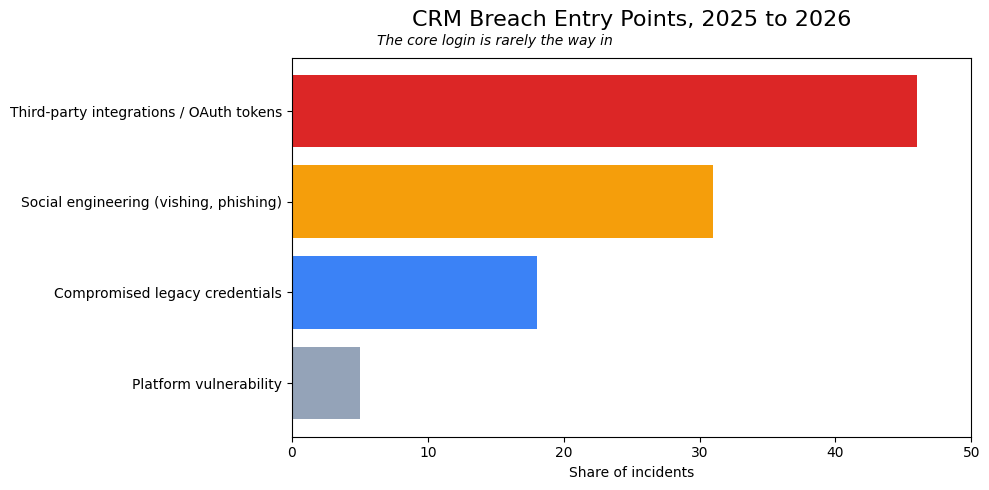
Take Cisco. In its own disclosure, the company explained that on 24 July 2025 an attacker used a voice phishing call, tricking a Cisco representative into granting access to one instance of a third-party, cloud-based CRM system. The attacker exported basic profile data, names, addresses, email addresses, phone numbers, and account metadata for individuals who'd registered on Cisco.com. Notably, Cisco did not publish a number of affected users and declined to give one when asked; larger figures that circulated in later media coverage weren't part of Cisco's own statement, so treat them as estimates rather than confirmed fact. What Cisco did confirm is the mechanism, and the mechanism is the lesson: no CRM vulnerability, no broken encryption, just a person on a phone and access that was handed over.
The Klue breach in June 2026 makes the point even more sharply. Klue, a competitive-intelligence platform, integrates with Salesforce through OAuth tokens. Attackers got in through a compromised legacy credential, one Klue had originally created to prototype an integration it later abandoned but never deactivated. From there they harvested the OAuth tokens Klue's customers used to connect their systems, then used those tokens to query connected Salesforce environments directly and pull CRM data, running automated queries for roughly 24 hours before the activity was contained. Affected organizations included security firms like Huntress and Recorded Future, a pointed detail: even companies that professionally detect breaches were exposed through a supply chain they trusted. Salesforce was explicit that this wasn't a flaw in its platform but in the connected app's access.
What makes these attacks so effective is that they don't look like attacks. When an attacker uses a valid OAuth token, the CRM sees the legitimate, approved integration doing what it always does: no failed login, no unfamiliar password attempt, no geographic anomaly to flag. The access is indistinguishable from normal traffic, which is why detection has to come from watching data-access volume and behavior rather than login alerts and why an unused integration with live permissions is genuinely dangerous, not just untidy. This is the class of exposure that data loss prevention tooling is built to catch, flagging the bulk export or the unusual query pattern that a login-focused defense sails straight past.
For an SMB, the takeaway is direct. Your customer database can be exposed through a marketing tool, a support widget, or a sales connector whose permissions are far broader than they need to be. A single over-privileged integration turns one vendor's bad day into your data breach. So integration hygiene deserves the same seriousness as your password policy: audit which apps are connected, review what each can actually access, revoke tokens for anything you no longer use, enforce least privilege on the rest, and monitor exports and admin activity rather than assuming the login screen is the whole perimeter.
The Rule to Apply Immediately
If you remember one principle from all of this, make it this: if a CRM record can't be tied to a live business purpose, a legal requirement, or a clearly documented retention rule, it shouldn't be in your system. Data you don't need is pure liability, and the fastest way to shrink your risk is to stop storing what you can't justify.
Here's the checklist to run this week, before you store another customer's information:
- Inventory every field in your CRM and classify each by its business purpose.
- Delete or anonymise anything that doesn't map to a purpose, a legal need, or a retention rule.
- Set automated retention and deletion rules per data category, and confirm they actually fire.
- Restrict access by role, and tightly limit who can export data.
- Confirm your encryption in writing: AES-256 at rest, TLS 1.2 or 1.3 in transit, encrypted backups, and documented key management.
- Audit every connected integration, revoke unused OAuth tokens, and enforce least privilege on the rest.
- Make sure your vendor contracts obligate the same security and deletion standards you're held to.
- Turn on and review audit logs for access, changes, deletions, and unusual export activity.
Conclusion
None of this requires enterprise budgets or a dedicated security team. It requires knowing your own data and refusing to accept "our CRM is secure" as a complete answer. The businesses that get breached rarely lack a firewall; they lack visibility into what they're storing and what's quietly connected to it. Close that gap, and you've done more for your customers' data than most companies many times your size.