A smart social media management tool can help you to have your centrally controlled platform across multiple profiles where you can plan, post and analyze your content efficiently. The right system enhances output without misunderstandings, whether it is in a small group or the creation of an individual. At the same time, social media optimization tools enable you to be more accurate in your posts, arrange posts better, and communicate. In choosing a social media management tool to enhance your presence, find a tool that is analytical, scheduled, and cross-platform.

Looking for a Social Media management Tool?
Check out Techimply's List of the Best Social Media Tools for your business.
Top Social Media Management Tools
|
Tool Name |
Plan Details |
Price |
Suitable for |
Key Features |
|
Semrush |
Social Toolkit: Social Dashboard, Poster, Tracker, Analytics, AI Insights |
Starts at $20/month |
Individuals & small teams |
- Competitive intelligence & benchmarking - Content suggestions - Post scheduling - Analytics & performance tracking - Multi-network management |
|
HubSpot |
CRM-integrated social tools, mentions & engagement tracking |
Starts at $500/month |
Medium to large businesses |
- CRM integration - Campaign tracking - Mentions & engagement monitoring - Analytics & reporting |
|
Social Champ |
Scheduling, post-recycling, and platform management |
Starts at $4/month |
Freelancers, small teams |
- Automated post recycling - Bulk upload - RSS feed integration - Basic analytics |
|
Buffer |
Post scheduling, basic analytics, and team collaboration |
Starts at $5/month |
Small teams, individual users |
- Easy-to-use interface - Post scheduling - Basic analytics - Team collaboration |
|
Hootsuite |
Scheduling, engagement feed, reporting, and team workflow |
Starts at ₹1,915/month |
Agencies, businesses |
- Multi-network support - Team collaboration - Engagement feed - Reporting & analytics |
|
Vista Social |
Scheduling, analytics, social listening, reporting |
Starts at $64/month |
Agencies, businesses |
- Publishing & scheduling - Social listening - Analytics - Review management |
|
Loomly |
Pre-planned content, post previews, suggestions, and team collaboration |
Custom Pricing |
Small to medium teams |
- Content calendar - Post previews - Team roles & approval workflows - Collaboration tools |
|
Iconosquare |
Analytics and insights for Instagram and Facebook |
Starts at $33/month |
Visual brands |
- Instagram & Facebook analytics - Visual dashboards - Competitor benchmarking - Performance tracking |
|
Typefully |
Twitter/X thread creation and posting, post monitoring |
Starts at $12.50/month |
Twitter/X users |
- Thread creation & posting - Clean, distraction-free interface - Post monitoring & analytics |
|
Sendible |
Scheduling, monitoring, reporting, and client management |
Starts at $29/month |
Agencies managing multiple clients |
- Multi-client management - Scheduling & publishing - Engagement tracking - Reporting & analytics |
|
Sprout Social |
Publishing, engagement, reporting, social listening |
Starts at $199/month |
Medium to large teams |
- Team collaboration - Analytics & reporting - Social monitoring & listening - Publishing & scheduling |
|
Zoho Social |
Team collaboration, reporting, listening, and scheduling |
Starts at ₹600/month |
Teams using Zoho applications |
- CRM integration - Scheduling & publishing - Reporting & analytics - Social listening |
|
Sprinklr |
Publishing, engagement, listening, and reporting across various networks |
Custom pricing |
Large enterprises |
- Multi-network publishing - Customer experience management - Advanced social listening - Reporting & analytics |

Expert Advise
Effective social media management can be useful in increasing brand awareness, creating a good online community, improving customer service, creating demand, and reducing the overall sales cycle.
1. Semrush
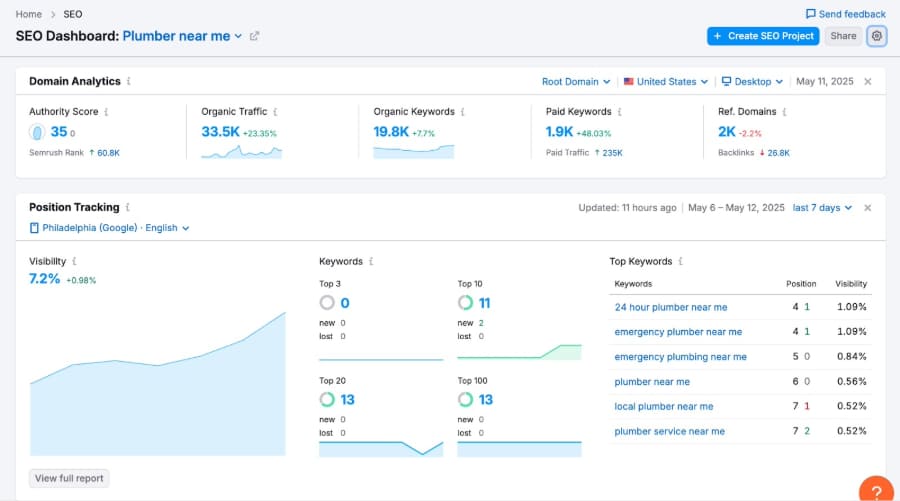
Semrush is a well known marketing and SEO tool; however, the social toolkit assists in scheduling, analytics, and competitor monitoring. It enables you to control various networks and analyze the content performance effectively.
Pros
-
Good competitive intelligence and benchmarking.
-
Offers analytical and content suggestions.
Cons
-
Restricted management of comments/messages.
-
It may be too daunting for novices.
Pricing: Starts at just $20 per month.
2. Hubspot
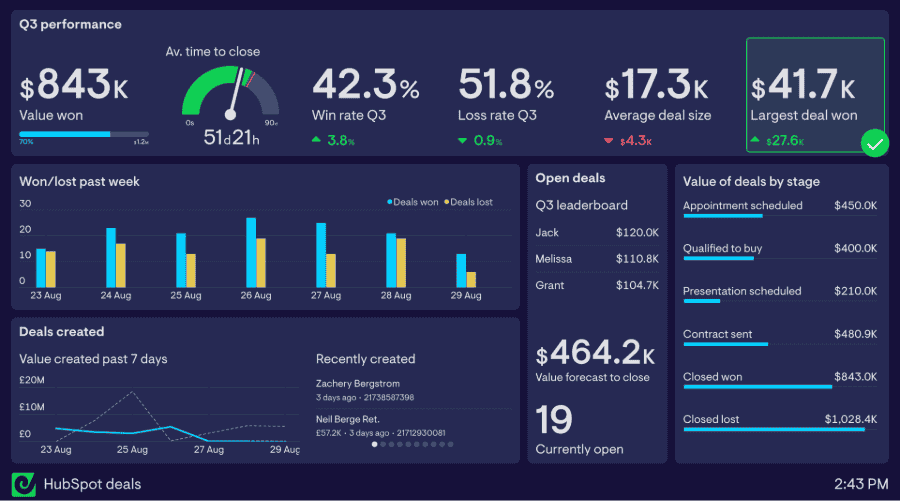
The social media tools offered by HubSpot belong to the bigger marketing tools of the company. You can plan the posts, track the interactions, and follow the performance, and combine it with CRM and campaigns.
Pros
-
Outstanding CRM and marketing integration.
-
Mentions and engagement will be effectively monitored.
Cons
-
Plans of the higher tier are costly.
-
Social media tools cover many needs but aren’t designed for specialized functions.
Pricing: Starts at just $500 per month.
3. Social Champ
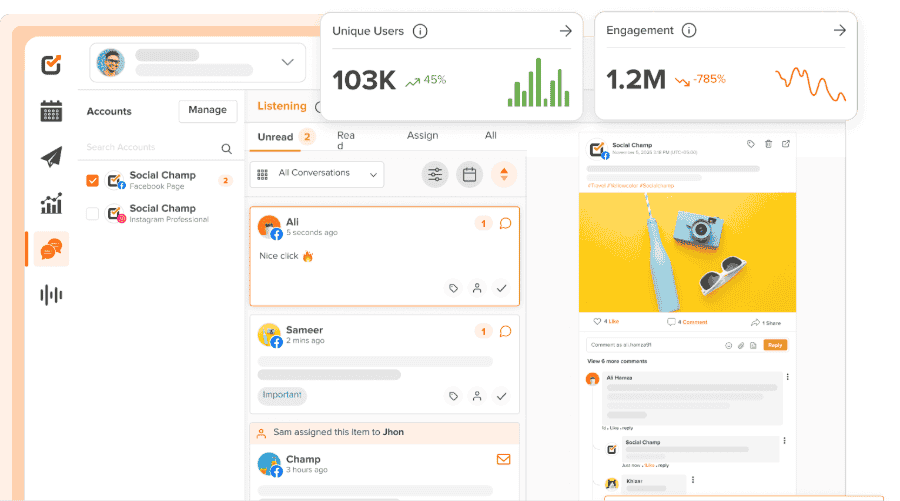
Social Champ is concentrated on scheduling, post recycling, and management of the platform. It eases the content planning of small teams or individual users.
Pros
-
Support automated recycling of posts.
-
Economical and easy to establish.
Cons
-
Reduced sophisticated analytics on reduced plans.
-
Less refined interface when working with big teams.
Pricing: Starts at just $4 per month.
4. Buffer
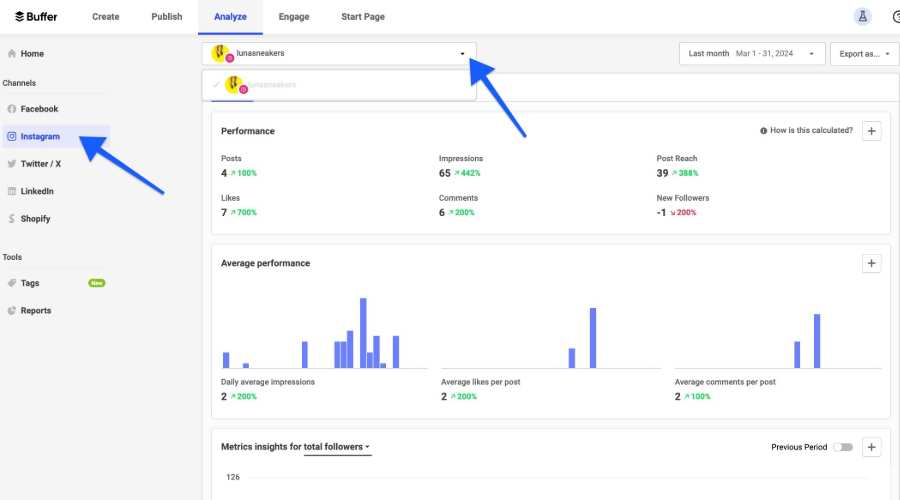
Buffer focuses on post scheduling, basic analytics, and collaboration between teams. It has an intuitive, user-friendly interface, which is very convenient in content management (when it comes to small teams).
Pros
-
Low learning curve and user friendly.
-
Perfect when it comes to small teams or individual users.
Cons
-
Analytics are basic compared to full-featured platforms.
-
Lacks improved social listening capabilities.
Pricing: Starts at just $5 per month.
5. Hootsuite
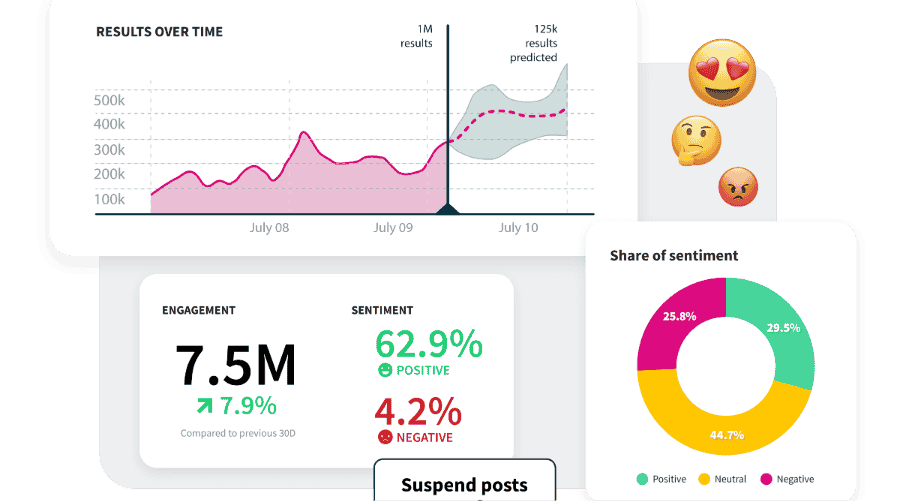
Hootsuite is an established software that sustains the scheduling, engagement feed, reporting, and group workflow. It operates on various networks, and it fits agencies and businesses.
Pros
-
Skilled in cross-platform publishing and collaboration in a team.
-
Extensive reporting and performance boards.
Cons
-
High pricing may be applied to sophisticated features.
-
Interface can be complicated with numerous streams and accounts.
Pricing: Starts at just ₹1,915 per month.
6. Vista Social
Vista Social is a scheduling, analytics, social listening, and reporting platform. It is appropriate for agencies and businesses that want to have a single solution.
Pros
-
Combines publishing, listening, and analytics.
-
Fine in terms of agency processes and reporting to clients.
Cons
-
There were other features not available in the lower-level plans.
-
Less third-party integration than mature tools.
Pricing: Starts at just $64 per month.
7. Loomly
Loomly is dedicated to preplanned content, post previews, suggestions, and collaboration between teams. Its approval processes and role administration ease the work of teams.
Pros
-
Presents content concepts and after preview functionalities.
-
Supports team roles and approval processes.
Cons
-
Advanced tools are not as detailed as analytics.
-
Weak social listening skills.
Pricing: Pricing is customized according to your specific requirements.
8. Iconosquare
Iconosquare is a brand that is distinguished by analytics and insights (Instagram and Facebook). It monitors the performance of the content and competitor benchmarking.
Pros
-
Good visual analytics and dashboards.
-
Best suited to visually brand-oriented brands.
Cons
-
Restricted postings and scheduling of non-visual media.
-
The management tools of engagement are elementary.
Pricing: Starts at just $33 per month.
9. Typefully
Typefully is more of a Twitter/X utility; it assists in creating and posting threads and monitoring the success of posts. It is a plain and easy, no-distraction text-based platform.
Pros
-
Good at writing and posting threads.
-
Clean, simple interface
Cons
-
Poor support for other platforms.
-
Simple analytics and team capabilities.
Pricing: Starts at just $12.50 per month.
10. Sendible
Sendible is a scheduling, monitoring, reporting and client management application. The agencies tend to use it to organize various clients.
Pros
-
Appropriate in case of a multi-client or agency configuration.
-
A combination of publishing, engagement, and reporting functions.
Cons
-
Most features are unlocked in higher-tier plans.
-
There are too many accounts on the Dashboard.
Pricing: Starts at just $29 per month.
11. Sprout Social
Sprout Social is a sought-after application that has an excellent publishing, engagement, reporting, and social listening capability. It is effective in medium and large teams.
Pros
-
Superior cooperation and analytics.
-
Wealthy social monitoring and listening systems.
Cons
-
Expensive for growing teams
-
Visionary customization needs extra expenses.
Pricing: Starts at just $199 per month.
12. Zoho Social
Zoho Social offers team collaboration, reporting, listening, and scheduling at a fair cost. It fits well with the Zoho business applications.
Pros
-
Powerful key attributes at a fair price.
-
Integrates with Zoho CRM and other applications.
Cons
-
The analytics is not as extensive as the best tools.
-
There are limited social listening characteristics.
Pricing: Starts at just ₹600 per month.
13. Sprinklr
Sprinklr is a social media management tool that is utilized by large companies. It provides publishing, engagement, listening, and reporting on a variety of networks.
Pros
-
Very scalable and powerful for large teams.
-
Thick social listening and customer experience attributes.
Cons
-
Very costly and business-oriented.
-
The learning curve and implementation are complex.
Pricing: Pricing is customized according to your specific requirements.
Key Features To Look For In Powerful Social Media Management Tools
To select the best social media marketing tools, it is necessary to pay attention to those features that simplify and improve the management. Social Media Management Software Market is projected to grow from USD 36.23 Billion in 2025 to USD 144.60 billion by 2034. This is what a good social media management platform must provide:
-
Scheduling And Publishing
-
Cross-Platform Management
Best social tools enable you to control various platforms such as Facebook, Instagram, X/Twitter, and LinkedIn from one location. Performance can be monitored and updates made without having to make individual logins to each network, and this saves time and effort.
-
Content Curation And Creation
An effective social media management tool is capable of uncovering trending topics, post ideas, and templates that can be used to create visuals. It keeps your feed up to date and interesting, and takes less effort to make it. An Instagram post generator can further streamline content creation, helping you produce engaging posts quickly and consistently.
-
Analytics And Reporting
Analytics capabilities monitor interaction, exposure, and clicks, and channel behaviors. A social media manager who has good reporting skills assists in measuring the performance, detecting trends and improving strategies to achieve improved performance.
-
Collaboration
Multi-user roles, approvals, and shared calendars are facilitated by collaboration tools. The content publishing process is easier and more efficient since teams are able to coordinate, review drafts, and avoid errors.
-
Social Listening
Social listening is the type of process which implies monitoring of brand names, hashtags, and competitor activities. They are quite useful in case of tracing the trends, understanding the feelings of the audience, and understanding the possibilities of making the engagement stronger or responding to feedback in a few seconds.
Struggling To Choose? Find The Best Social Media Tool For Your Business Needs
The choice of the appropriate social media management tool will depend on the way your team operates and what outcomes you aim to attain. In most cases, free social media management tools suffice to schedule and analyze in the case of small businesses. Teams that are bigger may also like platforms with an integrated set of advanced functions, such as collaborating as a team and automatic publishing. Additionally, the use of social media optimization tools can help to increase reach and interaction because you analyze how and when your audience reads the material. It is just a matter of balance, simplicity, scalability and smartness.
Fun Fact
58% of consumers discover new businesses via social media, surpassing traditional search and TV in brand discovery.
What Should You Look For In Social Media Management Tools?
When selecting Suitable SMM tools for your business, it should be given to aspects that make your work process easier and increase your online strategy. The following are the main points to be taken into consideration
-
Ease of Use
Select tools that have a user-friendly interface that simplify handling of various social platforms even among novices.
-
Flexible Scheduling
The most useful SMM tools allow you to plan, schedule, and autopost on the different platforms to have a steady flow of content without doing it manually.
-
Advanced Analytics
Find deep coverage and insights to monitor engagement, impressions, and reach - to assist you in accurately determining campaign performance.
-
Multi-Platform Management
A great tool must enable you to follow all the various social media platforms, reply to messages, and organise campaigns all in one dashboard.
-
Sentiment and Keyword Tracking:
Top tools will allow you to monitor the appropriate keywords and track the mood of the audience and optimize campaigns on the fly.
-
Social Content Management
Good social content management guarantees brand consistency- all pictures, captions and reports are kept under a single roof.
Conclusion
An effective social media tool or platform will enable you to use one dashboard to organize various platforms, organize and schedule your posts, and evaluate your performance effectively. Being a single developer or a small team, the appropriate system enhances efficiency and decreases mistakes. The best social marketing tools will make sure that posts are optimized, scheduled at the appropriate time, and consistent with your plan, and a variety of analytics and cross-platform management will make sure that the brand remains consistent.
It is also possible to follow the tendencies, keep an eye on the attitude of the audience, and respond to comments due to being a decent social media handler. Combining the ability to schedule, analyze, and socially listen will help streamline the management of social media, make your operations more productive, result-oriented, and strategic. The appropriate selection of tools provides you with ease and scalability as well as effectiveness, which allows you to increase your reach without compromising the quality of the content.