Running a brick-and-mortar storefront anywhere in India means managing long queues, frantic rush hours, and thousands of distinct items. To keep your daily checkout workflow running smoothly, choosing an optimized Retail POS Software is the ultimate foundational step for your business. Over the last few years, the way shopkeepers tally stock items and collect customer money has transformed completely. Traditionally, stores relied heavily on manual data entry or basic laser systems.

Looking for Retail POS Software?
Check out Techimply's List of the Best Retail POS Software in India for your business.
However, data from the IMARC Group India Retail Market Report indicates that the Indian retail market reached a massive valuation of USD 1,124.2 Billion, and is expanding rapidly alongside high digital adoption. Today, retail shop owners face a big operational question: should they invest in a traditional product scanning matrix, or transition their checkout counters toward a mobile matrix? Finding the perfect tool requires understanding how modern systems communicate, track inventory, and settle billing ledgers without introducing stressful delays for your staff or customers.
Barcode vs QR Billing: What’s the Difference?
1. How barcode billing works
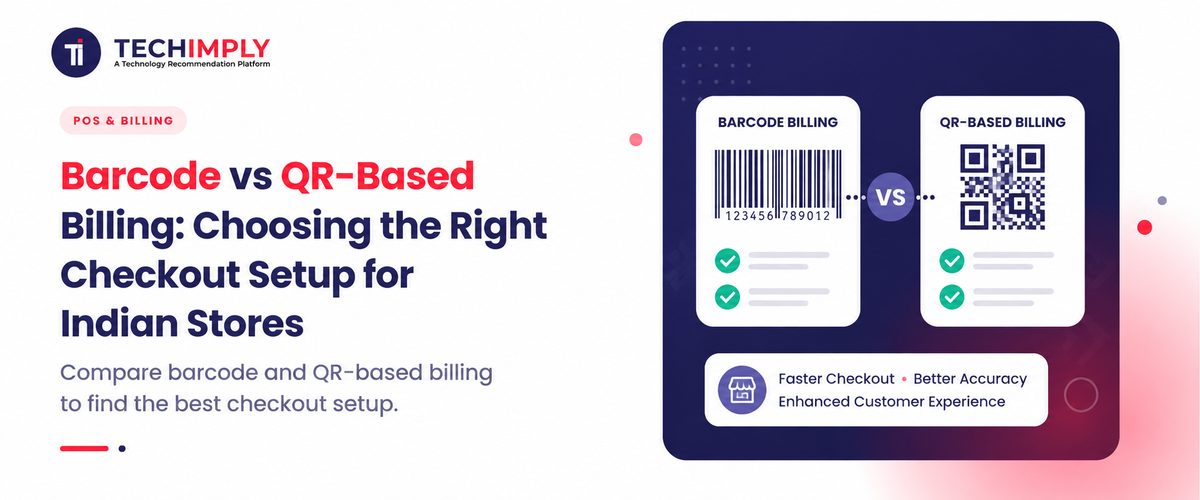
Traditional identification systems process a series of vertical black lines of varying widths printed on a white label sticker, which can be managed efficiently through Barcode Software. This visual setup is known as a linear data pattern. When a cashier holds an item up to a dedicated barcode scanner, the machine shoots a red laser light across the pattern to read the specific numbers encoded inside. The barcode POS software instantly translates this light signal into a single text-based product identification code. The connected Retail POS Software searches its central database, finds the corresponding product name, pulls up the precise price matrix, and appends it to the customer’s invoice. This linear data pathway is strictly a one-way system built to identify a specific item stock keeping unit rather than storage of complex records.
2. How QR-based billing works
A two-dimensional grid format stores information horizontally and vertically using tiny black squares arranged systematically inside a larger square border. Because it reads across two dimensions, a QR code scanner or basic mobile camera can extract hundreds of times more data than a standard linear sticker. In a QR billing environment, scanning the grid can instantly reveal the manufacturing date, expiry status, batch number, and web links. When a cashier utilizes automated QR billing software, they don't just fetch a basic SKU code; they can fetch detailed promotional discounts and custom product specifications instantly. This massive storage capacity makes a QR POS system an incredibly versatile data ecosystem for modern shops.
3. Product scanning vs QR payments
Many Indian retailers mistake product scanning for the simple act of displaying a printout to collect digital money. It is crucial to separate the two. A product tracking system reads data to identify an object and deduct it from your central warehouse stockpile. A QR code checkout system used at the payment terminal is a financial channel that processes money transfers via the Unified Payments Interface network. Modern Retail billing software handles both functions by utilizing an integrated approach with Payment Processing Software for secure digital transactions. The software utilizes a product scan to figure out the exact bill amount, and then instantly generates a dynamic screen graphic to collect the exact digital payment without any manual typing mistakes.
Pros and Cons of Barcode Billing
1. Speed and convenience
Linear tracking systems offer unparalleled speed during massive peak checkout rushes. A handheld or counter-embedded laser machine can capture an item code instantly from almost any angle without needing perfect camera focus. This makes a traditional POS billing system highly efficient for processing large baskets with forty or fifty individual items. The sheer velocity of a barcode checkout line keeps queues short, which satisfies walk-in shoppers and maximizes your daily transaction throughput.
2. Hardware requirements
The primary drawback of building a linear data environment is the high upfront financial cost of physical equipment. A retailer must buy separate handheld hardware, heavy desktop label printers, and dedicated processing stations for every individual counter. If a barcode scanner drops or stops working during busy hours, the entire checkout counter grinds to a halt until expensive replacements are wired in. This high physical dependency raises long-term maintenance overheads for independent shop owners.
3. Inventory management
Linear tracking provides incredible reliability for tracking complex material movements across your enterprise. Because every product contains a unique identifier, a barcode inventory system updates your warehouse stockpiles the exact millisecond an item clears the front desk. This real-time automation prevents stockouts and simplifies product reordering through integrated Inventory Management Software. Utilizing advanced barcode POS system modules ensures your back-end accounting books remain 100% accurate, while Accounting Software helps maintain organized financial records without relying on exhausting manual year-end counts.
4. Best use cases
This setup is ideal for businesses that process high transactional volumes with massive product varieties. Supermarkets, high-traffic department outlets, multi-category footwear brands, and hypermarkets require this specific configuration. Integrating dedicated barcode scanning software into your enterprise resource planning layout is the most effective way to manage tens of thousands of individual products without facing data processing bottlenecks.
Pros and Cons of QR-Based Billing
1. Flexible scanning
Two-dimensional grid tracking offers phenomenal versatility because cashiers can read the information from paper sheets, smartphone screens, or product packaging. A QR billing system can scan a damaged or partially smudged label effortlessly because the underlying logic contains built-in error correction algorithms. This high data resilience prevents checkout lines from stalling when item tags get wrinkled during shipping or customer handling.
2. Lower hardware dependency
The biggest benefit of deploying a two-dimensional setup is the massive reduction in equipment expenses. Instead of buying expensive laser machines, employees can utilize a low-cost smartphone camera or a simple QR code scanner attachment to process sales. This makes QR billing software highly accessible for budget-conscious business owners who want to avoid bulky wiring and messy counter spaces.
3. Inventory and payment use cases
Deploying a QR POS system allows your business to combine inventory deduction and financial settlement into a single, unified step. For example, a customer can scan a single box patch that deducts the item from your Retail inventory software, shows the precise weight data, and simultaneously triggers a secure digital payment portal. This dual-action pathway streamlines individual sales workflows and reduces customer waiting times significantly.
4. Limitations
Despite its flexibility, a two-dimensional grid can encounter processing lag when handling massive grocery baskets. Smartphone cameras often struggle to focus quickly when scanning item after item in rapid succession under poor store lighting. Furthermore, if your Retail POS Software lacks optimization for high-density two-dimensional reading, your checkout lines can slow down, which frustrates customers carrying large volumes of items.
Barcode vs QR: Which Is Better for Indian Stores?
1. Kirana stores
For the traditional neighborhood Indian mom-and-pop shop, minimizing hardware costs and maximizing counter space is essential. A lightweight QR code billing system is often the most sensible option for a small kirana outlet. Since many daily items like loose grains or fresh produce lack factory labels, displaying a simple digital matrix for quick calculation and instant UPI payment processing keeps operations smooth without requiring bulky desktop printers.
2. Supermarkets
Large multi-aisle grocery outlets absolutely require a heavy-duty barcode checkout setup to survive peak weekend rushes. Cashiers must process dozens of packed goods like biscuits, soap bars, and masalas every single minute. Connecting high-speed laser hardware to a robust Retail billing system is the only reliable way to prevent massive terminal bottlenecks and keep long customer queues moving systematically.
3. Pharmacies
Medical shops handle thousands of tiny syrup bottles, strip tablets, and healthcare products with strict expiration timelines. An advanced barcode inventory system helps chemists track precise batch numbers and verify product authenticity instantly with the support of Pharmacy Management Software. Utilizing reliable barcode billing software guarantees that life-saving medicines are sold safely, accounted for perfectly, and tracked accurately against distributor invoices.
4. Apparel and specialty stores
Modern lifestyle boutiques and garment showrooms benefit immensely from a hybrid configuration. Clothing items use linear tags for fast price tag checking at the counter. Simultaneously, the clothing store uses an integrated Retail checkout system to flash a dynamic grid on a terminal screen, allowing the shopper to complete a cardless digital payment in seconds.
Can a POS Support Both Barcode and QR?
Yes, investing in a versatile, unified platform is the smartest choice for a growing business. Modern Retail POS Software solutions are built to be completely hybrid, meaning they interface seamlessly with both linear laser machines and advanced camera arrays. A hybrid setup allows your cashier to scan a product’s standard linear tag to log the item, and then instantly print out a temporary receipt containing a payment grid for the customer to scan with their mobile phone.
According to financial industry insights from Razorpay Retail Payment Guides, providing multiple payment options directly on a single screen increases customer checkout satisfaction and dramatically reduces transaction dropouts. By running a hybrid checkout setup, you protect your retail business from sudden hardware failures, give shoppers maximum freedom to pay how they prefer, and ensure your back-end Retail inventory software tracks every single piece of merchandise flawlessly.
Conclusion
To summarize, choosing between these two checkout environments depends entirely on your product volume, infrastructure budget, and daily counter speeds. If you manage a large supermarket or a busy pharmacy with thousands of factory-packaged goods, a dedicated barcode POS software setup with laser tracking is the best choice to ensure maximum accuracy. Conversely, if you operate a smaller boutique or a neighborhood shop with limited space, a low-cost QR billing software configuration can save you thousands in hardware fees.