Shoviv Lotus Notes to Office 365 Migration Tool

Effortlessly Migrate Lotus Notes NSF files to Office 365 format without any data loss

0.0
Rating out of 5 Based on 0 reviews

What is Shoviv Lotus Notes to Office 365?

Shoviv Lotus Notes to Office 365 Migration Tool is professional utility software engineered to securely and efficiently migrate Lotus Notes to Office 365 (Microsoft 365). It specializes in converting and transferring data from IBM Notes/HCL Notes (NSF files) and Domino Server mailboxes to the cloud-based Office 365 platform. Designed with an advanced algorithm, the tool ensures zero data loss while migrating all mailbox items like emails, calendars, contacts, and attachments, making the transition to the cloud straightforward for organizations.

Pricing of Shoviv Lotus Notes to Office 365 Migration Tool

Corporate License

INR 899.00
INR 0.00

1

899

Buy Now
  • Up to 30 Systems/PC
  • Life Time License
  • Life Time Updates
  • 24*7 Technical Support

Awards & Badges Received

Get More Awards & Badges from Techimply
Badge-1
Badge-2
Badge-3

Key Features of Shoviv Lotus Notes to Office 365 Migration Tool

Key Features:
  • Backup and Recovery
  • Compliance Management
  • Data Retention Management
  • Data Import/Export
  • eDiscovery

Key Specification

Other Categories: Operating System Software Website Development & Management Software Email Archiving Software New Saas Software
Deployment: Any
Customer Support: Phone,Email,Live Chat,Online (Ticket),Business Hours
Customization: Yes
Languages Support: Arabic, English, French

Who uses Shoviv Lotus Notes to Office 365 Migration Tool

Personal

Personal
StartUps
StartUps
SMEs
SMEs
Agencies
Agencies
Enterprises
Enterprises

Company Details

Company Name: Shoviv Software
Headquarter: Dehradun, Uttarakhand India
Social Media:

Shoviv Lotus Notes to Office 365 Migration Tool Description

Who Uses Shoviv Lotus Notes to Office 365?

This powerful migration tool is essential for:

  • IT Administrators and Consultants: Individuals and firms tasked with performing large-scale, enterprise-level Lotus to Office 365 migration projects.
  • Small, Mid-Market, and Enterprise Businesses: Organizations that are moving away from the legacy Lotus Notes/Domino environment to adopt the modern, collaborative features of Microsoft Office 365.
  • Users Seeking Alternative Export Formats: Anyone who needs to convert NSF files to other formats like Outlook PST, Live Exchange Server, EML, or MSG.

Why Choose Shoviv Lotus Notes to Office 365?

Choosing Shoviv Lotus Notes to Office 365 Migration Tool provides a reliable alternative to complex and error-prone manual methods (like the IMAP connector). The software is highly favored for its ability to handle batch migration of multiple NSF mailboxes simultaneously, significantly reducing downtime. Its user-friendly interface makes the transition process accessible even for users without deep technical expertise, ensuring data integrity and folder hierarchy are perfectly maintained.

What are the Benefits of Shoviv Lotus Notes to Office 365?

Implementing this solution results in these critical advantages:

  1. Accelerated Migration: Capable of processing a large number of NSF mailboxes concurrently, speeding up the entire migration timeline.
  2. Zero Data Loss Guarantee: Advanced algorithms ensure that all mailbox components, including metadata and folder structure, are migrated without any corruption.
  3. Selective Migration Control: Powerful filtering options allow users to migrate only necessary data based on date range, item type, or folder criteria.
  4. Admin Impersonation Support: Enables IT admins to migrate multiple mailboxes using a single Office 365 admin account, simplifying large-scale corporate migration.
  5. Versatile Export Options: Provides the flexibility to not just migrate lotus notes to office 365, but also convert data to PST, Live Exchange, EML, and MSG formats.

What are the Features of Shoviv Lotus Notes to Office 365?

Key functionalities that ensure a successful Lotus Notes to Office 365 transfer:

  1. Batch NSF/Domino Mailbox Migration: Easily add and process multiple NSF files or Domino Server mailboxes in a single, continuous operation.
  2. Mailbox Mapping: Automated and manual mapping options to accurately map source Lotus Notes mailboxes to the correct target Office 365 user mailboxes.
  3. Incremental Export: Allows the process to resume from the last point of interruption and prevents the migration of duplicate items in subsequent runs.
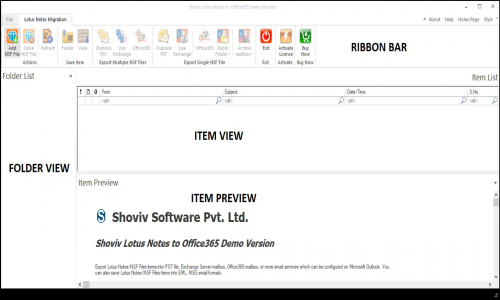
  4. Data Preview Facility: Users can preview all mailbox items (emails, contacts, calendars) with their properties before initiating the final migration.
  5. Folder Mapping & Translation: Features to map source folders to specific target folders and translate email addresses during the migration process for corporate continuity.
  6. Detailed Log Reports: Generates a comprehensive report upon completion, detailing the status of all processed, filtered, and failed items.

How to Use Shoviv Lotus Notes to Office 365?

The process is guided by the software's user-friendly interface:

  1. Installation: Download and install the Shoviv Lotus Notes to Office 365 Migration Tool on a Windows machine.
  2. Add Source: Launch the tool and add the source NSF files (from local storage) or connect to the Domino Server to add mailboxes.
  3. Select Destination: Choose Office 365 as the target, and enter the Office 365 Global Administrator credentials for mapping.
  4. Map & Filter: Map the source NSF mailboxes to the corresponding Office 365 mailboxes, and apply filters (date, item type) as needed for selective migration.
  5. Execute: Click the "Export" button to start the fully automated migrate lotus notes to office 365 process.

How to Get Demo of Shoviv Lotus Notes to Office 365?

You can test the software's capabilities risk-free before making a purchase:

  • Free Demo Version: Shoviv Lotus Notes to Office 365 offers a free trial version available for download directly from the official website.
  • Trial Limitation: The demo allows you to process and migrate the first 50 items per folder to Office 365 (or other destinations), enabling you to verify the integrity and functionality of the tool with your own data.

Alternative

ManageEngine OS Deployer

Imaging and deployment software

5.0
Rating out of 5 Based on 1 reviews

monday.com

Made for work, designed to love

3.9
Rating out of 5 Based on 10 reviews

Wrike

One platform to streamline all workflows

4.2
Rating out of 5 Based on 10 reviews

Shoviv Lotus Notes to Office 365 Migration Tool Video/Screenshots
User Reviews

no-reviews
Share your experience! Be the very first reviewer. Write a Review

Frequently Asked Questions (FAQs)

The user group of Shoviv Lotus Notes to Office 365 Migration Tool are as follows :

  • Personals
  • Startups
  • SMEs
  • Agencies
  • Enterprises

Shoviv Lotus Notes to Office 365 Migration Tool has 1 plans,

  • Corporate License INR 899.00 1

Shoviv Lotus Notes to Office 365 Migration Tool is allowed 0 Days Free Trial.

The key featuers of Shoviv Lotus Notes to Office 365 Migration Tool are as follows :

  • Backup and Recovery
  • Compliance Management
  • Data Retention Management
  • Data Import/Export
  • eDiscovery

Shoviv Lotus Notes to Office 365 Migration Tool pricing model : Onetime(Perpetual License)

Shoviv Lotus Notes to Office 365 Migration Tool is Any Software.

Yes

Shoviv Lotus Notes to Office 365 Migration Tool offers Phone,Email,Live Chat,Online (Ticket),Business Hours support.

Shoviv Lotus Notes to Office 365 Migration Tool provides Help Guides,Video Guides,Blogs,On-Site Training for the software training.