Overgrad

Excellence, Operationalized

0.0
Rating out of 5 Based on 0 reviews

What is Overgrad?

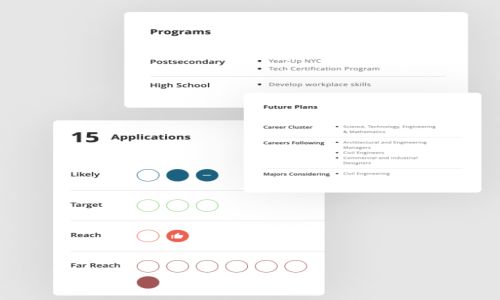
Overgrad is your all-in-one solution for guiding students through postsecondary planning. Built by former educators, it simplifies processes, enhances outcomes, and provides real-time feedback, ensuring every student finds and completes their ideal postsecondary path.

Pricing of Overgrad

no-pricing
For get detailed pricing as per your requirements.

Who uses Overgrad

StartUps
StartUps

Company Details

Company Name: Overgrad
Headquarter: Chicago, Illinois United States
Social Media:

Overgrad Description

Why Choose Overgrad?

Unlike traditional tools that simply track tasks, Overgrad focuses on outcomes. It is built by former educators who recognized that while 90% of students want to go to college, only a fraction actually graduate. Overgrad provides the infrastructure to bridge that gap through data-driven guidance.

Key Features

  • College & Career Search: Explore 4-year, 2-year, trade schools, military, and apprenticeship paths.

  • Common App Integration: Seamlessly link and track Common App applications.

  • Milestone Tracking: Set and monitor custom progress goals for students (e.g., FAFSA completion).

  • Electronic Document Delivery: Securely send transcripts and letters of recommendation.

  • Real-Time Dashboards: Educators can view district-wide or campus-specific data at a glance.

  • Alumni Tracking: Monitor persistence and employment data even after students graduate.

Benefits of Overgrad

  • For Students: Simplifies the complex application process and helps discover careers based on personality and interest surveys.

  • For Counselors: Replaces 3–5 different tools (spreadsheets, trackers, etc.), giving them more time for direct student advising.

  • For Districts: Standardizes the postsecondary process across multiple campuses and provides "board-ready" reports instantly.

How to Use Overgrad

  1. Students: Sign up via an invite from your school, complete your profile, and use the "Career Interest Survey" to start exploring. Add colleges to your "Following" list to track deadlines.

  2. Counselors/Educators: Use the "Educator Dashboard" to bulk-upload students, set milestones, and monitor which students need urgent intervention.

  3. Parents: Access a view-only dashboard to stay updated on your child’s progress and upcoming deadlines.

Pricing & Demo

contact Techimply

Alternative

Canvas LMS

Canvas LMS, The World's #1 Teaching and Learning Software

0.0
Rating out of 5 Based on 0 reviews

Google Classroom

By Google Classroom

0.0
Rating out of 5 Based on 0 reviews

Moodle Workplace

By Moodle

0.0
Rating out of 5 Based on 0 reviews

Overgrad Video/Screenshots

User Reviews

no-reviews
Share your experience! Be the very first reviewer. Write a Review

Frequently Asked Questions (FAQs)

The user group of Overgrad are as follows :

  • Startups

Overgrad has 0 plans.

Overgrad is not allowing Free Trial.

Overgrad pricing model : Monthly

Overgrad is Online Software.

Yes

Overgrad offers Phone support.

Overgrad provides Help Guides for the software training.