OneDirectory

Automated Org Chart & Employee Directory Software

0.0
Rating out of 5 Based on 0 reviews

What is OneDirectory?

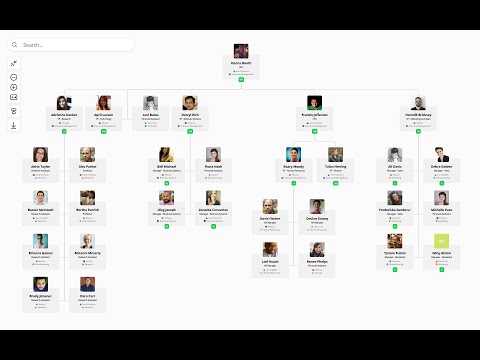
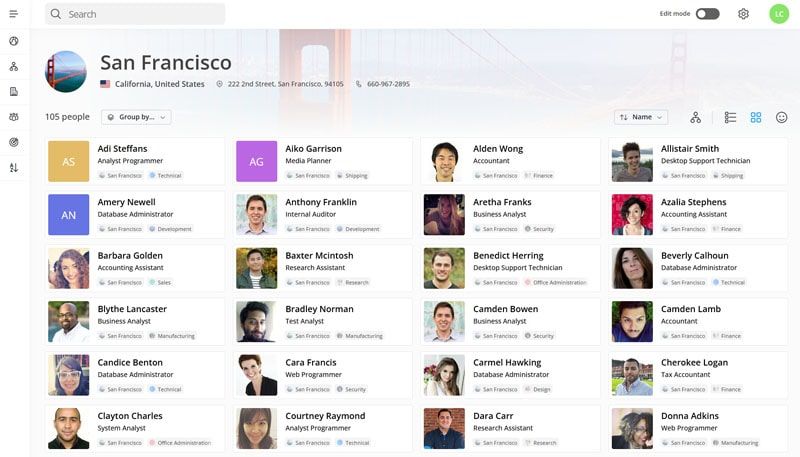
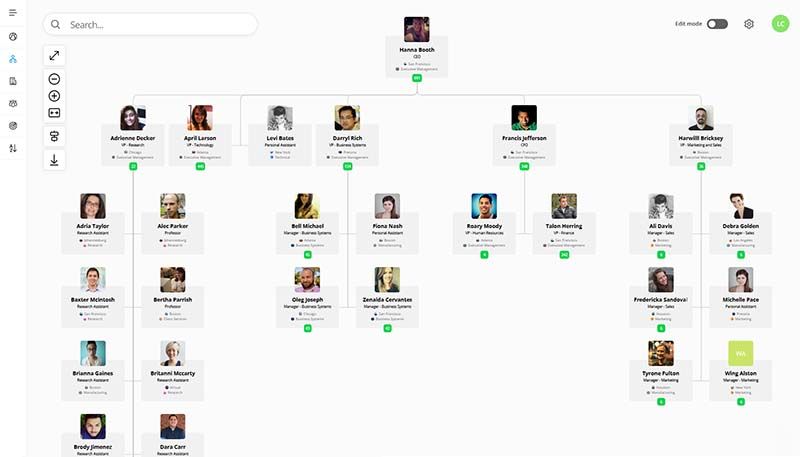
OneDirectory is a modern employee directory software designed to help organizations visualize and connect their workforce. Built for Microsoft 365 environments, it acts as a people-centric hub that simplifies employee search, promotes collaboration, and supports organizational transparency. OneDirectory offers a visual layout of the company's structure, allowing users to browse team members by department, location, or job role. It’s especially valuable for remote and hybrid teams, making it easy to find and connect with colleagues. Whether you're onboarding new employees or maintaining internal communication, OneDirectory enhances the way your team discovers and engages with each other.

Pricing of OneDirectory

Standard

USD 299
USD 0.00

/mo

Buy Now
  • Employee directory & org chart for small to mid-sized companies
  • Up to 500 employees
  • Employee directory
  • Interactive org chart
  • Employee profiles
  • Offices & departments
  • Skills directory
  • Sync from Microsoft 365
  • Filtering rules
  • In-app chat & email support

Pro

USD 599
USD 0.00

/mo

Buy Now
  • Unlimited employees advanced features and priority onboarding for larger organizations
  • All features in Standard plus:
  • Unlimited employees
  • Organizational units
  • Custom field mapping
  • Advanced filtering rules
  • Multi-tenancy
  • Seamless SSO
  • Manual invoicing
  • Priority onboarding & support

Enterprise

USD
USD 0.00

Custom

Buy Now
  • For large enterprises with custom directory requirements
  • Need a tailored directory solution with SLA custom terms data residency and priority roadmap? Contact our team to learn how OneDirectory can help.

Key Features of OneDirectory

Key Features:
  • Export Organogram
  • Core HR Integration
  • Workforce Planning
  • Smart Charts
  • Employee Directory
  • Predefined Templates
  • Access Control
  • Guest Sharing
  • Audit Trail
  • Single Sign-On (SSO)
  • Drag and drop Builder
  • Alerts

Key Specification

Other Categories: Org Chart Software Employee Database Management System
Deployment: Cloud Hosted
Customer Support: Phone,Email,Live Chat,Online (Ticket)
Customization: No
Languages Support: English

Who uses OneDirectory

Personal
Personal
StartUps
StartUps
SMEs
SMEs
Agencies
Agencies
Enterprises
Enterprises

Company Details

Company Name: OneDirectory
Headquarter: South Africa
Social Media:

OneDirectory Description

Why Choose OneDirectory?

Organizations choose OneDirectory to streamline communication, simplify people search, and bring visibility to their workforce structure. Integrated with Microsoft 365, it offers seamless setup and continuous synchronization with your existing user data. OneDirectory eliminates the hassle of outdated spreadsheets or hard-to-navigate internal systems, providing a sleek, user-friendly directory accessible across devices. It’s particularly useful for growing or distributed teams who need quick access to employee details without compromising on privacy or security. With a strong focus on design and functionality, OneDirectory improves internal networking and ensures your team always knows who’s who—no matter where they are located.

Benefits of OneDirectory

  • Simplifies people search and employee discovery
  • Enhances team visibility in remote or hybrid workplaces
  • Supports faster onboarding with quick access to team structures
  • Reduces HR support queries related to contact info
  • Improves internal collaboration and communication
  • Increases data accuracy by syncing with Microsoft 365
  • Customizable views to suit organizational needs
  • Boosts employee engagement by making everyone more visible

How to Use OneDirectory

Using OneDirectory is straightforward. After integrating with your Microsoft 365 tenant, it automatically pulls in user data, including job titles, departments, locations, and profile photos. Users can then log in via a browser or app to explore the company directory. You can search for colleagues by name, skill, role, or department. Admins can customize how information is displayed and ensure data privacy through settings. New hires can easily see who’s on their team, managers can visualize organizational structure, and anyone can quickly connect with the right contact. No manual entry is needed, and updates reflect automatically via Microsoft sync.

Features of OneDirectory

  • Seamless Microsoft 365 integration
  • Visual org chart and team views
  • Smart search and filtering options
  • Custom profile fields
  • Location-based employee grouping
  • Mobile-friendly responsive design
  • Role-based access control
  • Automatic data synchronization
  • Secure cloud hosting
  • Support for profile photos and rich employee bios

What Makes OneDirectory Different?

What sets OneDirectory apart is its deep integration with Microsoft 365 and its emphasis on user experience. Unlike traditional employee directories, OneDirectory functions as a powerful Org Chart Software, offering a visual, interactive platform that’s easy to navigate and highly customizable. It requires no manual data entry or syncing process, as it automatically pulls all details from your existing Microsoft 365 setup. The design is sleek and optimized for both desktop and mobile, making it accessible anytime, anywhere. Plus, its smart search capabilities and dynamic org chart visualization provide context around roles and relationships within the company—something most built-in directories lack. It’s truly built for the modern workplace.

Who Can Benefit from OneDirectory?

OneDirectory is ideal for businesses of all sizes—especially mid-sized and large enterprises using Microsoft 365. HR teams benefit from reduced admin workload; new hires use it for faster onboarding and understanding the team structure. Managers gain better visibility of direct reports and departments, while IT teams appreciate the seamless Microsoft integration. Remote and hybrid teams find it especially useful for staying connected and finding the right contacts across departments. Any organization looking to improve internal transparency, employee engagement, and workplace connection will find OneDirectory a valuable tool.

Is OneDirectory Easy to Use?

Yes, OneDirectory is designed with simplicity and usability in mind. Its clean interface and intuitive navigation make it easy for employees at all tech skill levels. Since it integrates with Microsoft 365, most of the heavy lifting is done automatically—no complicated setup, data imports, or training required. You simply log in and explore the directory, search for colleagues, or view the org chart. Admins can customize the display, add branding, and manage user access with minimal effort. Whether used on desktop or mobile, OneDirectory delivers a smooth, efficient experience.

What Support Does OneDirectory Offer?

OneDirectory provides comprehensive support through various channels. Customers can access detailed documentation, tutorials, and setup guides on their website. For direct help, there’s email and live chat support during business hours. Their team also offers onboarding assistance to help with integration and customization. Enterprise clients may receive dedicated account management and priority support. Regular updates and proactive feature enhancements are part of their service commitment. With responsive and knowledgeable support, OneDirectory ensures that any technical or usage-related issues are addressed promptly.

Alternative

Agentnoon

Transformations Org Design Outcomes Mergers People Analytics Faster with AI

0.0
Rating out of 5 Based on 0 reviews

ChartHop

Run your org, your way.

0.0
Rating out of 5 Based on 0 reviews

Organimi

By Organimi

0.0
Rating out of 5 Based on 0 reviews

OneDirectory Video/Screenshots

OneDirectory Key Clients

User Reviews

no-reviews
Share your experience! Be the very first reviewer. Write a Review

Frequently Asked Questions (FAQs)

The user group of OneDirectory are as follows :

  • Personals
  • Startups
  • SMEs
  • Agencies
  • Enterprises

OneDirectory has 3 plans,

  • Standard USD 299 /mo
  • Pro USD 599 /mo
  • Enterprise USD Custom

OneDirectory is allowed 0 Days Free Trial.

The key featuers of OneDirectory are as follows :

  • Export Organogram
  • Core HR Integration
  • Workforce Planning
  • Smart Charts
  • Employee Directory
  • Predefined Templates
  • Access Control
  • Guest Sharing
  • Audit Trail
  • Single Sign-On (SSO)
  • Drag and drop Builder
  • Alerts

OneDirectory pricing model : Yearly,Monthly

OneDirectory is Online Software.

No

OneDirectory offers Phone,Email,Live Chat,Online (Ticket) support.

OneDirectory provides Help Guides,Blogs for the software training.