Microsoft Threat Vulnerability Management

By Microsoft Threat Vulnerability Management

0.0
Rating out of 5 Based on 0 reviews

What is Microsoft Threat Vulnerability Management?

Microsoft Threat Vulnerability Management (formally Microsoft Defender Vulnerability Management or MDVM) is a modern, risk-based solution designed to discover, prioritize, and remediate vulnerabilities and misconfigurations across your endpoint and hybrid cloud environments. Built natively into the Microsoft Defender security ecosystem, it continuously monitors assets using built-in sensors, eliminating the need for periodic scans. MDVM uniquely correlates real-time Endpoint Detection and Response (EDR) insights with Microsoft's extensive threat intelligence to provide a clear, actionable risk score, enabling security and IT teams to quickly focus on the threats most likely to be exploited.

Pricing of Microsoft Threat Vulnerability Management

no-pricing
For get detailed pricing as per your requirements.

Key Specification

Other Categories: Cloud security software Vulnerability Management Software Cybersecurity Software
Deployment: Cloud Hosted
Customer Support: Phone,Email,Online (Ticket)
Customization: No
Languages Support: English

Who uses Microsoft Threat Vulnerability Management

StartUps

StartUps
SMEs
SMEs
Agencies
Agencies
Enterprises
Enterprises

Company Details

Company Name: Microsoft Threat Vulnerability Management
Headquarter: Seattle, Washington United States
Social Media:

Microsoft Threat Vulnerability Management Description

Who Uses Microsoft Threat Vulnerability Management?

MDVM is an integrated solution optimized for organizations already leveraging the Microsoft security stack but is also available as a standalone product:

  • Security Operations (SecOps) Teams: Relying on the centralized Microsoft Defender portal for a unified view of endpoint and cloud risk.
  • IT Operations (ITOps) & Patch Managers: Utilizing the built-in workflows and integration with Microsoft Intune/SCCM to accelerate and simplify remediation activities.
  • Enterprises with Microsoft E5 Licenses: Customers with Microsoft Defender Vulnerability Management license (included in Defender for Endpoint Plan 2) who want deep, agent-based visibility into their devices.
  • Compliance and Audit Teams: Using the platform to assess security baseline compliance against industry standards.

Why Choose Microsoft Threat Vulnerability Management?

Choose Microsoft Threat Vulnerability Management because it is a cloud-native, agent-based solution that provides unparalleled, real-time visibility into your devices, even when they are off the corporate network. Unlike traditional scanners, it embeds security context directly into the endpoint protection process. Its core strength lies in its risk-based prioritization, which fuses vulnerability data with Microsoft's proprietary global threat knowledge and breach likelihood predictions, giving you the fastest path to reducing your organization's cyber risk.

What are the Benefits of Microsoft Threat Vulnerability Management?

The platform delivers a cohesive strategy for reducing cyber exposure:

  1. Continuous Real-Time Discovery: Eliminates the need for disruptive, periodic scans by continuously collecting data via the built-in Defender agent on endpoints.
  2. Risk-Based Prioritization: Uses Microsoft threat intelligence and breach likelihood to prioritize vulnerabilities, allowing teams to focus on the small subset of flaws that pose the highest risk.
  3. Seamless Security-IT Bridge: Integrates built-in remediation workflows with tools like Microsoft Intune and Configuration Manager, automating the security and patching gap.
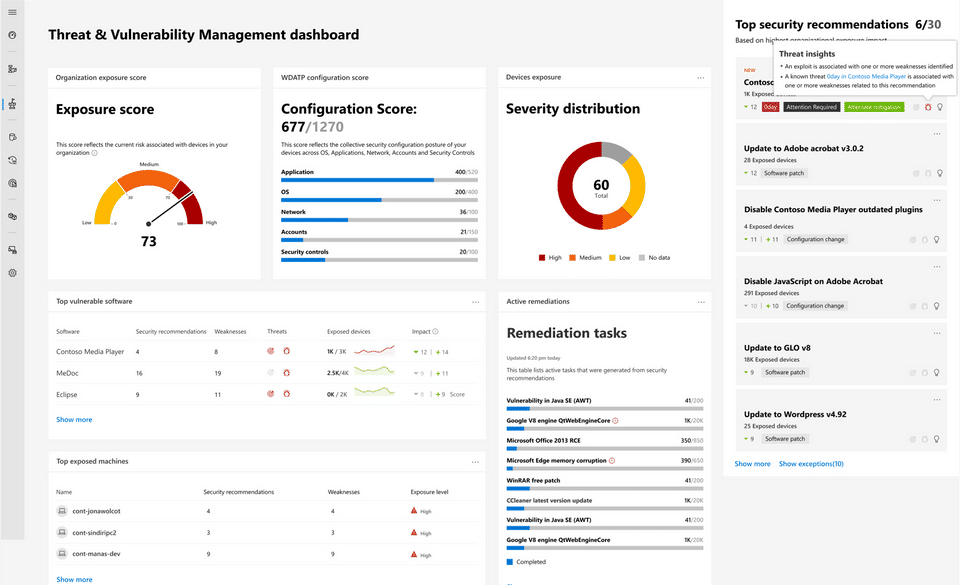
  4. Exposure Score and Secure Score: Provides clear, quantifiable metrics (Microsoft Secure Score for Devices) to measure risk posture and track improvement trends over time.
  5. Multi-Platform Coverage: Supports a wide range of devices and operating systems, including Windows, macOS, Linux, Android, and iOS, ensuring comprehensive visibility.

What are the Features of Microsoft Threat Vulnerability Management?

Core capabilities that simplify and accelerate risk remediation:

  1. Software Inventory & Assessment: Provides a full inventory of installed software, digital certificates, and browser extensions across your organization, alongside a view of associated vulnerabilities.
  2. Security Baseline Assessment: Allows you to measure and monitor device configurations against established security benchmarks (like CIS and STIG).
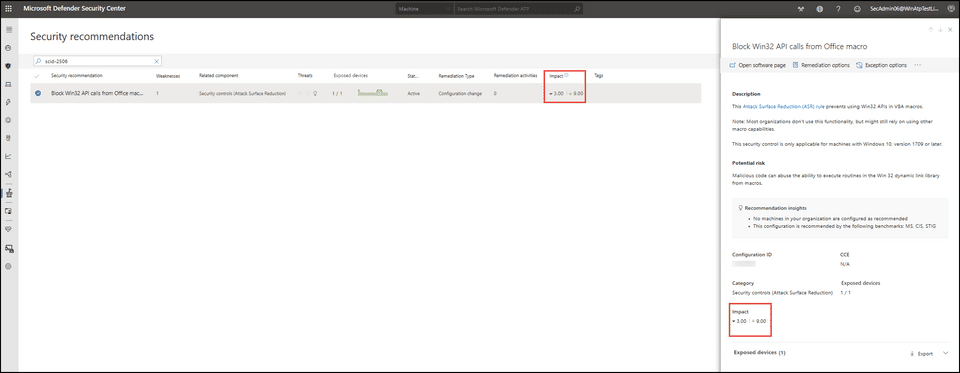
  3. Prioritized Security Recommendations: Presents a clear list of recommendations, ranked by risk, with actionable steps to mitigate exposure.
  4. Vulnerable Application Blocking: Allows security teams to proactively block known vulnerable versions of applications across endpoints before they can be exploited.
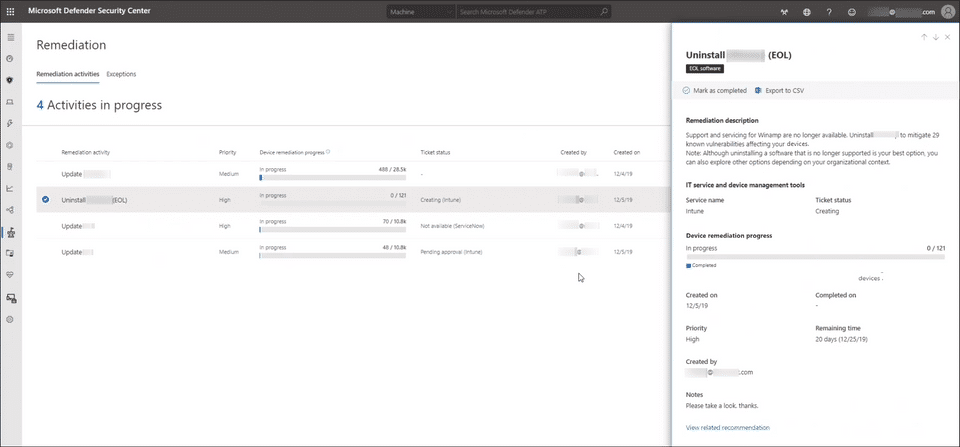
  5. Remediation Tracking: Built-in tracking and reporting features allow you to monitor the status of assigned remediation tasks and measure the impact on your Exposure Score.
  6. Authenticated Scan for Windows: Offers authenticated scanning for unmanaged Windows devices, expanding coverage beyond agent-managed endpoints.

How to Use Microsoft Threat Vulnerability Management?

MDVM is accessed through the Microsoft Defender portal and leverages existing endpoint agents:

  1. Access: Log in to the Microsoft Defender Vulnerability Management login page (part of the Microsoft 365 Defender portal).
  2. Visibility: View the Exposure Score dashboard to instantly see your organization's current risk level and the top security recommendations.
  3. Prioritize: Drill down into the recommendations, which are prioritized based on risk, threat context, and asset criticality.
  4. Remediate: Select a recommendation and use the built-in remediation option to create an automated task or ticket that seamlessly pushes the fix to IT management tools like Intune. 

How to Get Demo of Microsoft Threat Vulnerability Management?

You can start evaluating this solution with your existing Microsoft investment:

  • Included with Licenses: Microsoft Defender Vulnerability Management core capabilities are included with Microsoft Defender for Endpoint Plan 2 and Defender for Servers Plan 1 licenses.
  • Add-on Trial: If you have an existing Defender for Endpoint Plan 2 or Microsoft 365 E3 license, you can sign up for a free 90-day trial of the Microsoft Defender Vulnerability Management Add-on to access the advanced features (e.g., certificate assessment, application block).
  • Contact Sales: For detailed licensing and pricing information, or to discuss the Microsoft Defender Vulnerability Management add-on, contact a Microsoft sales representative or a certified partner.

Alternative

Tenable.io

Tenable One Exposure Management Platform

0.0
Rating out of 5 Based on 0 reviews

CyberUpgrade

Cut compliance work by 80%. Save €60K+ annually.

0.0
Rating out of 5 Based on 0 reviews

ManageEngine Vulnerability Manager Plus

Take control of your IT.

0.0
Rating out of 5 Based on 0 reviews

Microsoft Threat Vulnerability Management Video/Screenshots
User Reviews

no-reviews
Share your experience! Be the very first reviewer. Write a Review

Frequently Asked Questions (FAQs)

The user group of Microsoft Threat Vulnerability Management are as follows :

  • Startups
  • SMEs
  • Agencies
  • Enterprises

Microsoft Threat Vulnerability Management has 0 plans.

Microsoft Threat Vulnerability Management is allowed 0 Days Free Trial.

Microsoft Threat Vulnerability Management pricing model : Onetime(Perpetual License)

Microsoft Threat Vulnerability Management is Online Software.

No

Microsoft Threat Vulnerability Management offers Phone,Email,Online (Ticket) support.

Microsoft Threat Vulnerability Management provides Help Guides,Video Guides,Blogs for the software training.