JS Paint

Classic Paint, Modern Twist

0.0
Rating out of 5 Based on 0 reviews

what is JS Paint?
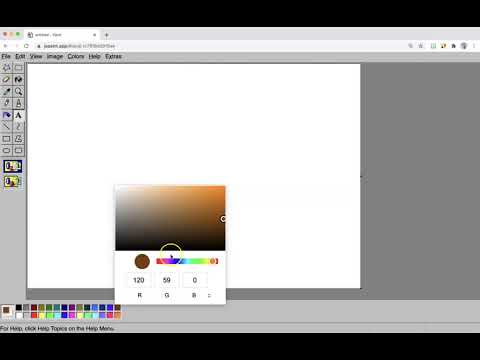
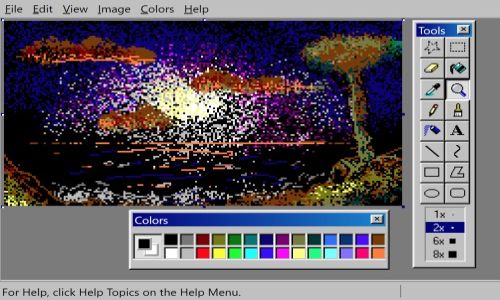
JS Paint is an open-source, web-based remake of Microsoft Paint, designed to replicate the classic Windows XP-era experience in your browser. It offers a nostalgic yet functional drawing environment with familiar tools like pencil, brush, shapes, and fill, along with added modern features such as autosave, dark mode, and cross-platform accessibility. With no installation required, JS Paint is perfect for casual doodling, quick editing, and users who miss the simplicity of the original MS Paint.

Pricing of JS Paint

no-pricing
For get detailed pricing as per your requirements.

Key Specification

Who uses JS Paint

Personal
Personal

Company Details

Company Name: JS Paint
Headquarter: US
Social Media:

JS Paint Description

What is JS Paint?

  • JS Paint is a browser-based remake of classic Microsoft Paint.

  • Designed to replicate the Windows XP-era MS Paint experience.

  • Open-source and runs directly in your browser.

  • No need for installation or setup.

  • Offers basic tools like pencil, brush, shapes, and text.

  • Ideal for sketching, editing images, or casual drawing.

  • Supports autosave and works across devices.

  • Simple, clean, and accessible to all users.

Why Choose JS Paint?

  • Brings back the nostalgic MS Paint interface.

  • Works on any device with a web browser.

  • Requires no installation or downloads.

  • Minimal learning curve with intuitive tools.

  • Offers a fast and distraction-free environment.

  • Includes modern updates like dark mode and autosave.

  • Perfect for users who want a no-fuss drawing tool.

  • Lightweight and reliable for quick image tasks.

Benefits of JS Paint

  • Easy access through any modern browser.

  • Familiar layout for users of classic MS Paint.

  • Works well on desktops, laptops, and tablets.

  • Automatically saves your progress.

  • No system resource load—lightweight software.

  • Suitable for quick edits and casual drawings.

  • Doesn’t require user registration or login.

  • Maintains high speed and performance.

How to Use JS Paint

  • Visit the website and wait for the interface to load.

  • Choose from tools like pencil, brush, shape, or text.

  • Select your colors and start drawing on the canvas.

  • Use the menu bar to open, save, or print your work.

  • Zoom in/out and resize the canvas as needed.

  • Undo or redo using shortcut buttons or keys.

  • No sign-up needed—start using immediately.

  • Works with mouse, touch, or stylus input.

Features of JS Paint

  • Classic MS Paint interface and layout.

  • Tools include pencil, brush, shapes, line, curve, and text.

  • Color fill and color picker available.

  • Canvas resizing, image rotation, and zoom support.

  • Dark mode option for better viewing.

  • Autosave and version history support.

  • Keyboard shortcuts for faster editing.

  • Works on all major web browsers and devices.

What Makes JS Paint Different?

  • Combines nostalgia with modern functionality.

  • No software installation or updates needed.

  • Open-source and constantly improved by the community.

  • Includes features not found in original MS Paint.

  • Offers undo/redo history and autosave options.

  • Cross-platform accessibility from any browser.

  • Extremely lightweight and fast loading.

  • Great for casual use, quick edits, and education.

Who Can Benefit from JS Paint?

  • Students needing quick drawing or diagram tools.

  • Teachers using visual aids in online or offline classes.

  • Designers for rough sketches or UI wireframes.

  • Nostalgic users who miss the old MS Paint.

  • Social media users creating memes or edits.

  • Beginners learning digital art tools.

  • Anyone looking for a simple and easy drawing app.

  • Professionals needing basic image adjustments on the go.

Is JS Paint Easy to Use?

  • Very beginner-friendly with a clean layout.

  • No technical knowledge required to operate.

  • Tools are well-labeled and simple to understand.

  • Instant access—no download or login needed.

  • Works smoothly on touchscreen and stylus devices.

  • Clear menu and keyboard shortcuts make navigation easy.

  • Autosave and history prevent loss of work.

  • Offers a stress-free digital drawing experience.

What Support Does JS Paint Offer?

  • Community-supported through user feedback and improvements.

  • Open-source platform allows user contributions.

  • Active development keeps features up to date.

  • Rarely faces bugs or errors due to simplicity.

  • In-app tooltips and icons are self-explanatory.

  • No formal customer service, but strong community presence.

  • Reliable for day-to-day basic image editing.

  • Automatically updated with the latest version.

Alternative

Logome

Design your stunning brand logo with AI

0.0
Rating out of 5 Based on 0 reviews

Fiverr Workspace

Scale your professional workforce with freelancers

0.0
Rating out of 5 Based on 0 reviews

Canva

What will you design today?

0.0
Rating out of 5 Based on 0 reviews

JS Paint Video/Screenshots

User Reviews

no-reviews
Share your experience! Be the very first reviewer. Write a Review

Frequently Asked Questions (FAQs)

The user group of JS Paint are as follows :

  • Personals

JS Paint has 0 plans.

JS Paint is allowed 7 Days Free Trial.

JS Paint is On Premise,Any Software.

No