iform pro

Smarter Faster Paper free.

0.0
Rating out of 5 Based on 0 reviews

What is iForm Pro

iForm Pro is a mobile form-building and data collection platform that enables users to create smart, flexible forms that work even without an internet connection. It supports multimedia attachments, GPS tracking, barcode scanning, and real-time data reporting. Whether you're capturing inspection reports, conducting surveys, or tracking inventory, iForm Pro simplifies the entire process. iForm Pro Pricing models cater to both small teams and enterprise-level deployments, making it scalable for growing businesses.

Pricing of iform pro

no-pricing
For get detailed pricing as per your requirements.

Key Features of iform pro

Key Features:
  • Photos
  • Voice memos
  • Drawings
  • Pre-filled forms
  • Draft forms
  • Share forms
  • Set mandatory fields
  • Form calculator

Key Specification

Other Categories: Field Service Management Software Mobile Forms Automation Software Workflow Automation Software Video Survey Software
Deployment: Cloud Hosted,Hybrid
Customer Support: Phone,Email
Customization: Yes
Languages Support: English

Who uses iform pro

StartUps
StartUps
Agencies
Agencies
Enterprises
Enterprises

Company Details

Company Name: iForm Pro
Headquarter: United Kingdom
Social Media:

iform pro Description

Why Choose iForm Pro

Choosing iForm Pro means choosing speed, accuracy, and efficiency. The software provides offline functionality, real-time syncing, and deep customization options. It is ideal for businesses looking for a solution that can be easily tailored to field-specific requirements. When comparing platforms like Overleaf, iForm Pro shines for its field-ready design, form logic capabilities, and extensive integration support. Consistently strong iForm Pro Reviews prove its effectiveness in streamlining workflows across industries.

Reasons to choose iForm Pro:

  • Easy-to-use mobile interface

  • Fast form deployment to teams

  • Offline data collection with auto-sync

  • Industry-leading support and updates

  • Affordable iForm Pro Pricing with value-added features


Benefits of iForm Pro

  • Streamlines data collection with smart mobile forms

  • Reduces paperwork and manual errors

  • Enables offline data entry with automatic cloud sync

  • Increases productivity in field operations

  • Customizes forms with drag-and-drop interface

  • Enhances reporting and decision-making with real-time data

  • Offers multimedia capture (images, videos, audio)

  • Secures sensitive information with role-based access

  • Supports integrations with CRM, Google Sheets, and cloud management platform

  • Receives consistently positive iForm Pro Reviews from users worldwide

With a strong feature set compared to tools like Overleaf, and flexible iForm Pro Pricing, it’s a cost-effective solution for businesses of all sizes.


How to Use iForm Pro

  1. Sign up and select a suitable plan from the available iForm Pro Pricing tiers

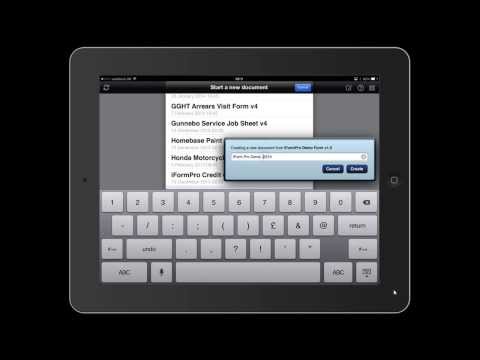
  2. Use the intuitive builder to design custom forms

  3. Assign forms to your mobile workforce

  4. Collect data in the field, with or without internet

  5. Sync and review submissions in the dashboard

  6. Export data or integrate it with third-party apps

  7. Monitor performance and adjust forms as needed

iForm Pro Reviews highlight its simple learning curve, powerful integrations, and excellent mobile performance, making it ideal for field teams and remote data collection.


Features of iForm Pro

  • Drag-and-drop mobile form builder

  • Offline data collection

  • GPS and geolocation tagging

  • Multimedia support (photos, videos, audio)

  • Barcode scanning and electronic signature

  • Smart form logic and conditional workflows

  • Real-time data dashboards and analytics

  • Custom branding and multi-language support

  • Enterprise-grade security controls

  • Integration with Dropbox, Salesforce, Box, Google Drive, and more

These iForm Pro Features ensure optimized field performance, improved data quality, and full control over operations. When compared to general platforms like Overleaf, iForm Pro is clearly built for high-demand, field-oriented use cases.

Alternative

Jotform Mobile Forms

By Jotform Mobile Forms

0.0
Rating out of 5 Based on 0 reviews

Formstack Forms

By Formstack

0.0
Rating out of 5 Based on 0 reviews

Process Street

By Process Street

0.0
Rating out of 5 Based on 0 reviews

iform pro Video/Screenshots

iform pro Key Clients

User Reviews

no-reviews
Share your experience! Be the very first reviewer. Write a Review

Frequently Asked Questions (FAQs)

The user group of iform pro are as follows :

  • Startups
  • Agencies
  • Enterprises

iform pro has 0 plans.

iform pro is allowed 0 Days Free Trial.

iform pro pricing model : Yearly,Monthly

iform pro is Cloud Hosted,Hybrid Software.

Yes

iform pro offers Phone,Email support.

iform pro provides Help Guides,Video Guides,Blogs,Webinars,Case Studies,Whitepapers for the software training.